-
Unity笔记(4):控制角色移动
目录
1、创建2D项目

2、搭建场景

3、角色移动
涉及到的功能有:刚体、碰撞体、脚本
角色控制器的代码基本上已经形成了一种套路,所以直接在官方的代码上略作修改即可。
(1)添加角色控制器
脚本代码:
直接复制粘贴使用即可
- using UnityEngine;
- using UnityEngine.Events;
- public class CharacterController2D : MonoBehaviour
- {
- public float jumpForce = 400f; // 弹跳力
- public bool canAirControl = false; // 在空中时,是否能控制
- public LayerMask groundMask; // 定义哪一个Layer是地面
- public Transform m_GroundCheck; // 用于判定地面的空物体
- const float k_GroundedRadius = .1f; // 用于检测地面的小圆形的半径
- private bool m_Grounded; // 当前是否在地面上
- private bool m_FacingRight = true; // 玩家是否面朝右边
- private Vector3 m_Velocity = Vector3.zero;
- const float m_NextGroundCheckLag = 0.1f; // 起跳后的一小段时间,不能再次起跳。防止连跳的一种解决方案
- float m_NextGroundCheckTime; // 过了这个时间才可能落地、才能再次起跳
- // 这个角色控制器,是依靠刚体驱动的
- private Rigidbody2D m_Rigidbody2D;
- [Header("Events")]
- [Space]
- public UnityEvent OnLandEvent;
- public UnityEvent OnAirEvent;
- [System.Serializable]
- public class BoolEvent : UnityEvent<bool> { }
- private void Awake()
- {
- m_Rigidbody2D = GetComponent
(); - if (OnLandEvent == null)
- OnLandEvent = new UnityEvent();
- if (OnAirEvent == null)
- OnAirEvent = new UnityEvent();
- }
- private void FixedUpdate()
- {
- bool wasGrounded = m_Grounded;
- m_Grounded = false;
- // 检测与地面的碰撞
- if (Time.time > m_NextGroundCheckTime)
- {
- Collider2D[] colliders = Physics2D.OverlapCircleAll(m_GroundCheck.position, k_GroundedRadius, groundMask);
- for (int i = 0; i < colliders.Length; i++)
- {
- if (colliders[i].gameObject != gameObject)
- {
- m_Grounded = true;
- if (!wasGrounded)
- OnLandEvent.Invoke();
- }
- }
- }
- if (wasGrounded && !m_Grounded)
- {
- OnAirEvent.Invoke();
- }
- }
- public void Move(float move, bool jump)
- {
- // 玩家在地面时,或者可以空中控制时,才能移动
- if (m_Grounded || canAirControl)
- {
- // 输入变量move决定横向速度
- m_Rigidbody2D.velocity = new Vector2(move, m_Rigidbody2D.velocity.y);
- // 面朝右时按左键,或面朝左时按右键,都会让角色水平翻转
- if (move > 0 && !m_FacingRight)
- {
- Flip();
- }
- else if (move < 0 && m_FacingRight)
- {
- Flip();
- }
- }
- // 在地面时按下跳跃键,就会跳跃
- if (m_Grounded && jump)
- {
- OnAirEvent.Invoke();
- m_Grounded = false;
- // 施加弹跳力
- m_Rigidbody2D.AddForce(new Vector2(0f, jumpForce));
- m_NextGroundCheckTime = Time.time + m_NextGroundCheckLag;
- }
- }
- private void Flip()
- {
- // true变false,false变true
- m_FacingRight = !m_FacingRight;
- // 缩放的x轴乘以-1,图片就水平翻转了
- transform.localScale = Vector3.Scale(transform.localScale, new Vector3(-1, 1, 1));
- }
- }

创建脚本后拖到角色物体上

对脚本的一些设置说明:
Jump force:跳跃力
Can Air Control:空中是否能控制(做一些动作上什么的)
Ground Mask:什么样的物体能被当做地面
Ground Check:地面检测,通常用子物体放在角色脚下

将空物体作为角色子物体放在角色脚的位置,

并将这个空物体拖入脚本栏,用来做地面检测

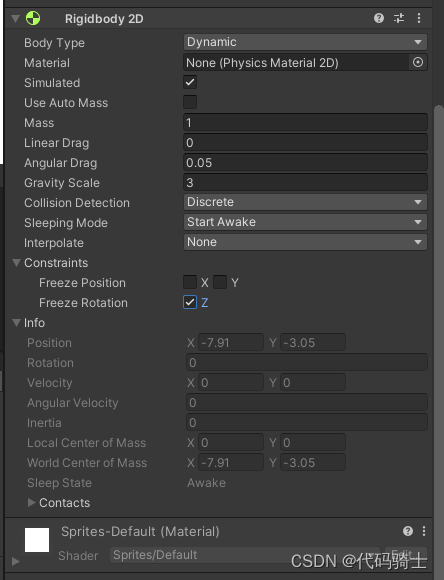
(2)添加刚体
(3)添加碰撞器
为了使角色运动更加真实和丝滑,我们通常将角色的脚部用圆形碰撞体包裹。身体用矩形包裹。

(4)添加脚本实现角色移动
- using System.Collections;
- using System.Collections.Generic;
- using UnityEngine;
- public class PlayerMovement : MonoBehaviour
- {
- public CharacterController2D cc;//角色控制器组件
- public float speed = 5f;//速度
- bool jump;//是否跳跃
- float move;//移动方向
- // Start is called before the first frame update
- void Start()
- {
- cc = GetComponent
(); - }
- // Update is called once per frame
- void Update()
- {
- move = Input.GetAxis("Horizontal");
- move *= speed;
- jump = Input.GetButton("Jump");
- }
- void FixedUpdate()
- {
- cc.Move(move, jump);
- }
- }
将角色控制器组件拖入栏中

这样就可以左右移动并跳跃了

(5)发现问题:
由于物理刚体中带有摩擦力的属性,所以接触墙壁时,会挂在上面

(6)解决问题:
创建2D物理材质:

设置摩擦系数为0

添加到角色碰撞体组件材质栏:

问题解决了。
参考视频链接:
-
相关阅读:
Flet教程之 13 ListView最常用的滚动控件 基础入门(教程含源码)
陈年雷司令葡萄酒中的石油笔记
1.log4j2 文件名使用不当导致的日志覆盖问题
Apache APISIX在微软云 ARM 和 x86 服务器上的性能测试对比
03.获取网页源代码
【剑指Offer】34.二叉树中和为某一值的路径(二)
在量化交易过程中,散户可以这样做
超越创意,从用户创造内容到AI生成内容的新时代
A Framework to Evaluate Fusion Methods for Multimodal Emotion Recognition
Qt页面布局
- 原文地址:https://blog.csdn.net/qq_51701007/article/details/126423736
