-
ES BulkRequest 写入索引数据失败排查和解决
问题场景:1,使用BulkRequest写入索引数据不生效,接口正常返回,索引没有数据。
先看原始代码:
- @Override
- public ResultMsg
saveRealtimeMsg(IMRealTimeMessageDTO imRealTImeMessageDTO) { - try {
- //1.创建批量导入数据
- BulkRequest bulkRequest = new BulkRequest();
- String index = elasticSearchConfig.getImRealtimeIndex();
- //2.将数据批量添加
- for(IMRealTimeMessageEntity entity : imRealTImeMessageDTO.getResult()){
- entity.setId(RandomUtil.randomString(elasticSearchConfig.getUuIdStr(), 18));
- if (StringUtils.isEmpty(entity.getSessionId())) {
- String sessionId = (String) JSONPath.read(entity.getCloudCustomData(), "sessionID");
- if (StringUtils.isNotBlank(sessionId)) {
- entity.setSessionId(sessionId);
- }
- }
- bulkRequest.add(
- new IndexRequest(index)
- //不填id时将会生成随机id
- .id(UUID.randomUUID().toString())
- .source(JSON.toJSONString(entity), XContentType.JSON).type("_doc")
- );
- }
- //3.执行请求
- BulkResponse bulkResponse = restHighLevelClient.bulk(bulkRequest, RequestOptions.DEFAULT);
- if(bulkResponse.status() != null && bulkResponse.status().getStatus()== HttpServletResponse.SC_OK){
- log.info("实时聊天消息es写入成功");
- return ResultMsg.ok("es数据同步!!!");
- }
- return ResultMsg.failed("es数据同步失败",bulkResponse.buildFailureMessage());
- } catch (Exception e) {
- e.printStackTrace();
- log.info("es data 同步失败:{}",e.getMessage());
- return ResultMsg.failed("es数据同步失败:{}",e.getMessage());
- }
- }
从代码层面来看写入数据是一点问题都没有的,我们接口也是200

通过kinbana查看数据
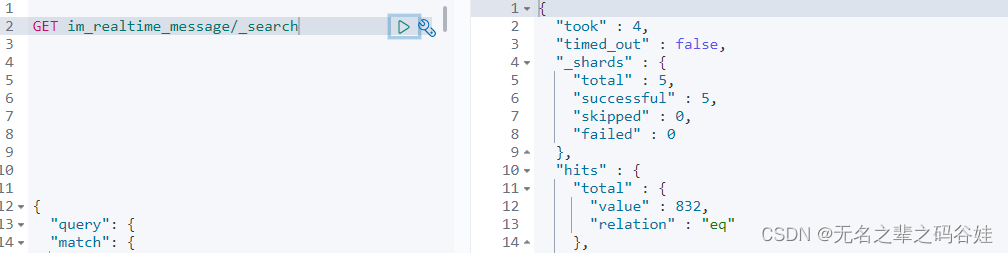
数据也是没有的执行了操作也是没有反应。那怎么解决这个问题?
1,查看我们的索引mapping有没有问题,是不是索引的数据格式导致我们数据写入不进去,基本上百分之九十就是这个问题,但是我们的并不是。
GET 索引/_mapping

如果上面没有问题我们就看代码的配置。
经过断点调试查看代码:
 我们的日期格式在es是yyyymmdd hhmmss格式但是这里是个时间蹉格式,肯定就不对了,但是你会说我jsonfamart也不行吗?
这样也不行,我序列化的时候tostring不行吗,答案是不行的,只有在序列化的时候转换一下。
2,注意这种方式是判断不了es写入成功失败,不能按照http方式去获取成功失败(底层也是通过http方式写入数据)
- BulkResponse bulkResponse = restHighLevelClient.bulk(bulkRequest, RequestOptions.DEFAULT);
- if(bulkResponse.status() != null && bulkResponse.status().getStatus()== HttpServletResponse.SC_OK){
- log.info("实时聊天消息es写入成功");
- return ResultMsg.ok("es数据同步!!!");
- }
- return ResultMsg.failed("es数据同步失败",bulkResponse.buildFailureMessage());
正确的方式:
- BulkResponse bulkResponse = restHighLevelClient.bulk(bulkRequest, RequestOptions.DEFAULT);
- if(bulkResponse.hasFailures()){
- log.info("数据写入失败:{}",bulkResponse.buildFailureMessage());
- return ResultMsg.failed("es数据同步失败",bulkResponse.buildFailureMessage());
- }else {
- log.info("实时聊天消息es写入成功");
- return ResultMsg.ok("es数据同步成功!!!");
- }
错误日志:

{"index":"im_realtime_message","type":"_doc","id":"eebeb54a-00fd-4998-9783-0c42eea3e492","cause":{"type":"exception","reason":"Elasticsearch exception [type=mapper_parsing_exception, reason=failed to parse field [insertTime] of type [date] in document with id 'eebeb54a-00fd-4998-9783-0c42eea3e492'. Preview of field's value: '1660835342572']","caused_by":{"type":"exception","reason":"Elasticsearch exception [type=illegal_argument_exception, reason=failed to parse date field [1660835342572] with format [yyyy-MM-dd HH:mm:ss]]","caused_by":{"type":"exception","reason":"Elasticsearch exception [type=date_time_parse_exception, reason=date_time_parse_exception: Text '1660835342572' could not be parsed at index 0]"}}},"status":400}
这个错就很明显了我们的时间格式不对对不对,咋解决呢?

我们在写入时间的时候格式化一下就搞定了
bulkRequest.add(
        new IndexRequest(index)
                //不填id时将会生成随机id
                .id(UUID.randomUUID().toString())
                .source(
                            JSONObject.toJSONStringWithDateFormat(entity, "yyyy-MM-dd HH:mm:ss", SerializerFeature.WriteDateUseDateFormat)
                     //   JSON.toJSONString(entity)
                        , XContentType.JSON).type("_doc")
);
3,如果还是写入不了数据,那就从新删除索引然后通过kinbana put数据方式及可。
-
相关阅读:
Golang 切片删除指定元素的几种方法
SpringBoot项目连接linux服务器数据库两种解决方法(linux直接开放端口访问&本机通过SSH协议访问,以mysql为例)
编程大杂烩(三)
支付宝周期扣款(支付后签约)业务功能总结(php+golang)
两个列表的最小索引总和
如何在 SAP Spartacus 中编写 ASM-Compatible 的代码
8000块钱小程序的背后,你知道吗?
企业微信管理客户如何管理?
算法通过村第十八关-回溯|青铜笔记|什么叫回溯(中篇)
Ubuntu1804里进行KITTI数据集可视化操作
- 原文地址:https://blog.csdn.net/qq_39751120/article/details/126415450