-
教小白搭建Hive分区分桶表
1、表说明
Hive表分为内部表、外部表,内部表全生命周期由hive管理,外部表在被删除时,文件不会被删除,关键字external,这里主要是内部表
分区表:避免全表扫描,提高查询效率,分区字段不饿能是表中已经存在的字段
映射文件:
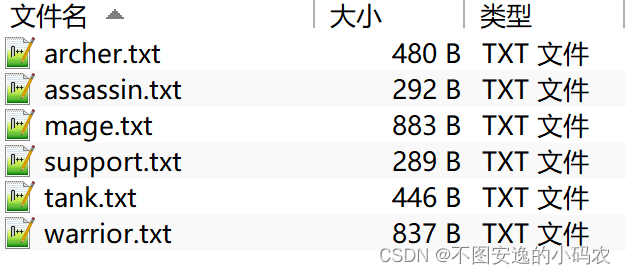
其中射手表示例如下

2、普通表搭建
- create table hornor_1(id int,name string,max_shanghai int,
- max_fangyu int,max_juli int,max_xueliang int,category string,
- roles string,other string)
- row format delimited
- fields terminated by "\t";
将文件移至表文件夹中,local关键字表示数据保存在本地即node1上,如果保存在HDFS上可以省略LOCAL关键字
- load data local inpath "/export/hivedata/archer.txt" into table hornor_1;
- load data local inpath "/export/hivedata/assassin.txt" into table hornor_1;
- load data local inpath "/export/hivedata/mage.txt" into table hornor_1;
- load data local inpath "/export/hivedata/support.txt" into table hornor_1;
- load data local inpath "/export/hivedata/tank.txt" into table hornor_1;
- load data local inpath "/export/hivedata/warrior.txt" into table hornor_1;
查询
- select * from hornor_1;
- select * from hornor_1 where roles="archer" and max_fangyu < 1000;

在HDFS上存储情况如图所示

3、静态分区表
- //静态分区建表
- create table hornor_2(id int,name string,max_shanghai int,
- max_fangyu int,max_juli int,max_xueliang int,category string,
- roles string,other string)
- partitioned by (role string)
- row format delimited
- fields terminated by "\t";
分区字段role,根据分区字段加载数据
- load data local inpath "/export/hivedata/archer.txt" into table hornor_2 partition (role='sheshou');
- load data local inpath "/export/hivedata/assassin.txt" into table hornor_2 partition (role='cike');
- load data local inpath "/export/hivedata/mage.txt" into table hornor_2 partition (role='fashi');
- load data local inpath "/export/hivedata/support.txt" into table hornor_2 partition (role='fuzhu');
- load data local inpath "/export/hivedata/tank.txt" into table hornor_2 partition (role='tanke');
- load data local inpath "/export/hivedata/warrior.txt" into table hornor_2 partition (role='zhanshi');
查询
- ###直接去分区里查询
- select * from hornor_1 where role="sheshou" and max_fangyu < 1000;

在HDFS上存储情况如图所示

4、动态分区
如果要分区的类型有点多,一直要手打输入文件,很麻烦,所以需要动态分区
- //开启动态分区功能
- set hive.exec.dynamic.partition = true;
- //允许所有分区都是动态的,关闭严格模式,不然至少一个静态分区
- set hive.exec.dynamic.partition.mode = nostrict;
1)完成一张普通表的搭建,即本文中的hornor_1表
2)动态分区表的建表语句同静态分区建表语句一致
- create table hornor_dynamic(id int,name string,max_shanghai int,
- max_fangyu int,max_juli int,max_xueliang int,category string,
- roles string,other string)
- partitioned by (role string)
- row format delimited fields terminated by "\t";
3)利用insert....select
- //先完成普通表的搭建,再利用insert into ...select
- insert into table hornor_dynamic partition (role)select tmp.*,tmp.roles from hornor_1 tmp;
4)查询
select * from hornor_dynamic ;


5、分桶表
文件样式

1)创建普通表
- //创建普通表
- create table ittest.t_usa_covid19(
- count_date string,
- county string,
- state string,
- fips int,
- cases int,
- deaths int
- )row format delimited fields terminated by ",";
加载文件
- 两种方式
- 在node1的/export/hivedata/目录下执行以下命令,路径根据自己调整
- hadoop fs -put us-covid19-counties.dat /user/hive/warehouse/ittest.db/t_usa_covid19
- load data local inpath "/export/hivedata/us-covid19-counties.dat" into table t_usa_covid19
查看普通表新建是否成功
select * from t_usa_covid19; 创建分桶表
创建分桶表- //创建分桶表
- create table ittest.t_usa_covid19_bucket(
- count_date string,
- county string,
- state string,
- fips int,
- cases int,
- deaths int
- )clustered by (state)into 5 buckets ;
把普通表的数据插入分桶表
insert into t_usa_covid19_bucket select * from t_usa_covid19;查看分桶表的数据是否插入成功
select * from t_usa_covid19_bucket;
分桶表优点:
1)根据分桶字段查询,减少全表扫描
2)JOIN时提高MR效率,减少笛卡尔积数量

3)高效抽样
-
相关阅读:
GitHub的使用
经纬度坐标为中心点生成米距离长度半径的圆形面,含java js源码+在线绘制,代码简单零依赖
MFC使用MScomm32.ocx控件实现串口通信
鸿蒙Harmony应用开发—ArkTS声明式开发(基础手势:MenuItemGroup)
【字符串匹配讲解 】
Java项目:SSM共享汽车租赁平台
java学习day21(File类和IO流)缓冲流、转换流、序列化流、打印流
09- 诊断事件的定义
10-Linux输入输出
TX Text Control .NET for Windows Forms 32 Crk
- 原文地址:https://blog.csdn.net/u010763324/article/details/126413049