-
uni-app实现web-view和App之间的互相通信
1.web-view向App传递消息
官网对于uni-app使用web-view的介绍如下:web-view

注意事项提到postMessage方法,这就是web-view向App传递消息的方法,使用如下:
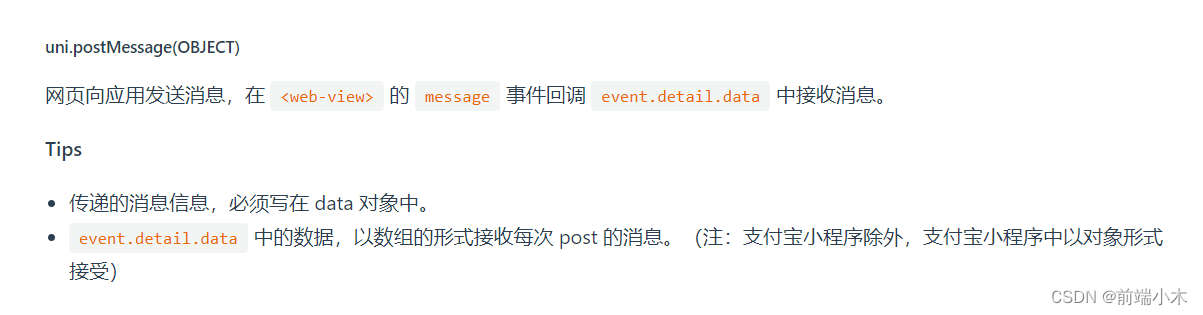
注意H5本身不支持uni-app里面的方法,所以在项目中引入支持调用uni-app方法的库

web-view页面使用:uni.postMessage({ data: { action: 'click' } });- 1
- 2
- 3
- 4
- 5
- 6
uni-app接受消息:
- 1
- 2
- 3
- 4
- 5
- 6
- 7
- 8
- 9
- 10
- 11
2.uni-app向web-view发送消息
(1)通过url带参数传递
uni-app页面:
computed: { webViewUrl() { return `${config.indexUrl}?accessToken=${this.accessToken}` } } - 1
- 2
- 3
- 4
- 5
- 6
- 7
web-view网页对url查询字符串进行解析即可得到数据:
/** * 解析url传递的参数 */ getQuery(name) { // 正则:[找寻'&' + 'url参数名字' = '值' + '&']('&'可以不存在) const reg = new RegExp("(^|&)" + name + "=([^&]*)(&|$)") const value = window.location.hash.substr(3).match(reg) // 内网服务 // const value = window.location.search.substr(1).match(reg) if (value != null) { // 对参数值进行解码 return decodeURIComponent(value[2]) } return null } const accessToken = this.getQuery('accessToken')- 1
- 2
- 3
- 4
- 5
- 6
- 7
- 8
- 9
- 10
- 11
- 12
- 13
- 14
- 15
- 16
- 17
(2)evalJS方法
uni-app页面:
methods: { message(arg) { console.log(JSON.stringify(arg)) const _funName = 'msgFromUniapp', _data = { msg: 'click' } const currentWebview = this.$scope.$getAppWebview().children()[0] currentWebview.evalJS(`${_funName}(${JSON.stringify(_data)})`) } } - 1
- 2
- 3
- 4
- 5
- 6
- 7
- 8
- 9
- 10
- 11
- 12
- 13
web-view页面:
window.msgFromUniapp = function(arg) { console.log(JSON.stringify(arg)) }- 1
- 2
- 3
-
相关阅读:
图数据库 之 Neo4j - 应用场景4 - 反洗钱(9)
java - 七大比较排序 - 详解
力扣(LeetCode)11. 盛最多水的容器(C++)
Spring注册Bean系列--方法5:@Import+ImportBeanDefinitionRegistrar
使用腾讯云发送短信 ---- 手把手教你搞定所有步骤
YonBuilder开发之后端函数
Elasticsearch学习--查询(prefix、wildcard、regexp、fuzzy)
【软件测试】路径覆盖
oss 部署前端项目报错 Cannot find module ‘@/views/.....‘(require和import区别)
c语言系统编程十二:Linux多任务编程之线程
- 原文地址:https://blog.csdn.net/liaoxuewu/article/details/126408977
