-
Python 操作BeautifulSoup4(爬取网页信息)
活动地址:CSDN21天学习挑战赛
Python 操作BeautifulSoup4(爬取网页信息)
1.BeautifulSoup4 介绍
BeautifulSoup4是爬虫里面需要掌握的一个必备库,通过这个库,将使我们通过requests请求的页面解析变得简单无比,再也不用通过绞尽脑汁的去想如何正则该如何匹配内容了。(一入正则深似海虽然它使用起来效率很高效哈)
这篇文档介绍了BeautifulSoup4中基础操作,并且有小例子.让我来向你展示它适合做什么,如何工作,怎样使用,如何达到你想要的效果
1.1 BeautifulSoup4 是什么
Beautifulsoup4 是 Beautiful Soup 项目的第四个版本,也是当前的最新版本。
Beautiful Soup 是一个可以从HTML或XML文件中提取数据的Python库.它能够通过你喜欢的转换器实现惯用的文档导航,查找,修改文档的方式.Beautiful Soup会帮你节省数小时甚至数天的工作时间.
Beautiful Soup 对 Python 2 的支持已于 2020 年 12 月 31 日停止:从现在开始,新的 Beautiful Soup 开发将专门针对 Python 3。Beautiful Soup 4 支持 Python 2 的最终版本是 4.9.3。
HTML 文档本身是结构化的文本,有一定的规则,通过它的结构可以简化信息提取。于是,就有了lxml、pyquery、BeautifulSoup等网页信息提取库。一般我们会用这些库来提取网页信息。其中,lxml 有很高的解析效率,支持 xPath 语法(一种可以在 HTML 中查找信息的规则语法);pyquery 得名于 jQuery(知名的前端 js 库),可以用类似 jQuery 的语法解析网页。但我们今天要说的,是剩下的这个:BeautifulSoup。
BeautifulSoup(下文简称 bs)翻译成中文就是“美丽的汤”,这个奇特的名字来源于《爱丽丝梦游仙境》(这也是为何在其官网会配上奇怪的插图,以及用《爱丽丝》的片段作为测试文本)。
1.2 使用之前对:数据结构中–‘树’的理解 回顾
简单回顾一下数据结构中关于树的基本知识,脑海中有个树的样子哈

结点的概念
结点:上面的示意图中每一个数据元素都被称为"结点"。
结点的度:结点所拥有的子树的个数称为该结点的度。 上图中A节点的子树的数量就是三个,它的度就是3。
根结点:每一个非空树都有且只有一个被称为根的结点。 上图中里面的A就是当前树的根节点。
子结点、父结点、兄弟结点:树中一个结点的子树的根结点称为这个结点的子结点,这个结点称为孩子结点的父结点。具有同一个父结点的子结点互称为兄弟结点。 上图中B、C、D就是兄弟节点,同时也是A的孩子节点,C是G双亲节点
叶子结点:度为0的结点称为叶子结点,或者称为终端结点。 上图中的K、M就是叶子节点的代表
DOCTYPE html> <html> <head> <meta charset="UTF-8"> <link rel="stylesheet" type="text/css" href="style.css"> <script type="application/javascript" src="script.js">script> <title>I’m the titletitle> head> <body> <h1>HelloWorldh1> <div> <div> <p>picture:p> <img src="example.png"/> div> <div> <p>A paragraph of explanatory text...p> div> div> body> html>- 1
- 2
- 3
- 4
- 5
- 6
- 7
- 8
- 9
- 10
- 11
- 12
- 13
- 14
- 15
- 16
- 17
- 18
- 19
- 20
- 21
上面的HTML源码通过HTML文档解析构建DOM树就会形成如下的效果
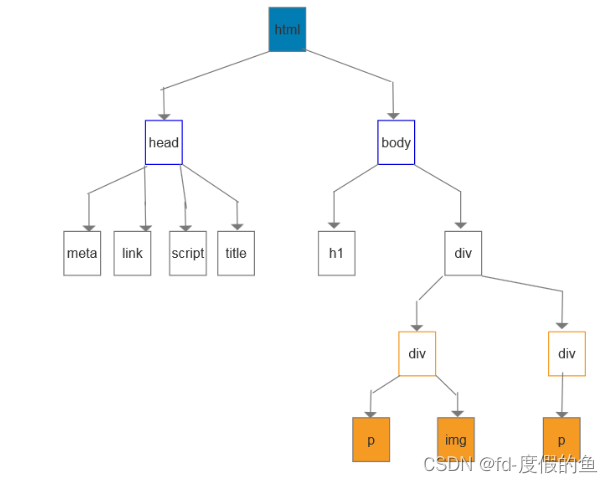
2.安装BeautifulSoup4模块库
# 安装BeautifulSoup4 pip install BeautifulSoup4- 1
- 2

基本使用流程:通过文本初始化 bs 对象->通过 find/find_all 或其他方法检测信息->输出或保存
官方文档很友好,也有中文,推荐阅读 :
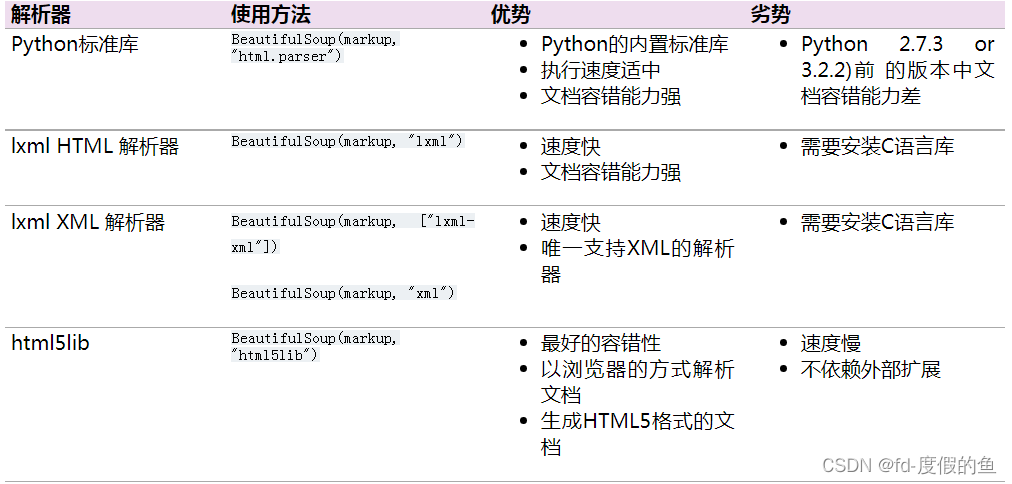
下表列出了主要的解析器,以及它们的优缺点:
2.1 案例基础操作
下面的一段HTML代码将作为例子练习
html_doc = """ <html> <head><title>The Dormouse's storytitle>head> <body> <p class="title"><b>The Dormouse's storyb>p> <p class="story">Once upon a time there were three little sisters; and their names were <a href="http://example.com/elsie" class="sister" id="link1">Elsiea>, <a href="http://example.com/lacie" class="sister" id="link2">Laciea> and <a href="http://example.com/tillie" class="sister" id="link3">Tilliea>; and they lived at the bottom of a well.p> <p class="story">...p> """- 1
- 2
- 3
- 4
- 5
- 6
- 7
- 8
- 9
- 10
- 11
- 12
- 13
- 14
分析

2.2 完整代码练习
# 导包 from bs4 import BeautifulSoup html_doc = """The Dormouse's story The Dormouse's story
Once upon a time there were three little sisters; and their names were Elsie, Lacie and Tillie; and they lived at the bottom of a well.
...
""" # 创建对象html_doc((使用BeautifulSoup解析这段代码,能够得到一个 BeautifulSoup 的对象,并能按照标准的缩进格式的结构输出:)) soup = BeautifulSoup(html_doc, 'html.parser') # 按照html标准的缩进格式的结构输出: print(soup.prettify()) # 1 获取title标签的所有内容 print("1.获取title标签的所有内容:", soup.title) # 2 获取title标签的名称 print("2.获取title标签的名称:", soup.title.name) # 3 获取title标签的文本内容 print("3.获取title标签的文本内容:", soup.title.string) # 4 获取head标签的所有内容 print("4.获取head标签的所有内容:", soup.head) # 5 获取第一个p标签中的所有内容 print("5.获取第一个p标签中的所有内容:", soup.p) # 6 获取第一个p标签的class的值 print("6.获取第一个p标签的class的值:", soup.p["class"]) # 7 获取第一个a标签中的所有内容 print("7.获取第一个a标签中的所有内容:", soup.a) # 8 获取所有的a标签中的所有内容 print("8.获取所有的a标签中的所有内容", soup.find_all("a")) # 9 获取id="link2" print("9.获取id=link2", soup.find(id="link2")) # # 10 获取所有的a标签,并遍历打印a标签中的href的值 for item in soup.find_all("a"): print(item.get("href")) # 11 获取所有的a标签,并遍历打印a标签的文本值 for item in soup.find_all("a"): print(item.get_text())- 1
- 2
- 3
- 4
- 5
- 6
- 7
- 8
- 9
- 10
- 11
- 12
- 13
- 14
- 15
- 16
- 17
- 18
- 19
- 20
- 21
- 22
- 23
- 24
- 25
- 26
- 27
- 28
- 29
- 30
- 31
- 32
- 33
- 34
- 35
- 36
- 37
- 38
- 39
- 40
- 41
- 42
- 43
- 44
- 45
- 46
- 47
- 48
- 49
- 50
- 51
- 52
- 53
- 54
- 55
- 56
输出结果: "D:\Program Files1\Python\python.exe" D:/Pycharm-work/pythonTest/打卡/0818-BeautifulSoup4.pyThe Dormouse's story The Dormouse's story
Once upon a time there were three little sisters; and their names were Elsie , Lacie and Tillie ; and they lived at the bottom of a well.
...
1.获取title标签的所有内容:The Dormouse's story 2.获取title标签的名称: title 3.获取title标签的文本内容: The Dormouse's story 4.获取head标签的所有内容:The Dormouse's story 5.获取第一个p标签中的所有内容:The Dormouse's story
6.获取第一个p标签的class的值: ['title'] 7.获取第一个a标签中的所有内容: Elsie 8.获取所有的a标签中的所有内容 [Elsie, Lacie, Tillie] 9.获取id=link2 Lacie http://example.com/elsie http://example.com/lacie http://example.com/tillie Elsie Lacie Tillie Process finished with exit code 0- 1
- 2
- 3
- 4
- 5
- 6
- 7
- 8
- 9
- 10
- 11
- 12
- 13
- 14
- 15
- 16
- 17
- 18
- 19
- 20
- 21
- 22
- 23
- 24
- 25
- 26
- 27
- 28
- 29
- 30
- 31
- 32
- 33
- 34
- 35
- 36
- 37
- 38
- 39
- 40
- 41
- 42
- 43
- 44
- 45
- 46
- 47
- 48
- 49
- 50
- 51
- 52
- 53
以上就是 BeautifulSoup 的一个极简上手介绍,对于 bs 能做什么,想必你已有了一个初步认识。如果你要在开发中使用,建议再看下它的官方文档(中文版)(英文版)。文档写得很清楚,也有中文版,你只要看了最初的一小部分,就可以在代码中派上用场了
-
相关阅读:
Camera2的使用【详细】
什么是Web组件(Web Components)?它们的主要部分有哪些?
【Cadence】配置文件cdsinit和cdsenv的使用
私有化部署AI智能客服,解放企业成本,提升服务效率
Web 开发相关概念
记一次 .NET 某工控视觉系统 卡死分析
java的Timer全网最详细总结
全国双非院校考研信息汇总整理 Part.6
Vue2.0项目自适应于不同分辨率
巧用Prometheus来扩展kubernetes调度器
- 原文地址:https://blog.csdn.net/u014096024/article/details/126410647
