-
shell——函数,正则
1.函数
1.函数概述
shell中允许将一组命令集合或语句形成一段可用代码,这些代码块称为shell函数,给这段代码起个名字称为函数名,后续可以直接调用该段代码的功能
2.定义函数
方式1:
函数名()
{
函数体(一堆命令的集合,来实现某个功能)
}方式2:
function 函数名()
{
函数体(一堆命令的集合,来实现某个功能)
}函数中return说明:
- 1.return可以结束一个函数。
- 2.return默认返回函数中最后一个命令状态值,也可以给定参数值,范围是0-256之间。
- 3.如果没有return命令,函数将返回最后一个指令的退出状态值。
3.调用函数
㈠ 当前命令行调用
[root@tom shell04]# source fun1.sh
[root@tom shell04]# . fun1.sh
[root@tom shell04]# hello
[root@tom shell04]# hello 888
㈡ 定义到用户的环境变量中
[root@tom shell05]# vim ~/.bashrc
文件中增加如下内容:
hello(){
echo “hello”
}
注意:
当用户打开bash的时候会读取该文件
㈢ 脚本中调用
#!/bin/bash
source ./fun1.sh
fun2(){
echo “hello”
}
fun2 //调用函数2.正则表达式
1.正则表达式概述
正则表达式(Regular Expression、regex或regexp,缩写为RE),也译为正规表示法、常规表示法,是一种字符模式,用于在查找过程中匹配指定的字符。
许多程序设计语言都支持利用正则表达式进行字符串操作。
正则表达式这个概念最初是由Unix中的工具软件(例如sed和grep)普及开的。
支持正则表达式的程序如:locate |find| vim| grep| sed |awk正则的作用
匹配邮箱、匹配身份证号码、手机号、银行卡号等
匹配某些特定字符串,做特定处理等等
正则当中名词解释
元字符
指那些在正则表达式中具有特殊意义的专用字符,如: 点 (\.) 星(*) 问号(?)等
前导字符
位于元字符前面的字符. abc* aooo.2.正则中普通常用的元字符
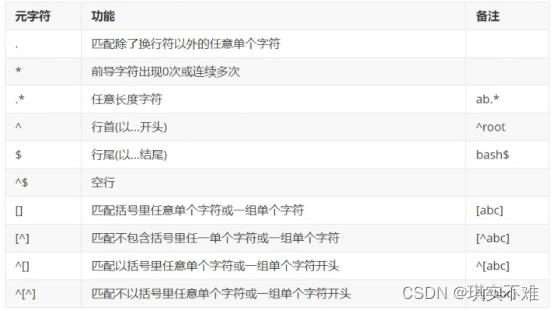
示例文本# cat 1.txt ggle gogle google gooogle goooooogle gooooooogle taobao.com taotaobaobao.com jingdong.com dingdingdongdong.com 10.1.1.1 Adfjd8789JHfdsdf/ a87fdjfkdLKJK 7kdjfd989KJK; bSKJjkksdjf878. cidufKJHJ6576, hello world helloworld yourself- 1
- 2
- 3
- 4
- 5
- 6
- 7
- 8
- 9
- 10
- 11
- 12
- 13
- 14
- 15
- 16
- 17
- 18
- 19
- 20
- 21
举例说明
grep ‘g.’ 1.txt
grep ‘g*’ 1.txt
grep ‘go*’ 1.txt
grep ‘go.*’ 1.txt
grep ‘g.*’ 1.txt
grep ‘^g.’ 1.txt
grep ‘^g.*’ 1.txt
grep ‘gle$’ 1.txt
grep ‘.*gle$’ 1.txt
grep ‘^$’ 1.txt
grep ‘^[abc]’ 1.txt
grep ‘^[^abc]’ 1.txt
grep ‘[abc]’ 1.txt
grep ‘[^abc]’ 1.txt
2.正则中其他常用元字符

举例说明:
grep ‘\
grep ‘\
grep ‘\
grep ‘go\{2\}’ 1.txt
grep ‘go\{2,\}’ 1.txt
grep ‘go\{2,4\}’ 1.txt
grep ‘go\{3,4\}’ 1.txt
grep ‘[0-9]\{2\}’ 1.txt
grep ‘[0-9]\{2\}\.[0-9]\{1\}\.[0-9]\{1\}\.[0-9]\{1\}’ 1.txt
%s/10.1.1.1/10.1.1.254/g
%s/\(10.1.1\).1/\1.254/g
grep ‘[0-9]’ 1.txt
grep -P ‘\d’ 1.txt
grep ‘[a-zA-Z_0-9]’ 1.txt
grep -P ‘\w’ 1.txt
grep -P ‘\s’ 1.txt
3.扩展类正则常用元字符
grep需要加-E 或者使用egrep
sed需要加必须加-r
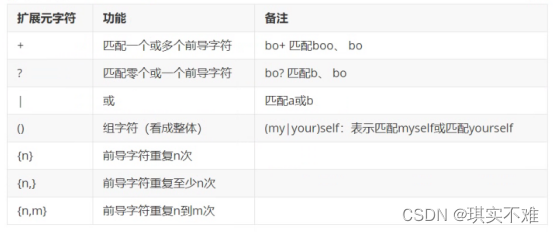
grep -E ‘go+’ 1.txt
grep -E ‘go?’ 1.txt
grep -E ‘go.?’ 1.txt
grep -E ‘^a|^b’ 1.txt
grep -E ‘^(a|b)’ 1.txt
grep -E ‘go{2}’ 1.txt注:

举例说明:
grep -E ‘[[:digit:]]?’ 1.txt
grep -E ‘[[:alnum:]]{3}’ 1.txt需要记住的几个元字符
. * () [] {n,m} ^ $ | \< \> -
相关阅读:
小程序使用Canvas设置文字竖向排列
修改pip默认安装位置
基于元胞自动机的社会力因素下的灾害人员疏散应急仿真
webpack工具包
vue3 为什么快, 相对于vue2 做了那些优化
第一百零八篇:最常用的基本数据类型(Number类型)
c语言练习题56:变种水仙花
使用jsch和commons-pool2为sftp创建连接池
【物理应用】基于Matlab模拟RANS湍流
linux系统向github传文件
- 原文地址:https://blog.csdn.net/m0_72036727/article/details/126360884
