-
docker、docker-compose 下安装elasticsearch、IK分词器
docker、docker-compose 下安装elasticsearch、IK分词器
文章目录
1、整体版本的选择,以及安装参考文档
1.1、整体版本以7.8.0;
选择的 elasticsearch:7.8.0、kibana:7.8.0、IK分词器 elasticsearch-analysis-ik-7.8.0;
1.2、整个安装步骤,参考以下文档,本地使用的是单机版本,文档以参考为主
详细可以参考
2、elasticsearch的安装
2.1、下载elasticsearch镜像
docker pull docker.elastic.co/elasticsearch/elasticsearch:7.8.0- 1
2.2、运行elasticsearch镜像的实例
docker run --name es01 -d \ -p 9200:9200 -p 9300:9300 -e "discovery.type=single-node" \ docker.elastic.co/elasticsearch/elasticsearch:7.8.0- 1
- 2
- 3
# -e 为环境变量, #discovery.type 指定为单机模式 -e "discovery.type=single-node" # -name 实例的名字 -name es01- 1
- 2
- 3
- 4
- 5
需要集群搭建,可以参考《官网文档-elasticsearch》
2.3、简单测试
浏览器 打开http://localhost:9200/
返回json数据如下:
{ "name" : "5663ac33f3ed", "cluster_name" : "docker-cluster", "cluster_uuid" : "PisVNRb7QHmvjJNoK08HSQ", "version" : { "number" : "7.8.0", "build_flavor" : "default", "build_type" : "docker", "build_hash" : "757314695644ea9a1dc2fecd26d1a43856725e65", "build_date" : "2020-06-14T19:35:50.234439Z", "build_snapshot" : false, "lucene_version" : "8.5.1", "minimum_wire_compatibility_version" : "6.8.0", "minimum_index_compatibility_version" : "6.0.0-beta1" }, "tagline" : "You Know, for Search" }- 1
- 2
- 3
- 4
- 5
- 6
- 7
- 8
- 9
- 10
- 11
- 12
- 13
- 14
- 15
- 16
- 17
2.4、进入elasticsearch镜像的实例,查看可以挂载的目录信息
进入容器,并查看elasticsearch容器的工作目录
#es01 是2.2步骤,elasticsearch镜像的实例的名称 docker exec -it es01 /bin/bash- 1
- 2

可以看到,我们需要用到的目录为:
config:配置文件data:数据存储的目录plugins:插件的目录,目前我们放入IK的分词插件2.5、拷贝容器内的配置文件到宿主机
#注意,2.4步骤,是在当前的容器内,需要先退出当前容器,如果已经退出,可以直接操作 exit #执行复制指令 docker cp es01:/usr/share/elasticsearch/config /Users/liqi/docker-compose/elasticsearch/config #关闭和删除当前的es容器 docker stop es01 docker rm es01- 1
- 2
- 3
- 4
- 5
- 6
- 7
2.6、挂载目录后,再次启动
docker run --name es01 -d \ -p 9200:9200 \ -p 9300:9300 \ -e "discovery.type=single-node" \ -v /Users/liqi/docker-compose/elasticsearch/config:/usr/share/elasticsearch/config \ -v /Users/liqi/docker-compose/elasticsearch/plugins:/usr/share/elasticsearch/plugins \ -v /Users/liqi/docker-compose/elasticsearch/data:/usr/share/elasticsearch/data \ docker.elastic.co/elasticsearch/elasticsearch:7.8.0- 1
- 2
- 3
- 4
- 5
- 6
- 7
- 8
3、docker-compose.yml脚本
version: '3.1' services: es01: image: docker.elastic.co/elasticsearch/elasticsearch:7.8.0 container_name: es01 environment: - discovery.type=single-node volumes: - ./data:/usr/share/elasticsearch/data - ./plugins:/usr/share/elasticsearch/plugins - ./config:/usr/share/elasticsearch/config ports: - 9200:9200 - 9300:9300- 1
- 2
- 3
- 4
- 5
- 6
- 7
- 8
- 9
- 10
- 11
- 12
- 13
- 14
4、分词器测试、使用
4.1、使用PostMan测试:未安装中文分词器测试
GET http://localhost:9200/_analyze { "text":"测试数据" }- 1
- 2
- 3
- 4

分词结果,可以看到,每个汉字,都是一个词语,没有根据汉语的组词来分词;
{ "tokens": [ { "token": "测", "start_offset": 0, "end_offset": 1, "type": "" , "position": 0 }, { "token": "试", "start_offset": 1, "end_offset": 2, "type": "" , "position": 1 }, { "token": "数", "start_offset": 2, "end_offset": 3, "type": "" , "position": 2 }, { "token": "据", "start_offset": 3, "end_offset": 4, "type": "" , "position": 3 } ] }- 1
- 2
- 3
- 4
- 5
- 6
- 7
- 8
- 9
- 10
- 11
- 12
- 13
- 14
- 15
- 16
- 17
- 18
- 19
- 20
- 21
- 22
- 23
- 24
- 25
- 26
- 27
- 28
- 29
- 30
- 31
- 32
4.2、安装IK 中文分词器插件
下载地址
https://github.com/medcl/elasticsearch-analysis-ik/releases/tag/v7.8.0
下载之后,解压出来,放入挂载的
plugins目录中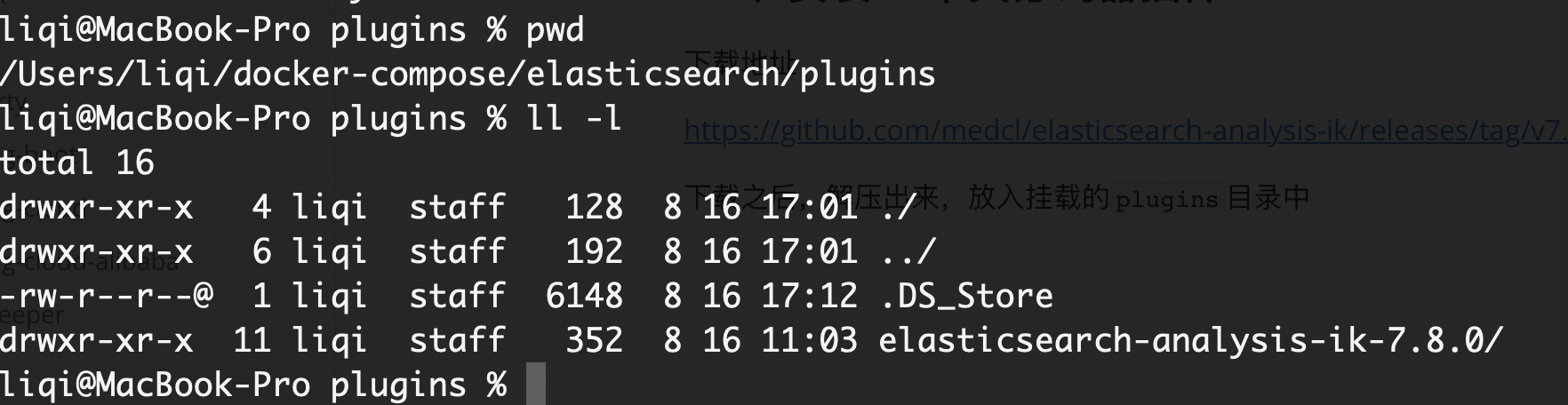
重启es的容器的服务
docker restart es01- 1
加入新的查询参数"analyzer":“ik_max_word”
GET http://localhost:9200/_analyze { "text":"测试数据", "analyzer":"ik_max_word" }- 1
- 2
- 3
- 4
- 5
ik_max_word:会将文本做最细粒度的拆分ik_smart:会将文本做最粗粒度的拆分返回的json,可以看到,已经按照新的汉字语义,进行分词了;
{ "tokens": [ { "token": "测试数据", "start_offset": 0, "end_offset": 4, "type": "CN_WORD", "position": 0 }, { "token": "测试", "start_offset": 0, "end_offset": 2, "type": "CN_WORD", "position": 1 }, { "token": "数据", "start_offset": 2, "end_offset": 4, "type": "CN_WORD", "position": 2 } ] }- 1
- 2
- 3
- 4
- 5
- 6
- 7
- 8
- 9
- 10
- 11
- 12
- 13
- 14
- 15
- 16
- 17
- 18
- 19
- 20
- 21
- 22
- 23
- 24
- 25
4.3、IK 中文分词器 自定义中文分词
再实际的分词过程中,我们还有一些常用词语,不想进行拆分的(药名、外国的地名、商品的品牌–蓝月亮 等),需要作为一个整体的搜索的情况,这样就需要我们进行自定义的词组信息;
在分词插件的的配置
config目录中/Users/liqi/docker-compose/elasticsearch1/plugins/elasticsearch-analysis-ik-7.8.0/config- 1

可以看到字典信息定义的文件后缀为
xxx.dic;我们自定义的字典也使用同样的命名方式;# 创建字典文件;注意,需要再elasticsearch-analysis-ik-7.8.0/config 目录下创建 touch custom.dic #编辑文件,插入短句 vim custom.dic- 1
- 2
- 3
- 4

我这边写入了短句
蓝月亮配置文件
IKAnalyzer.cfg.xml中,在 标签DOCTYPE properties SYSTEM "http://java.sun.com/dtd/properties.dtd"> <properties> <comment>IK Analyzer 扩展配置comment> <entry key="ext_dict">custom.dicentry> <entry key="ext_stopwords">entry> properties>- 1
- 2
- 3
- 4
- 5
- 6
- 7
- 8
- 9
- 10
- 11
- 12
- 13
重启容器
docker restart es01- 1
测试自定义的短句
GET http://localhost:9200/_analyze { "text":"蓝月亮", "analyzer":"ik_max_word" }- 1
- 2
- 3
- 4
- 5
返回json
{ "tokens": [ { "token": "蓝月亮", "start_offset": 0, "end_offset": 3, "type": "CN_WORD", "position": 0 }, { "token": "月亮", "start_offset": 1, "end_offset": 3, "type": "CN_WORD", "position": 1 } ] }- 1
- 2
- 3
- 4
- 5
- 6
- 7
- 8
- 9
- 10
- 11
- 12
- 13
- 14
- 15
- 16
- 17
- 18
-
相关阅读:
java项目-第134期ssm社团管理系统-java毕业设计
音频基础学习——声音的本质、术语与特性
git reset 和 git revert的使用
OpenLDAP | ubuntu 安装配置和汉化 phpldapadmin
面试官:说一说你的第一个Java程序是怎么跑起来的
(第一天:)1.字典赋值默认值、字典解压赋值
Redis Java 开发简单示例
20个关于文件操作的Python脚本
怎样让您的电商 API 快速且轻松地提取所有商品数据?
【2023集创赛】安谋科技杯二等奖作品: 智能体感游戏机
- 原文地址:https://blog.csdn.net/qq_28410283/article/details/126385648
