-
Android学习笔记 77. 可点击图片
Android学习笔记
Android 开发者基础知识 (Java) —— Google Developers 培训团队
第2单元 用户体验
第4课 用户互动
77. 可点击图片
你会做什么
- 为使用图像作为交互元素的模拟甜点订购应用创建一个新的 Android Studio 项目。
- 为图像设置
onClick()处理程序以显示不同的Toast消息。 - 更改模板提供的浮动操作按钮,使其显示不同的图标并启动另一个
Activity.
77.1 将图像添加到布局
-
启动新项目
使用Basic Activity模板

但是很明显现在的基础模板已经和以前不一样了,甚至用到了fragment,为了保持,这里笔者借鉴了官方项目源码。
地址:
https://github.com/google-developer-training/android-fundamentals-apps-v2/tree/master/DroidCafe
【题外话】
这里插个题外话,每次gradle构建,下载各种依赖包,Android studio默认都是下在C盘,这样会导致我们的C盘越来越小。
【真·解决办法】
一定要修改环境变量

设置好后,去c盘user目录,把.gradle直接干掉,然后可以重启一下电脑,再次构建项目,

真·解决。
→ 回到项目
activity_main.xml
<android.support.design.widget.CoordinatorLayout xmlns:android="http://schemas.android.com/apk/res/android" xmlns:app="http://schemas.android.com/apk/res-auto" xmlns:tools="http://schemas.android.com/tools" android:layout_width="match_parent" android:layout_height="match_parent" tools:context="com.example.android.droidcafe.MainActivity"> <android.support.design.widget.AppBarLayout android:layout_width="match_parent" android:layout_height="wrap_content" android:theme="@style/AppTheme.AppBarOverlay"> <android.support.v7.widget.Toolbar android:id="@+id/toolbar" android:layout_width="match_parent" android:layout_height="?attr/actionBarSize" android:background="?attr/colorPrimary" app:popupTheme="@style/AppTheme.PopupOverlay" /> android.support.design.widget.AppBarLayout> <include layout="@layout/content_main" /> <android.support.design.widget.FloatingActionButton android:id="@+id/fab" android:layout_width="wrap_content" android:layout_height="wrap_content" android:layout_gravity="bottom|end" android:layout_margin="16dp" app:srcCompat="@drawable/ic_shopping_cart" /> android.support.design.widget.CoordinatorLayout>- 1
- 2
- 3
- 4
- 5
- 6
- 7
- 8
- 9
- 10
- 11
- 12
- 13
- 14
- 15
- 16
- 17
- 18
- 19
- 20
- 21
- 22
- 23
- 24
- 25
- 26
- 27
- 28
- 29
- 30
- 31
- 32
- 33
- 34

content_main.xml
<android.support.constraint.ConstraintLayout xmlns:android="http://schemas.android.com/apk/res/android" xmlns:app="http://schemas.android.com/apk/res-auto" xmlns:tools="http://schemas.android.com/tools" android:layout_width="match_parent" android:layout_height="match_parent" app:layout_behavior="@string/appbar_scrolling_view_behavior" tools:context="com.example.android.droidcafe.MainActivity" tools:showIn="@layout/activity_main"> <TextView android:id="@+id/textintro" android:layout_width="wrap_content" android:layout_height="wrap_content" android:layout_marginTop="8dp" android:text="@string/intro_text" android:textSize="24sp" android:textStyle="bold" app:layout_constraintLeft_toLeftOf="parent" app:layout_constraintRight_toRightOf="parent" app:layout_constraintTop_toTopOf="parent" /> <ImageView android:id="@+id/donut" android:layout_width="wrap_content" android:layout_height="wrap_content" android:layout_marginLeft="24dp" android:layout_marginStart="24dp" android:layout_marginTop="24dp" android:contentDescription="@string/donuts" android:onClick="showDonutOrder" app:layout_constraintStart_toStartOf="parent" app:layout_constraintTop_toBottomOf="@+id/textintro" app:srcCompat="@drawable/donut_circle" /> <ImageView android:id="@+id/ice_cream" android:layout_width="wrap_content" android:layout_height="wrap_content" android:layout_marginLeft="24dp" android:layout_marginStart="24dp" android:layout_marginTop="24dp" android:contentDescription="@string/ice_cream_sandwiches" android:onClick="showIceCreamOrder" app:layout_constraintStart_toStartOf="parent" app:layout_constraintTop_toBottomOf="@+id/donut" app:srcCompat="@drawable/icecream_circle" /> <ImageView android:id="@+id/froyo" android:layout_width="wrap_content" android:layout_height="wrap_content" android:layout_marginLeft="24dp" android:layout_marginStart="24dp" android:layout_marginTop="24dp" android:contentDescription="@string/froyo" android:onClick="showFroyoOrder" app:layout_constraintStart_toStartOf="parent" app:layout_constraintTop_toBottomOf="@+id/ice_cream" app:srcCompat="@drawable/froyo_circle" /> <TextView android:id="@+id/donut_description" android:layout_width="0dp" android:layout_height="wrap_content" android:layout_marginEnd="24dp" android:layout_marginStart="24dp" android:layout_marginTop="24dp" android:text="@string/donuts" app:layout_constraintEnd_toEndOf="parent" app:layout_constraintStart_toEndOf="@+id/donut" app:layout_constraintTop_toTopOf="@+id/donut" /> <TextView android:id="@+id/ice_cream_description" android:layout_width="0dp" android:layout_height="wrap_content" android:layout_marginEnd="24dp" android:layout_marginStart="24dp" android:layout_marginTop="24dp" android:text="@string/ice_cream_sandwiches" app:layout_constraintEnd_toEndOf="parent" app:layout_constraintStart_toEndOf="@+id/ice_cream" app:layout_constraintTop_toTopOf="@+id/ice_cream" /> <TextView android:id="@+id/froyo_description" android:layout_width="0dp" android:layout_height="wrap_content" android:layout_marginEnd="24dp" android:layout_marginStart="24dp" android:layout_marginTop="24dp" android:text="@string/froyo" app:layout_constraintEnd_toEndOf="parent" app:layout_constraintStart_toEndOf="@+id/froyo" app:layout_constraintTop_toTopOf="@+id/froyo" /> android.support.constraint.ConstraintLayout>- 1
- 2
- 3
- 4
- 5
- 6
- 7
- 8
- 9
- 10
- 11
- 12
- 13
- 14
- 15
- 16
- 17
- 18
- 19
- 20
- 21
- 22
- 23
- 24
- 25
- 26
- 27
- 28
- 29
- 30
- 31
- 32
- 33
- 34
- 35
- 36
- 37
- 38
- 39
- 40
- 41
- 42
- 43
- 44
- 45
- 46
- 47
- 48
- 49
- 50
- 51
- 52
- 53
- 54
- 55
- 56
- 57
- 58
- 59
- 60
- 61
- 62
- 63
- 64
- 65
- 66
- 67
- 68
- 69
- 70
- 71
- 72
- 73
- 74
- 75
- 76
- 77
- 78
- 79
- 80
- 81
- 82
- 83
- 84
- 85
- 86
- 87
- 88
- 89
- 90
- 91
- 92
- 93
- 94
- 95
- 96
- 97
- 98
- 99
- 100

-
添加图片
-
添加文字说明
77.2 为图片添加点击事件
-
创建Toast方法

-
创建点击处理程序
public void showDonutOrder(View view) { displayToast(getString(R.string.donut_order_message)); }- 1
- 2
- 3
添加更多方法
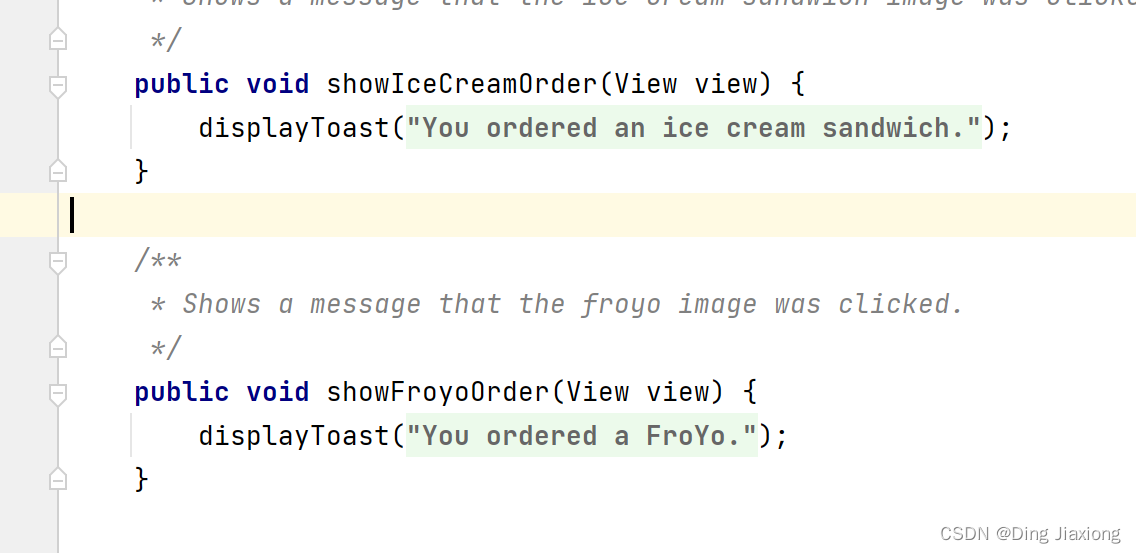
-
添加onclick属性

见上方的布局代码
-
运行程序

77.3 更改浮动操作按钮
- 添加新图标
- 添加活动
- 改变事件
77.4 小结
- 要在项目中使用图像,请将图像复制到项目的可绘制文件夹中(project_name > app > src > main > res > drawable)。
- 通过将 an 拖到布局并为其选择图像来定义 an
ImageView以使用它。ImageView - 添加
android:onClick属性以使ImageView可点击像按钮一样。指定点击处理程序的名称。 - 在 中创建一个单击处理程序
Activity以执行操作。 - 选择一个图标:在Project > Android窗格中展开****res,右键单击(或按住 Control 单击)drawable文件夹,然后选择New > Image Asset。在下拉菜单中选择操作栏和选项卡图标,然后单击剪贴画图像( **Clipart:**旁边的 Android 徽标)以选择剪贴画图像作为图标。
- 添加另一个
Activity:在Project > Android窗格中,右键单击(或按住 Control 单击)java文件夹中的包名称文件夹,然后选择New > Activity和模板Activity(例如Empty Activity)。 - 显示一条
Toast消息:
Toast.makeText(getApplicationContext(), message, Toast.LENGTH_SHORT).show();- 1
- 2
-
相关阅读:
远程仓库创建好后,出现版本冲突,提交不成功,pull也会失败的解决方法
微信小程序开发学习——顺序、选择、循环、数学函数
A-level计算机网络里的硬件详解
计算机组成原理知识点总结——第四章指令系统
jQuery【菜单功能、淡入淡出轮播图(上)、淡入淡出轮播图(下)、折叠面板】(五)-全面详解(学习总结---从入门到深化)
laravel Modify data is invalid 解决修改数据无效
河流动力学名词解释
科技驱动固定资产管理变革:RFID技术的前沿应用
73、SpringBoot 直接整合 JDBC
【嵌入式Linux内核驱动】内核模块三要素与验证测试
- 原文地址:https://blog.csdn.net/weixin_44226181/article/details/126378083
