-
Docker
安装docker-ce
1,查看版本
- [root@localhost ~]# cat /etc/redhat-release
- CentOS Linux release 7.9.2009 (Core)
- [root@localhost ~]# uname -r
- 3.10.0-1160.71.1.el7.x86_64
2卸载旧版本,旧版本的Docker称为docker或者docker-engine:
[root@localhost ~]# yum remove docker docker-common docker-selinux docker-engine3官网下载
- [root@localhost ~]# curl -fsSL https://get.docker.com -o get-docker.sh
- [root@localhost ~]# bash get-docker.sh
4添加centos源的信息
- [root@localhost ~]# yum install yum-utils device-mapper-persistent-data lvm2 -y
- [root@localhost ~]# yum-config-manager --add-repo https://mirrors.tuna.tsinghua.edu.cn/docker-ce/linux/centos/docker-ce.repo
5修改docker源
- [root@localhost ~]# sed -i 's@download.docker.com@mirrors.tuna.tsinghua.edu.cn/docker-ce@g' /etc/yum.repos.d/docker-ce.repo
- [root@localhost ~]# sed -i 's/$releasever/7/g' /etc/yum.repos.d/docker-ce.repo
- [root@localhost ~]# sed -i 's/$basearch/x86_64/g' /etc/yum.repos.d/docker-ce.repo
6更新源
[root@localhost ~]# yum makecache fast7安装dockerce最新版
[root@localhost ~]# yum -y install docker-ce
[root@localhost ~]# rpm -q docker-ce ------------------- 检查安装包docker-ce
docker-ce-20.10.17-3.el7.x86_64
[root@localhost ~]# systemctl start docker ---------- 启动docker服务
[root@localhost ~]# systemctl status docker安装指定版本
[root@localhost ~]# yum list docker-ce.x86_64 --showduplicates | sort -r- [root@localhost ~]# cd /etc/yum.repos.d/
- [root@localhost yum.repos.d]# yum install -y https://mirrors.tuna.tsinghua.edu.cn/docker-ce/linux/centos/7/x86_64/stable/Packages/docker-ce-selinux-17.03.3.ce-1.el7.noarch.rpm
- [root@localhost yum.repos.d]# yum install docker-ce-17.03.3.ce -y
- [root@localhost yum.repos.d]# rpm -q docker-ce
- docker-ce-20.10.17-3.el7.x86_64
- [root@localhost yum.repos.d]# systemctl start docker
- [root@localhost yum.repos.d]# systemctl status docker
[root@localhost ~]# docker --version
Docker version 20.10.17, build 100c701
[root@localhost ~]# docker version
Client: Docker Engine - Community
Version: 20.10.17
[root@localhost ~]# docker run hello-world
[root@localhost ~]# docker run -it ubuntu bash
下载nginx镜像,alpine的镜像httpd的镜像并且给httpd镜像重新打标签
[root@localhost ~]# vi /etc/docker/daemon.json

[root@localhost ~]# systemctl daemon-reload
[root@localhost ~]# systemctl restart docker
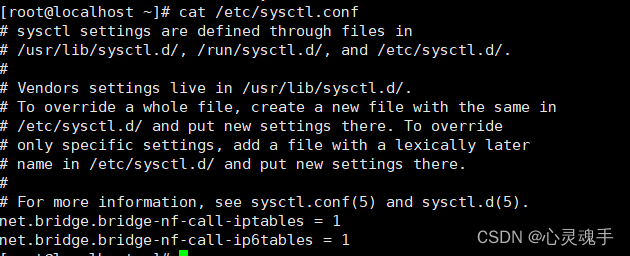
[root@localhost ~]# docker info[root@localhost ~]# vi /etc/sysctl.conf
-
[root@localhost ~]# docker pull nginx ----下载nginx镜像(需要等待一段时间)

[root@localhost ~]# docker pull alpine

[root@localhost ~]# docker pull httpd

[root@localhost ~]# docker images | grep httpd
httpd latest f2a976f932ec 2 weeks ago 145MB
[root@localhost ~]# docker tag httpd test/httpd:v1
[root@localhost ~]# docker images | grep httpd
httpd latest f2a976f932ec 2 weeks ago 145MB
test/httpd v1 f2a976f932ec 2 weeks ago 145MB -
相关阅读:
[pai-diffusion]pai的easynlp的diffusion模型训练
K8S云计算系列-(2)
论文的三种状态
【Arma3脚本教程】一、基本介绍
前端代码规范化的解决方案
BLOB/TEXT column ‘sup_content‘ used in key specification without a key length
今日头条创作11天才42.92元,收益越来越少,到底要不要坚持
Docker之自定义镜像上传阿里云
一个 SAP 开发工程师在 SAP 德国总部出差的见闻系列 2:Walldorf 附近的小旅馆
【大数据之Kafka】十二、Kafka之offset位移及漏消费和重复消费
- 原文地址:https://blog.csdn.net/weixin_49185464/article/details/126375461