-
基于Mybatis-Plus实现Geometry字段在PostGis空间数据库中的使用
目录
一、在pom.xml中引入postgis-jdbc相关jar包
背景
之前的一些个人文章介绍了空间数据库,以及Mybatis-Plus快速操作数据库组件,以及空间数据库PostGis的相关介绍。现在基于在空间数据库中已经定义了一张空间表,需要在应用程序中使用Mybatis-Plus来进行空间数据的查询、插入等常规操作。
在OGC标准中,通常空间字段是由Geometry类型来表示。而一般编程语言中是没有这种数据类型的。以java为例,怎么操作这些数据,满足业务需求呢?跟着本文一起来学习吧。
今天介绍基于postgis-jdbc的geometry属性的操作。
一、在pom.xml中引入postgis-jdbc相关jar包
- <dependency>
- <groupId>net.postgisgroupId>
- <artifactId>postgis-jdbcartifactId>
- <version>2.5.0version>
- dependency>
二、需要自定义Handler类来扩展字段支持。
- package com.hngtghy.framework.handler;
- import java.sql.CallableStatement;
- import java.sql.PreparedStatement;
- import java.sql.ResultSet;
- import java.sql.SQLException;
- import org.apache.ibatis.type.BaseTypeHandler;
- import org.apache.ibatis.type.JdbcType;
- import org.apache.ibatis.type.MappedTypes;
- import org.postgis.Geometry;
- import org.postgis.PGgeometry;
- @MappedTypes({String.class})
- public class PgGeometryTypeHandler extends BaseTypeHandler
{ - @Override
- public void setNonNullParameter(PreparedStatement ps, int i, String parameter, JdbcType jdbcType) throws SQLException {
- PGgeometry pGgeometry = new PGgeometry(parameter);
- Geometry geometry = pGgeometry.getGeometry();
- geometry.setSrid(4326);
- ps.setObject(i, pGgeometry);
- }
- @Override
- public String getNullableResult(ResultSet rs, String columnName) throws SQLException {
- String string = rs.getString(columnName);
- return getResult(string);
- }
- @Override
- public String getNullableResult(ResultSet rs, int columnIndex) throws SQLException {
- String string = rs.getString(columnIndex);
- return getResult(string);
- }
- @Override
- public String getNullableResult(CallableStatement cs, int columnIndex) throws SQLException {
- String string = cs.getString(columnIndex);
- return getResult(string);
- }
- private String getResult(String string) throws SQLException {
- PGgeometry pGgeometry = new PGgeometry(string);
- String s = pGgeometry.toString();
- return s.replace("SRID=4326;", "");
- }
- }
注意,在getResult()中关于4326坐标系的定义,可以根据需要进行废弃。这里写上为了统一投影坐标系。
三、在数据中创建表,建表语句如下:
- create table biz_point_test(
- id int8 primary key,
- name varchar(100),
- geom geometry(Point,4326)
- );
四、定义Mybatis-plus实体
- package com.hngtghy.project.extend.student.domain;
- import com.baomidou.mybatisplus.annotation.TableField;
- import com.baomidou.mybatisplus.annotation.TableId;
- import com.baomidou.mybatisplus.annotation.TableName;
- import com.hngtghy.framework.handler.PgGeometryTypeHandler;
- import lombok.AllArgsConstructor;
- import lombok.Getter;
- import lombok.NoArgsConstructor;
- import lombok.Setter;
- import lombok.ToString;
- @TableName(value ="biz_point_test",autoResultMap = true)
- @NoArgsConstructor
- @AllArgsConstructor
- @Setter
- @Getter
- @ToString
- public class PointTest {
- @TableId
- private Long id;
- private String name;
- @TableField(typeHandler = PgGeometryTypeHandler.class)
- private String geom;
- @TableField(exist=false)
- private String geomJson;
- }
提醒:1、在属性上使用@TableField(typeHandler=xxx)来指定对应的类型转换器。2、需要在实体上定义autoResultMap=true。否则配置不一定生效。
五、定义mapper查询器
- package com.hngtghy.project.extend.student.mapper;
- import org.apache.ibatis.annotations.Param;
- import org.apache.ibatis.annotations.Select;
- import com.baomidou.mybatisplus.core.mapper.BaseMapper;
- import com.hngtghy.project.extend.student.domain.PointTest;
- public interface PointTestMapper extends BaseMapper
{ - static final String FIND_GEOJSON_SQL="";
- @Select(FIND_GEOJSON_SQL)
- PointTest findGeoJsonById(@Param("id")Long id,@Param("name")String name);
- }
六、定义service业务类
- package com.hngtghy.project.extend.student.service.impl;
- import java.util.List;
- import org.springframework.beans.factory.annotation.Autowired;
- import org.springframework.stereotype.Service;
- import com.baomidou.mybatisplus.core.conditions.query.QueryWrapper;
- import com.baomidou.mybatisplus.extension.service.impl.ServiceImpl;
- import com.hngtghy.project.extend.student.domain.PointTest;
- import com.hngtghy.project.extend.student.mapper.PointTestMapper;
- import com.hngtghy.project.extend.student.service.IPointTestService;
- @Service
- public class PointTestServcieImpl extends ServiceImpl
- @Autowired
- private PointTestMapper pointMapper;
- @Override
- public PointTest selectById(Long id) {
- return pointMapper.selectById(id);
- }
- @Override
- public List
selectList(PointTest point) { - QueryWrapper
queryWrapper = new QueryWrapper (); - queryWrapper.select("id,name");
- return this.getBaseMapper().selectList(queryWrapper);
- }
- @Override
- public int insertPointTest(PointTest point) {
- return pointMapper.insert(point);
- }
- @Override
- public int updatePoint(PointTest point) {
- return pointMapper.updateById(point);
- }
- @Override
- public PointTest selectGeomById(Long id) {
- QueryWrapper
queryWrapper = new QueryWrapper (); - queryWrapper.select("geom","st_asgeojson(geom) as geomJson");
- queryWrapper.eq("id", id);
- return this.getBaseMapper().selectOne(queryWrapper);
- }
- @Override
- public PointTest findGeoJsonById(Long id) {
- return pointMapper.findGeoJsonById(id, null);
- }
- }
这里添加了一个数据库不存在的字段geomJson,会将空间属性转变成geojson字段,方便于前台的如leaflet、openlayers、cesium等组件进行展示。所以使用postgis的st_asgeojson(xxx)进行函数转换。
七、相关方法调用
//1、列表查询List<PointTest> pointList = pointService.selectList(null);System.out.println(pointList);[PointTest(id=1559371184090423297, name=中寨居委会, geom=null, geomJson=null), PointTest(id=2, name=禾滩村, geom=null, geomJson=null), PointTest(id=1559403683801796610, name=中寨居委会, geom=null, geomJson=null)]//2、插入PointTest point = new PointTest();point.setName("中寨居委会");point.setGeom("POINT(109.262605 27.200669)");//POINT(lng,lat) 经度,纬度pointService.insertPointTest(point);//3、查询数据PointTest point = pointService.selectGeomById(1559371184090423297L);PointTest json = pointService.findGeoJsonById(1559371184090423297L);PointTest(id=null, name=null, geom=POINT(109.262605 27.200669), geomJson={"type":"Point","coordinates":[109.262605,27.200669]})PointTest(id=null, name=null, geom=null, geomJson={"type":"Point","coordinates":[109.262605,27.200669]})八、使用pgadmin可以查看到相应的点数据,如下图所示:

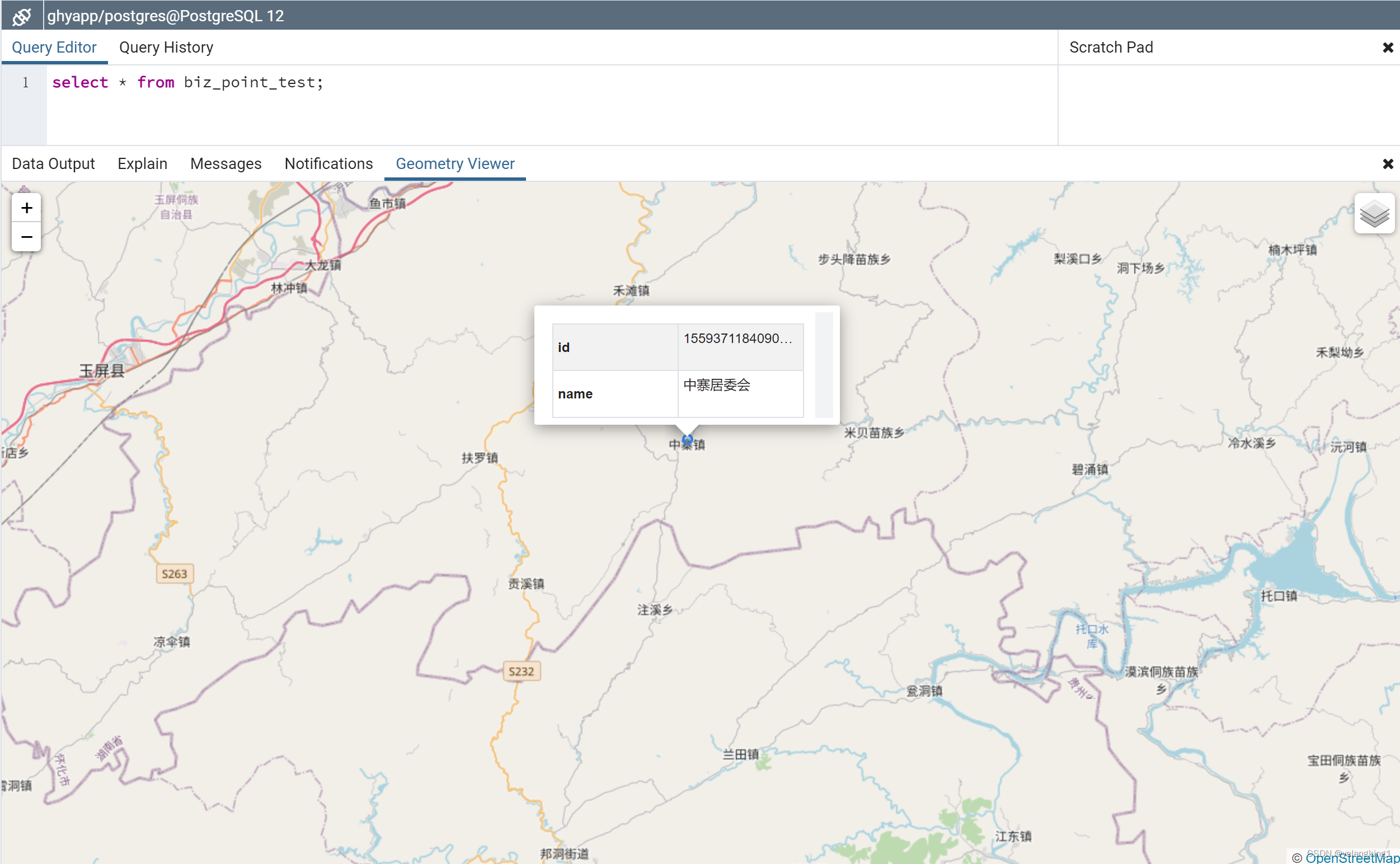 总结:通过以上步骤可以实现在mybatis-plus中操作geometry空间字段,同时实现查询和插入操作。通过geojson,结合前端可视化组件即可完成矢量数据的空间可视化。希望本文可以帮到你,欢迎交流。
 -
相关阅读:
Java高级---网络编程
自定义函数
oracle在where条件中关于索引字段的使用注意事项
【JAVA】集合与背后的逻辑框架,包装类,List,Map,Set,静态内部类
2022款Thinkphp家政上门预约系统-全开源系统源码
android 如何使用aidl编译CPP接口
【英语:基础高阶_全场景覆盖表达】K12.口语主题陈述——教育类
一文讲清楚密评中的数据库存储加密 安当加密
设计模式-策略模式
从0开始学人工智能测试节选:Spark -- 结构化数据领域中测试人员的万金油技术(二)
- 原文地址:https://blog.csdn.net/yelangkingwuzuhu/article/details/126364080
