-
gentool gen go自动生成表结构
第一步:安装
go install gorm.io/gen/tools/gentool@latest
第二步:运行
样例1通过配置文件:
gentool -c "hack/gen.yml"样例2通过 字段获取
gentool -dsn "user:pwd@tcp(127.0.0.1:3306)/database?charset=utf8mb4&parseTime=True&loc=Local" -tables "kk_product"gen.yml文件内容
version: "0.1"
database:
  # consult[https://gorm.io/docs/connecting_to_the_database.html]"
  dsn : "root:root@tcp(127.0.0.1:3306)/gotest?charset=utf8&parseTime=True&loc=Local"
  # input mysql or postgres or sqlite or sqlserver. consult[https://gorm.io/docs/connecting_to_the_database.html]
  db  : "mysql"
  # enter the required data table or leave it blank.You can input :
  tables  :
#     - kk_product
  # tables  :
  # specify a directory for output
  outPath :  "app/dao/query"
  # query code file name, default: gen.go
  outFile :  ""
  # generate unit test for query code
  withUnitTest  : false
  # generated model code's package name
  modelPkgName  : "app/model/internal"
  # generate with pointer when field is nullable
  fieldNullable : false
  # generate field with gorm index tag
  fieldWithIndexTag : false
  # generate field with gorm column type tag
  fieldWithTypeTag  : false
  # detect integer field's unsigned type, adjust generated data type
  fieldSignable  : false
备注:
gentool -h
Usage of gentool:
-c string 是gen.yml的路径
is path for gen.yml
-db string 输入mysql或postgres或sqlite或sqlserver 数据库类型
input mysql or postgres or sqlite or sqlserver. consult[https://gorm.io/docs/connecting_to_the_database.html] (default "mysql")
-dsn string 数据库配置信息
consult[https://gorm.io/docs/connecting_to_the_database.html]
-fieldNullable 生成的模型代码的包名 当字段为空时使用指针生成
generate with pointer when field is nullable
-fieldSignable 要检测整型字段的无符号类型,请调整生成的数据类型
detect integer field's unsigned type, adjust generated data type
-fieldWithIndexTag 使用gorm索引标记生成字段
generate field with gorm index tag
-fieldWithTypeTag 使用gorm列类型标记生成字段
generate field with gorm column type tag
-modelPkgName string 表结构生成的对应目录
generated model code's package name
-onlyModel 仅生成模型(无查询文件)
only generate models (without query file)
-outFile string 查询代码文件名,默认值:gen.go outPath底下的基础文件 建议用默认的gen.go
query code file name, default: gen.go
-outPath string 指定输出目录
specify a directory for output (default "./dao/query")
-tables string 输入所需的数据表或将其留空
enter the required data table or leave it blank
-withUnitTest 为查询代码生成单元测试
generate unit test for query code问题:
goland 报错,提示 cgo: C compiler "gcc" not found: exec: "gcc": executable file not found in %PATH%
1.缺乏编译软件导致的,软件下载地址
https://sourceforge.net/projects/mingw-w64/files/
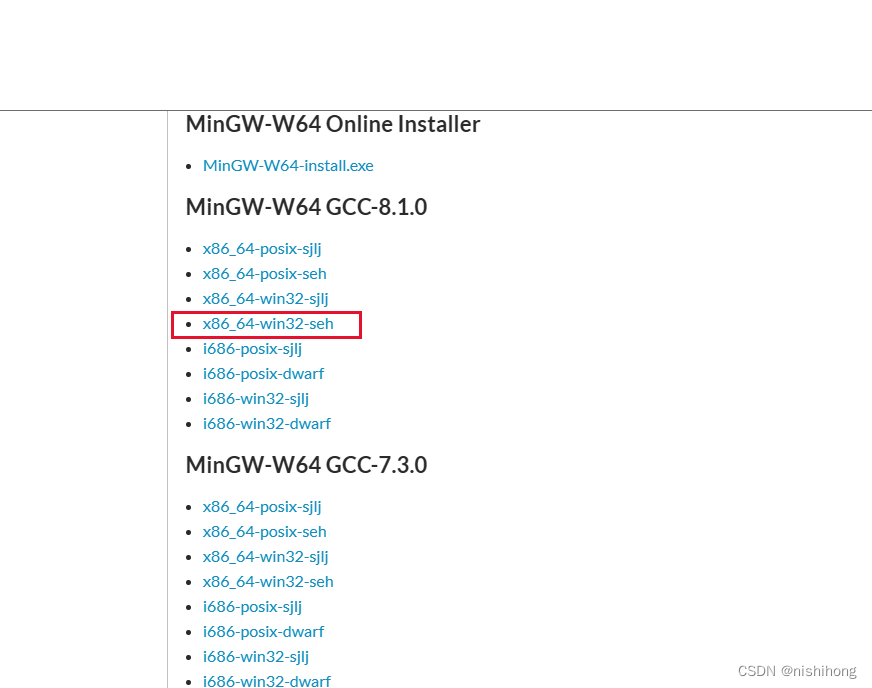
2.下载之后,进行离线软件包安装
2.1 将下载文件解压在想要安装的地方即可
2.2 系统环境变量添加MinGW64 bin路径
2.3 测试在cmd命令里面输入
gcc -v
-
相关阅读:
iPhone恢复篇:如何从iPhone恢复误删除的照片
面向初学者的 Android 应用开发基础知识
Cesium快速上手3-Billboard/Label/PointPrimitives图元使用讲解
股票价格预测 | Python实现基于CNN卷积神经网络的股票预测模型(keras,Conv1D)
创业教学信息管理系统
基于Elasticsearch + Fluentd + Kibana(EFK)搭建日志收集管理系统
mysql使用--带搜索条件的查询
操作系统文件管理-----索引分配
《Java8实战》
计算机视觉: 可控的高质量人体生成
- 原文地址:https://blog.csdn.net/nishihong/article/details/126360705
