-
elasticsearch(es)的安装-macOs
前提:已经安装过jdk1.8
java -version #查看jdk版本- 1

1.es的安装和访问
es安装
brew install elasticsearch #安装 brew info elasticsearch # 查看es信息 brew services start elasticsearch # 启动- 1
- 2
- 3

浏览器输入:localhost:9200 查看es

2.kibana的安装和访问
kibana可以通过可视化的界面操作访问es
-
kibana安装
brew install kibana #安装
brew info kibana # 查看信息
brew services start kibana #启动 -
kibana访问:浏览器访问 localhost:5601,找到开发工具(Dev Tools),向es中插入数据&搜索数据

3.es集群搭建
之前是通过brew命令安装的es,虽然一键很爽,但是要搭建集群,按照下述文章搭建单机版es集群的说法,需要找到安装包
## 查看全部安装路径 brew list ## 查看指定软件安装路径 brew list 软件名- 1
- 2
- 3
- 4
实战
brew list elasticsearch ## 结果 /usr/local/Cellar/elasticsearch/7.10.2/.bottle/etc/ (3 files) /usr/local/Cellar/elasticsearch/7.10.2/bin/elasticsearch /usr/local/Cellar/elasticsearch/7.10.2/bin/elasticsearch-keystore /usr/local/Cellar/elasticsearch/7.10.2/bin/elasticsearch-plugin /usr/local/Cellar/elasticsearch/7.10.2/bin/elasticsearch-shard /usr/local/Cellar/elasticsearch/7.10.2/homebrew.mxcl.elasticsearch.plist /usr/local/Cellar/elasticsearch/7.10.2/libexec/bin/ (8 files) /usr/local/Cellar/elasticsearch/7.10.2/libexec/lib/ (42 files) /usr/local/Cellar/elasticsearch/7.10.2/libexec/modules/ (93 files)- 1
- 2
- 3
- 4
- 5
- 6
- 7
- 8
- 9
- 10
- 11
查看通过安装包安装es的文章安装包安装es-mac,可以看到,/usr/local/Cellar/elasticsearch/7.10.2/ 其实就是安装包,试着复制,然后安装。
cp -R 7.10.2 7.10.2.backup1 cp -R 7.10.2 7.10.2.backup2- 1
- 2
得到两个安装包的副本后,修改副本中的配置文件
但是进文件夹里看,并没有config文件夹,通过brew命令查看es安装情况,可以得到config路径:/usr/local/etc/elasticsearch/
和我假设的不一致。/usr/local/Cellar/elasticsearch/7.10.2/ 并不是安装包,只是通过brew命令后的安装路径。brew info elasticsearch ## 结果 From:https://github.com/Homebrew/homebrew-core/blob/HEAD/Formula/elasticsearch.rb Config: /usr/local/etc/elasticsearch/- 1
- 2
- 3
- 4
通过brew命令还可以得到安装包路径:https://github.com/Homebrew/homebrew-core/blob/HEAD/Formula/elasticsearch.rb 点进去后得到rul:https://github.com/elastic/elasticsearch/archive/v7.10.2.tar.gz。点击下载、解压后目录如下,也没有config目录。
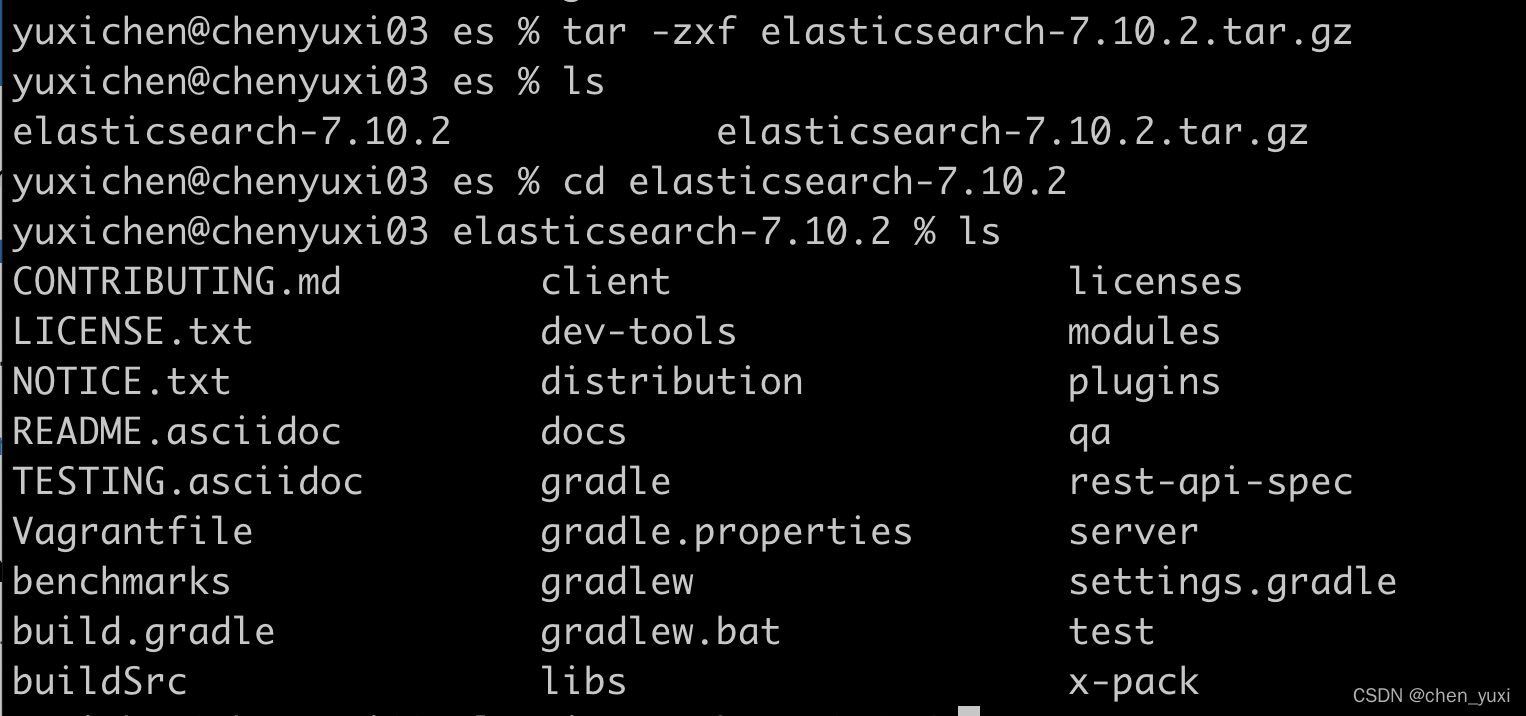
考虑从官网下载:https://www.elastic.co/cn/start ,此时有config目录了

检查已有es的config文件里的cluster name。将两者修改成一致。cyx_elasticsearch## 通过brew安装的es的yml文件,路径:/usr/local/etc/elasticsearch/ cluster.name: elasticsearch_brew ## 通过官网下载的es里的yml文件,路径:~/software/es/es-a/elasticsearch-8.0.1/config cluster.name: my-application- 1
- 2
- 3
- 4
elasticsearch.yml文件的解释&修改
# ======================== Elasticsearch Configuration ========================= # # NOTE: Elasticsearch comes with reasonable defaults for most settings. # Before you set out to tweak and tune the configuration, make sure you # understand what are you trying to accomplish and the consequences. # # The primary way of configuring a node is via this file. This template lists # the most important settings you may want to configure for a production cluster. # # Please consult the documentation for further information on configuration options: # https://www.elastic.co/guide/en/elasticsearch/reference/index.html # # ---------------------------------- Cluster ----------------------------------- # # Use a descriptive name for your cluster: # cluster.name: cyx-application # # ------------------------------------ Node ------------------------------------ # # Use a descriptive name for the node: # node.name: node-1 # 是否有资格选举为主节点 node.master: true # 是否存储数据 node.data: true # 最大集群节点数 node.max_local_storage_nodes: 3 # # Add custom attributes to the node: # #node.attr.rack: r1 # # ----------------------------------- Paths ------------------------------------ # # Path to directory where to store the data (separate multiple locations by comma): # path.data: /Users/yuxichen/software/es/es-a/data # # Path to log files: # path.logs: /Users/yuxichen/software/es/es-a/logs # # ----------------------------------- Memory ----------------------------------- # # Lock the memory on startup: # #bootstrap.memory_lock: true # # Make sure that the heap size is set to about half the memory available # on the system and that the owner of the process is allowed to use this # limit. # # Elasticsearch performs poorly when the system is swapping the memory. # # ---------------------------------- Network ----------------------------------- # # By default Elasticsearch is only accessible on localhost. Set a different # address here to expose this node on the network: # #network.host: 192.168.0.1 # # By default Elasticsearch listens for HTTP traffic on the first free port it # finds starting at 9200. Set a specific HTTP port here: # 端口号 http.port: 9201 # 内部节点之间沟通端口 transport.tcp.port: 9500 # # For more information, consult the network module documentation. # # --------------------------------- Discovery ---------------------------------- # # Pass an initial list of hosts to perform discovery when this node is started: # The default list of hosts is ["127.0.0.1", "[::1]"] # 候选主节点地址 # discovery.seed_hosts: ["127.0.0.1:9300", "127.0.0.1:9400"] # # Bootstrap the cluster using an initial set of master-eligible nodes: # cluster.initial_master_nodes: ["node-1", "node-2"] # # For more information, consult the discovery and cluster formation module documentation. # # ---------------------------------- Various ----------------------------------- # # Allow wildcard deletion of indices: # #action.destructive_requires_name: false- 1
- 2
- 3
- 4
- 5
- 6
- 7
- 8
- 9
- 10
- 11
- 12
- 13
- 14
- 15
- 16
- 17
- 18
- 19
- 20
- 21
- 22
- 23
- 24
- 25
- 26
- 27
- 28
- 29
- 30
- 31
- 32
- 33
- 34
- 35
- 36
- 37
- 38
- 39
- 40
- 41
- 42
- 43
- 44
- 45
- 46
- 47
- 48
- 49
- 50
- 51
- 52
- 53
- 54
- 55
- 56
- 57
- 58
- 59
- 60
- 61
- 62
- 63
- 64
- 65
- 66
- 67
- 68
- 69
- 70
- 71
- 72
- 73
- 74
- 75
- 76
- 77
- 78
- 79
- 80
- 81
- 82
- 83
- 84
- 85
- 86
- 87
- 88
- 89
- 90
- 91
总结下,yml文件需要修改的配置
cluster.name: cyx-application node.name: node-1 node.master: true node.data: true node.max_local_storage_nodes: 3 path.data: /Users/yuxichen/software/es/es-a/data path.logs: /Users/yuxichen/software/es/es-a/logs http.port: 9201 transport.tcp.port: 9500 discovery.seed_hosts: ["127.0.0.1:9200", "127.0.0.1:9201"] cluster.initial_master_nodes: ["node-1", "node-2"]- 1
- 2
- 3
- 4
- 5
- 6
- 7
- 8
- 9
- 10
- 11
配置完三个节点的yml后,开始关闭已经启动的es
?brew services stop elasticsearch #输出 Stopping `elasticsearch`... (might take a while) ==> Successfully stopped `elasticsearch` (label: homebrew.mxcl.elasticsearch)- 1
- 2
- 3
- 4
试着启动三个节点
#通过brew安装的 brew services start elasticsearch #输出 ==> Successfully started `elasticsearch` (label: homebrew.mxcl.elasticsearch) #通过下载的安装包启动 ./bin/elasticsearch ##输出 报错一:node.master设置找不到 报错二:transport.tcp.port: 设置找不到- 1
- 2
- 3
- 4
- 5
- 6
- 7
- 8
- 9
把这些都删除后,直接在浏览器中输入localhost:9201,提示需要用户名密码,但是我又没设置过,在官网文档elasticsearch8.0.1
和网上的文档也没有找到第一次登陆需要用户名密码的原因。就在配置文件中设置了不需要鉴权
可以启动的官网下载的elasticsearch8.0.1版本的yml文件修改如下cluster.name: cyx-application node.name: node-1 path.data: /Users/yuxichen/software/es/es-a/data path.logs: /Users/yuxichen/software/es/es-a/logs http.port: 9201 cluster.initial_master_nodes: ["node-1", "node-2"] xpack.security.enabled: false- 1
- 2
- 3
- 4
- 5
- 6
- 7
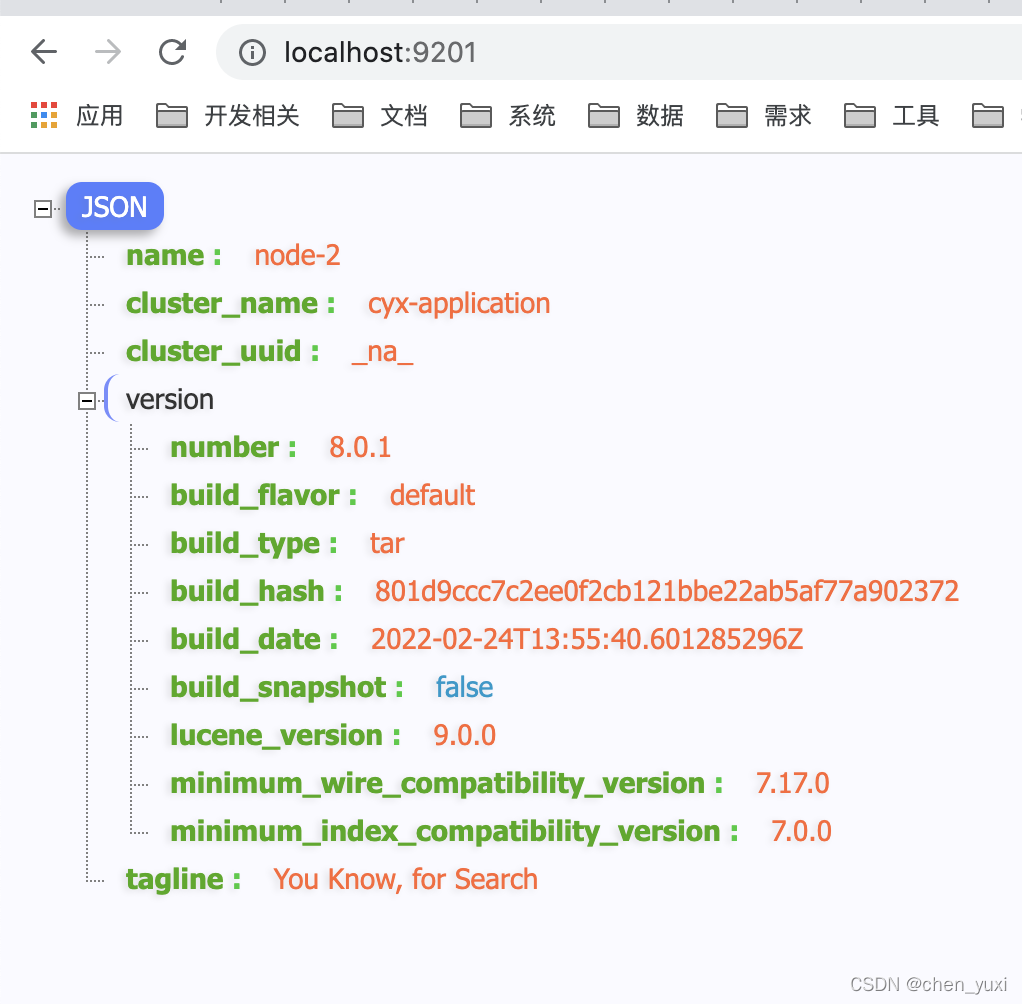


接下来测试集群是否搭建成功&配置kibana
测试集群,输出结果如下,可以看出节点总数为1,所以集群没有搭建成功,需要找下原因http://localhost:9200/_cat/health?v- 1

实在是找不到原因,只好放弃8.0.1这个版本太新了,下载了稍微老一点的版本:7.16.0,按照常见文章的配置,看上去是成功了

配置了下kibana,然后查看集群健康,发现竟然是red,我要哭了
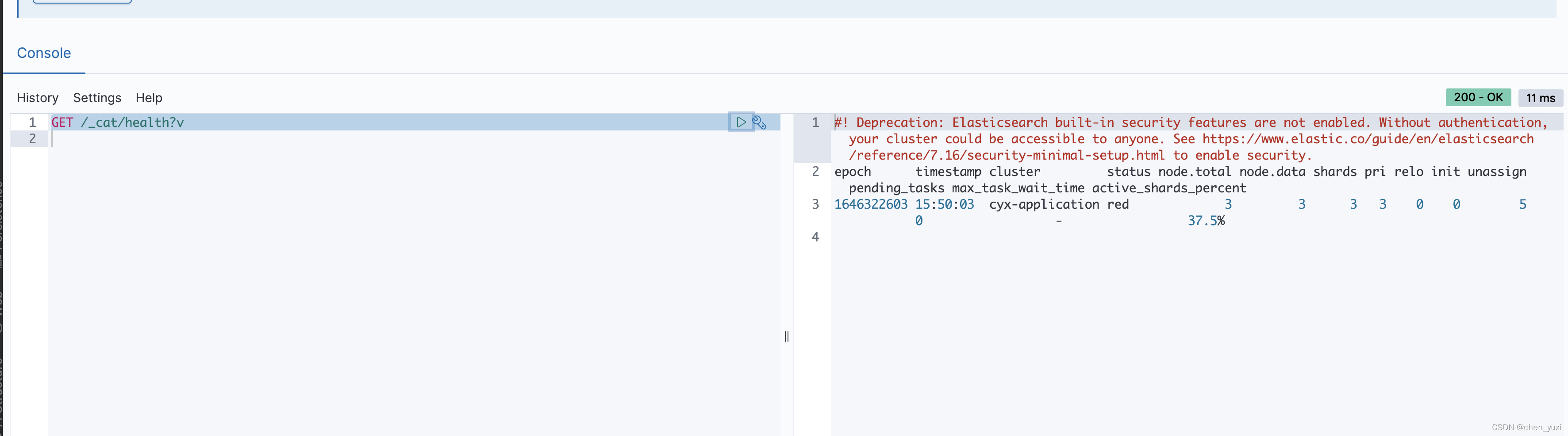
整了半天还是一直是yellow,且node-2、3启动时候报错,搞不定了,先去洗漱睡了好困啊啊啊啊[2022-03-04T00:24:07,468][ERROR][o.e.i.g.DatabaseNodeService] [node-3] failed to download database [GeoLite2-City.mmdb] org.elasticsearch.cluster.block.ClusterBlockException: blocked by: [SERVICE_UNAVAILABLE/1/state not recovered / initialized]; at org.elasticsearch.cluster.block.ClusterBlocks.globalBlockedException(ClusterBlocks.java:179) ~[elasticsearch-7.16.0.jar:7.16.0] at org.elasticsearch.cluster.block.ClusterBlocks.globalBlockedRaiseException(ClusterBlocks.java:165) ~[elasticsearch-7.16.0.jar:7.16.0] at org.elasticsearch.action.search.TransportSearchAction.executeSearch(TransportSearchAction.java:927) ~[elasticsearch-7.16.0.jar:7.16.0] at org.elasticsearch.action.search.TransportSearchAction.executeLocalSearch(TransportSearchAction.java:761) ~[elasticsearch-7.16.0.jar:7.16.0] at org.elasticsearch.action.search.TransportSearchAction.lambda$executeRequest$6(TransportSearchAction.java:397) ~[elasticsearch-7.16.0.jar:7.16.0] at org.elasticsearch.action.ActionListener$1.onResponse(ActionListener.java:136) ~[elasticsearch-7.16.0.jar:7.16.0] at org.elasticsearch.index.query.Rewriteable.rewriteAndFetch(Rewriteable.java:112) ~[elasticsearch-7.16.0.jar:7.16.0] at org.elasticsearch.index.query.Rewriteable.rewriteAndFetch(Rewriteable.java:77) ~[elasticsearch-7.16.0.jar:7.16.0]- 1
- 2
- 3
- 4
- 5
- 6
- 7
- 8
- 9
- 10
参考:https://www.cnblogs.com/chenyanbin/p/13493920.html
参考:
Mac安装es -
相关阅读:
Python 和Java 哪个更适合做自动化测试?
达芬奇MacOS最新中文版 DaVinci Resolve Studio 18中文注册秘钥
ES6语法学习
前端人70%以上 不了解的this指向
【AGC】如何集成华为AGC性能管理- iOS
mysql表的增删改查(进阶)
SPSS教程:手把手教你绘制簇状条形图
centos7.9安装X2go
Java中数组array和列表list相互转换
Python web 框架web.py「简约美」
- 原文地址:https://blog.csdn.net/m0_67390788/article/details/126359709