-
Elasticsearch(四) es集群搭建部署以及节点分片介绍
一、为什么要进行集群部署,集群解决的问题
1,单节点容量小,集群可以进行扩容;
2,单节点故障问题,集群其他机器可以继续提供服务;
3,可以解决高并发问题;二、集群搭建步骤
以我们之前文章做介绍安装部署后的为单节点,此时我们需要进行集群部署,我们部署三台es作为集群。
步骤一:
我们复制之前es安装目录 /home/elastic/elasticsearch 目录分别为elasticsearch_02、elasticsearch_03,自身名称修改为elasticsearch_01,在复制之前删除elasticsearch/data 下所有文件。步骤二:
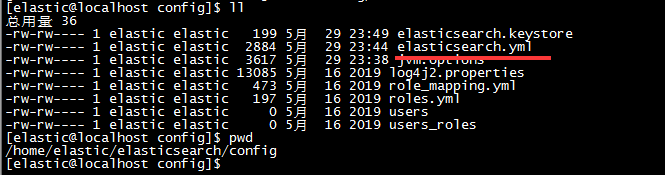
修改每个elasticsearch_0n/config下配置文件 elasticsearch.yml
要修改的八处:
cluster.name(三台配置一样)、node.name、path.data、path.logs、http.port、transport.tcp.port、discovery.zen.ping.unicast.hosts(三台配置一样)、discovery.zen.minimum_master_nodes(三台配置一样)
# # Use a descriptive name for your cluster: # cluster.name: cluster_name # # ------------------------------------ Node ------------------------------------ # # Use a descriptive name for the node: # node.name: node-1 # # Add custom attributes to the node: # #node.attr.rack: r1 # # ----------------------------------- Paths ------------------------------------ # # Path to directory where to store the data (separate multiple locations by comma): # path.data: /home/elastic/elasticsearch_01/data # # Path to log files: # path.logs: /home/elastic/elasticsearch_01/logs # ---------------------------------- Network ----------------------------------- # # Set the bind address to a specific IP (IPv4 or IPv6): # network.host: 0.0.0.0 # # Set a custom port for HTTP: # http.port:9201 transport.tcp.port:9301 # # For more information, consult the network module documentation. # # --------------------------------- Discovery ---------------------------------- # # Pass an initial list of hosts to perform discovery when new node is started: # The default list of hosts is ["127.0.0.1", "[::1]"] # discovery.zen.ping.unicast.hosts: ["127.0.0.1:9301","127.0.0.1:9302","127.0.0.1:9303"] # # Prevent the "split brain" by configuring the majority of nodes (total number of master-eligible nodes / 2 + 1): # discovery.zen.minimum_master_nodes: 2- 1
- 2
- 3
- 4
- 5
- 6
- 7
- 8
- 9
- 10
- 11
- 12
- 13
- 14
- 15
- 16
- 17
- 18
- 19
- 20
- 21
- 22
- 23
- 24
- 25
- 26
- 27
- 28
- 29
- 30
- 31
- 32
- 33
- 34
- 35
- 36
- 37
- 38
- 39
- 40
- 41
- 42
- 43
- 44
- 45
- 46
- 47
调整完毕,在需要调整下kibana的链接配置:~/kibana/config/kibana.yml

步骤三:分别启动三台es,启动完成后启动kibana
三、创建索引中分片数量以及副本数量设置;
PUT /custerindex { "settings": { "number_of_shards": 3, "number_of_replicas": 1 } }- 1
- 2
- 3
- 4
- 5
- 6
- 7
number_of_shards:索引分片数:表示改索引数据中的数据将被拆分为多少个分片,每个分片上记录了不同的数量,全部分片数据之和为索引全部数据;
number_of_replicas:索引分片副本数:表示分片的备份数量;设置为一时表示 除了主分片还有一个副分片,一共俩个分片;

如上图则表示了索引分片为3,分片副本为一的 配置。当其中任何一个节点挂掉之后,其索引的全部信息 其他两台还有其完整的数据信息(分片1,分片2,分片3)。
通过Head插件我们看到了如下的集群信息:
其中有三台集群几点分别为 node-01、node-02、node-03。前面有五角星的表示为主节点。其他的为工作节点。右边的 0 1 2 表示索引的分片在集群节点上的信息。边框为粗的表示主分片,其他为副分片。由图可以看出 在节点1上有副分片 1 和 2;主节点 node-02上有主分片 分片0 和 分片2;节点3上有副分片0 和主分片1;

-
相关阅读:
RepLKNet:不是大卷积不好,而是卷积不够大,31x31卷积了解一下 | CVPR 2022
jarvisoj_level3_x64
c#中容易被忽视的foreach
3种方式自动化控制APP
组合预测 | MATLAB实现基于BP-Adaboost强分类器多特征分类预测
如何使用Docker轻松构建和管理应用程序(二)
Java并发编程第12讲——cancelAcquire()流程详解及acquire方法总结
python 中指定GPU乱序解决方案
excel功能区(ribbonx)编程笔记 4-combobox和dropdown控件
工频变压器和高频变压器
- 原文地址:https://blog.csdn.net/m0_67392010/article/details/126359820