-
【微信h5】获取用户openid:基于vue3+springBoot
一、前言
开发网页端小程序,需要用到用户openid,所以通过查找资料,现在将完整的获取流程分享给大家。
前端页面非.vue格式,而是.html格式
该项目框架为:vue3+elementPlus+springboot
二、步骤
1、引入所需js
微信js:
vue3.js以及axios.js
js所在目录位置:
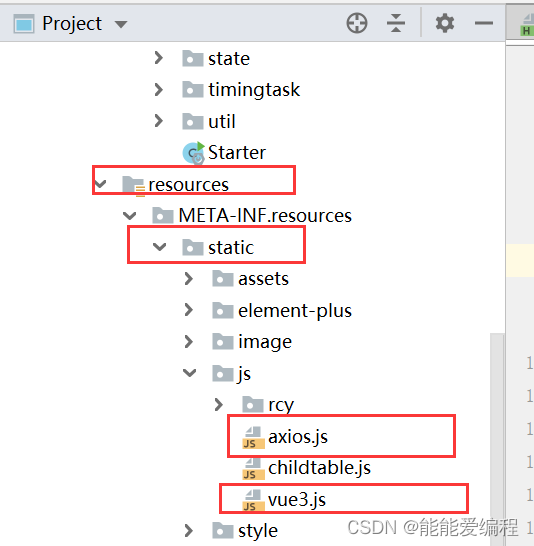
1、vue3.js:
链接:https://pan.baidu.com/s/1qk03G1QEd-E8IN6lnF-mjg
提取码:gblc2、axios.js:
链接:https://pan.baidu.com/s/1JM2EPmg-evCCun4ycI1Few
提取码:txkk2、html代码开发--- vue写法
- mounted() {
- var appid = "xxxxxxx"; //个人公众号appid
- var redirect = encodeURIComponent(window.location.href); //重定向回来的地址
- var wx_code = this.getUrlParam("code"); // 截取url中的code
- //获取code的地址。获取成功重定向后地址栏中将会带有code,判断没有code的话,就跳转到微信官方链接上获取,获取成功后会再重定向回来,注意url是需要使用encodeURIComponent处理一下编码的
- if (!wx_code) {
- // scope: 必传;应用授权作用域,snsapi_base (不弹出授权页面,直接跳转,只能获取用户openid),snsapi_userinfo (弹出授权页面,可通过openid拿到昵称、性别、所在地。并且, 即使在未关注的情况下,只要用户授权,也能获取其信息 )
- // 静默授权
- window.location.href = "https://open.weixin.qq.com/connect/oauth2/authorize?appid=" + appid + "&redirect_uri=" + redirect + "&response_type=code&scope=snsapi_base&state=123#wechat_redirect";
- } else {
- // 获取到了code
- this.getOpenId(wx_code); //把code传给后台获取用户信息
- }
- },
- methods: {
- //getUrlParam方法就是使用正则截取地址栏里的code
- getUrlParam: function (name) {
- var reg = new RegExp("(^|&)" + name + "=([^&]*)(&|$)");
- var r = window.location.search.substr(1).match(reg);
- if (r != null) return unescape(r[2]);
- return null;
- },
- //获取用户的openid
- getOpenId(code) {
- let result = axios({
- method: 'post',
- url: "/api/getOpenid",
- data: {code: code},
- header: {
- 'Content-Type': 'application/x-www-form-urlencoded'
- }
- }).then(function (result) {
- var wxResult = result.data.data;
- var openid = wxResult.openid;
- }).catch(error => {
- //待完善弹窗
- });
- },
- }
3、controller层
- @RequestMapping("/getOpenid")
- public JSONObject getOpenid(@RequestBody DataObject para) throws AppException {
- return wxh5BusinessService.getOpenid(para);
- }
4、service层
- //获取openid
- public JSONObjectgetOpenid(DataObject para) throws AppException {
- String code = para.getString("code", "");
- //在配置文件中配置上appid及secret,然后wxh5Properties为编写的配置类
- String appid = wxh5Properties.getAppid();
- String appsecret = wxh5Properties.getAppsecret();
- JSONObject result =new JSONObject();
- String url = "https://api.weixin.qq.com/sns/oauth2/access_token?appid=" + appid + "&secret=" + appsecret + "&code=" + code + "&grant_type=authorization_code";
- String data = HttpUtil.sendGet(url);
- return (JSONObject)JSONObject.parse(data);
- }
5、在微信公众平台配置网页授权域名

至此,即可通过上述步骤获取到用户的openid了。
-
相关阅读:
linux驱动30:度量时间差
【原创】基于JavaWeb的社区物业管理系统(Web物业管理系统毕业设计)
ArcGIS属性域和子类型
ZYNQ之FPGA学习----Vivado软件使用
阿里、滴滴、华为等一线互联网分布式消息中间件:RocketMQ核心笔记
香草酸豌豆白蛋白1b纳米粒Vanillic Acid-PA1b|汉黄芩苷牛血清白蛋白纳米粒Wogonoside-BSA|科研试剂
Python分享之多进程初步 (multiprocessing包)
定时任务cron与crontab
pytorch的自动微分、计算图 | 代码解析
Kafka核心原理第二弹——更新中
- 原文地址:https://blog.csdn.net/weixin_44431073/article/details/126358690
