增量导入导出要基于快照
导出的过程当中害怕镜像被修改所以打快照。快照的数据是不会变化的
镜像级别的双向同步
镜像主到备,备到主。一对一 就算是池模式的双向同步,镜像也具有主备关系
双向同步,池模式
[root@clienta ~]# ceph osd pool create rbd
pool 'rbd' created
[root@clienta ~]# rbd pool init rbd
[root@clienta ~]# ceph orch apply rbd-mirror --placement=serverc.lab.example.com
Scheduled rbd-mirror update...
[root@clienta ~]#

[root@serverf ~]# ceph osd pool create rbd
pool 'rbd' created
[root@serverf ~]# rbd pool init rbd
[root@serverf ~]# ceph orch apply rbd-mirror --placement=serverf.lab.example.com
Scheduled rbd-mirror update...
[root@serverf ~]#
一个集群任意一个节点安装rbd-mirror就行了

[root@serverf ~]# rbd mirror pool enable rbd pool
[root@serverf ~]#

[root@clienta ~]# rbd mirror pool enable rbd pool
[root@clienta ~]#
两边开启池模式


[root@clienta ~]# rbd mirror pool peer bootstrap create --site-name prod rbd > /root/prod
[root@clienta ~]# scp /root/prod  root@serverf:~
Warning: Permanently added 'serverf,172.25.250.15' (ECDSA) to the list of known hosts.
prod                                                            100%  253    20.1KB/s   00:00

[root@serverf ~]# rbd mirror pool peer bootstrap create --site-name bup rbd > /root/bup
[root@serverf ~]# scp /root/bup root@clienta:~
Warning: Permanently added 'clienta,172.25.250.10' (ECDSA) to the list of known hosts.
bup                                                             100%  253     8.0KB/s   00:00


[root@serverf ~]# rbd mirror pool peer bootstrap import --site-name bup rbd  /root/prod
2022-08-15T11:49:25.186-0400 7f2c0ba292c0 -1 auth: unable to find a keyring on /etc/ceph/..keyring,/etc/ceph/.keyring,/etc/ceph/keyring,/etc/ceph/keyring.bin,: (2) No such file or directory
2022-08-15T11:49:25.202-0400 7f2c0ba292c0 -1 auth: unable to find a keyring on /etc/ceph/..keyring,/etc/ceph/.keyring,/etc/ceph/keyring,/etc/ceph/keyring.bin,: (2) No such file or directory
2022-08-15T11:49:25.202-0400 7f2c0ba292c0 -1 auth: unable to find a keyring on /etc/ceph/..keyring,/etc/ceph/.keyring,/etc/ceph/keyring,/etc/ceph/keyring.bin,: (2) No such file or directory
(这个import导入,做一边就可以,也就是可以省一个scp步骤。还是建议在serverf这里做import)
两个集群建立联系,知晓对方信息
[root@clienta ~]# rbd mirror pool info rbd
Mode: pool
Site Name: prod

Peer Sites:

UUID: db75b9df-3aad-4d96-9a18-071274e6ca41
Name: bup
Mirror UUID: 5b2135ab-a90a-490f-9e39-7e2d059740f5
Direction: rx-tx
Client: client.rbd-mirror-peer
[root@clienta ~]#


[root@serverf ~]# rbd mirror pool info rbd
Mode: pool
Site Name: bup

Peer Sites:

UUID: 0d1b536e-6e83-49e4-aa9d-2dc4928607be
Name: prod
Mirror UUID: ca13dd9d-79b6-4614-aa5f-c4c8cb300396
Direction: rx-tx
Client: client.rbd-mirror-peer
[root@serverf ~]#


[root@clienta ~]# rbd mirror pool status
health: WARNING
daemon health: OK
image health: WARNING
images: 0 total
查看两个池状态。
[root@serverf ~]# rbd create image4 --size 1024 --pool rbd --image-feature exclusive-lock,journaling
[root@serverf ~]# rbd info image4
rbd image 'image4':
    size 1 GiB in 256 objects
    order 22 (4 MiB objects)
    snapshot_count: 0
    id: ac7a80f965cd
    block_name_prefix: rbd_data.ac7a80f965cd
    format: 2
    features: exclusive-lock, journaling
    op_features:
    flags:
    create_timestamp: Mon Aug 15 12:01:42 2022
    access_timestamp: Mon Aug 15 12:01:42 2022
    modify_timestamp: Mon Aug 15 12:01:42 2022
    journal: ac7a80f965cd
    mirroring state: enabled
    mirroring mode: journal
    mirroring global id: c3cb1983-508e-4d6c-a2a1-87a04c5cae7b
    mirroring primary: true

[root@clienta ~]# rbd ls
image1
image2
image4
[root@clienta ~]# rbd info image4
rbd image 'image4':
    size 1 GiB in 256 objects
    order 22 (4 MiB objects)
    snapshot_count: 0
    id: fafc8a70d31d
    block_name_prefix: rbd_data.fafc8a70d31d
    format: 2
    features: exclusive-lock, journaling
    op_features:
    flags:
    create_timestamp: Mon Aug 15 12:01:45 2022
    access_timestamp: Mon Aug 15 12:01:45 2022
    modify_timestamp: Mon Aug 15 12:01:45 2022
    journal: fafc8a70d31d
    mirroring state: enabled
    mirroring mode: journal
    mirroring global id: c3cb1983-508e-4d6c-a2a1-87a04c5cae7b
    mirroring primary: false
[root@clienta ~]#
在备集群创建镜像,主集群同步
镜像的1对1同步,被同步为false
报错

[root@clienta ~]# rbd mirror pool status
health: WARNING
daemon health: OK
image health: WARNING
images: 8 total
    7 unknown
    1 replaying

这个错误会让池子变为单向同步,很致命。会报超时。
过程整理
主集群操作
ceph osd pool create rbd
rbd pool init rbd
rbd mirror pool enable rbd pool # 开启池模式同步
ceph orch apply rbd-mirror --placement=serverf.lab.example.com #安装rbd mirror

rbd mirror pool peer bootstrap create --site-name prod rbd > /root/prod
rsycn prod root@serverf:~


备集群操作
ceph osd pool create rbd
rbd pool init rbd
rbd mirror pool enable rbd pool
ceph orch apply rbd-mirror --placement=serverf.lab.example.com #安装rbd mirror
rbd mirror pool peer bootstrap import --site-name bup rbd /root/prod
rbd ls

测试:
在prod和bup集群上各自创建镜像,可以互相同步
rbd create image1 --size 1024 --pool rbd --image-feature exclusive-lock,journaling  #创建镜像,开启排他锁和日志功能
主备镜像切换
rbd mirror image demote test1 降级 (备)
rbd mirror image promote test1 升级 (主)
先降级
以前的osd都有xfs文件系统 (filestore)

现在bluestore osd都以逻辑卷的形式作为存储。在裸盘上,未被格式化
对象存储
mon 拥有用户数据,存储池信息,和osd信息。mon与mon之间也会数据同步
mgr 主备部署,可以实现dashboard web服务,可与监控工具对接(收集osd信息,数据统计)
rgw 可以提供web服务,并提供s3 swift接口
rgw对ceph来说为客户端,只要是客户端就要做认证

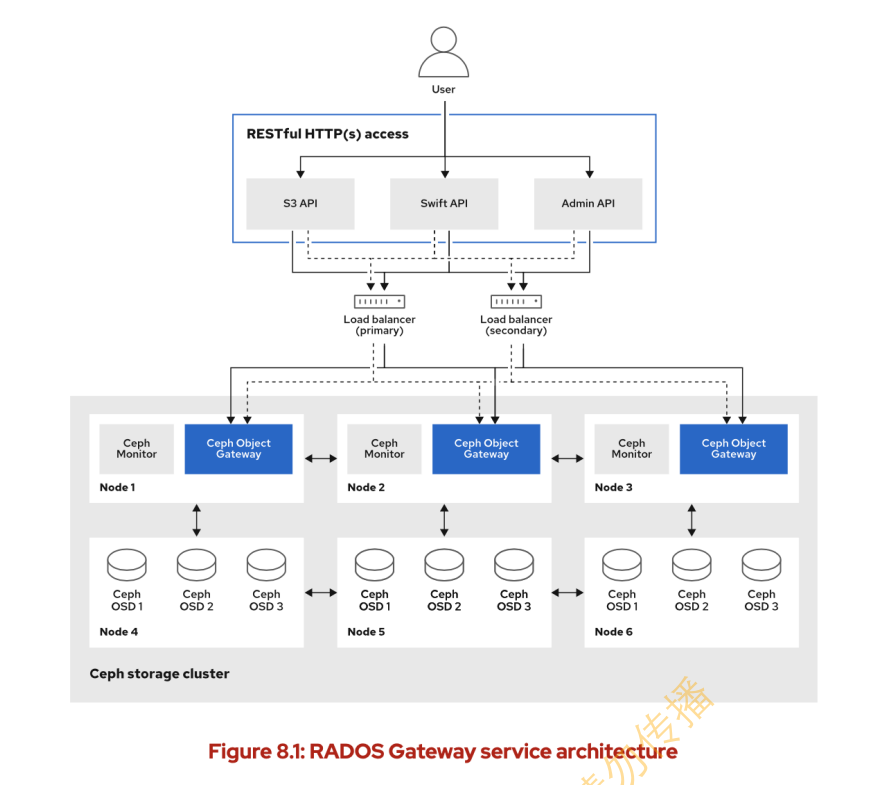

删除原有rgw
[student@workstation ~]$ lab start object-radosgw
部署rgw
serverc serverd
两个都 8080 端口 (主备)
[root@clienta ~]# radosgw-admin realm list
{
    "default_info": "",
    "realms": []
}
[root@clienta ~]# radosgw-admin zonegroup list
{
    "default_info": "1dd3f8b5-a9f5-4930-a9f0-62cce8d81e9e",
    "zonegroups": [
        "default"
    ]
}
[root@clienta ~]# radosgw-admin zone list
{
    "default_info": "8b63d584-9ea1-4cf3-8443-a6a15beca943",
    "zones": [
        "default"
    ]
}
[root@clienta ~]#
创建一个realm,设置成默认的realm
[root@clienta ~]# radosgw-admin realm create --rgw-realm=myrealm --default
{
    "id": "ddfa65f0-ee1e-4233-b88e-2e5f96faa5ec",
    "name": "myrealm",
    "current_period": "e19e92b1-9b91-4726-8151-a943f6b650fc",
    "epoch": 1
}
[root@clienta ~]# radosgw-admin realm list
{
    "default_info": "ddfa65f0-ee1e-4233-b88e-2e5f96faa5ec",
    "realms": [
        "myrealm"
    ]
}
[root@clienta ~]#
创建zonegroup 指定realm
    [root@clienta ~]# radosgw-admin zonegroup create --rgw-realm=myrealm --rgw-zonegroup=myzonegroup --master  --default
    {
        "id": "4bbf15ed-56bb-4bc7-b30e-e70d3b5f2055",
        "name": "myzonegroup",
        "api_name": "myzonegroup",
        "is_master": "true",
        "endpoints": [],
        "hostnames": [],
        "hostnames_s3website": [],
        "master_zone": "",
        "zones": [],
        "placement_targets": [],
        "default_placement": "",
        "realm_id": "ddfa65f0-ee1e-4233-b88e-2e5f96faa5ec",
        "sync_policy": {
            "groups": []
        }
    }
    [root@clienta ~]# radosgw-admin realm list
    {
        "default_info": "ddfa65f0-ee1e-4233-b88e-2e5f96faa5ec",
        "realms": [
            "myrealm"
        ]
    }
    [root@clienta ~]#
id与realm的对应上了
创建zone 指定realm与zonegroup
[root@clienta ~]# radosgw-admin zone create --rgw-realm=myrealm  --rgw-zonegroup=myzonegroup --rgw-zone=myzone  --master  --default
{
    "id": "e4a0f422-74de-4c1b-b6f9-1dce56607795",
    "name": "myzone",
    "domain_root": "myzone.rgw.meta:root",
    "control_pool": "myzone.rgw.control",
    "gc_pool": "myzone.rgw.log:gc",
    "lc_pool": "myzone.rgw.log:lc",
    "log_pool": "myzone.rgw.log",
    "intent_log_pool": "myzone.rgw.log:intent",
    "usage_log_pool": "myzone.rgw.log:usage",
    "roles_pool": "myzone.rgw.meta:roles",
    "reshard_pool": "myzone.rgw.log:reshard",
    "user_keys_pool": "myzone.rgw.meta:users.keys",
    "user_email_pool": "myzone.rgw.meta:users.email",
    "user_swift_pool": "myzone.rgw.meta:users.swift",
    "user_uid_pool": "myzone.rgw.meta:users.uid",
    "otp_pool": "myzone.rgw.otp",
    "system_key": {
        "access_key": "",
        "secret_key": ""
    },
    "placement_pools": [
        {
            "key": "default-placement",
            "val": {
                "index_pool": "myzone.rgw.buckets.index",
                "storage_classes": {
                    "STANDARD": {
                        "data_pool": "myzone.rgw.buckets.data"
                    }
                },
                "data_extra_pool": "myzone.rgw.buckets.non-ec",
                "index_type": 0
            }
        }
    ],
    "realm_id": "ddfa65f0-ee1e-4233-b88e-2e5f96faa5ec",
    "notif_pool": "myzone.rgw.log:notif"
}
[root@clienta ~]#
提交修改。备集群做同步时,你改了提交了,备集群就知道要同步了
[root@clienta ~]# radosgw-admin period update  --rgw-realm=myrealm --commit
结果太长了省略
创建rgw
[root@clienta ~]# ceph orch apply rgw mqy --realm=myrealm  --zone=myzone --placement="2 serverc.lab.example.com serverd.lab.example.com"  --port=8080
Scheduled rgw.mqy update...
查验
ceph orch ps
rgw.mqy.serverc.xmynyy              serverc.lab.example.com  running (10s)  1s ago     10s  *:8080         16.2.0-117.el8cp  2142b60d7974  c656e4a3f1ba
rgw.mqy.serverd.soqmhn              serverd.lab.example.com  running (24s)  3s ago     24s  *:8080         16.2.0-117.el8cp  2142b60d7974  8e326dbbe1c9
[root@clienta ~]#


[root@clienta ~]# ceph auth ls | grep rgw
installed auth entries:
client.bootstrap-rgw
    caps: [mon] allow profile bootstrap-rgw
client.rgw.mqy.serverc.xmynyy
    caps: [osd] allow rwx tag rgw *=*
client.rgw.mqy.serverd.soqmhn
    caps: [osd] allow rwx tag rgw *=*
[root@clienta ~]#
访问一下
[root@clienta ~]# curl http://serverc.lab.example.com:8080
<ListAllMyBucketsResult xmlns="http://s3.amazonaws.com/doc/2006-03-01/"><Owner><ID>anonymousID><DisplayName>DisplayName>Owner><Buckets>Buckets>ListAllMyBucketsResult>[root@clienta ~]#
查看服务
[root@clienta ~]#
[root@clienta ~]# ceph orch ls
NAME                     RUNNING  REFRESHED  AGE  PLACEMENT
alertmanager                 1/1  4m ago     10M  count:1
crash                        4/4  7m ago     10M  *
grafana                      1/1  4m ago     10M  count:1
mgr                          4/4  7m ago     10M  clienta.lab.example.com;serverc.lab.example.com;serverd.lab.example.com;servere.lab.example.com
mon                          4/4  7m ago     10M  clienta.lab.example.com;serverc.lab.example.com;serverd.lab.example.com;servere.lab.example.com
node-exporter                4/4  7m ago     10M  *
osd.default_drive_group     9/12  7m ago     10M  server*
prometheus                   1/1  4m ago     10M  count:1
rgw.mqy                      2/2  4m ago     4m   serverc.lab.example.com;serverd.lab.example.com;count:2
删除服务
[root@clienta ~]# ceph orch rm rgw.mqy
Removed service rgw.mqy
2/2都会被删掉
ceph orch ps 查看进程
进程也会没有
再次创建
placement为数量
这个命令可以动态修改
[root@clienta ~]# ceph orch apply rgw mqy --realm=myrealm --zone=myzone --placement="4 serverc.lab.example.com serverd.lab.example.com" --port=8080
查验
[root@clienta ~]# ceph orch ps | tail
osd.4                               servere.lab.example.com  running (74m)  46s ago    9M   -              16.2.0-117.el8cp  2142b60d7974  1b89696479d7
osd.5                               serverd.lab.example.com  running (74m)  3s ago     9M   -              16.2.0-117.el8cp  2142b60d7974  a00346d7b07b
osd.6                               servere.lab.example.com  running (74m)  46s ago    9M   -              16.2.0-117.el8cp  2142b60d7974  ef718e21063d
osd.7                               serverd.lab.example.com  running (74m)  3s ago     9M   -              16.2.0-117.el8cp  2142b60d7974  463646452da7
osd.8                               servere.lab.example.com  running (74m)  46s ago    9M   -              16.2.0-117.el8cp  2142b60d7974  ba2977e9530e
prometheus.serverc                  serverc.lab.example.com  running (74m)  2s ago     10M  *:9095         2.22.2            deca4dcb80bb  d63e1b8d813e
rgw.mqy.serverc.gddkwr              serverc.lab.example.com  running (11s)  2s ago     11s  *:8081         16.2.0-117.el8cp  2142b60d7974  d550e449cd72
rgw.mqy.serverc.svktdz              serverc.lab.example.com  running (23s)  2s ago     23s  *:8080         16.2.0-117.el8cp  2142b60d7974  f1783a8a3b16
rgw.mqy.serverd.myvikk              serverd.lab.example.com  running (17s)  3s ago     17s  *:8081         16.2.0-117.el8cp  2142b60d7974  6ef750d279e8
rgw.mqy.serverd.vdajmd              serverd.lab.example.com  running (29s)  3s ago     29s  *:8080         16.2.0-117.el8cp  2142b60d7974  dd1959871603
[root@clienta ~]#
查看rgw服务和进程
ceph orch ps 查看进程 daemon
ceph orch ls 查看service
ceph orch rm rgw.mqy
rgw用户管理
创建s3用户,访问rgw
默认就是创建s3
[root@clienta ~]# radosgw-admin user create --uid=user1  --access-key=123  --secret=456 --email=user1@example.com --display-name=user1
{
    "user_id": "user1",
    "display_name": "user1",
    "email": "user1@example.com",
    "suspended": 0,  # 1就是禁用
    "max_buckets": 1000,  # 最大bucket
    "subusers": [],
    "keys": [
        {
            "user": "user1",
            "access_key": "123",
            "secret_key": "456"
        }
    ],
    "swift_keys": [],
    "caps": [],
    "op_mask": "read, write, delete",
    "default_placement": "",
    "default_storage_class": "",
    "placement_tags": [],
    "bucket_quota": {
        "enabled": false,
        "check_on_raw": false,
        "max_size": -1,
        "max_size_kb": 0,
        "max_objects": -1
    },
    "user_quota": {
        "enabled": false,
        "check_on_raw": false,
        "max_size": -1,
        "max_size_kb": 0,
        "max_objects": -1
    },
    "temp_url_keys": [],
    "type": "rgw",
    "mfa_ids": []
}
s3 bucket(container) object
对象存储是扁平化的
对用户的操作
查看用户
radosgw-admin user info --uid=user1
修改
[root@clienta ~]# radosgw-admin user modify --uid=user1 --display-name='user1 li' --max_buckets=500

设置过默认值所以不需要指定,特定的区域
[root@clienta ~]# radosgw-admin zonegroup list
{
    "default_info": "4bbf15ed-56bb-4bc7-b30e-e70d3b5f2055",
    "zonegroups": [
        "myzonegroup",
        "default"
    ]
}
创建key
radosgw-admin user create/modify --uid=user1 --access-key=abc --secret=def
删除key
radosgw-admin key rm --uid=user1 --access-key=abc
自动生成key
radosgw-admin key create --uid=user1 --gen-access-key --gen-secret
设置用户配额
基于用户或基于bucket
用户可以创建多个bucket
[root@clienta ~]# radosgw-admin quota set --quota-scope=user --uid=user1  --max-objects=1024 --max-size=1G
[root@clienta ~]# radosgw-admin user  info --uid=user1
{
    "user_id": "user1",
    "display_name": "user1 li",
    "email": "user1@example.com",
    "suspended": 0,
    "max_buckets": 500,
    "subusers": [],
    "keys": [
        {
            "user": "user1",
            "access_key": "123",
            "secret_key": "456"
        }
    ],
    "swift_keys": [],
    "caps": [],
    "op_mask": "read, write, delete",
    "default_placement": "",
    "default_storage_class": "",
    "placement_tags": [],
    "bucket_quota": {
        "enabled": false,
        "check_on_raw": false,
        "max_size": -1,
        "max_size_kb": 0,
        "max_objects": -1
    },
    "user_quota": {
        "enabled": false,
        "check_on_raw": false,
        "max_size": 1073741824,
        "max_size_kb": 1048576,
        "max_objects": 1024
    },
    "temp_url_keys": [],
    "type": "rgw",
    "mfa_ids": []
}

[root@clienta ~]#
设置配额,但未启用
[root@clienta ~]# radosgw-admin  quota enable --quota-scope=user --uid=user1
[root@clienta ~]# radosgw-admin  quota enable --quota-scope=bucket --uid=user1
启用用户和bucket配额
[root@clienta ~]# radosgw-admin quota set --quota-scope=bucket --uid=user1 --max-objects=1024 --max-size=200M
设置bucket 虽然你用户能有1G的对象大小,但你每个bucket只能存200M(你不能把1G存在一个bucket里)
用户访问rgw
clienta为ceph集群的客户端 (集群管理范围内)
安装
[root@clienta ~]# yum -y install awscli
aws configure --profile=ceph 输入用户ak和sk
[root@clienta ~]# aws --profile=ceph configure
AWS Access Key ID [None]: 123
AWS Secret Access Key [None]: 456
Default region name [None]:
Default output format [None]:
[root@clienta ~]#

[root@clienta ~]# cd .aws/
[root@clienta .aws]# ls
config  credentials
[root@clienta .aws]# cat config
[profile ceph]
[root@clienta .aws]# cat credentials
[ceph]
aws_access_key_id = 123
aws_secret_access_key = 456
[root@clienta .aws]#
--profile 也可以不加,指定就是ceph,不指定就为ceph
[root@clienta .aws]# aws s3 ls --profile=ceph --endpoint=http://serverc:8080
[root@clienta .aws]#
[root@clienta .aws]# aws s3  --profile=ceph --endpoint=http://serverc:8080 mb s3://bucket1
make_bucket: bucket1
[root@clienta .aws]# aws s3 ls --profile=ceph --endpoint=http://serverc:8080
2022-08-16 05:58:31 bucket1
[root@clienta .aws]#
上传对象到bucket
[root@clienta .aws]# aws s3 cp /etc/ceph/ceph.conf  s3://bucket1/ceph2  --profile=ceph --endpoint=http://serverc:8080
upload: ../../etc/ceph/ceph.conf to s3://bucket1/ceph2
[root@clienta .aws]# aws s3 ls s3://bucket1  --profile=ceph --endpoint=http://serverc:8080
2022-08-16 06:00:02        177 ceph2
上传一个公共文件(不需要验证秘钥)
[root@clienta .aws]# aws --profile=ceph --endpoint=http://serverc:8080 --acl=public-read-write s3 cp /etc/passwd  s3://bucket1/
upload: ../../etc/passwd to s3://bucket1/passwd
[root@clienta .aws]#
第一种访问方式
[root@foundation0 ~]# wget http://serverc:8080/bucket1/passwd
第二种
[root@foundation0 tmp]# wget http://bucket1.serverc:8080/passwd
这种方式得做域名解析
*.serverc   172.25.250.12   泛域名解析
红帽文档有详情
还得开启bucket功能
[student@workstation ~]$ ping aca.serverc
PING aca.serverc (172.25.250.12) 56(84) bytes of data.
64 bytes from serverc.lab.example.com (172.25.250.12): icmp_seq=1 ttl=64 time=6.67 ms
管理员权限命令
[root@clienta .aws]# radosgw-admin bucket rm --bucket=bucket1
2022-08-16T06:17:18.744-0400 7f9f237a8380 -1 ERROR: could not remove non-empty bucket bucket1


有点潦草