-
Eclipse如何搭建一个SpringBoot项目
1、什么是springboot
SpringBoot是Spring体系下的一个框架,设计SpringBoot的目的在于能够帮助开发者快速的搭建Spring应用,并且SpringBoot还整合了(反向整合)很多第三方的框架或者服务。让开发者使用这些技术变得简单。相当于Maven整合了很多第三方的jar包,SpringBoot整合了很多第三方的框架。
约定 >配置 >编码
这个是什么意思呢,以前我们是硬编码的时代,然后SSM框架就是配置的时代,那么springboot是约定时代。
springboot能够快速搭建一个web应用,省去了这么多的配置就是约定好了。我们自己不用去配置这么多的繁琐的配置了。
这个概念很重要需要去理解。
SpringBoot基于Maven(gradle) +Spring
2、下载springboot工程
1、进入http://start.spring.io/网站,springboot给我们提供了构建springboot项目的模板代码。
 3、将下载的工程导入到Eclipse中
- 下载好的项目我们导入到我们的eclipse中去。


3、SpringBoot工程项目结构介绍

2.application.properties
在src/main/resources下有一个application.properties的核心配置文件。
这个配置文件是用来写我们的配置的
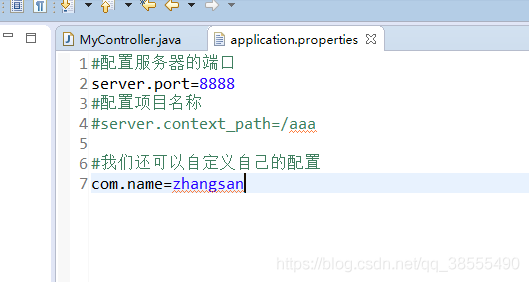
- 服务器的端口server.port=8888
- 配置一个项目名(spirngboot默认没有项目名)server.context_path=/test
- 整合mybatis配置数据源等
3.启动类

4、Mavne工程改造成spirngboot工程?
- 修改pom.xml文件
- 创建一个application.properties文件
- 创建一个启动类
可以参考上图来创建,maven改造成springboot工程非常简单,就是这么几步。
问题:如果每次创建工程都那么麻烦,效率就低了。
解决方案:springboot官网有个模板代码,我们填写基本的信息,下载下来就可以了。
就是上图的操作。
5、SpringBoot的起步依赖给我做了什么?
- spring-boot-starter

- spring-boot-starter-web:

5、配置SpringBoot的tomcat端口和项目名称:
修改application.propertie核心配置文件

#服务器的端口
server.port=8888
#项目名称
server.context_path=/test
6、springboot配置热部署
配置了热部署,我们修改代码后,可以自启,提高我们的开发效率。

代码示例:
“1.0” encoding=“UTF-8”> “http://maven.apache.org/POM/4.0.0” xmlns:xsi=“http://www.w3.org/2001/XMLSchema-instance” xsi:schemaLocation=“http://maven.apache.org/POM/4.0.0 http://maven.apache.org/xsd/maven-4.0.0.xsd”>
4.0.0 org.springframework.boot spring-boot-starter-parent 1.5.20.RELEASE com.xiaomin springboot_demo 0.0.1-SNAPSHOT springboot_demo Demo project for Spring Boot 1.8 org.springframework.boot spring-boot-starter-web org.springframework.boot spring-boot-starter-test test org.springframework.boot spring-boot-devtools true org.springframework.boot spring-boot-maven-plugin true 7、测试
- 创建controller
注意:springboot约定,创建的类放在和启动类,同级下就可以扫描到,就不用自己配置扫描了。但是我们的实际并不是这样的,有很多层,有dao、service、controller

不在同一级别的需要在启动类添加包的扫描

package com.xiaomin.springboot_demo;
import org.springframework.boot.SpringApplication;
import org.springframework.boot.autoconfigure.SpringBootApplication;
import org.springframework.boot.web.servlet.FilterRegistrationBean;
import org.springframework.context.annotation.Bean;
@SpringBootApplication(scanBasePackages={“a.b”,“com.xiaomin.springboot_demo”})[个人用户1]
public class SpringbootDemoApplication {
public static void main(String[] args) {
SpringApplication.run(SpringbootDemoApplication.class, args);
}
}
2.controller代码
RestController注解等于@Controller,@RequestBody这两个注解。
package a.b;
import org.springframework.web.bind.annotation.RequestBody;
import org.springframework.web.bind.annotation.RequestMapping;
import org.springframework.web.bind.annotation.RestController;
/**
* RestController注解 == @Controller @RequestBody
* 一个顶俩
* @author Administrator
*
*/
@RestController
public class MyController2 {
@RequestMapping(“/hello2”)
public String hello2(){
return “hello springboot2!!”;
}
}
返回结果:端口我们在application.propertis中修改了,故这里是8888

-
相关阅读:
常用hivesql记录
Prism 入门03,模块化介绍使用
js 数据类型
【数据测试】之迁移(三)
页面的渲染流程
为什么要有包装类,顺便说一说基本数据类型、包装类、String类该如何转换?
DataFrame,数据列筛选代替遍历每一行数据去判断,大大提高数据过滤速度
实现对python源码加密的方法
Xshell连接Docker版本CentOS7
三维目标检测之ROS可视化
- 原文地址:https://blog.csdn.net/m0_67393342/article/details/126358177