-
linux系统基本配置
系统时间管理
# 查看系统时间 date- 1
- 2

#格式化输出系统时间(-可以使用其他符号替换) date "+%Y-%m-%d %H:%M:%S"- 1
- 2

#设置时间 date -s "2001-11-10 20:18:43"- 1
- 2

#加日 date -d "+1 day" '+%Y-%m-%d' #加月 date -d "+ 1 month" '+%Y-%m-%d' #加年 date -d "+ 1 year" '+%Y-%m-%d' #指定日期加 date -d "2022-01-06 +1 year" '+%Y-%m-%d'- 1
- 2
- 3
- 4
- 5
- 6
- 7
- 8

#同步网络时间cn.pool.ntp.org为中国国家授时中心服务器地址 ntpdate cn.pool.ntp.org- 1
- 2

网络管理
#查看当前网络信息 ifconfig- 1
- 2
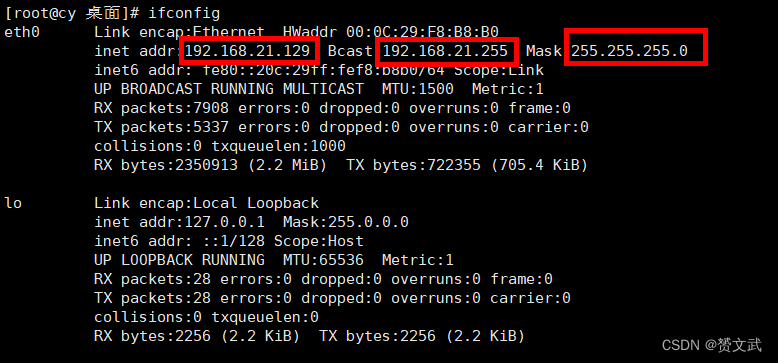
手动更改ip地址步骤如下:
编辑网卡配置文件——vi /etc/sysconfig/network-scripts/ifcfg-eth0

- BOOTPROTO=dhcp|static|none,其中dhcp为自动获取ip地址,static、none均为手动配置ip
- IPADDR、GATEWAY、DNS1均需用户手动添加含义分别为IPv4地址、网关、dns;IPADD选项从起始IP到结束IP选取,GATEWAY与DNS1相同同为网关IP


- 修改完毕后重启网络生效
#重启网络服务 service network restart #开启网络服务 service network start #关闭网络服务 service network stop- 1
- 2
- 3
- 4
- 5
- 6
设置主机名与主机映射:
#查看主机名 hostname- 1
- 2

#修改主机名,更改红线处即更改主机名 vi /etc/sysconfig/network- 1
- 2

#配置主机映射 vi /etc/hosts- 1
- 2

#ping命令测试 ping cy- 1
- 2

拓展:
外部win10ping主机ping不通解决方案:- linux输入yum install samba下载安装
- linux执行service nmb start
- win重新ping(外部ping要确保双方防火墙均关闭)

启动级别管理
#查看系统运行级别 runlevel- 1
- 2

#修改系统运行级别 vi /etc/inittab- 1
- 2

将id:后的5改为3,重启linux将不再加载桌面,效果图如下:

防火墙相关命令(CentOS6版本)如下:#查看防火墙状态 service iptables status #开启防火墙 service iptables start #关闭防火墙 service iptables stop #重启防火墙 service iptables restart #永久关闭防火墙 chkconfig iptables off #永久关闭后重启 chkconfig iptables on- 1
- 2
- 3
- 4
- 5
- 6
- 7
- 8
- 9
- 10
- 11
- 12
进程管理
一个应用运行的背后往往有很多进程
#查看系统所有进程详细信息 ps -ef- 1
- 2

- UID——进程所属用户
- PID——区分两个进程的依据,动态变化
- PPID——PID的一种,可以理解为唇亡齿寒
- C——cpu占用率
- STIME——进程启动时间
- TTY——TTY终端
- TIME——进程从执行到现在总的cpu占用时间
#杀进程 kill 进程编号 #强制杀进程 kill -9 进程编号 #杀死所有同名进程 killall 进程名- 1
- 2
- 3
- 4
- 5
- 6


拓展
- |与grep
命令1|grep命令可以理解为将命令1得到的结果作为参数传递给grep,grep再进行进一步的筛选
#查找文件a中带a的行 grep 查找字符 文件名- 1
- 2

#查找进程名带events的进程 ps -ef| grep events- 1
- 2

- netstat命令
#查看网络端口使用情况 netstat -tunlp- 1
- 2

- ps aux
a——显示终端机下所有程序,包括其他用户程序
u——以用户为主格式显示程序状况
x——显示所有终端机,不以终端机区分

注
截图中若出现^C符号则均为个人截图脚本所致,请忽略
-
相关阅读:
免费服务器搭建网盘教程,给电脑挂载500G磁盘
读书笔记-学习GNU Emacs-3终篇
34 机器学习(二):数据准备|knn
外包干了3个月,技术倒退明显...
设计模式-装饰器模式
附文献!艾美捷抗人IL-17AmAb(MT44.6)未偶联相关研究
Android 12.0系统申请动态权限之高德定位
C++(STL容器适配器)
GD32测量pwm波频率以及占空比
Java基础之jvm2
- 原文地址:https://blog.csdn.net/weixin_51371629/article/details/126345789