-
SpringBoot学习小结之数据库版本管理工具Flyway

前言
flyway 是什么
flyway 是一款数据库迁移工具,你也可以把它看成是一款数据库版本管理工具。
2010年,Axel Fontaine 创建了 flyway ,2019 年 flyway 被 Redgate 收购,flyway 后面也分为 Community edition (开源社区版) 和 Teams edition (商业版) ,一些高级功能(如 Undo )只能在商业版中使用,对于基本的数据迁移,开源的版本也够用了。
为什么要用 flyway
- 场景一:开发环境,多人共用一套数据库
开发正调试着,忽然代码报错“XX字段不存在”:谁 TMD 又把表结构给改了 - 场景二:开发环境,每个人各自搭建自己的数据库
开发完一个功能,提交代码、更新,重启准备调试下,代码报错“XX字段不存在”
吼一嗓子:谁又改表结构了?什么?每个人都要把 xxx.sql 执行一遍?
……
新员工:我要搭一套开发数据库,到底应该执行哪些 SQL 脚本? - 场景三:开发转测试
测试:你看这个功能是不是有个 Bug ?
开发:哦,你要执行一下这个 SQL 脚本。
测试:嗯,现在没问题了,但是怎么保证这个脚本没有 Bug ,我能再重现、测试一遍吗?
开发:额~,你重新搭一遍数据库吧…… - 场景四:搭建一套演示环境
执行 SQL 脚本1、SQL 脚本2、SQL 脚本3……启动服务失败!什么?这个脚本N是测试版本的,war 包是已经上线的版本?
删库再来一遍……
传统的解决方案就是在一个固定的文件夹中,将需要跑的 SQL 脚本放在里面。开发人员在合作的时候,A 修改了数据库,在 B 遇到问题的时候,可能需要交流沟通一下,去跑需要的脚本。在项目上线的过程中,也是运维人员在规定的文件夹中,找到需要跑的 SQL 脚本,运行它们。
Flyway 等 migration 工具就是要把开发人员和运维人员从以上这些场景的繁琐工作中解放出来,如果使用 maven 的话,那么在项目编译( SpringBoot 运行 Application)的时候,SQL 数据库的改动就自动进入数据库,只要启动成功,开发或者运维人员对 SQL 数据库的migrate 过程是无感知的,项目依然可以照常运行。
flyway 原理
flyway 会在空数据库中建立一个 flyway_schema_history 表(如下所示),这张表用来追踪数据库的状态。它会根据版本顺序,依次执行 sql脚本。
installed_rank version description type script checksum installed_by installed_on execution_time success 1 1 Initial Setup SQL V1__Initial_Setup.sql 1996767037 axel 2016-02-04 22:23:00.0 546 true 2 2 First Changes SQL V2__First_Changes.sql 1279644856 axel 2016-02-06 09:18:00.0 127 true 3 2.1 Refactoring JDBC V2_1__Refactoring axel 2016-02-10 17:45:05.4 251 true 一、基本概念
1.1 Migration
flyway 把数据库内所有的变更称之为 Migrations (迁移),如果学过 Ruby On Rails (ROR) 的话,这个和 ROR 中 db:migrate 类似。Migrations 可以根据是否可以多次运行分为以下两种类型
-
Versioned Migrations
版本迁移有一个 version (版本必须唯一)、一个 desription (描述用来提供信息,能够记住每次迁移做什么) 和一个 checksum (校验和用于检测意外的变化)。版本迁移是最常见的迁移类型。它们只按顺序执行一次。
Versioned Migrations 还包含一个特殊的 Undo Migrations ,它是用来撤销 相同版本 Versioned Migrations 的(社区版不支持 undo )。
-
Repetable Migrations
可重复执行的迁移有一个描述和一个校验和,但没有版本。它们不是只运行一次,而是在每次校验和更改时(重新)执行,并且总是在最后运行。
经常用在重复创建 视图、存储过程、函数、package(oracle),批量重复引用数据插入等, 和
CREATE OR REPLACE密切相关
Migration 还可以根据 不同语言分为以下三种类型
-
SQL-base migration
基于 SQL 的迁移,这是最常见的类型。在SpringBoot 项目中,默认放在 resoures 目录下 db/migration。
sql 脚本命名规则如下

-
Java-base migration
基于 Java 的迁移,通常用于不能轻易用 SQL 就能解决的迁移,例如:BLOB 和 CLOB 字段数据的更改,批量数据新增修改等。
在SpringBoot 项目中,默认放在 src/main/java/db/migration 下面。
类通常需要继承 BaseJavaMigration 这个类,类名也需要符合以下规则

-
Script migration
flyway 还支持 各种脚本语言(社区版不支持),例如Windows Powershell (.ps1), 批处理(.bat, .cmd), Linux Bash (.sh, .bash) , 和Python脚本(.py)。
脚本迁移通常用于需要第三方软件支持的情况,例如批量上传等。
1.2 版本号
flyway 根据版本号来确定执行顺序,版本号之间用点(也可以用_)隔开。具体源码可以查看 org.flywaydb.core.api.MigrationVersion
下面都是有效的版本号
- 1
- 001
- 5.2
- 1.2.3.4.5.6.7.8.9
- 205.68
- 20130115113556
- 2013.1.15.11.35.56
- 2013.01.15.11.35.56
flyway 通过点分隔,依次比较数字大小确定大小顺序。
常用的版本号选择方案有:
- 数字递增,1 < 1.0.1 < 2.0 < 2.0.1
- 时间, 2022.02.02.121212 < 2022.08.08.111111
1.3 CallBack
flyway 提供回调来参与生命周期 migrate、clean、 info、 validate、 baseline、 repair
- migrate: 将数据库更新到最新版。
- clean: 删除数据库所有内容
- info: 打印数据库所有迁移的信息
- validate: 校验已经 apply 的 Migrations 是否有变更,默认开启,原理是对比 flyway_schema_history 表与本地 Migrations 的checkNum 值,如果值相同则验证通过,否则失败。
- baseline: 将现有数据库作为一个基准版本
- repair: 修复 flyway_schema_history 表,它会删除失败的 Migrations,重新计算 校验和等信息
回调 SQL 脚本名字必须包含以下名字之一,可以在后面用__添加描述
名字 执行时机 beforeMigrate migrate 运行之前 beforeRepeatables migrate 运行时,所有 repeatable migrations 运行前 beforeEachMigrate migrate 运行时,在每个 migration 之前 afterEachMigrate migrate 运行时,在每个 migration 成功之后 afterEachMigrateError migrate 运行时,在每个 migration 失败之后 afterMigrate 在 migrate 成功运行之后 afterMigrateApplied 在至少应用了一次成功迁移的 migrate 运行之后 afterVersioned migrate 运行时,在所有 versioned migrations 运行之后 afterMigrateError 在 migrate 运行失败后 beforeClean 在 clean 运行前 afterClean 在 clean 运行成功后 afterCleanError 在 clean 运行失败后 beforeInfo 在 info 运行前 afterInfo 在 info 运行成功后 afterInfoError 在 info 运行失败后 beforeValidate 在 validate 运行前 afterValidate 在 validate 运行成功后 afterValidateError 在 validate 运行失败后 beforeBaseline 在 baseline 运行前 afterBaseline 在 baseline 运行成功后 afterBaselineError 在 baseline 运行失败后 beforeRepair 在 repair 运行前 afterRepair 在 repair 运行成功后 afterRepairError 在 repair 运行失败后 createSchema 在自动创建不存在的 scheme 之前 二、pom依赖
<dependency> <groupId>org.springframework.bootgroupId> <artifactId>spring-boot-starterartifactId> dependency> <dependency> <groupId>org.springframework.bootgroupId> <artifactId>spring-boot-starter-jdbcartifactId> dependency> <dependency> <groupId>org.flywaydbgroupId> <artifactId>flyway-coreartifactId> <version>6.4.4version> dependency> <dependency> <groupId>mysqlgroupId> <artifactId>mysql-connector-javaartifactId> <version>5.1.47version> <scope>runtimescope> dependency>- 1
- 2
- 3
- 4
- 5
- 6
- 7
- 8
- 9
- 10
- 11
- 12
- 13
- 14
- 15
- 16
- 17
- 18
- 19
- 20
- 21
- 22
三、简单例子
3.1 yml 配置
flyway yml 所有配置可以见 org.springframework.boot.autoconfigure.flyway.FlywayProperties 这个类
spring: application: name: demoflyway datasource: driver-class-name: com.mysql.jdbc.Driver url: jdbc:mysql://localhost:3306/demo_flyway?serverTimezone=UTC&useSSL=false&useUnicode=true&characterEncoding=UTF-8 username: root password: root flyway: # 数据库非空时是否 baseline baseline-on-migrate: true # 禁止清理数据库表 clean-disabled: true- 1
- 2
- 3
- 4
- 5
- 6
- 7
- 8
- 9
- 10
- 11
- 12
- 13
3.2 SQL 脚本
在 Springboot 项目中,sql 脚本一般放在 src/main/java/resources/db/migration下面,这也是默认配置。可通过 application.yml 中 locations 配置
V1.0__add_table_address.sql
DROP TABLE IF EXISTS `address`; CREATE TABLE `address` ( `address_id` bigint(20) NOT NULL, `address_name` varchar(100) NOT NULL, PRIMARY KEY (`address_id`) ) ENGINE=InnoDB DEFAULT CHARSET=utf8mb4;- 1
- 2
- 3
- 4
- 5
- 6
V2.0__add_table_order.sql
DROP TABLE IF EXISTS `order`; CREATE TABLE `order` ( `order_id` bigint(20) NOT NULL AUTO_INCREMENT, `order_type` int(11) DEFAULT NULL, `user_id` int(11) NOT NULL, `address_id` bigint(20) NOT NULL, `status` varchar(50) DEFAULT NULL, PRIMARY KEY (`order_id`) ) ENGINE=InnoDB DEFAULT CHARSET=utf8mb4;- 1
- 2
- 3
- 4
- 5
- 6
- 7
- 8
- 9
回调脚本一般要和上述 Versioned Migration 分开,可以放在 db/callbacks 下面,需要将路径配置到 application.yml
spring: flyway: locations: classpath:db/migration, classpath:db/callbacks- 1
- 2
- 3
beforeMigrate__demo_callback.sql
select 1- 1

从上面日志可以看到 sql 回调脚本执行了
3.3 Java 脚本
Java Versioned Migration 脚本默认放在 src/main/java/db/migration 下面
public class V1_1__AddDataToAddress extends BaseJavaMigration { @Override public void migrate(Context context) throws Exception { final JdbcTemplate jdbcTemplate = new JdbcTemplate(new SingleConnectionDataSource(context.getConnection(), true)); // Create 10 data for (int i = 1; i <= 10; i++) { jdbcTemplate.execute(String.format("insert into address(address_name) " + "values('胜利村%d组')", i)); } } }- 1
- 2
- 3
- 4
- 5
- 6
- 7
- 8
- 9
- 10
- 11
- 12
- 13
回调脚本需要实现Callback 接口,并且需要配置
@Component public class DemoFlywayCallback implements Callback { private final List<Event> supportEvents = Arrays.asList(Event.AFTER_EACH_MIGRATE, Event.BEFORE_MIGRATE, Event.AFTER_MIGRATE); private static final Logger logger = LoggerFactory.getLogger(DemoFlywayCallback.class); @Override public boolean supports(Event event, Context context) { return supportEvents.contains(event); } @Override public boolean canHandleInTransaction(Event event, Context context) { return false; } @Override public void handle(Event event, Context context) { if (event.equals(Event.BEFORE_MIGRATE)) { logger.info(Event.AFTER_MIGRATE.toString()); } else if (event.equals(Event.AFTER_MIGRATE)) { logger.info(Event.AFTER_MIGRATE.toString()); } else if (event.equals(Event.AFTER_EACH_MIGRATE)) { MigrationInfo migrationInfo = context.getMigrationInfo(); logger.info("Flyway script:{} finished!", migrationInfo != null ? migrationInfo.getScript() : null); } } }- 1
- 2
- 3
- 4
- 5
- 6
- 7
- 8
- 9
- 10
- 11
- 12
- 13
- 14
- 15
- 16
- 17
- 18
- 19
- 20
- 21
- 22
- 23
- 24
- 25
- 26
- 27
- 28
- 29
- 30
@Bean public FlywayConfigurationCustomizer flywayConfigurationCustomizer(List<Callback> callBack) { return configuration -> configuration.callbacks(callBack.toArray(new Callback[0])); }- 1
- 2
- 3
- 4
四、Maven 插件
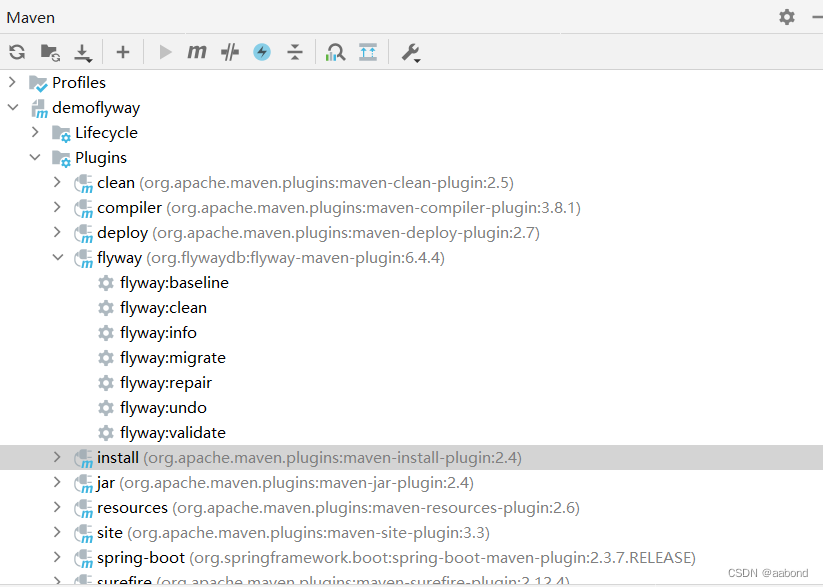
上面在使用 flyway 时,总要启动整个 springboot 工程,比较耗费时间,并且它只会执行 migrate 这一种命令。其实还可以通过 maven 插件执行,不需要完全启动 springboot, 并且支持生命周期的更多命令。
<plugin> <groupId>org.flywaydbgroupId> <artifactId>flyway-maven-pluginartifactId> <version>6.4.4version> <configuration> <url>jdbc:mysql://localhost:3306/demo_flyway?serverTimezone=UTC&useSSL=false&useUnicode=true&characterEncoding=UTF-8url> <driver>com.mysql.jdbc.Driverdriver> <user>rootuser> <password>password> <locations>classpath:db/migration, classpath:db/callbackslocations> <callbacks>com.aabond.demoflyway.DemoFlywayCallbackcallbacks> configuration> plugin>- 1
- 2
- 3
- 4
- 5
- 6
- 7
- 8
- 9
- 10
- 11
- 12
- 13
五、出现问题及解决方案
5.1 Unable to check whether schema
demoflywayis empty启动后报这个错误,还出现以下报错信息
SQL State : HY000 Error Code : 1577 Message : Cannot proceed because system tables used by Event Scheduler were found damaged at server start- 1
- 2
- 3
解决方法:需要开启 Event Scheduler 功能,可通过 在 my.ini 文件中配置 event_scheduler=1 或 执行 SET GLOBAL event_scheduler = ON; 实现
5.2 Detected failed migration to version 1.0 (add table address)
sql 脚本执行出现错误,修改后再次执行,还是出现这个问题。
解决方法:删除 flyway_schema_history 中这条记录,重新执行。建议在添加脚本文件时,先在数据库执行一下,避免出现这种问题。
出现原因:flyway 默认会扫描 classpath:db/migration 下所有 SQL 脚本,并根据 flyway_schema_history 表中的 SQL 记录最大版本号,忽略小于等于最大版本号的 SQL , 从小到大执行其余 SQL 。这也是为什么我们修改了 SQL 脚本,重新运行却没有成功的原因。
参考
- 场景一:开发环境,多人共用一套数据库
-
相关阅读:
第十九章 ObjectScript 应用程序中的数值计算 - 选择数字格式
1.5 新一代信息技术
C++知识点大纲(期末理论复习用/南邮计科
dockerfile介绍与使用案例
代码随想录打卡第四十八天|动态规划章节 ● 322. 零钱兑换 ● 279.完全平方数
【Git】gitignore不生效场景2: 添加文件忽略 & .gitignore,整个文件夹都被忽略了
基于springboot 手工艺品在线展示系统-计算机毕设 附源码 42553
8086/8088 存储器分段概念
这应该是关于回归模型最全的总结了(附原理+代码)
【无标题】vscode 配置c++ c编译环境
- 原文地址:https://blog.csdn.net/qq_23091073/article/details/126350375
