-
centos 7 新特性之systemd
systemd介绍
POST --> Boot Sequence --> Bootloader --> kernel + initramfs(initrd) --> rootfs --> /sbin/init
init:
CentOS 5: SysV init
CentOS 6: Upstart
CentOS 7: Systemd
systemd : 系统启动和服务器守护进程管理器,负责在系统启动或运行时,激活系统资源,服务器进程和其他进程
systemd新特性:
- 系统引导时实现服务并行启动
- 按需启动守护进程
- 自动化的服务依赖关系管理
- 同时采用socket式与D-Bus总线式激活服务
- 系统状态快照
核心概念 : unit
unit 表示不同类型的systemd对象,通过配置文件进行标识和配置,文件中主要包含了系统服务,监听socket,保存的系统快照以及其他与init相关的信息
配置文件 :
- /usr/lib/systemd/system : 内个服务最主要的启动脚本设置,类似于之前的 /etc/init.d/
- /run/systemd/system : 系统执行过程中所产生的服务脚本,比上面目录优先运行
- /etc/systemd/system : 管理员建立的执行脚本,类似于 /etc/rc.d/rcN.d/Sxx 类的功能,比上面目录优先运行
unti类型:
systemctl -t help : 查看unit类型- [root@centos7 ~]# systemctl -t help
- Available unit types: #可用的unit类型
- service #文件扩展名为 .service ,用于定义系统服务
- socket #用于标识进程间通信用的socket文件,也可以在系统启动时,延迟启动服务,实现按需启动
- busname
- target #用于模拟实现"运行级别"
- snapshot #管理系统快照
- device #用于定义内核识别的设备
- mount #定义文件系统挂载点
- automount #文件系统的自动挂载点
- swap #用于标识swap设备
- timer
- path #用于定义文件系统的一个文件或目录使用,常用于当文件系统变化时,延迟激活服务,如: spool 目录
- slice
- scope
关键特性:
基于socket的激活机制: socket与服务程序分离
基于d-bus的激活机制:
基于device的激活机制
基于path的激活机制
系统快照: 保存各unit的当前状态信息于持久存储设备中
向后兼容sysv init 脚本
不兼容:
systemctl 命令固定不变,不可扩展
非由systemd启动的服务,systemctl无法与之通信和控制
服务管理
管理系统服务:
CentOS 7 : service unit
注意 : 能兼容早期的服务脚本
命令 : systemctl COMMAND name.service
- 启动 : service name start ==> systemctl start name.service
- 停止 : service name stop ==> systemctl stop name.service
- 重启 : service name restart ==> systemctl restart name.service
- 状态 : service name status ==> systemctl status name.service
条件式重启 : 已启动才启动,否则不做操作
service name condrestart ==> systemctl try-restart name.service重载或重启服务 : 先加载,再启动
systemctl reload-or-restart name.service重载或条件式重启服务 :
systemctl reload-or-try-restart name.service禁止自动和手动启动:
systemctl mask name.service取消禁止:
systemctl unmask name.service查看某服务当前激活与否的状态:
systemctl is-active name.service查看所有已经激活的服务:
systemctl list-units --type|-t service查看所有服务:
systemctl list-units --type|-t service -all|-a设定某服务开机自启:
chkconfig name on ==> systemctl enbale name.service设定某服务开机禁止启动:
chkconfig name off ==> systemctl disable name.service查看所有服务的开机自启状态:
chkconfig --list ==> systemctl list-unit-files --type service用来列出该服务在哪些运行级别下启用和禁用:
chkconfig sshd -list ==> ls /etc/systemd/system/*.wants/sshd.service查看服务是否开机自启:
systemctl is-enabled name.service查看服务的依赖关系:
systemctl list-dependencies name.service杀掉进程:
systemctl kill 进程名服务状态
- systemctl list-units --type service --all 显示所有状态
- loaded : unit配置文件已处理
- active(running) : 一次或多次持续处理的运行
- active(exited) : 成功完成一次性的配置
- active(waiting) : 运行中,等待一个事件
- inactive : 不运行
- enabled : 开机启动
- disabled : 开机不启动
- static : 开机不启动,但可被另一个启用的服务激活
systemctl 命令示例
显示所有单元状态:
systemctl 或 systemctl list-units只显示服务单元的状态:
systemctl --type=service显示sshd服务单元:
systemctl status sshd.service -l验证sshd服务当前是否活动:
systemctl is-active sshd启动,停止和重启sshd服务:
- systemctl start sshd.service
- systemctl stop sshd.service
- systemctl restart sshd.service
重新加载配置:
systemctl reload sshd.service列出活动状态的所有服务单元:
systemctl list-units --type service列出所有服务单元:
systemctl list-units -t service -a查看服务单元的启用和禁用状态:
systemctl list-unit-files -t service列出失败的服务:
systemctl --failed -t service
列出依赖的单元:systemctl list-dependencies sshd验证sshd服务是否开机启动:
systemctl is-enabled sshd禁用network,使之不能自动启动,但手动可以
systemctl disable network启用network
systemctl enable network运行级别
target units:
unit配置文件: .target
- ls /usr/lib/systemd/system/*.target
- systemctl list-unit-files --type target --all
运行级别:

- 0 == > runlevel0.target -> poweroff.target
- 1 == > runlevel1.target -> rescue.target
- 2 == > runlevel2.target -> multi-user.target
- 3 == > runlevel3.target -> multi-user.target
- 4 == > runlevel4.target -> multi-user.target
- 5 == > runlevel5.target -> graphical.target
- 6 == > runlevel6.target -> reboot.target
查看依赖性:
systemctl list-dependencies graphical.target
级别切换:
- init N ==> sytemctl isolate name.target
- systemctl isolate multi-user.target
注: 只有 /lib/systemd/system/*.target文件中
AllowIsolate=yes 才能切换(修改文件需执行 systemctl daemon-reload 才能生效)
查看 target :
runlevel 或 who -r
获取默认运行级别:
/etc/inittab ==> systemctl get-default修改默认级别:
- /etc/inittab ==> systemctl set-default name.target
- systemctl set-default multi-user.target
- ls -l /etc/systemd/system/default.target
其他命令
切换至紧急救援模式:
systemctl rescue切换至emergency 模式:
systemctl emergency其他常用命令:
- 传统命令init,poweroff,halt,reboot 都成为systemctl的软链接
- 关机 : systemctl halt,systemctl poweroff
- 重启 : systemctl reboot
- 挂起 : systemctl suspend
- 休眠 : systemctl hibernate
- 休眠并挂起 : systemctl hybrid-sleep
centos 7 引导顺序
UEFI或BIOS初始化,运行POST开机自检
选择启动设备
引导装载程序,centos是grub2
加载装载程序的配置文件 : /etc/grub.d/ /etc/default/grub /boot/grub2/grub.cfg
加载initramfs驱动模块
加载内核
内核初始化,centos 7使用systemd代替init
执行initrd.target所有单元,包括挂载 /etc/fstab
从initramfs根文件系统切换到磁盘根目录
systemd执行默认target配置,配置文件 /etc/systemd/default.target /etc/systemd/system/
systemd执行sysinit.target初始化系统及basic.target准备操作系统
systemd 启动multi-user.target下的本机与服务器服务
systemd执行multi-user.target下的/etc/rc.d/rc.local
systemd执行multi-user.target下的getty.target及登入服务
systemd执行graphical需要的服务
service unit 文件格式
/etc/systemd/system : 系统管理员和用户使用
/usr/lib/systemd/system : 发行版打包者使用
以 "#" 开头的行后面的内容会被认为为是注释
相关布尔值, 1,yes,on,true 都是开启,0,no,off,false 都是关闭
时间默认是秒,所以要用毫秒(ms)分钟(m)等 显示说明
service unit file 文件通常由三部分组成
[Unit] : 定义与Unit类型无关的通用选型,用于提供unit的描述信息,unit行为及依赖关系
[Service] : 与特定类型相关的专用选项,此处为Service类型
[Install] : 定义由 "systemctl enable"以及"systemctl disable" 命令在实现服务启用或禁用是用到的一些选项
Unit常用的选项:
Description : 描述信息
After : 定义unit的启动次序,表示当前unit应该晚于哪些unit启动,其功能与Before相反
Requires : 依赖到的其他units,强依赖,被依赖的units无法激活,当前unit即无法激活
Wants : 依赖到的其他units,弱依赖
Conflicts : 定义units间的冲突关系
Service常用选项:
Type : 定义影响ExecStart及相关参数的功能的unit进程启动类型
simple : 默认值,这个daemon主要由ExecStart接的指令串来启动,启动后常驻于内存中
forking : 由ExecStart启动的程序透过spawns延伸出其他子程序来作为此daemon的主要服务。原生父程序在启动结束后就会终止
oneshot : 与simple类似,不过这个程序在工作完毕后就结束了,不会常驻内存中
dbus : 与simple类似,但这个daemon必须要在取得一个D-Bus的名称后,才会继续运作,因此通常也要同时设定BusnName= 才行
notify : 在启动完成后会发送一个通知消息,还需要配合NotifyAccess来让systemd接收消息
idle : 与simple类似,要执行这个daemon必须要所有的工作都顺利执行完毕后才会执行,这类的daemon通常是开机到最后才执行的服务
EnvironmentFile : 环境配置文件
ExecStart : 指明启动unit要运行命令或脚本的绝对路径
ExecstartPre : ExecStart前运行
ExecStartPost : ExecStart后运行
ExecStop : 指明停止unit要运行的命令或脚本
Restart : 当设定Restart=1时,则当次daemon服务意外终止后,会再次自动启动此服务
Install常用选项
Alias : 别名,可使用systemctl command Alias.service
RequiredBy : 被哪些units所依赖,强依赖
WantedBy : 被哪些units所依赖,弱依赖
Also : 安装本服务的时候还要安装别的相关服务
注意: 对于新创建的unit文件,或者修改了的unit文件,要通知systemd重载此配置文件,而后可以选择重启
systemctl daemon-reload服务unit文件示例
- vim /testdir/backup_etc.sh
- #!/bin/bash
- tar -Jcf /testdir/backup_etc_`date +%F`.tar.gz /etc &> /dev/null
- vim /etc/systemd/system/backup_etc.service
- [Unit]
- Description=back up /etc
- Requires=atd.service
- [Service]
- Type=simple
- ExecStart=/bin/bash -c "echo /testdir/backup_etc.sh | at now"

centos 7 启动相关
设置内核参数,只影响当次启动
启动时,在linux16行后添加 systemd.unit=desired.target
systemd.unit=emergency.target
system.unit=rescue.target
recure.target 比 emergency 支持更多的功能,例如日志等
启动排错:
文件系统损坏:
先尝试自动修复,失败则进入emergency shell ,提示用户修复
在 /etc/fstab 不存在对应的设备和UUID,等一段时间,如不可用,进入emergency shell
在 /etc/fstab 不存在对应挂载点 systemd 尝试创建挂载点,否则提示进入 emergency shell
在 /etc/fstab 不正确的挂载选项,提示进入 emergency shell
破解root口令:
启动时任意键暂停启动
按e键进入编辑模式
将光标移动到linux16 开始的行,添加内核参数 rd.break
按ctrl+x 启动
- mount -o remount,rw /sysroot
- chroot /sysroot
- passwd root
- touch /.autorelabel
修复grub2 :
引导提示时可以使用命令行界面可从文件系统引导
主要配置文件 /boot/grub2/grub.cfg
修改配置文件
- grub2-mkconfig > /boot/grub2/grub.cfg
- 或
- grub2-mkconfig -o /boot/grub2/grub.cfg
修复grub
grub2-install /dev/sda练习
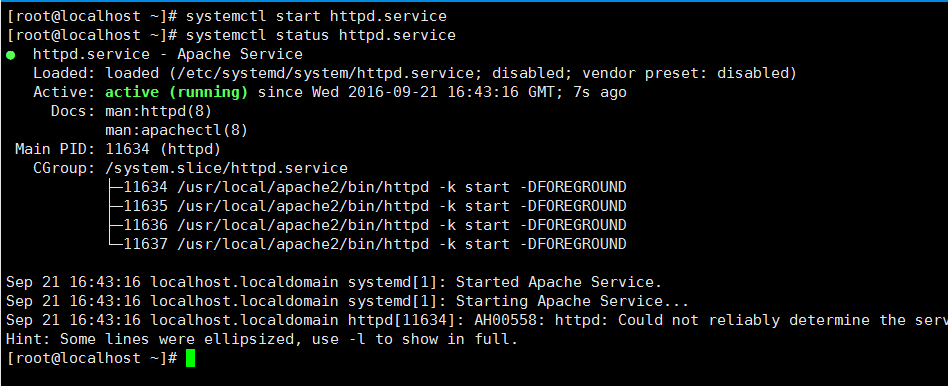
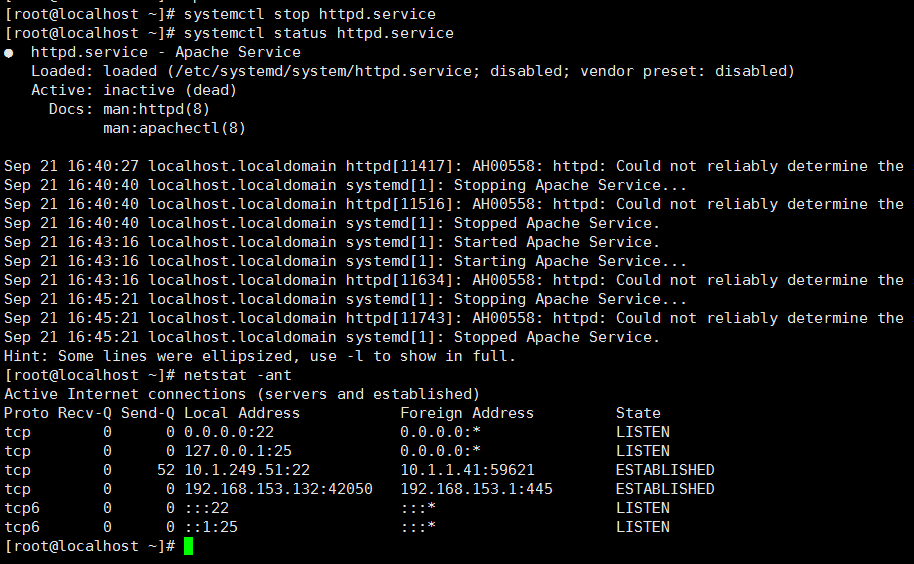
1,为编译安装的httpd服务,实现service unit文件
vim /etc/man_db.conf




2,破解centos7 口令

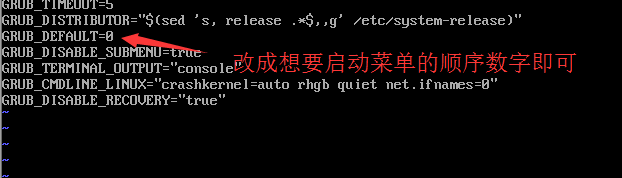
3,修改默认的启动内核
4,启动时临时禁用SELinux

5,启动时进入emergency模式


6,删除编译安装的新内核

-
相关阅读:
Spring Boot中@Import三种使用方式!
C++的缺陷和思考(四)
shell脚本的多线程介绍
HDU1276:士兵队列训练问题 ← STL queue
【计算机视觉】3D视觉
从零开始学Spring Boot系列-集成Kafka
浅谈操作系统和进程
【动手学深度学习】softmax回归的从零开始实现(PyTorch版本)(含源代码)
【SpringCloud】07 流量管理sentinel
springboot常用组件的集成
- 原文地址:https://blog.csdn.net/ly1358152944/article/details/126343032
