-
vue项目打包优化的方法
1.按需加载第三方库
例如 ElementUI、lodash 等
a, 装包
npm install babel-plugin-component -Db, babel.config.js
- module.exports = {
- "presets": [
- "@vue/cli-plugin-babel/preset"
- ],
- "plugins": [
- [
- "component",
- {
- "libraryName": "element-ui",
- "styleLibraryName": "theme-chalk"
- }
- ]
- ]
- }
c, main.js
- import ElementUI from 'element-ui'
- import 'element-ui/lib/theme-chalk/index.css'
- Vue.use(ElementUI)
换成
import './plugins/element.js'element.js
- import Vue from 'vue'
- import { Button, Form, FormItem, Input, Message, Header, Container, Aside, Main, Menu, Submenu, MenuItemGroup, MenuItem, Breadcrumb, BreadcrumbItem, Card, Row, Col, Table, TableColumn, Switch, Tooltip, Pagination, Dialog, MessageBox, Tag, Tree, Select, Option, Cascader, Alert, Tabs, TabPane, Steps, Step, CheckboxGroup, Checkbox, Upload, Timeline, TimelineItem } from 'element-ui'
- Vue.use(Button)
- Vue.use(Form)
- Vue.use(FormItem)
- Vue.use(Input)
- Vue.use(Header)
- Vue.use(Container)
- Vue.use(Aside)
- Vue.use(Main)
- Vue.use(Menu)
- Vue.use(Submenu)
- Vue.use(MenuItemGroup)
- Vue.use(MenuItem)
- Vue.use(Breadcrumb)
- Vue.use(BreadcrumbItem)
- Vue.use(Card)
- Vue.use(Row)
- Vue.use(Col)
- Vue.use(Table)
- Vue.use(TableColumn)
- Vue.use(Switch)
- Vue.use(Tooltip)
- Vue.use(Pagination)
- Vue.use(Dialog)
- Vue.use(Tag)
- Vue.use(Tree)
- Vue.use(Select)
- Vue.use(Option)
- Vue.use(Cascader)
- Vue.use(Alert)
- Vue.use(Tabs)
- Vue.use(TabPane)
- Vue.use(Steps)
- Vue.use(Step)
- Vue.use(CheckboxGroup)
- Vue.use(Checkbox)
- Vue.use(Upload)
- Vue.use(Timeline)
- Vue.use(TimelineItem)
- // 把弹框组件挂着到了 vue 的原型对象上,这样每一个组件都可以直接通过 this 访问
- Vue.prototype.$message = Message
- Vue.prototype.$confirm = MessageBox.confirm
效果图

优化 按需加载第三方工具包(例如 lodash)或者使用 CDN 的方式进行处理。
按需加载使用的工具方法 (当用到的工具方法少时按需加载打包) 用到的较多通过cdn
通过form lodash 搜索 哪处用到
例如此处的 1.


换成

按需导入
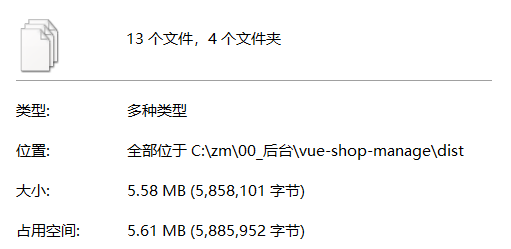
效果图
2.移除console.log
npm i babel-plugin-transform-remove-console -Dbabel.config.js
- const prodPlugins = []
- if (process.env.NODE_ENV === 'production') {
- prodPlugins.push('transform-remove-console')
- }
- module.exports = {
- presets: ['@vue/cli-plugin-babel/preset'],
- plugins: [
- [
- 'component',
- {
- libraryName: 'element-ui',
- styleLibraryName: 'theme-chalk'
- }
- ],
- ...prodPlugins
- ]
- }
效果图

3. Close SourceMap
生产环境关闭 功能
vue.config.js
- module.exports = {
- productionSourceMap: false
- }
效果图

4. Externals && CDN
通过 externals 排除第三方 JS 和 CSS 文件打包,使用 CDN 加载。
vue.config.js
- module.exports = {
- productionSourceMap: false,
- chainWebpack: (config) => {
- config.when(process.env.NODE_ENV === 'production', (config) => {
- const cdn = {
- js: [
- 'https://cdn.staticfile.org/vue/2.6.11/vue.min.js',
- 'https://cdn.staticfile.org/vue-router/3.1.3/vue-router.min.js',
- 'https://cdn.staticfile.org/axios/0.18.0/axios.min.js',
- 'https://cdn.staticfile.org/echarts/4.1.0/echarts.min.js',
- 'https://cdn.staticfile.org/nprogress/0.2.0/nprogress.min.js',
- 'https://cdn.staticfile.org/quill/1.3.4/quill.min.js',
- 'https://cdn.jsdelivr.net/npm/vue-quill-editor@3.0.4/dist/vue-quill-editor.js'
- ],
- css: [
- 'https://cdn.staticfile.org/nprogress/0.2.0/nprogress.min.css',
- 'https://cdn.staticfile.org/quill/1.3.4/quill.core.min.css',
- 'https://cdn.staticfile.org/quill/1.3.4/quill.snow.min.css',
- 'https://cdn.staticfile.org/quill/1.3.4/quill.bubble.min.css'
- ]
- }
- config.set('externals', {
- vue: 'Vue',
- 'vue-router': 'VueRouter',
- axios: 'axios',
- echarts: 'echarts',
- nprogress: 'NProgress',
- 'nprogress/nprogress.css': 'NProgress',
- 'vue-quill-editor': 'VueQuillEditor',
- 'quill/dist/quill.core.css': 'VueQuillEditor',
- 'quill/dist/quill.snow.css': 'VueQuillEditor',
- 'quill/dist/quill.bubble.css': 'VueQuillEditor'
- })
- config.plugin('html').tap((args) => {
- args[0].isProd = true
- args[0].cdn = cdn
- return args
- })
- })
- }
- }
public/index.html
- DOCTYPE html>
</div></div></li><li><div class="hljs-ln-numbers"><div class="hljs-ln-line hljs-ln-n" data-line-number="10"></div></div><div class="hljs-ln-code"><div class="hljs-ln-line"> <%= htmlWebpackPlugin.options.title %></div></div></li><li><div class="hljs-ln-numbers"><div class="hljs-ln-line hljs-ln-n" data-line-number="11"></div></div><div class="hljs-ln-code"><div class="hljs-ln-line"> - <% if(htmlWebpackPlugin.options.isProd){ %>
- <% for(var css of htmlWebpackPlugin.options.cdn.css) { %>
- <% } %>
- <% } %>
- We're sorry but <%= htmlWebpackPlugin.options.title %> doesn't work properly without JavaScript enabled.
- Please enable it to continue.
- <% if(htmlWebpackPlugin.options.isProd){ %>
- <% for(var js of htmlWebpackPlugin.options.cdn.js) { %>
- <% } %>
- <% } %>
效果图

继续对 ElementUI 的加载方式进行优化
vue.config.js
- module.exports = {
- chainWebpack: config => {
- config.when(process.env.NODE_ENV === 'production', config => {
- config.set('externals', {
- './plugins/element.js': 'ELEMENT'
- })
- config.plugin('html').tap(args => {
- args[0].isProd = true
- return args
- })
- })
- }
- }
public/index.html
- html>
- <html lang="en">
- <head>
- <meta charset="utf-8">
- <meta http-equiv="X-UA-Compatible" content="IE=edge">
- <meta name="viewport" content="width=device-width,initial-scale=1.0">
- <link rel="icon" href="<%= BASE_URL %>favicon.ico">
- <title>
- <%= htmlWebpackPlugin.options.isProd ? '' : 'dev - ' %>电商后台管理系统
- title>
- <% if(htmlWebpackPlugin.options.isProd){ %>
- <link rel="stylesheet" href="https://cdn.staticfile.org/element-ui/2.13.0/theme-chalk/index.css" />
- <script src="https://cdn.staticfile.org/element-ui/2.13.0/index.js">script>
- <% } %>
- head>
- <body>
- <noscript>
- <strong>We're sorry but <%= htmlWebpackPlugin.options.title %> doesn't work properly without JavaScript enabled.
- Please enable it to continue.strong>
- noscript>
- <div id="app">div>
- body>
- html>
效果图

5.路由懒加载的方式
- import Vue from 'vue'
- import VueRouter from 'vue-router'
- import Login from '../components/Login.vue'
- Vue.use(VueRouter)
- const routes = [
- {
- path: '/',
- redirect: '/login'
- },
- {
- path: '/login',
- component: Login
- },
- {
- path: '/Home',
- component: () => import('../components/Home.vue'),
- redirect: '/welcome',
- children: [
- {
- path: '/welcome',
- component: () => import('../components/Welcome.vue')
- },
- {
- path: '/users',
- component: () => import('../components/user/Users.vue')
- },
- {
- path: '/rights',
- component: () => import('../components/power/Rights.vue')
- },
- {
- path: '/roles',
- component: () => import('../components/power/Roles.vue')
- },
- {
- path: '/categories',
- component: () => import('../components/goods/Cate.vue')
- },
- {
- path: '/params',
- component: () => import('../components/goods/Params.vue')
- },
- {
- path: '/goods',
- component: () => import('../components/goods/List.vue')
- },
- {
- path: '/goods/add',
- component: () => import('../components/goods/Add.vue')
- },
- {
- path: '/orders',
- component: () => import('../components/order/Order.vue')
- },
- {
- path: '/reports',
- component: () => import('../components/report/Report.vue')
- }
- ]
- }
- ]
- const router = new VueRouter({
- routes
- })
- router.beforeEach((to, from, next) => {
- // to 要访问的路径
- // from 从哪里来的
- // next() 直接放行,next('/login') 表示跳转
- // 要访问 /login 的话那直接放行
- if (to.path === '/login') return next()
- const tokenStr = window.sessionStorage.getItem('token')
- // token 不存在那就跳转到登录页面
- if (!tokenStr) return next('/login')
- // 否则 token 存在那就放行
- next()
- })
- export default router
其他:图片压缩、CSS 压缩和提取、JS 提取...

- 部署到 Nginx
下载 Nginx,双击运行 nginx.exe,浏览器输入 localhost 能看到界面表示服务启动成功!
前端 axios 中的 baseURL 指定为 /api,配置 vue.config.js 代理如下
- module.exports = {
- devServer: {
- proxy: {
- '/api': {
- target: 'http://127.0.0.1:8888',
- changeOrigin: true
- }
- }
- }
- }
路由模式、基准地址、404 记得也配置一下
- const router = new VueRouter({
- mode: 'history',
- base: '/shop/',
- routes: [
- // ...
- {
- path: '*',
- component: NotFound
- }
- ]
- })
执行 npm run build 打包,把 dist 中的内容拷贝到 Nginx 的 html 文件夹中
修改 Nginx 配置
- http {
- server {
- listen 80;
- location / {
- # proxy_pass https://www.baidu.com;
- root html;
- index index.html index.htm;
- try_files $uri $uri/ /index.html;
- }
- location /api {
- # 重写地址
- # rewrite ^.+api/?(.*)$ /$1 break;
- # 代理地址
- proxy_pass http://127.0.0.1:8888;
- # 不用管
- proxy_redirect off;
- proxy_set_header Host $host;
- proxy_set_header X-Real-IP $remote_addr;
- proxy_set_header X-Forwarded-For $proxy_add_x_forwarded_for;
- }
- }
- }
重启服务
nginx -s reload
访问 localhost 查看下效果吧
- 开启 Gzip 压缩
前端通过 vue.config.js 配置,打包成带有 gzip 的文件
- const CompressionWebpackPlugin = require('compression-webpack-plugin')
- module.exports = {
- configureWebpack: config => {
- if (process.env.NODE_ENV === 'production') {
- config.plugins = [...config.plugins, new CompressionWebpackPlugin()]
- }
- }
- }
Nginx 中开启 gzip 即可
-
相关阅读:
基于Springboot的特产销售平台设计与实现毕业设计源码091036
《计算几何》学习笔记
SSM框架具体功能实现
存储器的分类
CMU15-445 format\clang-format\clang-tidy 失败
[C++] 哈希的模拟实现---闭散列法、开散列法(上)
竞赛 车道线检测(自动驾驶 机器视觉)
【node进阶】深度解析Koa框架---路由|静态资源|获取请求参数
dubbo漫谈(一)
NLP(2)--Transformer
- 原文地址:https://blog.csdn.net/weixin_68531033/article/details/126342877


