-
css 动画 过渡
1,过渡
在使用css写相关效果的时候,我们将元素的一种动画效果切换到另一种动画效果,这个时候我们需要规定两点,1,给元素的哪些属性添加动画效果,2,规定动画效果的时长
2,过渡的属性
transition-property
过渡的属性值
过渡的属性值没有限制,
带px的 (字体大小,宽高等),
不带px的 (背景色,字体颜色)
transition-duration
过渡的时间
设置的值越小,动画越快
当值为0时没有过渡动画效果
transition-timing-function
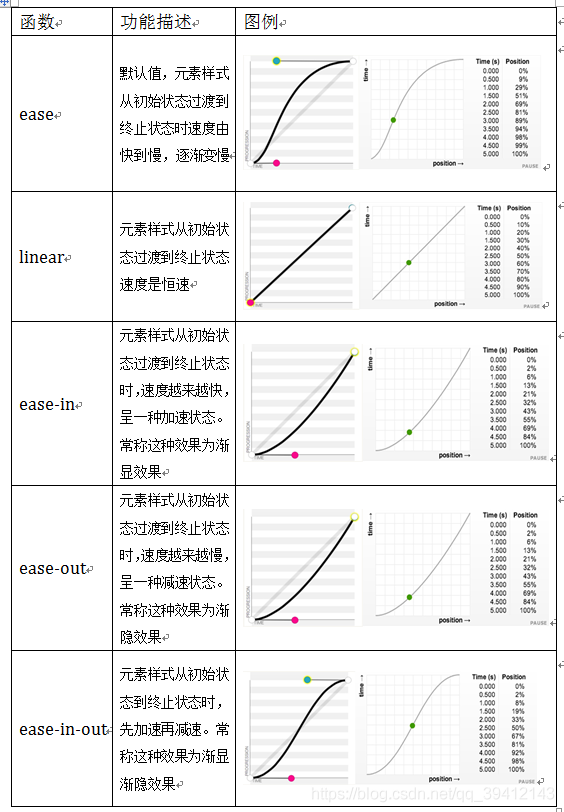
transition-delay
动画的延时时间,经过多久之后开始动画
示例
- <template>
- <view class=''>
- <view class="test1" :class="{
- testMove:moveRight
- }">
- 你
- view>
- <button @click="move">移动button>
- view>
- template>
- <script>
- export default {
- components: {},
- data: () => ({
- moveRight: false
- }),
- computed: {},
- watch: {},
- onLoad(options) {
- },
- onShow() {
- },
- onReady() {
- },
- methods: {
- move() {
- this.moveRight=true
- }
- },
- onHide() {},
- onUnload() {},
- onPullDownRefresh() {
- uni.stopPullDownRefresh();
- },
- onReachBottom() {}
- }
- script>
- <style lang='scss'>
- .test1 {
- width: 200rpx;
- height: 120rpx;
- background-color: #f00;
- transition-property: all;
- font-size: 24rpx;
- transition-duration: 1000ms;
- transition-timing-function: ease-in;
- transition-delay: 1000ms;
- color: #fff;
- text-align: left;
- }
- .testMove{
- margin-left:600rpx;
- background-color: green;
- font-size: 80rpx;
- color: #000;
- text-align: right;
- }
- style>
-
相关阅读:
C语言 牛客网习题 10.20 day2
字节跳动测开实习生面试,拿15K过分吗?
海外社媒营销新策略:故事化叙事如何触动用户情感,增强品牌魅力
【暴力DP】CF1409 F
Docker中将静态页面部署nginx
【微服务】- 服务调用 - OpenFeign
树上查询SPOJQTREE4
HAL_UART_Receive不能正常超时返回
redis的事务
java线程池介绍
- 原文地址:https://blog.csdn.net/qq_42389674/article/details/126332628
