-
二十一、商城 - 商品录入-KindEditor 编辑器(9)
一、商品分类
1.1 需求及表结构分析
1.1.1 需求分析
实现三级商品分类列表查询功能
- 进入页面首先显示所有一级分类,效果如下:

- 点击列表行的查询下级按钮,进入下级分类列表,同时更新面包屑导航

- 再次点击表行的查询下级按钮,进入三级分类列表,因为三级分类属于最后一级,所以在列表中不显示查询下级按钮,同时更新面包屑导航

点击面包屑导航,可以进行返回操作。
1.1.2 表结构分析
tb_item_cat 商品分类表
字段 类型 长度 含义 id Bigint 主键 parent_id Bigint 上级ID name varchar 分类名称 type_id Bigint 类型模板ID 1.2 列表实现
1.2.1 后端代码
修改youlexuan_sellergoods_interface工程ItemCatService接口,新增方法定义
/** * 根据上级ID返回列表 * @return */ public List<TbItemCat> findByParentId(Long parentId);- 1
- 2
- 3
- 4
- 5
修改youlexuan_sellergoods_service工程 ItemCatServiceImpl ,实现方法
/** * 根据上级ID返回列表 * @return */ @Override public List<TbItemCat> findByParentId(Long parentId) { TbItemCatExample tbItemCatExample = new TbItemCatExample(); Criteria criteria = tbItemCatExample.createCriteria(); criteria.andParentIdEqualTo(parentId); return itemCatMapper.selectByExample(tbItemCatExample); }- 1
- 2
- 3
- 4
- 5
- 6
- 7
- 8
- 9
- 10
- 11
- 12
- 13
- 14
- 15
修改youlexuan_manager_web的 ItemCatController.java
/** * 根据上级ID返回列表 * @return */ @RequestMapping("/findByParentId") public List<TbItemCat> findByParentId(Long parentId) { return itemCatService.findByParentId(parentId); }- 1
- 2
- 3
- 4
- 5
- 6
- 7
- 8
- 9
- 10
测试:
http://localhost:9101/itemCat/findByParentId.do?parentId=0( 注:先登录哦)
1.2.2 前端代码
(1)修改 itemCatService.js
//查询并显示一级分类 this.findByParentId = function (parentId) { return $http.get('../itemCat/findByParentId.do?parentId='+parentId); }- 1
- 2
- 3
- 4
- 5
(2)修改 itemCatController.js
//查询并显示一级分类 $scope.findByParentId = function (parentId) { itemCatService.findByParentId(parentId).success(function (response) { return $scope.list = response; }) }- 1
- 2
- 3
- 4
- 5
- 6
- 7
- 8
(3)修改 item_cat.html
- 将自动生成的 itemCat.html 类的相关copy 到 item_cat.html中 👇🏾👇🏾


更改后的
item_cat.html完整代码 :DOCTYPE html> <html> <head> <meta charset="utf-8"> <meta http-equiv="X-UA-Compatible" content="IE=edge"> <title>商品分类管理title> <meta content="width=device-width,initial-scale=1,maximum-scale=1,user-scalable=no" name="viewport"> <link rel="stylesheet" href="../plugins/bootstrap/css/bootstrap.min.css"> <link rel="stylesheet" href="../plugins/adminLTE/css/AdminLTE.css"> <link rel="stylesheet" href="../plugins/adminLTE/css/skins/_all-skins.min.css"> <link rel="stylesheet" href="../css/style.css"> <script src="../plugins/jQuery/jquery-2.2.3.min.js">script> <script src="../plugins/bootstrap/js/bootstrap.min.js">script> <script type="text/javascript" src="../plugins/angularjs/angular.min.js">script> <script type="text/javascript" src="../js/base.js">script> <script type="text/javascript" src="../js/service/itemCatService.js">script> <script type="text/javascript" src="../js/controller/baseController.js">script> <script type="text/javascript" src="../js/controller/itemCatController.js">script> head> <body class="hold-transition skin-red sidebar-mini" ng-app="youlexuan" ng-controller="itemCatController" ng-init="findByParentId(0)"> <div class="box-header with-border"> <h3 class="box-title">商品分类管理 h3> div> <div class="box-body"> <ol class="breadcrumb"> <li> <a href="#">顶级分类列表a> li> <li> <a href="#">珠宝a> li> <li> <a href="#">银饰a> li> ol> <div class="table-box"> <div class="pull-left"> <div class="form-group form-inline"> <div class="btn-group"> <button type="button" class="btn btn-default" title="新建" data-toggle="modal" data-target="#editModal"><i class="fa fa-file-o">i> 新建 button> <button type="button" class="btn btn-default" title="删除"><i class="fa fa-trash-o">i> 删除button> <button type="button" class="btn btn-default" title="刷新"><i class="fa fa-check">i> 刷新button> div> div> div> <table id="dataList" class="table table-bordered table-striped table-hover dataTable"> <thead> <tr> <th class="" style="padding-right:0px"> <input type="checkbox" class="icheckbox_square-blue"> th> <th class="sorting_asc">分类IDth> <th class="sorting">分类名称th> <th class="sorting">类型模板IDth> <th class="text-center">操作th> tr> thead> <tbody> <tr ng-repeat="entity in list" > <td><input type="checkbox" ng-click="updateSelection($event,entity.id)">td> <td>{{entity.id}}td> <td>{{entity.name}}td> <td>{{entity.typeId}}td> <td class="text-center"> <button type="button" class="btn bg-olive btn-xs" ng-click="findByParentId(entity.id)">查询下级button> <button type="button" class="btn bg-olive btn-xs" data-toggle="modal" data-target="#editModal" ng-click="findOne(entity.id)">修改 button> td> tr> <tr> <td><input type="checkbox">td> <td>983td> <td>手镯/手链/脚链td> <td> 11 td> <td class="text-center"> <button type="button" class="btn bg-olive btn-xs">查询下级button> <button type="button" class="btn bg-olive btn-xs" data-toggle="modal" data-target="#editModal">修改 button> td> tr> <tr> <td><input type="checkbox">td> <td>984td> <td>戒指/耳饰td> <td> 11 td> <td class="text-center"> <button type="button" class="btn bg-olive btn-xs">查询下级button> <button type="button" class="btn bg-olive btn-xs" data-toggle="modal" data-target="#editModal">修改 button> td> tr> tbody> table> div> div> <div class="modal fade" id="editModal" tabindex="-1" role="dialog" aria-labelledby="myModalLabel" aria-hidden="true"> <div class="modal-dialog"> <div class="modal-content"> <div class="modal-header"> <button type="button" class="close" data-dismiss="modal" aria-hidden="true">×button> <h3 id="myModalLabel">商品类目编辑h3> div> <div class="modal-body"> <table class="table table-bordered table-striped" width="800px"> <tr> <td>父类目ID=0时,代表的是一级的类目td> <td><input class="form-control" ng-model="entity.parentId" placeholder="父类目ID=0时,代表的是一级的类目"> td> tr> <tr> <td>类目名称td> <td><input class="form-control" ng-model="entity.name" placeholder="类目名称">td> tr> <tr> <td>类型idtd> <td><input class="form-control" ng-model="entity.typeId" placeholder="类型id">td> tr> table> div> <div class="modal-footer"> <button class="btn btn-success" data-dismiss="modal" aria-hidden="true" ng-click="save()">保存button> <button class="btn btn-default" data-dismiss="modal" aria-hidden="true">关闭button> div> div> div> div> body> html>- 1
- 2
- 3
- 4
- 5
- 6
- 7
- 8
- 9
- 10
- 11
- 12
- 13
- 14
- 15
- 16
- 17
- 18
- 19
- 20
- 21
- 22
- 23
- 24
- 25
- 26
- 27
- 28
- 29
- 30
- 31
- 32
- 33
- 34
- 35
- 36
- 37
- 38
- 39
- 40
- 41
- 42
- 43
- 44
- 45
- 46
- 47
- 48
- 49
- 50
- 51
- 52
- 53
- 54
- 55
- 56
- 57
- 58
- 59
- 60
- 61
- 62
- 63
- 64
- 65
- 66
- 67
- 68
- 69
- 70
- 71
- 72
- 73
- 74
- 75
- 76
- 77
- 78
- 79
- 80
- 81
- 82
- 83
- 84
- 85
- 86
- 87
- 88
- 89
- 90
- 91
- 92
- 93
- 94
- 95
- 96
- 97
- 98
- 99
- 100
- 101
- 102
- 103
- 104
- 105
- 106
- 107
- 108
- 109
- 110
- 111
- 112
- 113
- 114
- 115
- 116
- 117
- 118
- 119
- 120
- 121
- 122
- 123
- 124
- 125
- 126
- 127
- 128
- 129
- 130
- 131
- 132
- 133
- 134
- 135
- 136
- 137
- 138
- 139
- 140
- 141
- 142
- 143
- 144
- 145
- 146
- 147
- 148
- 149
- 150
- 151
- 152
- 153
- 154
- 155
- 156
- 157
- 158
- 159
- 160
- 161
- 162
- 163
- 164
- 165
- 166
- 167
- 168
- 169
- 170
- 171
- 172
- 173
- 174
启动服务: 安装改变的工程或直接安装父工程,启动 youlexuan_sellergoods_service 和youlexuan_manager_web
测试结果
http://localhost:9101/admin/index.html先要登录哦!!! 然后点击 “查询下级”则有下级出现
1.3 面包屑导航
我们需要返回上级列表,需要通过点击面包屑来实现
修改 itemCatController.js
//查询并显示一级分类 $scope.findByParentId = function (parentId) { itemCatService.findByParentId(parentId).success(function (response) { return $scope.list = response; }) } $scope.grade = 1; //默认为1级 //设置级别 $scope.setGrade = function (value) { $scope.grade = value; } //读取分类列表 $scope.selectList = function (p_entity) { if($scope.grade == 1){ //如果为1级 $scope.entity_1 = null; $scope.entity_2 = null; } if($scope.grade == 2){ //如果为2级 $scope.entity_1 = p_entity; $scope.entity_2 = null; } if($scope.grade == 3){ //如果为3级 $scope.entity_2 = p_entity; } $scope.findByParentId(p_entity.id); //查询此级下级列表 }- 1
- 2
- 3
- 4
- 5
- 6
- 7
- 8
- 9
- 10
- 11
- 12
- 13
- 14
- 15
- 16
- 17
- 18
- 19
- 20
- 21
- 22
- 23
- 24
- 25
- 26
- 27
- 28
- 29
- 30
- 31
- 32
- 33
- 34
- 35
- 36
- 37
- 38
- 39
- 40
- 41
- 42
- 43
- 44
修改列表的查询下级按钮,设定级别值后 显示列表

<tbody> <tr ng-repeat="entity in list" > <td><input type="checkbox" ng-click="updateSelection($event,entity.id)">td> <td>{{entity.id}}td> <td>{{entity.name}}td> <td>{{entity.typeId}}td> <td class="text-center"> <span ng-if="grade != 3"> <button type="button" class="btn bg-olive btn-xs" ng-click="setGrade(grade+1);selectList(entity)">查询下级button> span> <button type="button" class="btn bg-olive btn-xs" data-toggle="modal" data-target="#editModal" ng-click="findOne(entity.id)">修改 button> td> tr> tbody>- 1
- 2
- 3
- 4
- 5
- 6
- 7
- 8
- 9
- 10
- 11
- 12
- 13
- 14
- 15
- 16
- 17
- 18
- 19

这里我们使用了
ng-if指令,用于条件判断,当级别不等于3的时候才显示“查询下级”按钮绑定面包屑:
<ol class="breadcrumb"> <li> <a href="#" ng-click="setGrade(1);selectList({id:0})">顶级分类列表a> li> <li ng-if="entity_1!=null"> <a href="#" ng-click="setGrade(2);selectList(entity_1)">{{entity_1.name}}a> li> <li ng-if="entity_2!=null"> <a href="#" ng-click="setGrade(3);selectList(entity_2)">{{entity_2.name}}a> li> ol>- 1
- 2
- 3
- 4
- 5
- 6
- 7
- 8
- 9
- 10
- 11

1.4 商品编辑分类面包屑

<tr> <td>上级商品分类td> <td> 顶级分类 <span ng-if="entity_1 != null">>>{{entity_1.name}}span> <span ng-if="entity_2 != null">>>{{entity_2.name}}span> td> tr>- 1
- 2
- 3
- 4
- 5
- 6
- 7
- 8

1.5 新增商品分类
实现商品分类,如下图:

当前显示的是哪一分类的列表,我们就将这个商品分类新增到这个分类下。
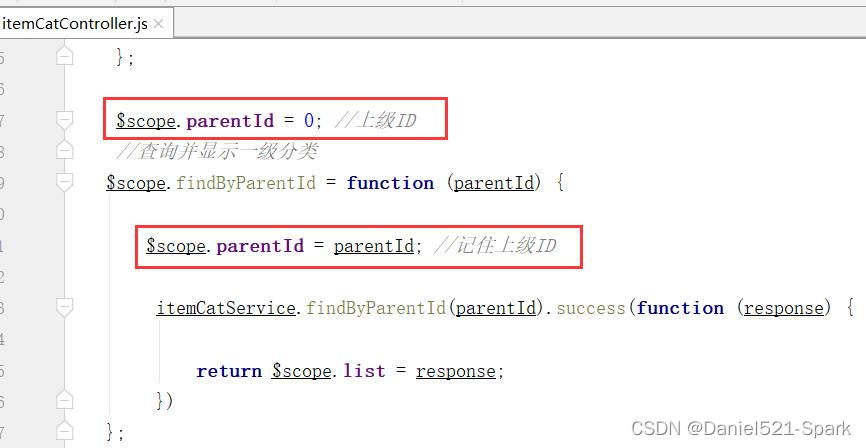
实现思路:我们需要一个变量去记住上级ID,在保存的时候再根据这个ID来新增分类
修改itemCatController.js, 定义变量
$scope.parentId=0;//上级ID- 1
查询时记录上级ID
$scope.parentId=parentId;//记住上级ID- 1
保存的时候,用到此变量
$scope.entity.parentId=$scope.parentId;//赋予上级ID $scope.findByParentId($scope.parentId);//重新加载- 1
- 2
- 3

修改页面 item_cat.html

1.6 新增商品分类–实现模板下拉列表
1.6.1 后端代码
(1)、修改 youlexuan_dao工程 TbTypeTemplateMapper 接口,新增获取模板列表数据方法
//获取模板列表 List<Map> selectOptionList();- 1
- 2
(2)、修改 youlexuan_dao 工程 TbTypeTemplateMapper.xml ,新增获取模板列表配置
<select id="selectOptionList" resultType="java.util.Map"> SELECT id,name AS text FROM tb_type_template </select>- 1
- 2
- 3
(3)、修改youlexuan_sellergoods-interface工程TypeTemplateService接口,新增方法定义
/** * 模板下拉框数据 */ List<Map> selectOptionList();- 1
- 2
- 3
- 4
(4)、修改 youlexuan_sellergoods-service工程TypeTemplateServiceImpl ,实现方法
/** * 模板下拉框数据 */ @Override public List<Map> selectOptionList() { return typeTemplateMapper.selectOptionList(); }- 1
- 2
- 3
- 4
- 5
- 6
- 7
- 8
(5)、修改youlexuan_manager_web工程TypeTemplateController,实现方法
/** * 模板下拉框数据 */ @RequestMapping("/selectOptionList") public List<Map> selectOptionList(){ return typeTemplateService.selectOptionList(); }- 1
- 2
- 3
- 4
- 5
- 6
- 7
- 8
后端返回json测试 :
http://localhost:9101/typeTemplate/selectOptionList.do
1.6.2 前端代码
(1)、修改youlexuan_manager_web工程 typeTemplateService.js 新增获取下拉菜单数据方法
//获取模板列表 this.selectOptionList=function () { return $http.get('../typeTemplate/selectOptionList.do'); }- 1
- 2
- 3
- 4
- 5
(2)、修改youlexuan_manager_web工程itemCatController.js 新增获取下拉菜单数据方法
//读取模板列表 $scope.typeTemplateList={data:[]};//模板列表 $scope.findtypeTemplateList = function () { typeTemplateService.selectOptionList().success(function (response) { $scope.typeTemplateList={data:response}; }); }- 1
- 2
- 3
- 4
- 5
- 6
- 7
- 8
- 9
- 10
- 11
- 12
注意:需要在itemCatController引入typeTemplateService

(3)、修改youlexuan_manager_web工程中的 item_cat.html,引入相关js

(3)、修改youlexuan-manager-web工程中的item_cat.html,引入相关js
<script type="text/javascript" src="../js/service/typeTemplateService.js"> </script> <link rel="stylesheet" href="../plugins/select2/select2.css" /> <link rel="stylesheet" href="../plugins/select2/select2-bootstrap.css" /> <script src="../plugins/select2/select2.min.js" type="text/javascript"></script> <script type="text/javascript" src="../js/angular-select2.js"> </script>- 1
- 2
- 3
- 4
- 5
- 6
(4)、修改youlexuan_manager_web工程中的item_cat.html,修改模板id为下拉选择
<tr> <td>类型模板td> <td> <input select2 config="typeTemplateList" ng-model="entity.typeId" select2-model="aa" placeholder="商品类型模板" class="form-control" type="text" /> td> tr>- 1
- 2
- 3
- 4
- 5
- 6
- 7


1.7 修改商品分类
修改item_cat.html的修改按钮 (应该已经开发了)

1.8 删除商品分类
(1)修改item_cat.html 的删除按钮、类别单选框

(2)修改itemCatController.js的删除方法,删除后返回指定父id的类别
$scope.findByParentId($scope.parentId);//刷新列表- 1

完整 item_cat.html 代码 :
DOCTYPE html> <html xmlns:setgrade> <head> <meta charset="utf-8"> <meta http-equiv="X-UA-Compatible" content="IE=edge"> <title>商品分类管理title> <meta content="width=device-width,initial-scale=1,maximum-scale=1,user-scalable=no" name="viewport"> <link rel="stylesheet" href="../plugins/bootstrap/css/bootstrap.min.css"> <link rel="stylesheet" href="../plugins/adminLTE/css/AdminLTE.css"> <link rel="stylesheet" href="../plugins/adminLTE/css/skins/_all-skins.min.css"> <link rel="stylesheet" href="../css/style.css"> <script src="../plugins/jQuery/jquery-2.2.3.min.js">script> <script src="../plugins/bootstrap/js/bootstrap.min.js">script> <script type="text/javascript" src="../plugins/angularjs/angular.min.js">script> <script type="text/javascript" src="../js/base.js">script> <script type="text/javascript" src="../js/service/typeTemplateService.js">script> <script type="text/javascript" src="../js/service/itemCatService.js">script> <script type="text/javascript" src="../js/controller/baseController.js">script> <script type="text/javascript" src="../js/controller/itemCatController.js">script> <link rel="stylesheet" href="../plugins/select2/select2.css" /> <link rel="stylesheet" href="../plugins/select2/select2-bootstrap.css" /> <script src="../plugins/select2/select2.min.js" type="text/javascript">script> <script type="text/javascript" src="../js/angular-select2.js"> script> head> <body class="hold-transition skin-red sidebar-mini" ng-app="youlexuan" ng-controller="itemCatController" ng-init="findByParentId(0);findtypeTemplateList();"> <div class="box-header with-border"> <h3 class="box-title">商品分类管理 h3> div> <div class="box-body"> <ol class="breadcrumb"> <li> <a href="#" ng-click="setGrade(1);selectList({id:0})">顶级分类列表a> li> <li ng-if="entity_1!=null"> <a href="#" ng-click="setGrade(2);selectList(entity_1)">{{entity_1.name}}a> li> <li ng-if="entity_2!=null"> <a href="#" ng-click="setGrade(3);selectList(entity_2)">{{entity_2.name}}a> li> ol> {{grade}} <div class="table-box"> <div class="pull-left"> <div class="form-group form-inline"> <div class="btn-group"> <button type="button" class="btn btn-default" title="新建" data-toggle="modal" data-target="#editModal"><i class="fa fa-file-o">i> 新建 button> <button type="button" class="btn btn-default" title="删除" ng-click="dele()"><i class="fa fa-trash-o">i> 删除button> <button type="button" class="btn btn-default" title="刷新"><i class="fa fa-check">i> 刷新button> div> div> div> <table id="dataList" class="table table-bordered table-striped table-hover dataTable"> <thead> <tr> <th class="" style="padding-right:0px"> <input type="checkbox" class="icheckbox_square-blue">th> <th class="sorting_asc">分类IDth> <th class="sorting">分类名称th> <th class="sorting">类型模板IDth> <th class="text-center">操作th> tr> thead> <tbody> <tr ng-repeat="entity in list" > <td><input type="checkbox" ng-click="updateSelection($event,entity.id)">td> <td>{{entity.id}}td> <td>{{entity.name}}td> <td>{{entity.typeId}}td> <td class="text-center"> <span ng-if="grade != 3"> <button type="button" class="btn bg-olive btn-xs" ng-click="setGrade(grade+1);selectList(entity)">查询下级button> span> <button type="button" class="btn bg-olive btn-xs" data-toggle="modal" data-target="#editModal" ng-click="findOne(entity.id)">修改 button> td> tr> tbody> table> div> div> <div class="modal fade" id="editModal" tabindex="-1" role="dialog" aria-labelledby="myModalLabel" aria-hidden="true"> <div class="modal-dialog" > <div class="modal-content"> <div class="modal-header"> <button type="button" class="close" data-dismiss="modal" aria-hidden="true">×button> <h3 id="myModalLabel">商品分类编辑h3> div> <div class="modal-body"> <table class="table table-bordered table-striped" width="800px"> <tr> <td>上级商品分类td> <td> <span ng-if="entity_1 != null">>>{{entity_1.name}}span> <span ng-if="entity_2 != null">>>{{entity_2.name}}span> td> tr> <tr> <td>商品分类名称td> <td><input class="form-control" ng-model="entity.name" placeholder="商品分类名称"> td> tr> <tr> <td>类型模板td> <td> <input select2 config="typeTemplateList" ng-model="entity.typeId" select2-model="aa" placeholder="商品类型模板" class="form-control" type="text" /> td> tr> table> div> <div class="modal-footer"> <button class="btn btn-success" data-dismiss="modal" aria-hidden="true" ng-click="save()">保存button> <button class="btn btn-default" data-dismiss="modal" aria-hidden="true">关闭button> div> div> div> div> body> html>- 1
- 2
- 3
- 4
- 5
- 6
- 7
- 8
- 9
- 10
- 11
- 12
- 13
- 14
- 15
- 16
- 17
- 18
- 19
- 20
- 21
- 22
- 23
- 24
- 25
- 26
- 27
- 28
- 29
- 30
- 31
- 32
- 33
- 34
- 35
- 36
- 37
- 38
- 39
- 40
- 41
- 42
- 43
- 44
- 45
- 46
- 47
- 48
- 49
- 50
- 51
- 52
- 53
- 54
- 55
- 56
- 57
- 58
- 59
- 60
- 61
- 62
- 63
- 64
- 65
- 66
- 67
- 68
- 69
- 70
- 71
- 72
- 73
- 74
- 75
- 76
- 77
- 78
- 79
- 80
- 81
- 82
- 83
- 84
- 85
- 86
- 87
- 88
- 89
- 90
- 91
- 92
- 93
- 94
- 95
- 96
- 97
- 98
- 99
- 100
- 101
- 102
- 103
- 104
- 105
- 106
- 107
- 108
- 109
- 110
- 111
- 112
- 113
- 114
- 115
- 116
- 117
- 118
- 119
- 120
- 121
- 122
- 123
- 124
- 125
- 126
- 127
- 128
- 129
- 130
- 131
- 132
- 133
- 134
- 135
- 136
- 137
- 138
- 139
- 140
- 141
- 142
- 143
- 144
- 145
- 146
- 147
- 148
二、电商概念及表结构分析
2.1 电商概念SPU与SKU
SPU = Standard Product Unit (标准产品单位)
SPU是商品信息聚合的最小单位,是一组可复用、易检索的标准化信息的集合,该集合描述了一个产品的特性。
通俗点讲,属性值、特性相同的商品就可以称为一个SPU。
例如:
iphone7 就是一个SPU,与商家,与颜色、款式、套餐都无关。SKU = stock keeping unit (库存量单位)
SKU即库存进出计量的单位, 可以是以件、盒、托盘等为单位。
SKU是物理上不可分割的最小存货单元。在使用时要根据不同业态,不同管理模式来处理。在服装、鞋类商品中使用最多最普遍。
例如:
纺织品中一个SKU通常表示:规格、颜色、款式。2.2 表结构分析
Tb_goods 商品表

Tb_goods_desc 商品扩展信息表

Tb_item SKU表

三、商家后台-商品录入【基本功能】
3.1 需求分析
在商家后台实现商品录入功能。包括商品名称、副标题、价格、包装列表、售后服务

3.2 后端代码
3.2.1 实体类
找到工程youlexuan_pojo在com.zql.group包下,创建组合实体类 Goods
package com.zql.group; import com.zql.pojo.TbGoods; import com.zql.pojo.TbGoodsDesc; import com.zql.pojo.TbItem; import java.io.Serializable; import java.util.List; /** * @Author:Daniel * @Version 1.0 */ public class Goods implements Serializable { private TbGoods goods;//商品SPU private TbGoodsDesc goodsDesc;//商品扩展 private List<TbItem> itemList;//商品SKU列表 public TbGoods getGoods() { return goods; } public void setGoods(TbGoods goods) { this.goods = goods; } public TbGoodsDesc getGoodsDesc() { return goodsDesc; } public void setGoodsDesc(TbGoodsDesc goodsDesc) { this.goodsDesc = goodsDesc; } public List<TbItem> getItemList() { return itemList; } public void setItemList(List<TbItem> itemList) { this.itemList = itemList; } }- 1
- 2
- 3
- 4
- 5
- 6
- 7
- 8
- 9
- 10
- 11
- 12
- 13
- 14
- 15
- 16
- 17
- 18
- 19
- 20
- 21
- 22
- 23
- 24
- 25
- 26
- 27
- 28
- 29
- 30
- 31
- 32
- 33
- 34
- 35
- 36
- 37
- 38
- 39
- 40
- 41
- 42
- 43
- 44
- 45
- 46
- 47
3.2.2 数据访问层
由于我们需要在商品表添加数据后可以得到自增的ID,所以我们需要在TbGoodsMapper.xml中的insert配置中添加如下配置
/*添加自增的id*/ <selectKey keyProperty="id" keyColumn="id" resultType="java.lang.Long" order="AFTER"> select LAST_INSERT_id() as id selectKey>- 1
- 2
- 3
- 4

3.2.3 服务接口层
修改youlexuan_sellergoods_interface 的 GoodsService接口 add方法 (已生成做修改)

3.2.4 服务实现层
修改youlexuan_sellergoods_service的 GoodsServiceImpl.java
@Autowired private TbGoodsDescMapper goodsDescMapper; /** * 增加 */ @Override public void add(Goods goods) { goods.getGoods().setAuditStatus("0");//设置未申请状态 goodsMapper.insert(goods.getGoods()); goods.getGoodsDesc().setGoodsId(goods.getGoods().getId());//设置ID goodsDescMapper.insert(goods.getGoodsDesc());//插入商品扩展数据 }- 1
- 2
- 3
- 4
- 5
- 6
- 7
- 8
- 9
- 10
- 11
- 12

3.2.5 控制层
修改youlexuan_shop_web工程的 GoodsController 的add方法
String sellerId = SecurityContextHolder.getContext().getAuthentication().getName();//是否审核通过,通过才能添加 goods.getGoods().setSellerId(sellerId);- 1
- 2
- 3

3.3 前端代码
3.3.1 控制层
修改goodsController.js ,在增加成功后弹出提示,并清空实体(因为编辑页面无列表)
//添加商品 $scope.entity = {goods:{},goodsDesc:{},itemList:[]}; $scope.add = function(){ $scope.entity.goodsDesc.introduction=editor.html();//提取kindeditor编辑器的内容 goodsService.add($scope.entity).success(function (response) { if (response.success){ alert("添加成功"); $scope.entity ={}; editor.html('');//清空富文本编辑器 } else{ alert(response.message); } }) };- 1
- 2
- 3
- 4
- 5
- 6
- 7
- 8
- 9
- 10
- 11
- 12
- 13
- 14
- 15
- 16
- 17
- 18
- 19
- 20
- 21
- 22
- 23
3.3.2 页面
修改goods_edit.html ,引入JS、定义控制器:
<script type="text/javascript" src="../plugins/angularjs/angular.min.js"> </script> <script type="text/javascript" src="../js/base.js"> </script> <script type="text/javascript" src="../js/service/goodsService.js"> </script> <script type="text/javascript" src="../js/controller/baseController.js"> </script> <script type="text/javascript" src="../js/controller/goodsController.js"> </script>- 1
- 2
- 3
- 4
- 5
ng-app="youlexuan" ng-controller="goodsController"- 1

表单部分代码:

保存按钮

四、商家后台-商品录入【商品介绍】
4.1 需求分析
实现商品介绍的录入,要求使用富文本编辑器

4.2 富文本编辑器介绍
富文本编辑器,Rich Text Editor, 简称 RTE, 它提供类似于 Microsoft Word 的编辑功能。常用的富文本
编辑器:
- KindEditor 是一套开源的在线HTML编辑器,主要用于让用户在网站上获得所见即所得编辑效果,开发人员可以用 KindEditor 把传统的多行文本输入框(textarea)替换为可视化的富文本输入框。 KindEditor 使用 JavaScript 编写,可以无缝地与 Java、.NET、PHP、ASP 等程序集成,比较适合在 CMS、商城、论坛、博客、Wiki、电子邮件等互联网应用上使用。
4.3 使用 kindeditor 完成商品介绍的录入
4.3.1 导入 kindeditor 编辑器所需js类库
<!-- 富文本编辑器 --> <link rel="stylesheet" href="../plugins/kindeditor/themes/default/default.css" /> <script charset="utf-8" src="../plugins/kindeditor/kindeditor-min.js"></script> <script charset="utf-8" src="../plugins/kindeditor/lang/zh_CN.js"></script>- 1
- 2
- 3
- 4
注意:富文本编辑器引入要在angular类库之前引入。
4.3.2 初始化 kindeditor 编辑器
在页面中添加JS代码,用于初始化kindeditor
<script type="text/javascript"> var editor; KindEditor.ready(function(K) { editor = K.create('textarea[name="content"]', { allowFileManager : true }); }); </script>- 1
- 2
- 3
- 4
- 5
- 6
- 7
- 8
allowFileManager 【是否允许浏览服务器已上传文件】 默认值是:false
注意:编辑器对象名称是editor,要不然会取不到值
4.3.3 提取 kindeditor 编辑器的内容
在goodsController.js中的add()方法中添加
$scope.entity.goodsDesc.introduction=editor.html();- 1
4.3.4 清空 kindeditor 编辑器的内容
修改goodsController.js的add方法
editor.html('');//清空富文本编辑器- 1

测试:
http://127.0.0.1:9102/shoplogin.html用户名:Daniel 密码:123

goods_edit.html 添加页面当前完整代码
DOCTYPE html> <html> <head> <meta charset="utf-8"> <meta http-equiv="X-UA-Compatible" content="IE=edge"> <title>商品编辑title> <meta content="width=device-width,initial-scale=1,maximum-scale=1,user-scalable=no" name="viewport"> <link rel="stylesheet" href="../plugins/bootstrap/css/bootstrap.min.css"> <link rel="stylesheet" href="../plugins/adminLTE/css/AdminLTE.css"> <link rel="stylesheet" href="../plugins/adminLTE/css/skins/_all-skins.min.css"> <link rel="stylesheet" href="../css/style.css"> <script src="../plugins/jQuery/jquery-2.2.3.min.js">script> <script src="../plugins/bootstrap/js/bootstrap.min.js">script> <link rel="stylesheet" href="../plugins/kindeditor/themes/default/default.css"/> <script charset="utf-8" src="../plugins/kindeditor/kindeditor-min.js">script> <script charset="utf-8" src="../plugins/kindeditor/lang/zh_CN.js">script> <script type="text/javascript"> var editor; //编辑器对象名称是editor,要不然会取不到值 KindEditor.ready(function (K) { editor = K.create('textarea[name="content"]', { allowFileManager: true }); }); script> <script type="text/javascript" src="../plugins/angularjs/angular.min.js">script> <script type="text/javascript" src="../js/base.js">script> <script type="text/javascript" src="../js/service/goodsService.js">script> <script type="text/javascript" src="../js/controller/baseController.js">script> <script type="text/javascript" src="../js/controller/goodsController.js">script> head> <body class="hold-transition skin-red sidebar-mini" ng-app="youlexuan" ng-controller="goodsController"> <section class="content"> <div class="box-body"> <div class="nav-tabs-custom"> <ul class="nav nav-tabs"> <li class="active"> <a href="#home" data-toggle="tab">商品基本信息a> li> <li> <a href="#pic_upload" data-toggle="tab">商品图片a> li> <li> <a href="#customAttribute" data-toggle="tab">扩展属性a> li> <li> <a href="#spec" data-toggle="tab">规格a> li> ul> <div class="tab-content"> <div class="tab-pane active" id="home"> <div class="row data-type"> <div class="col-md-2 title">商品分类div> <div class="col-md-10 data"> <table> <tr> <td> <select class="form-control"> select> td> <td> <select class="form-control select-sm">select> td> <td> <select class="form-control select-sm">select> td> <td> 模板ID:19 td> tr> table> div> <div class="col-md-2 title">商品名称div> <div class="col-md-10 data"> <input type="text" class="form-control" ng-model="entity.goods.goodsName" placeholder="商品名称" value=""> div> <div class="col-md-2 title">品牌div> <div class="col-md-10 data"> <select class="form-control">select> div> <div class="col-md-2 title">副标题div> <div class="col-md-10 data"> <input type="text" class="form-control" ng-model="entity.goods.caption" placeholder="副标题" value=""> div> <div class="col-md-2 title">价格div> <div class="col-md-10 data"> <div class="input-group"> <span class="input-group-addon">¥span> <input type="text" class="form-control" ng-model="entity.goods.price" placeholder="价格" value=""> div> div> <div class="col-md-2 title editer">商品介绍div> <div class="col-md-10 data editer"> <textarea name="content" ng-model="entity.goods.introduction" style="width:800px;height:400px;visibility:hidden;">textarea> div> <div class="col-md-2 title rowHeight2x">包装列表div> <div class="col-md-10 data rowHeight2x"> <textarea rows="4" class="form-control" ng-model="entity.goodsDesc.packageList" placeholder="包装列表">textarea> div> <div class="col-md-2 title rowHeight2x">售后服务div> <div class="col-md-10 data rowHeight2x"> <textarea rows="4" class="form-control" ng-model="entity.goodsDesc.saleService" placeholder="售后服务">textarea> div> div> div> <div class="tab-pane" id="pic_upload"> <div class="row data-type"> <div class="btn-group"> <button type="button" class="btn btn-default" title="新建" data-target="#uploadModal" data-toggle="modal"><i class="fa fa-file-o">i> 新建 button> div> <table class="table table-bordered table-striped table-hover dataTable"> <thead> <tr> <th class="sorting">颜色th> <th class="sorting">图片th> <th class="sorting">操作th> thead> <tbody> <tr> <td> td> <td> <img alt="" src="" width="100px" height="100px"> td> <td> <button type="button" class="btn btn-default" title="删除"><i class="fa fa-trash-o">i> 删除 button> td> tr> tbody> table> div> div> <div class="tab-pane" id="customAttribute"> <div class="row data-type"> <div> <div class="col-md-2 title">扩展属性1div> <div class="col-md-10 data"> <input class="form-control" placeholder="扩展属性1"> div> div> <div> <div class="col-md-2 title">扩展属性2div> <div class="col-md-10 data"> <input class="form-control" placeholder="扩展属性2"> div> div> div> div> <div class="tab-pane" id="spec"> <div class="row data-type"> <div class="col-md-2 title">是否启用规格div> <div class="col-md-10 data"> <input type="checkbox"> div> div> <p> <div> <div class="row data-type"> <div> <div class="col-md-2 title">屏幕尺寸div> <div class="col-md-10 data"> <span> <input type="checkbox">4.0 span> <span> <input type="checkbox">4.5 span> <span> <input type="checkbox">5.0 span> div> div> <div> <div class="col-md-2 title">网络制式div> <div class="col-md-10 data"> <span> <input type="checkbox">2G span> <span> <input type="checkbox">3G span> <span> <input type="checkbox">4G span> div> div> div> <div class="row data-type"> <table class="table table-bordered table-striped table-hover dataTable"> <thead> <tr> <th class="sorting">屏幕尺寸th> <th class="sorting">网络制式th> <th class="sorting">价格th> <th class="sorting">库存th> <th class="sorting">是否启用th> <th class="sorting">是否默认th> tr> thead> <tbody> <tr> <td> 4.0 td> <td> 3G td> <td> <input class="form-control" placeholder="价格"> td> <td> <input class="form-control" placeholder="库存数量"> td> <td> <input type="checkbox"> td> <td> <input type="checkbox"> td> tr> <tr> <td> 4.0 td> <td> 4G td> <td> <input class="form-control" placeholder="价格"> td> <td> <input class="form-control" placeholder="库存数量"> td> <td> <input type="checkbox"> td> <td> <input type="checkbox"> td> tr> <tr> <td> 5.0 td> <td> 3G td> <td> <input class="form-control" placeholder="价格"> td> <td> <input class="form-control" placeholder="库存数量"> td> <td> <input type="checkbox"> td> <td> <input type="checkbox"> td> tr> <tr> <td> 5.0 td> <td> 4G td> <td> <input class="form-control" placeholder="价格"> td> <td> <input class="form-control" placeholder="库存数量"> td> <td> <input type="checkbox"> td> <td> <input type="checkbox"> td> tr> tbody> table> div> div> div> div> div> div> <div class="btn-toolbar list-toolbar"> <button class="btn btn-primary" ng-click="add()"><i class="fa fa-save">i>保存button> <button class="btn btn-default">返回列表button> div> section> <div class="modal fade" id="uploadModal" tabindex="-1" role="dialog" aria-labelledby="myModalLabel" aria-hidden="true"> <div class="modal-dialog"> <div class="modal-content"> <div class="modal-header"> <button type="button" class="close" data-dismiss="modal" aria-hidden="true">×button> <h3 id="myModalLabel">上传商品图片h3> div> <div class="modal-body"> <table class="table table-bordered table-striped"> <tr> <td>颜色td> <td><input class="form-control" placeholder="颜色">td> tr> <tr> <td>商品图片td> <td> <table> <tr> <td> <input type="file" id="file"/> <button class="btn btn-primary" type="button"> 上传 button> td> <td> <img src="" width="200px" height="200px"> td> tr> table> td> tr> table> div> <div class="modal-footer"> <button class="btn btn-success" data-dismiss="modal" aria-hidden="true">保存button> <button class="btn btn-default" data-dismiss="modal" aria-hidden="true">关闭button> div> div> div> div> body> html>- 1
- 2
- 3
- 4
- 5
- 6
- 7
- 8
- 9
- 10
- 11
- 12
- 13
- 14
- 15
- 16
- 17
- 18
- 19
- 20
- 21
- 22
- 23
- 24
- 25
- 26
- 27
- 28
- 29
- 30
- 31
- 32
- 33
- 34
- 35
- 36
- 37
- 38
- 39
- 40
- 41
- 42
- 43
- 44
- 45
- 46
- 47
- 48
- 49
- 50
- 51
- 52
- 53
- 54
- 55
- 56
- 57
- 58
- 59
- 60
- 61
- 62
- 63
- 64
- 65
- 66
- 67
- 68
- 69
- 70
- 71
- 72
- 73
- 74
- 75
- 76
- 77
- 78
- 79
- 80
- 81
- 82
- 83
- 84
- 85
- 86
- 87
- 88
- 89
- 90
- 91
- 92
- 93
- 94
- 95
- 96
- 97
- 98
- 99
- 100
- 101
- 102
- 103
- 104
- 105
- 106
- 107
- 108
- 109
- 110
- 111
- 112
- 113
- 114
- 115
- 116
- 117
- 118
- 119
- 120
- 121
- 122
- 123
- 124
- 125
- 126
- 127
- 128
- 129
- 130
- 131
- 132
- 133
- 134
- 135
- 136
- 137
- 138
- 139
- 140
- 141
- 142
- 143
- 144
- 145
- 146
- 147
- 148
- 149
- 150
- 151
- 152
- 153
- 154
- 155
- 156
- 157
- 158
- 159
- 160
- 161
- 162
- 163
- 164
- 165
- 166
- 167
- 168
- 169
- 170
- 171
- 172
- 173
- 174
- 175
- 176
- 177
- 178
- 179
- 180
- 181
- 182
- 183
- 184
- 185
- 186
- 187
- 188
- 189
- 190
- 191
- 192
- 193
- 194
- 195
- 196
- 197
- 198
- 199
- 200
- 201
- 202
- 203
- 204
- 205
- 206
- 207
- 208
- 209
- 210
- 211
- 212
- 213
- 214
- 215
- 216
- 217
- 218
- 219
- 220
- 221
- 222
- 223
- 224
- 225
- 226
- 227
- 228
- 229
- 230
- 231
- 232
- 233
- 234
- 235
- 236
- 237
- 238
- 239
- 240
- 241
- 242
- 243
- 244
- 245
- 246
- 247
- 248
- 249
- 250
- 251
- 252
- 253
- 254
- 255
- 256
- 257
- 258
- 259
- 260
- 261
- 262
- 263
- 264
- 265
- 266
- 267
- 268
- 269
- 270
- 271
- 272
- 273
- 274
- 275
- 276
- 277
- 278
- 279
- 280
- 281
- 282
- 283
- 284
- 285
- 286
- 287
- 288
- 289
- 290
- 291
- 292
- 293
- 294
- 295
- 296
- 297
- 298
- 299
- 300
- 301
- 302
- 303
- 304
- 305
- 306
- 307
- 308
- 309
- 310
- 311
- 312
- 313
- 314
- 315
- 316
- 317
- 318
- 319
- 320
- 321
- 322
- 323
- 324
- 325
- 326
- 327
- 328
- 329
- 330
- 331
- 332
- 333
- 334
- 335
- 336
- 337
- 338
- 339
- 340
- 341
- 342
- 343
- 344
- 345
- 346
- 347
- 348
- 349
- 350
- 351
- 352
- 353
- 354
- 355
- 356
- 357
- 358
- 359
- 360
- 361
- 362
- 363
- 364
- 365
- 366
- 367
- 368
- 369
- 370
- 371
- 372
- 373
- 374
- 375
- 376
- 377
- 378
- 379
- 380
- 381
- 382
- 383
- 384
- 385
- 386
- 387
- 388
- 389
- 390
- 391
- 392
- 393
- 394
- 395
- 396
- 397
- 398
- 399
- 400
- 401
- 402
- 403
- 404
- 405
-
相关阅读:
Linux和树莓派基础交互
STM32外部中断大问题
C++模拟OpenGL库——图片处理及纹理系统(三):图片缩放操作:简单插值&二次线性插值
Studying-代码随想录训练营day62| Floyd 算法精讲、A*算法精讲(A star算法)、最短路算法总结篇、图论总结
何为面向对象的编程思想
linux 下安装 Nginx 以及 开启文件下载目录 配置web路径
No150.精选前端面试题,享受每天的挑战和学习
JavaBean专项练习(学生信息管理系统)(增删改查)(每步详细解释和思路)
C++之值传递&指针传递&引用传递详解
GIS 数据结构整理:网格索引
- 原文地址:https://blog.csdn.net/weixin_42171159/article/details/126310967
