-
创建springboot(三)用户登录
用户登录
完成用户登录操作
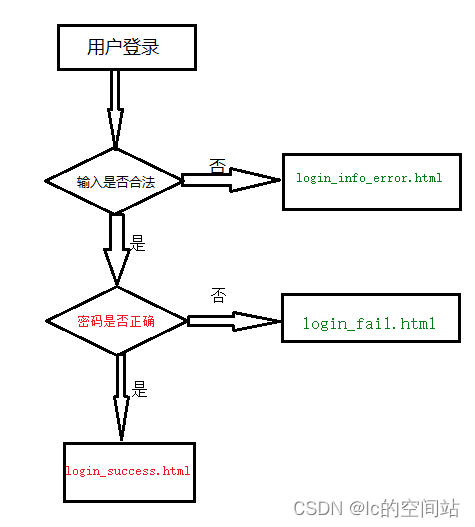
流程:
1:用户通过首页index.html点击超链接[用户登录]来到登录页面login.html
2:在登录页面你上有两个输入框:用户名和密码
用户在这里输入登录信息后点击登录按钮提交表单
3:服务端处理登录验证
4:响应用户登录结果(成功或失败)
实现步骤
1:在static目录下定义需要使用的页面
1.1:login.html 登录页面
该页面中form表单action=“/loginUser”
1.2:login_info_error.html
当用户输入登录信息有误(比如空着不输入内容就点击登录)时提示该页面
居中显示一行字:登录信息输入有误,请重新登录
1.3:login_success.html
登录成功提示页面,居中显示一行字:登录成功,欢迎回来
1.4:login_fail.html
登录失败提示页面,居中显示一行字:登陆失败,用户名或密码错误.
2:在UserController上定义处理登录的方法:login()
在该方法上添加注解:@RequestMapping(“/loginUser”)
3:实现login方法逻辑
3.1:通过request获取表单提交的用户名和密码
3.2:读取users目录下对应的用户文件(反序列化)
3.3:比对用户密码
3.4:响应用户登录成功或失败页面
登录成功的标准:用户名和密码都输入正确
登录失败的标准:用户名错误或密码错误
1.登录控制
/** * 用户登录 * @param request * @param response */ @RequestMapping("/loginUser") private void login(HttpServletRequest request,HttpServletResponse response){ String username = request.getParameter("username"); String password = request.getParameter("password"); if(username==null||username.isEmpty()|| password==null||password.isEmpty() ){ try { response.sendRedirect("/login_info_error.html"); } catch (IOException e) { e.printStackTrace(); } return; } File file=new File(UserDir,username+".obj"); //如果文件不存在 if (!file.exists()){ try { response.sendRedirect("/login_fail.html"); } catch (IOException e) { e.printStackTrace(); } }else{//如果文件存在 try (FileInputStream fis=new FileInputStream(file); ObjectInputStream ois=new ObjectInputStream(fis); ){ User user = (User)ois.readObject(); //如果用户名和密码都正确 if(username.equals(user.getUsername())&&password.equals(user.getPassword())){ response.sendRedirect("/login_success.html"); }else{//如果用户名或密码不正确 response.sendRedirect("/login_fail.html"); } } catch (IOException | ClassNotFoundException e) { e.printStackTrace(); } } }- 1
- 2
- 3
- 4
- 5
- 6
- 7
- 8
- 9
- 10
- 11
- 12
- 13
- 14
- 15
- 16
- 17
- 18
- 19
- 20
- 21
- 22
- 23
- 24
- 25
- 26
- 27
- 28
- 29
- 30
- 31
- 32
- 33
- 34
- 35
- 36
- 37
- 38
- 39
- 40
- 41
- 42
- 43
2.登录页面login.html
DOCTYPE html> <html lang="en"> <head> <meta charset="UTF-8"> <title>用户登录title> head> <body> <center> <h1>用户登录h1> <form action="/loginUser" method="get"> <table> <tr> <td>用户名td> <td><input type="text" name="username">td> tr> <tr> <td>密码td> <td><input type="password" name="password">td> tr> <tr> <td colspan="2" align="center"> <input type="submit" value="登录"> td> tr> table> form> center> body> html>- 1
- 2
- 3
- 4
- 5
- 6
- 7
- 8
- 9
- 10
- 11
- 12
- 13
- 14
- 15
- 16
- 17
- 18
- 19
- 20
- 21
- 22
- 23
- 24
- 25
- 26
- 27
- 28
- 29
3.登录成功login_success.html
DOCTYPE html> <html lang="en"> <head> <meta charset="UTF-8"> <title>成功title> head> <body> <center> <h1>登录成功,欢迎回来h1> center> body> html>- 1
- 2
- 3
- 4
- 5
- 6
- 7
- 8
- 9
- 10
- 11
- 12
4.用户信息输入非法login_info_error.html
DOCTYPE html> <html lang="en"> <head> <meta charset="UTF-8"> <title>失败title> head> <body> <center> <h1>登录信息输入有误,请<a href="/login.html">重新登录a>h1> center> body> html>- 1
- 2
- 3
- 4
- 5
- 6
- 7
- 8
- 9
- 10
- 11
- 12
5.登录失败(用户名或密码错误)login_fail.html
DOCTYPE html> <html lang="en"> <head> <meta charset="UTF-8"> <title>失败title> head> <body> <center> <h1>登陆失败,用户名或密码错误.h1> center> body> html>- 1
- 2
- 3
- 4
- 5
- 6
- 7
- 8
- 9
- 10
- 11
- 12
-
相关阅读:
报价又快又准,ERP系统助力元器件贸易企业快速开单
基于SpringBoot的流浪动物管理系
逍遥自在学C语言 | 指针的基础用法
悲观模式下分库分表合并迁移
libyuv 海思平台编译测试
项目部署服务器【java】
[ Module ] 环境变量管理工具 Modules 安装和使用
Linux总结
qt文件操作的一些技巧
C语言实现字符串比较
- 原文地址:https://blog.csdn.net/longgetaotao_06/article/details/126329887
