-
自己写一个定时备份 mysql 的备份工具
初
希望能写一些简单的教程和案例分享给需要的人
mysql 备份工具(1)
最近遇到删库的事情,平时又没备份,非常的难受,写个工具,定时备份,如果出现回到解放前的事情,也有从容应对之法。
环境:需要先安装一个 mysql
系统:windows
工具:mysqldump.exe主要是靠 mysqldump.exe
我这边写的只是一个定时任务。程序结构:

代码:
Form1.cs
using System; using System.Collections.Generic; using System.ComponentModel; using System.Data; using System.Diagnostics; using System.Drawing; using System.IO; using System.Linq; using System.Text; using System.Threading.Tasks; using System.Windows.Forms; namespace MysqlBak { public partial class Form1 : Form { public Form1() { InitializeComponent(); } // 当找不到文件或者拒绝访问时出现的Win32错误码 const int ERROR_FILE_NOT_FOUND = 2; const int ERROR_ACCESS_DENIED = 5; // 通过命令行获取help显示信息 void PrintDoc(string cmd) { Process process = new Process(); try { process.StartInfo.UseShellExecute = false; //是否使用操作系统shell启动 process.StartInfo.CreateNoWindow = true; //是否在新窗口中启动该进程的值 (不显示程序窗口) process.StartInfo.RedirectStandardInput = true; // 接受来自调用程序的输入信息 process.StartInfo.RedirectStandardOutput = true; // 由调用程序获取输出信息 process.StartInfo.RedirectStandardError = true; //重定向标准错误输出 process.StartInfo.FileName = "cmd.exe"; process.Start(); // 启动程序 process.StandardInput.WriteLine(cmd); //向cmd窗口发送输入信息 //process.StandardInput.WriteLine("txyf@mysql"); //向cmd窗口发送输入信息 process.StandardInput.AutoFlush = true; // 前面一个命令不管是否执行成功都执行后面(exit)命令,如果不执行exit命令,后面调用ReadToEnd()方法会假死 process.StandardInput.WriteLine("exit"); StreamReader reader = process.StandardOutput;//获取exe处理之后的输出信息 string curLine = reader.ReadLine(); //获取错误信息到error while (!reader.EndOfStream) { if (!string.IsNullOrEmpty(curLine)) { showLog(curLine); } curLine = reader.ReadLine(); } reader.Close(); //close进程 process.WaitForExit(); //等待程序执行完退出进程 process.Close(); } catch (Win32Exception e) { if (e.NativeErrorCode == ERROR_FILE_NOT_FOUND) { showLog(e.Message + ". 检查文件路径."); } else if (e.NativeErrorCode == ERROR_ACCESS_DENIED) { showLog(e.Message + ". 你没有权限操作文件."); } } } public void showLog(string msg) { StringBuilder sb = new StringBuilder(); sb.Append(textBox2.Text); sb.Append("\r\n"); sb.Append(string.Format("{0}:{1}", DateTime.Now, msg)); textBox2.Text = sb.ToString(); } private void button1_Click(object sender, EventArgs e) { bkMysql(); } private void bkMysql() { var dbip = textBox_dbip.Text; var dbprot = textBox_dbprot.Text; var dbuser = textBox_dbuser.Text; var password = textBox_dbpassword.Text; var dbname = textBox_dbname.Text; if (dbip.Length == 0 || dbprot.Length == 0 || dbuser.Length == 0 || password.Length == 0 || dbname.Length == 0) { MessageBox.Show("请先配置好参数"); } //PrintDoc("help"); string path = System.AppDomain.CurrentDomain.BaseDirectory; string bakpath = path + "bak"; string bakName = bakpath + "\\" + dbname + "_" + DateTime.Now.ToString("yyyyMMdd_HHmmss") + " - all.sql"; if (!Directory.Exists(bakpath)) { Directory.CreateDirectory(bakpath); } string bf = $"{path}mysqldump.exe --host=\"{dbip}\" --port={dbprot} --user=\"{dbuser}\" --password=\"{password}\" --result-file=\"{bakName}\" --databases {dbname}"; PrintDoc(bf); if (true) { SqlDirectory(); } } private void timer1_Tick(object sender, EventArgs e) { bool isZD = false; if (DateTime.Now.ToString("mmss") == "0000") { isZD = true; } label1.Text = $"信息:{DateTime.Now}"; if (button2.Text == "开启自动备份") { } else { switch (button2.Text) { case "点击停止.": button2.Text = "点击停止.."; break; case "点击停止..": button2.Text = "点击停止..."; break; case "点击停止...": button2.Text = "点击停止."; break; default: break; } if (radioButton3.Checked) { if (isZD) { bkMysql(); } } } } private void button2_Click(object sender, EventArgs e) { if (button2.Text == "开启自动备份") { button2.Text = "点击停止."; } else { button2.Text = "开启自动备份"; } } private void button3_Click(object sender, EventArgs e) { string path = System.AppDomain.CurrentDomain.BaseDirectory; string bakpath = path + "bak"; string bakName = bakpath + "\\" + "x1_" + DateTime.Now.ToString("yyyyMMdd_HHmmss") + " - all.sql"; if (!Directory.Exists(bakpath)) { Directory.CreateDirectory(bakpath); } System.Diagnostics.Process.Start(bakpath); //PrintDoc("start.."); } private static TreeNode getRootNode(string dirname)//根据传入的文件夹地址,遍历所有的子目录和文件并生成节点 { TreeNode node = new TreeNode(dirname); string[] dirs = Directory.GetDirectories(dirname); string[] files = Directory.GetFiles(dirname); foreach (string dir in dirs) { node.Nodes.Add(dir); getRootNode(dir); } foreach (string file in files) { TreeNode fnode = new TreeNode(file); node.Nodes.Add(fnode); } return node; } private void Form1_Load(object sender, EventArgs e) { SqlDirectory(); } private void SqlDirectory() { treeView1.Nodes.Clear(); string path = System.AppDomain.CurrentDomain.BaseDirectory; string bakpath = path + "bak"; if (!Directory.Exists(bakpath)) { Directory.CreateDirectory(bakpath); } string[] files = Directory.GetFiles(bakpath); foreach (var item in files) { TreeNode fnode = new TreeNode(Path.GetFileName(item)); treeView1.Nodes.Add(fnode); } } } }- 1
- 2
- 3
- 4
- 5
- 6
- 7
- 8
- 9
- 10
- 11
- 12
- 13
- 14
- 15
- 16
- 17
- 18
- 19
- 20
- 21
- 22
- 23
- 24
- 25
- 26
- 27
- 28
- 29
- 30
- 31
- 32
- 33
- 34
- 35
- 36
- 37
- 38
- 39
- 40
- 41
- 42
- 43
- 44
- 45
- 46
- 47
- 48
- 49
- 50
- 51
- 52
- 53
- 54
- 55
- 56
- 57
- 58
- 59
- 60
- 61
- 62
- 63
- 64
- 65
- 66
- 67
- 68
- 69
- 70
- 71
- 72
- 73
- 74
- 75
- 76
- 77
- 78
- 79
- 80
- 81
- 82
- 83
- 84
- 85
- 86
- 87
- 88
- 89
- 90
- 91
- 92
- 93
- 94
- 95
- 96
- 97
- 98
- 99
- 100
- 101
- 102
- 103
- 104
- 105
- 106
- 107
- 108
- 109
- 110
- 111
- 112
- 113
- 114
- 115
- 116
- 117
- 118
- 119
- 120
- 121
- 122
- 123
- 124
- 125
- 126
- 127
- 128
- 129
- 130
- 131
- 132
- 133
- 134
- 135
- 136
- 137
- 138
- 139
- 140
- 141
- 142
- 143
- 144
- 145
- 146
- 147
- 148
- 149
- 150
- 151
- 152
- 153
- 154
- 155
- 156
- 157
- 158
- 159
- 160
- 161
- 162
- 163
- 164
- 165
- 166
- 167
- 168
- 169
- 170
- 171
- 172
- 173
- 174
- 175
- 176
- 177
- 178
- 179
- 180
- 181
- 182
- 183
- 184
- 185
- 186
- 187
- 188
- 189
- 190
- 191
- 192
- 193
- 194
- 195
- 196
- 197
- 198
- 199
- 200
- 201
- 202
- 203
- 204
- 205
- 206
- 207
- 208
- 209
- 210
- 211
- 212
- 213
- 214
- 215
- 216
- 217
- 218
- 219
- 220
- 221
- 222
- 223
- 224
- 225
- 226
- 227
- 228
- 229
- 230
- 231
- 232
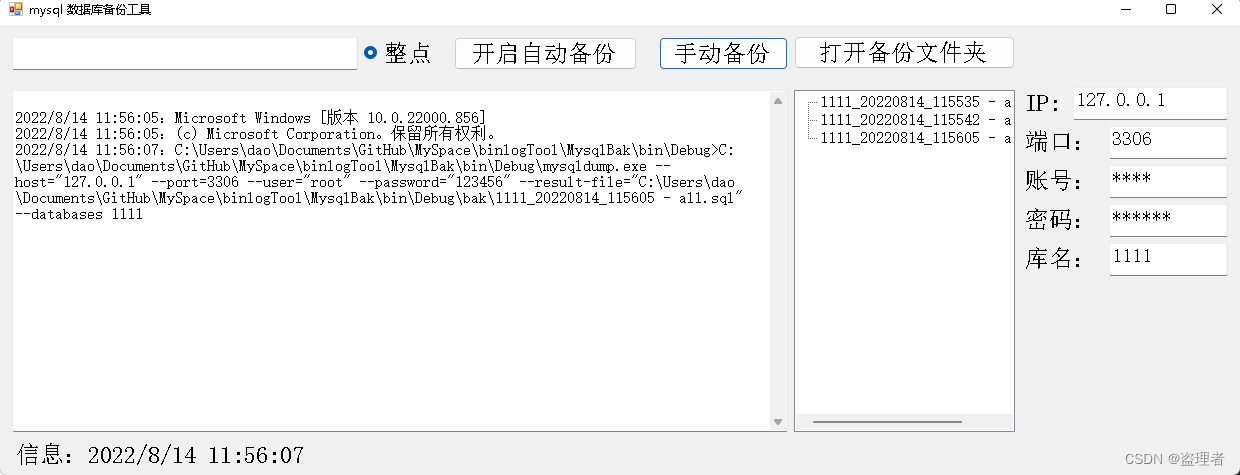
运行结果
-
相关阅读:
在Spring Boot项目中使用JPA
HTML+CSS个人静态网页设计
大数据实训2 - 法律咨询数据分析和服务推荐
Web大学生网页作业成品:基于html制作中国科技发展网站设计题材【航天之路7页】HTML+CSS+JavaScript
深入浅出:npm常用命令详解与实践
【Spring】AOP的三种方式
基于Dijkstra、A*和动态规划的移动机器人路径规划(Matlab代码实现)
Springboot旅游度假村管理系统34q0n计算机毕业设计-课程设计-期末作业-毕设程序代做
c语言实现三子棋
MCE | 磁珠 Protocol,如何快速捕获您心仪的蛋白~
- 原文地址:https://blog.csdn.net/qq_36051316/article/details/126286293
