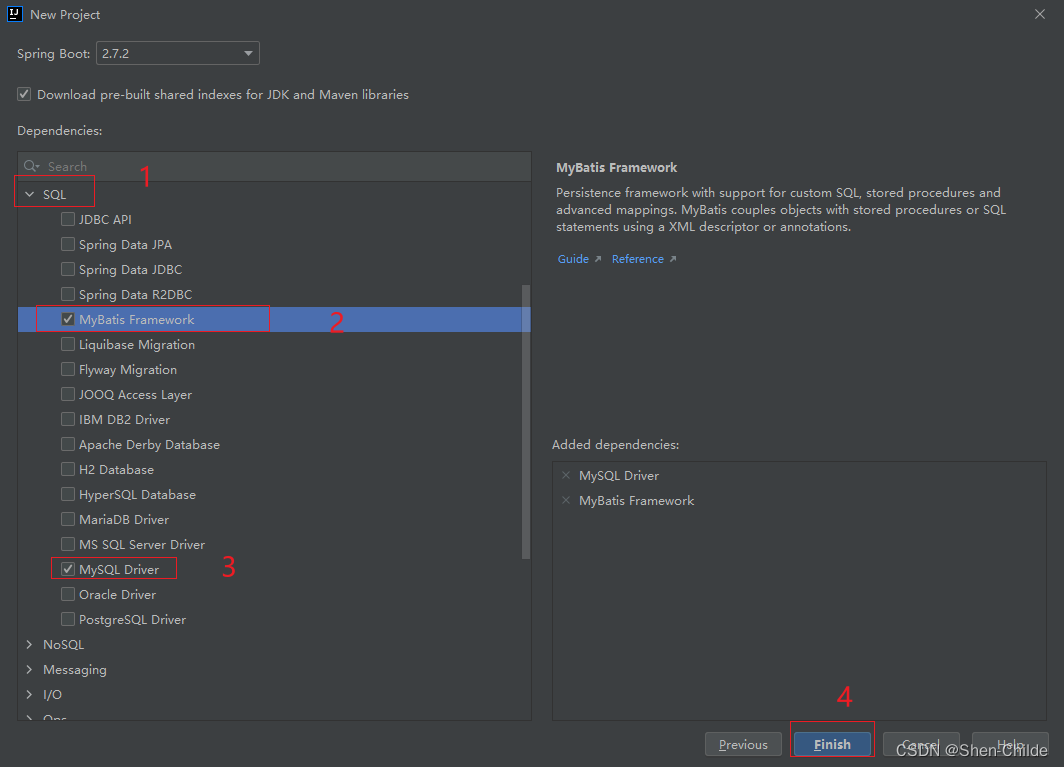
勾选MyBatis技术SQL(MyBatis Framework、MySQL Driver) 配置数据库连接信息 application.yml 接口中使用SQL映射添加@Mapper被容器识别到
spring :
datasource :
driver-class-name : com.mysql.cj.jdbc.Driver
url : jdbc: mysql: //localhost: 3306/ssmbuild? serverTimezone=UTC
username : root
password : 111111
package com. sgz. dao ;
import com. sgz. pojo. Book ;
import org. apache. ibatis. annotations. Mapper ;
import org. apache. ibatis. annotations. Select ;
@Mapper
public interface BookDao {
@Select ( "select * from books where bookID = #{id}" )
Book getById ( Integer id) ;
}
package com. sgz ;
import com. sgz. dao. BookDao ;
import org. junit. jupiter. api. Test ;
import org. springframework. beans. factory. annotation. Autowired ;
import org. springframework. boot. test. context. SpringBootTest ;
@SpringBootTest
class Day63SpringbootMybatisApplicationTests {
@Autowired
private BookDao bookDao;
@Test
void contextLoads ( ) {
System . out. println ( bookDao. getById ( 2 ) ) ;
}
}
1 2 3 4 5 6 7 8 9 10 11 12 13 14 15 16 17 18 19 20