-
本地存储localStorage及商品管理系统
本地存储
在本地浏览器上存储大量的数据,HTML5提供了localStorage
- 数据存储在用户浏览器中
- 设置,读取方便,页面刷新不丢失数据
- 容量较大, 在5M左右
localStorage
- 生命周期永久生效,除非手动删除,否则关闭页面也会存在
- 可以多窗口(页面)共享(同一浏览器可以共享)
- 以键值对的形式存储使用
// 存储数据 // localStorage.setItem('名字','值') localStorage.setItem('uname','zs') // 读取数据 // localStorage.getItem('名字') console.log(localStorage.getItem('uname')) // 删除数据 // localStorage.removeItem('名字') localStorage.removeItem('uname') // 存储复杂数据类型 var obj = { name:"ls", age:23 } // localStorage 只能存储字符串 localStorage.setItem('o',JSON.stringify(obj)) console.log(typeof localStorage.getItem('o')) console.log(JSON.parse(localStorage.getItem('o')))- 1
- 2
- 3
- 4
- 5
- 6
- 7
- 8
- 9
- 10
- 11
- 12
- 13
- 14
- 15
- 16
- 17
- 18
- 19
- 20
- 21
- 22
案例:wacth监听存储到本地,data中从本地读取
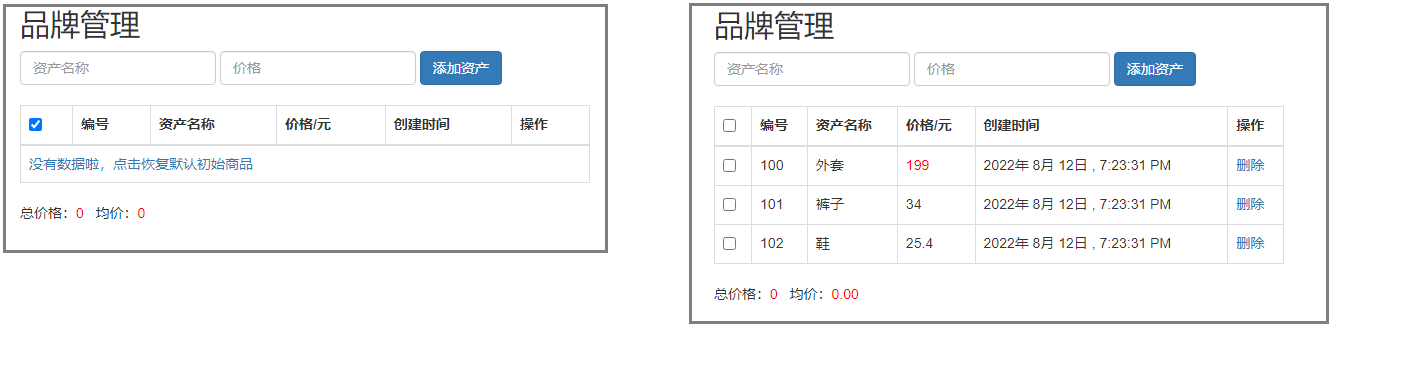
初始列表中没有数据,可以点击蓝字生成原始数据,或者手动添加数据。之后勾选、删除和添加的数据,刷新页面不会改变。总价和均价计算勾选上的商品。
引入了vue,bootstrap和moment.js.col{ color: red; } #app{ margin: 0 100px; }- 1
- 2
- 3
- 4
- 5
- 6
<div id="app"> <h2>品牌管理h2> <form class="form-inline"> <div class="form-group"> <input type="text" class="form-control" placeholder="资产名称" v-model="name"> div> <div class="form-group"> <input type="number" class="form-control" placeholder="价格" v-model="price"> div> <input type="button" @click="add" value="添加资产" class="btn btn-primary"> form> <br> <table class="table table-bordered"> <tr> <th> <input type="checkbox" v-model="allcheck"> th> <th>编号th> <th>资产名称th> <th>价格/元th> <th>创建时间th> <th>操作th> tr> <tbody v-if="objArr.length>0"> <tr v-for="(item,index) in objArr"> <td> <input type="checkbox" v-model="item.ischeck"> td> <td>{{item.id}}td> <td>{{item.name}}td> <td :class = "{'col':item.price>100}">{{item.price}}td> <td>{{item.time|toDate}}td> <td><a href="#" @click.prevent="remove(index)">删除a>td> tr> tbody> <tbody v-else> <tr> <td colspan="6"><a href="#" @click.prevent="reset">没有数据啦,点击恢复默认初始商品a>td> tr> tbody> table> <p>总价格:<span class="col">{{allprice}}span> 均价:<span class="col">{{avgprice}}span>p> div>- 1
- 2
- 3
- 4
- 5
- 6
- 7
- 8
- 9
- 10
- 11
- 12
- 13
- 14
- 15
- 16
- 17
- 18
- 19
- 20
- 21
- 22
- 23
- 24
- 25
- 26
- 27
- 28
- 29
- 30
- 31
- 32
- 33
- 34
- 35
- 36
- 37
- 38
- 39
- 40
- 41
- 42
- 43
- 44

// Vue.filter('toDate',val=>{ // return moment(val).format('MMMM Do YYYY, h:mm:ss a') // }) var app = new Vue({ el:'#app', data:{ arr: [ { id:100, name:'外套', price:199, time:new Date() }, { id:101, name:'裤子', price:34, time:new Date() }, { id:102, name:'鞋', price:25.4, time:new Date() } ], // 本地读取数据 objArr:JSON.parse(localStorage.getItem('objArr') || '[]'), name:'', price:'', checkArr:[] }, // 计算属性 全选&总价格&平均价格 computed:{ allcheck:{ //全选 // 全选的值发生变化就会触发set方法 set(val){ console.log(val) // val是全选状态 (true/false) this.objArr.forEach(item=>{ item.ischeck = val }) }, get(){ console.log("get") // 判断数组中的每一条数据是否全部选中,全选中 全选就选中 // 只要有一条数据不选中 全选就不选中 return this.objArr.every(item=>{ return item.ischeck == true }) } }, // 总价来源于所有数据计算而来的结果 allprice(){ //总价格 var sum = 0; this.checkArr = this.objArr.filter((x,i)=>{ return x.ischeck==true; }) this.checkArr.forEach(item=>{ // console.log(item.price,typeof item.price); sum += item.price; }) return sum; }, avgprice(){ return this.checkArr.length == 0 ? 0 : (this.allprice/this.checkArr.length).toFixed(2) } }, methods:{ remove(index){ // console.log('remove'); // if(confirm("确定要删除吗?")){ this.objArr.splice(index,1); // } }, add(){ // 判断用户输入是否为空 if(this.name.length===0 || this.price.length===0){ alert("不能为空") return } // 创建一条要添加的数据 var obj = { id:this.objArr.length > 0 ? (this.objArr[this.objArr.length-1].id+1) : 100, name:this.name, price:Number(this.price), time:new Date(), ischeck:false } // console.log(obj); this.objArr.push(obj); // console.log(this.objArr); this.name=''; this.price='' }, reset(){ // console.log(123); this.objArr = JSON.parse(JSON.stringify(this.arr)); } }, // 侦听器 watch:{ // 侦听数组的变化 数组变化就进行存储 objArr:{ deep:true, handler(newval,oldval){ // 数组存储到本地 localStorage.setItem('objArr',JSON.stringify(newval)) } } }, // 过滤器 filters:{ 'toDate':(val)=>{ return moment(val).format('YYYY[年] M[月] D[日] , h:mm:ss A'); } } })- 1
- 2
- 3
- 4
- 5
- 6
- 7
- 8
- 9
- 10
- 11
- 12
- 13
- 14
- 15
- 16
- 17
- 18
- 19
- 20
- 21
- 22
- 23
- 24
- 25
- 26
- 27
- 28
- 29
- 30
- 31
- 32
- 33
- 34
- 35
- 36
- 37
- 38
- 39
- 40
- 41
- 42
- 43
- 44
- 45
- 46
- 47
- 48
- 49
- 50
- 51
- 52
- 53
- 54
- 55
- 56
- 57
- 58
- 59
- 60
- 61
- 62
- 63
- 64
- 65
- 66
- 67
- 68
- 69
- 70
- 71
- 72
- 73
- 74
- 75
- 76
- 77
- 78
- 79
- 80
- 81
- 82
- 83
- 84
- 85
- 86
- 87
- 88
- 89
- 90
- 91
- 92
- 93
- 94
- 95
- 96
- 97
- 98
- 99
- 100
- 101
- 102
- 103
- 104
- 105
- 106
- 107
- 108
- 109
- 110
- 111
- 112
- 113
- 114
- 115
- 116
- 117
- 118
- 119
-
相关阅读:
AI-数学-高中-42导数的概念与意义
Windows用VM虚拟机安装MacOS Ventura 13.6系统全流程教程(附资源)
mmclassification 训练自定义数据
文心一言 VS 讯飞星火 VS chatgpt (105)-- 算法导论10.1 3题
Android的多线程和异步处理
3分钟看懂NPDP| 超全版
2023.10.17 关于 wait 和 notify 的使用
Rust语言有些情况一直卡住的解决方法
阿里云通义千问开源两款语音基座模型分别是SenseVoice和CosyVoice
Map集合概述和一般使用
- 原文地址:https://blog.csdn.net/qq_45025670/article/details/126305891
