-
计设大赛作品分享
参加计算机设计大赛团队做了两个月的游戏,拿到了国三的好成绩,下面是项目分享。
目录
一、游戏流程图
游戏的是由一个个游戏场景组成的,各个场景之间有都接口相连。

场景编号:

二、分块剖析
1、封面设计-场景①
(1)思路:
游戏角色从右下角向左边乘船驶出,到达最左侧直到身影消失后,显示游戏封面《诗梦游记》。


(2)技术:
①背景由美工制作。
②字体采用
 制作的字体图片完成。
③动画由unity动画器制作完成。
④跳转到下一场景和角色移动由代码完成。
(3)代码:
跳转到下一场景和角色移动脚本:
- using UnityEngine;
- using UnityEngine.SceneManagement;
- public class fengmian_jindutiao : MonoBehaviour
- {
- public float speed;
- public GameObject gameobject;
- void Update()
- {
- transform.Translate(speed * Time.deltaTime, 0, 0);
- if (Input.GetKeyDown(KeyCode.Escape) /*|| Input.GetKeyDown(KeyCode.Home)*/)
- {
- SceneManager.LoadScene("Login");//build index
- }
- }
- void OnTriggerEnter2D(Collider2D other)
- {
- Debug.Log("下一个场景:登录界面");
- //切换下一个场景
- SceneManager.LoadScene("Login");//build index
- }
- }
2、登录与注册-②③场景
(1)思路:
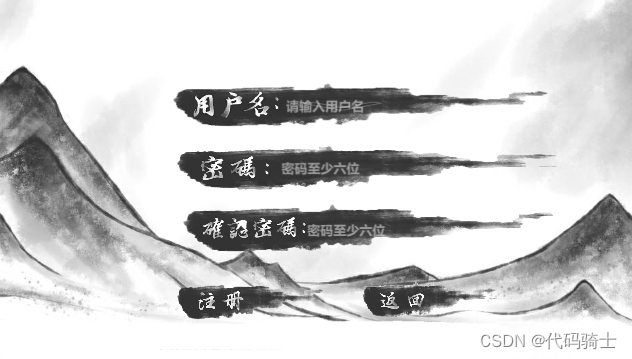
玩家通过注册功能注册游戏账号,返回登录界面进行登录。玩家的账号信息及密码都由服务器数据库保存,如果注册完成,直接登录即可,如果没有注册则无法登录。
(2)技术:
①UI设计
②数据库连接
③登录功能(代码)

④注册功能(代码)
(3)代码
登录代码:

Login脚本:
- using MySql.Data.MySqlClient;
- using System;
- using System.Collections;
- using System.Collections.Generic;
- using System.Data;
- using UnityEngine;
- using UnityEngine.UI;
- using UnityEngine.SceneManagement;
- public class Login : MonoBehaviour
- {
- public InputField i1, i2;
- private bool show = true;
- public Text RUname;//获取用户名
- public string reName;
- public void toLogin(string s1,string s2)
- {
- //建立连接语句
- //charset=utf8这句要写,不然可能会报错
- string constr = "server=服务器公网网址;port=端口;User Id=用户名;password=密码;Database=数据库;charset=utf8";
- //建立连接
- MySqlConnection mycon = new MySqlConnection(constr);
- //打开连接
- mycon.Open();
- //插入数据
- /*MySqlCommand mycmd = new MySqlCommand("insert into user(username,pw) values ('" + s1 + "','" + s2 + "')", mycon);
- if (mycmd.ExecuteNonQuery() > 0)
- {
- print("Insert success!");
- }*/
- //查询数据
- string selstr = "select * from peotry";
- MySqlCommand cmd = new MySqlCommand(selstr, mycon);
- MySqlDataReader reader = cmd.ExecuteReader();
- /*try
- {*/
- while (reader.Read())
- {
- if(reader[0].ToString() == s1 && reader[1].ToString() == s2)
- {
- Debug.Log("登陆成功进入:主菜单");
- i1.text = "";
- i2.text = "";
- show = false;
- //获取当前用户名
- RUname.text = s1;
- reName = s1;
- // 保存用户名数据
- PlayerPrefs.SetString("reName", reName);
- //登录成功切换场景
- SceneManager.LoadScene("主菜单");//build index
- break;
- }
- }
- if (show)
- {
- GameObject.Find("游戏主控").GetComponent
().error(); - i1.text = "";
- i2.text = "";
- }
- //}
- //关闭连接
- mycon.Close();
- }
- }
Exit脚本:
- using System.Collections;
- using System.Collections.Generic;
- using UnityEngine;
- using UnityEngine.SceneManagement;
- public class Exit : MonoBehaviour
- {
- // Start is called before the first frame update
- public void OnStartGame()
- {
- SceneManager.LoadScene(1);
- }
- public void OnExitGame()
- {
- #if UNITY_EDITOR
- UnityEditor.EditorApplication.isPlaying = false;
- #else
- Application.Quit();
- #endif
- }
- }
GameUI脚本:
- using System.Collections;
- using System.Collections.Generic;
- using UnityEngine;
- using UnityEngine.UI;
- public class GameUI : MonoBehaviour
- {
- public Image image1;
- public Image image2;
- // Start is called before the first frame update
- void Start()
- {
- image1.transform.position = new Vector3(1000, 1000, 0);
- image2.transform.position = new Vector3(1000, 1000, 0);
- }
- // Update is called once per frame
- void Update()
- {
- }
- public void onExit()
- {
- image1.transform.position = new Vector3(0, 0, 0);
- GameObject.Find("退出按钮").GetComponent
- GameObject.Find("关于按钮").GetComponent
- }
- public void cancel1()
- {
- image1.transform.position = new Vector3(1000,1000,0);
- GameObject.Find("退出按钮").GetComponent
- GameObject.Find("关于按钮").GetComponent
- }
- public void cancel2()
- {
- image2.transform.position = new Vector3(1000, 1000, 0);
- GameObject.Find("退出按钮").GetComponent
- GameObject.Find("关于按钮").GetComponent
- }
- public void error()
- {
- image2.transform.position = new Vector3(0, 0, 0);
- GameObject.Find("退出按钮").GetComponent
- GameObject.Find("关于按钮").GetComponent
- }
- }
Gradualchage脚本:
- using System.Collections;
- using System.Collections.Generic;
- using UnityEngine;
- using UnityEngine.UI;
- using UnityEngine.SceneManagement;
- public class Gradualchange : MonoBehaviour
- {
- public Image image;
- public float showTime = 2.50f;//规定的显示时间
- public float ShowTimeTrigger = 0;//显示的实时时间
- public float fadeTime = 2;//规定的消失时间
- public float fadeTimeTrigger = 0;//消失的实时时间
- private bool show = true;
- private bool turn = true;
- // Update is called once per frame
- void Update()
- {
- if (turn)
- {
- ShowTimeTrigger += Time.deltaTime;
- if (ShowTimeTrigger > showTime)
- {
- if (fadeTimeTrigger >= 0 && fadeTimeTrigger < fadeTime)
- {
- fadeTimeTrigger += Time.deltaTime;
- if (show)
- {
- image.color = new Color(1, 1, 1, 1 - (fadeTimeTrigger / fadeTime));
- }
- else
- {
- image.color = new Color(1, 1, 1, (fadeTimeTrigger / fadeTime));
- }
- }
- else
- {
- SceneManager.LoadScene("Login");
- turn = false;
- }
- }
- }
- }
- }
LoginJudge脚本:
- using System.Collections;
- using System.Collections.Generic;
- using UnityEngine;
- using UnityEngine.UI;
- public class LoginJudge : MonoBehaviour
- {
- public InputField i1,i2;
- private string s1, s2;
- private int count = 0;
- private bool show = true;
- // Start is called before the first frame update
- public void Jugde()
- {
- show = true;
- s1 = i1.text;
- s2 = i2.text;
- for(int i = 0;i < s2.Length; i++)
- {
- count++;
- }
- if(count < 6)
- {
- GameObject.Find("游戏主控").GetComponent
().error(); - i1.text = "";
- i2.text = "";
- show = false;
- }
- count = 0;
- if (show)
- {
- GameObject.Find("游戏主控").GetComponent
().toLogin(s1, s2); - }
- }
- }
Register脚本:
- using MySql.Data.MySqlClient;
- using System;
- using System.Collections;
- using System.Collections.Generic;
- using System.Data;
- using UnityEngine;
- using UnityEngine.UI;
- using UnityEngine.SceneManagement;
- public class Register : MonoBehaviour
- {
- public void change()
- {
- SceneManager.LoadScene("Register");
- }
- }
注册代码:

RJudge脚本:
- using MySql.Data.MySqlClient;
- using System;
- using System.Collections;
- using System.Collections.Generic;
- using System.Data;
- using UnityEngine;
- using UnityEngine.UI;
- public class RJudge : MonoBehaviour
- {
- public InputField i1, i2, i3;
- public Image m1, m2, m3, m4;
- private string s1, s2, s3,sco;
- private bool show = true;
- private int score = 0;
- // Start is called before the first frame update
- void Start()
- {
- m1.transform.position = new Vector3(1000, 1000, 0);
- m2.transform.position = new Vector3(1000, 1000, 0);
- m3.transform.position = new Vector3(1000, 1000, 0);
- m4.transform.position = new Vector3(1000, 1000, 0);
- }
- public void registerjudge()
- {
- show = true;
- s1 = i1.text;
- s2 = i2.text;
- s3 = i3.text;
- sco = score.ToString();
- if(s1 == "")
- {
- GameObject.Find("注册按钮").GetComponent
- m4.transform.position = new Vector3(0, 0, 0);
- show = false;
- }
- if (show)
- {
- if (s2 != s3 || s2.Length < 6 || s3.Length < 6)
- {
- GameObject.Find("注册按钮").GetComponent
- m1.transform.position = new Vector3(0, 0, 0);
- show = false;
- }
- }
- if (show)
- {
- //建立连接语句
- //charset=utf8这句要写,不然可能会报错
- string constr = "server=服务器公网网址;port=端口;User Id=用户名;password=密码;Database=数据库;charset=utf8";
- //建立连接
- MySqlConnection mycon = new MySqlConnection(constr);
- //打开连接
- mycon.Open();
- GameObject.Find("注册按钮").GetComponent
- /*try
- {
- MySqlCommand mycmd = new MySqlCommand("insert into 表(username,pw) values ('" + s1 + "','" + s2 + "')", mycon);
- if (mycmd.ExecuteNonQuery() > 0)
- {
- print("Insert success!");
- }
- m2.transform.position = new Vector3(0, 0, 0);
- }
- catch (Exception e)
- {
- m3.transform.position = new Vector3(0, 0, 0);
- }*/
- string selstr = "select * from 表";
- MySqlCommand cmd = new MySqlCommand(selstr, mycon);
- MySqlDataReader reader = cmd.ExecuteReader();
- bool judge = true;
- while (reader.Read())
- {
- if (reader[0].ToString() == s1)
- {
- m3.transform.position = new Vector3(0, 0, 0);
- judge = false;
- }
- }
- reader.Close();
- cmd.Clone();
- if (judge)
- {
- MySqlCommand mycmd = new MySqlCommand("insert into 表(username,pw,score) values ('" + s1 + "','" + s2 + "','" + score + "')", mycon);
- if (mycmd.ExecuteNonQuery() > 0)
- {
- print("Insert success!");
- }
- m2.transform.position = new Vector3(0, 0, 0);
- }
- mycon.Close();
- }
- }
- }
Confirm 脚本:
- using System.Collections;
- using System.Collections.Generic;
- using UnityEngine;
- using UnityEngine.UI;
- using UnityEngine.SceneManagement;
- public class Confirm : MonoBehaviour
- {
- public InputField i1, i2, i3;
- public Image m1, m2, m3, m4;
- public void confirm1()
- {
- GameObject.Find("注册按钮").GetComponent
- m1.transform.position = new Vector3(1000, 1000, 0);
- i1.text = "";
- i2.text = "";
- i3.text = "";
- }
- public void confirm2()
- {
- GameObject.Find("注册按钮").GetComponent
- m2.transform.position = new Vector3(1000, 1000, 0);
- SceneManager.LoadScene("Login");
- }
- public void confirm3()
- {
- GameObject.Find("注册按钮").GetComponent
- m3.transform.position = new Vector3(1000, 1000, 0);
- i2.text = "";
- i3.text = "";
- }
- public void confirm4()
- {
- i2.text = "";
- i3.text = "";
- GameObject.Find("注册按钮").GetComponent
- m4.transform.position = new Vector3(1000, 1000, 0);
- }
- }
Return 脚本:
- using System.Collections;
- using System.Collections.Generic;
- using UnityEngine;
- using UnityEngine.SceneManagement;
- public class Return : MonoBehaviour
- {
- public void returnLogin()
- {
- SceneManager.LoadScene("Login");
- }
- }
3、主菜单-场景④
(1)思路
实现四个按钮:一是左上角的返回登录按钮,二是游戏开始按钮,三是游戏关于按钮,四是游戏退出按钮。
(2)技术
① UI设计
②按钮功能代码

(3)代码
返回登录界面:
ReturnLogin脚本:
- using UnityEngine;
- using UnityEngine.SceneManagement;
- public class zhucaidan_fanhuidenglu : MonoBehaviour
- {
- public void ReturnLogin()
- {
- SceneManager.LoadScene("Login");//build index
- }
- }
开始按钮:
zhucaidan_kaishi 脚本:
- using UnityEngine;
- using UnityEngine.UI;
- using UnityEngine.SceneManagement;
- public class zhucaidan_kaishi : MonoBehaviour
- {
- public void Kaishi()
- {
- Debug.Log("进入场景:漫画");
- SceneManager.LoadScene("manhua");//build index
- }
- }
关于按钮:
zhucaidan_openguanyu 脚本:
- using UnityEngine;
- using UnityEngine.UI;
- public class zhucaidan_openguanyu : MonoBehaviour
- {
- public GameObject guyuPanel;
- public void OpenGuanYu()
- {
- guyuPanel.SetActive(true);
- }
- }
退出按钮:
zhucaidan_tuichu 脚本:
- using System.Collections;
- using System.Collections.Generic;
- using UnityEngine;
- using UnityEngine.SceneManagement;
- public class zhucaidan_tuichu : MonoBehaviour
- {
- public void OnExitGame()
- {
- #if UNITY_EDITOR
- UnityEditor.EditorApplication.isPlaying = false;
- #else
- Application.Quit();
- #endif
- }
- }
4、剧情漫画-场景⑤
(1)思路
加载场景动画,一共三页,每页的内容由动画器制作,页面间的跳转由代码控制。
(2)技术
①漫画制作
②控制脚本

(3)代码
控制漫画进度代码:
donghua_jindu 脚本:
- using UnityEngine;
- using UnityEngine.UI;
- using UnityEngine.SceneManagement;
- public class donghua_jindu : MonoBehaviour
- {
- public GameObject panel_1;
- public GameObject panel_2;
- public GameObject panel_3;
- public GameObject page1;
- public GameObject page2;
- public GameObject page3;
- public float speed;
- void Update()
- {
- transform.position += new Vector3(speed * Time.deltaTime, 0, 0);
- if (Input.GetKeyDown(KeyCode.Escape) /*|| Input.GetKeyDown(KeyCode.Home)*/)
- {
- //加载场景
- SceneManager.LoadScene("诗梦秘境");//build index
- }
- }
- private void OnTriggerEnter2D(Collider2D other)
- {
- if (other.tag == "page_1")
- {
- panel_1.SetActive(false);
- panel_2.SetActive(true);
- }
- else if (other.tag == "page_2")
- {
- panel_2.SetActive(false);
- panel_3.SetActive(true);
- }
- else if (other.tag == "page_3")
- {
- panel_3.SetActive(true);
- //加载场景
- SceneManager.LoadScene("诗梦秘境");//build index
- transform.position = new Vector3(-10, -8, 0);
- }
- }
- }
5、游戏地图-场景⑥⑦
(1)思路
实现关卡的进入与地图的转换还有积分排行功能。
(2)技术
①美工设计
②功能实现


(3)代码
进入游戏代码:
play_zhuliguan 脚本:
- using UnityEngine;
- using UnityEngine.UI;
- using UnityEngine.SceneManagement;
- public class play_zhuliguan : MonoBehaviour
- {
- public void Play_ZLG()
- {
- Debug.Log("进入游戏:竹里馆");
- SceneManager.LoadScene("竹里馆");//build index
- }
- }
积分排行脚本:
- using MySql.Data.MySqlClient;
- using System;
- using System.Collections;
- using System.Collections.Generic;
- using System.Data;
- using UnityEngine;
- using UnityEngine.UI;
- public class paihangbang_duquAndxianshi : MonoBehaviour
- {
- public GameObject PaiMing;
- //private List
s = new List (); - public Text userName_And_userScore;
- private string texts;
- public void OpenPaiHangbang()
- {
- PaiMing.SetActive(true);
- }
- public void ReadScore()
- {
- string constr = "server=服务器公网网址;port=端口;User Id=用户名;password=密码;Database=数据库;charset=utf8";
- //建立连接
- MySqlConnection mycon = new MySqlConnection(constr);
- //打开连接
- mycon.Open();
- //读取数据
- string selstr = "select * from 表";
- MySqlCommand cmd = new MySqlCommand(selstr, mycon);
- MySqlDataReader reader = cmd.ExecuteReader();
- string temp1;
- string temp2;
- List
s = new List (); - while (reader.Read())
- {
- temp1 = reader[0].ToString();//用户名
- temp2 = reader[2].ToString();//得分
- s.Add(new user(temp1, int.Parse(temp2)));
- }
- s.Sort((x, y) => { return -x.score.CompareTo(y.score); });//升序排序
- texts = " ";
- for (int i = 0; i < s.Count; i++)
- {
- //Debug.Log(s[i].score + " " + s[i].username);//打印用户名及分数
- //userName_And_userScore.text = (s[i].score + " " + s[i].username).ToString();
- //userName_And_userScore.Add((s[i].score + " " + s[i].username).ToString());
- texts += ((i + 1).ToString() + "\t用户名: " + s[i].username + "\t" + " 总得分: " + s[i].score + " 分").ToString();
- texts += '\n';
- texts += '\n';
- }
- userName_And_userScore.text = texts;
- mycon.Close();
- }
- public class user
- {
- public string username;
- public int score;
- public user(string username, int score)
- {
- this.username = username;
- this.score = score;
- }
- }
- }
6、游戏玩法1-(场景⑧~⑫)
(1)思路
第一个关卡地图里都是五言诗,所以玩法是一轮点击五次,若五次能连成一句诗则消除此句,直到将整首诗消除即可通关。
(2)技术
①玩法设计
②美工设计

(3)代码
玩法设计脚本:
- using System.Collections;
- using System.Collections.Generic;
- using UnityEngine;
- using UnityEngine.UI;
- using UnityEngine.SceneManagement;
- //数据库连接
- using MySql.Data.MySqlClient;
- using System.Data;
- //using System;
- public class jinagxue_play : MonoBehaviour
- {
- //小关排名
- public Text Name_And_Score;
- private string texts;
- //获取当前用户名
- private string recentUsername;//当前用户名
- public GameObject TongguanUI;
- public Sprite[] gameWords;//汉字图片数组
- public List
- public List
hudie = new List ();//将所有蝴蝶存入列表 - public List
words = new List ();//将古诗汉字存入列表 - //新玩法:一次点五下!!!
- private bool firstGuess, secondGuess, thirdGuess, forthGuess, fifthGuess;
- private int firstGuess_Index, secondGuess_Index, thirdGuess_Index, forthGuess_Index, fifthGuess_Index;//按钮索引
- private int firstGuess_Word, secondGuess_Word, thirdGuess_Word, forthGuess_Word, fifthGuess_Word;//汉字索引
- private int countGuess;//点击次数
- private int countCorrectGuess;//点击正确次数
- private int gameGuess;
- //游戏计时
- //已经花费的时间
- float timeSpeed = 0.0f;
- public Text timeText;
- //随机显示答案
- public Image AnswerImage;
- public Text anserText;
- void Awake()
- {
- gameWords = Resources.LoadAll
("江雪/诗句"); - }
- void Start()
- {
- TongguanUI.SetActive(false);
- GetButtons();//获取按钮组件
- AddSprite();//将资源文件下的图片填入图片列表
- Shuffle(words);//图片随机排列函数
- AddListeners();//为按钮组件添加事件监听器
- gameGuess = 4;//5句诗
- //showAnser();
- }
- void Update()//更新游戏时间
- {
- timeSpeed += Time.deltaTime;
- if (Input.GetKeyDown(KeyCode.Escape) /*|| Input.GetKeyDown(KeyCode.Home)*/)
- {
- SceneManager.LoadScene("诗梦秘境");//build index
- }
- }
- void GetButtons()//添加按钮组件
- {
- GameObject[] objects = GameObject.FindGameObjectsWithTag("GameButton");
- GameObject[] hudies = GameObject.FindGameObjectsWithTag("HuDie");
- for (int i = 0; i < objects.Length; i++)
- {
- btns.Add(objects[i].GetComponent
- hudie.Add(hudies[i].GetComponent
()); - }
- }
- void AddListeners()//添加按钮监听器
- {
- foreach (Button btn in btns)
- {
- btn.onClick.AddListener(() => PickUpButtons());//lambda表达式
- }
- }
- void PickUpButtons()//按钮响应事件
- {
- if (!firstGuess)
- {
- firstGuess = true;
- firstGuess_Index = int.Parse(UnityEngine.EventSystems.EventSystem.current.currentSelectedGameObject.name);//获取按钮序号
- firstGuess_Word = int.Parse(words[firstGuess_Index].name);//获取按钮组件的image序号
- //关闭此处的蝴蝶图层,显示汉字
- hudie[firstGuess_Index].color = new Color(255, 255, 255, 0);
- btns[firstGuess_Index].image.sprite = words[firstGuess_Index];
- btns[firstGuess_Index].image.color = new Color(0, 0, 0, 255);
- //Debug.Log(firstGuess_Word);
- }
- else if (!secondGuess)
- {
- secondGuess = true;
- secondGuess_Index = int.Parse(UnityEngine.EventSystems.EventSystem.current.currentSelectedGameObject.name);//获取按钮序号
- secondGuess_Word = int.Parse(words[secondGuess_Index].name);//此处的汉字序号
- //关闭此处的蝴蝶图层,显示汉字
- hudie[secondGuess_Index].color = new Color(255, 255, 255, 0);
- btns[secondGuess_Index].image.sprite = words[secondGuess_Index];
- btns[secondGuess_Index].image.color = new Color(0, 0, 0, 255);
- //Debug.Log(secondGuess_Word);
- }
- else if (!thirdGuess)
- {
- thirdGuess = true;
- thirdGuess_Index = int.Parse(UnityEngine.EventSystems.EventSystem.current.currentSelectedGameObject.name);//获取按钮序号
- thirdGuess_Word = int.Parse(words[thirdGuess_Index].name);//此处的汉字序号
- //关闭此处的蝴蝶图层,显示汉字
- hudie[thirdGuess_Index].color = new Color(255, 255, 255, 0);
- btns[thirdGuess_Index].image.sprite = words[thirdGuess_Index];
- btns[thirdGuess_Index].image.color = new Color(0, 0, 0, 255);
- //Debug.Log(thirdGuess_Word);
- }
- else if (!forthGuess)
- {
- forthGuess = true;
- forthGuess_Index = int.Parse(UnityEngine.EventSystems.EventSystem.current.currentSelectedGameObject.name);//获取按钮序号
- forthGuess_Word = int.Parse(words[forthGuess_Index].name);//此处的汉字序号
- //关闭此处的蝴蝶图层,显示汉字
- hudie[forthGuess_Index].color = new Color(255, 255, 255, 0);
- btns[forthGuess_Index].image.sprite = words[forthGuess_Index];
- btns[forthGuess_Index].image.color = new Color(0, 0, 0, 255);
- //Debug.Log(forthGuess_Word);
- }
- else if (!fifthGuess)
- {
- fifthGuess = true;
- fifthGuess_Index = int.Parse(UnityEngine.EventSystems.EventSystem.current.currentSelectedGameObject.name);//获取按钮序号
- fifthGuess_Word = int.Parse(words[fifthGuess_Index].name);//此处的汉字序号
- //关闭此处的蝴蝶图层,显示汉字
- hudie[fifthGuess_Index].color = new Color(255, 255, 255, 0);
- btns[fifthGuess_Index].image.sprite = words[fifthGuess_Index];
- btns[fifthGuess_Index].image.color = new Color(0, 0, 0, 255);
- //Debug.Log(fifthGuess_Word);
- StartCoroutine(CheckIfThePuzzleMatch());
- }
- }
- IEnumerator CheckIfThePuzzleMatch()
- {
- yield return new WaitForSeconds(1f);
- if ((firstGuess_Word + secondGuess_Word + thirdGuess_Word + forthGuess_Word + fifthGuess_Word == 10)
- &&(firstGuess_Word>=0&&firstGuess_Word<=4) && (secondGuess_Word >= 0 && secondGuess_Word <= 4)
- && (thirdGuess_Word >= 0 && thirdGuess_Word <= 4) && (forthGuess_Word >= 0 && forthGuess_Word <= 4)
- && (fifthGuess_Word >= 0 && fifthGuess_Word <= 4))
- {
- yield return new WaitForSeconds(.5f);
- Debug.Log("第一行结束");//0~4
- btns[firstGuess_Index].interactable = false;
- btns[secondGuess_Index].interactable = false;
- btns[thirdGuess_Index].interactable = false;
- btns[forthGuess_Index].interactable = false;
- btns[fifthGuess_Index].interactable = false;
- btns[firstGuess_Index].image.color = new Color(0, 0, 0, 0);
- btns[secondGuess_Index].image.color = new Color(0, 0, 0, 0);
- btns[thirdGuess_Index].image.color = new Color(0, 0, 0, 0);
- btns[forthGuess_Index].image.color = new Color(0, 0, 0, 0);
- btns[fifthGuess_Index].image.color = new Color(0, 0, 0, 0);
- CheckIfTheGameIsFinished();
- }
- else if ((firstGuess_Word + secondGuess_Word + thirdGuess_Word + forthGuess_Word + fifthGuess_Word == 35)
- && (firstGuess_Word >= 5 && firstGuess_Word <= 9) && (secondGuess_Word >= 5 && secondGuess_Word <= 9)
- && (thirdGuess_Word >= 5 && thirdGuess_Word <= 9) && (forthGuess_Word >= 5 && forthGuess_Word <= 9)
- && (fifthGuess_Word >= 5 && fifthGuess_Word <= 9))
- {
- yield return new WaitForSeconds(.5f);
- Debug.Log("第二行结束");//5~9
- btns[firstGuess_Index].interactable = false;
- btns[secondGuess_Index].interactable = false;
- btns[thirdGuess_Index].interactable = false;
- btns[forthGuess_Index].interactable = false;
- btns[fifthGuess_Index].interactable = false;
- btns[firstGuess_Index].image.color = new Color(0, 0, 0, 0);
- btns[secondGuess_Index].image.color = new Color(0, 0, 0, 0);
- btns[thirdGuess_Index].image.color = new Color(0, 0, 0, 0);
- btns[forthGuess_Index].image.color = new Color(0, 0, 0, 0);
- btns[fifthGuess_Index].image.color = new Color(0, 0, 0, 0);
- CheckIfTheGameIsFinished();
- }
- else if ((firstGuess_Word + secondGuess_Word + thirdGuess_Word + forthGuess_Word + fifthGuess_Word == 60)
- && (firstGuess_Word >= 10 && firstGuess_Word <= 14) && (secondGuess_Word >= 10 && secondGuess_Word <= 14)
- && (thirdGuess_Word >= 10 && thirdGuess_Word <= 14) && (forthGuess_Word >= 10 && forthGuess_Word <= 14)
- && (fifthGuess_Word >= 10 && fifthGuess_Word <= 14))
- {
- yield return new WaitForSeconds(.5f);
- Debug.Log("第三行结束");//10~14:10\11\12\13\14
- btns[firstGuess_Index].interactable = false;
- btns[secondGuess_Index].interactable = false;
- btns[thirdGuess_Index].interactable = false;
- btns[forthGuess_Index].interactable = false;
- btns[fifthGuess_Index].interactable = false;
- btns[firstGuess_Index].image.color = new Color(0, 0, 0, 0);
- btns[secondGuess_Index].image.color = new Color(0, 0, 0, 0);
- btns[thirdGuess_Index].image.color = new Color(0, 0, 0, 0);
- btns[forthGuess_Index].image.color = new Color(0, 0, 0, 0);
- btns[fifthGuess_Index].image.color = new Color(0, 0, 0, 0);
- CheckIfTheGameIsFinished();
- }
- else if ((firstGuess_Word + secondGuess_Word + thirdGuess_Word + forthGuess_Word + fifthGuess_Word == 85)
- && (firstGuess_Word >= 15 && firstGuess_Word <= 19) && (secondGuess_Word >= 15 && secondGuess_Word <= 19)
- && (thirdGuess_Word >= 15 && thirdGuess_Word <= 19) && (forthGuess_Word >= 15 && forthGuess_Word <= 19)
- && (fifthGuess_Word >= 15 && fifthGuess_Word <= 19))
- {
- yield return new WaitForSeconds(.5f);
- Debug.Log("第四行结束");//15~19; 15\16\17\18\19
- btns[firstGuess_Index].interactable = false;
- btns[secondGuess_Index].interactable = false;
- btns[thirdGuess_Index].interactable = false;
- btns[forthGuess_Index].interactable = false;
- btns[fifthGuess_Index].interactable = false;
- btns[firstGuess_Index].image.color = new Color(0, 0, 0, 0);
- btns[secondGuess_Index].image.color = new Color(0, 0, 0, 0);
- btns[thirdGuess_Index].image.color = new Color(0, 0, 0, 0);
- btns[forthGuess_Index].image.color = new Color(0, 0, 0, 0);
- btns[fifthGuess_Index].image.color = new Color(0, 0, 0, 0);
- CheckIfTheGameIsFinished();
- }
- else
- {
- yield return new WaitForSeconds(.5f);
- //开启蝴蝶图层
- hudie[firstGuess_Index].color = new Color(255, 255, 255, 200);
- hudie[secondGuess_Index].color = new Color(255, 255, 255, 200);
- hudie[thirdGuess_Index].color = new Color(255, 255, 255, 200);
- hudie[forthGuess_Index].color = new Color(255, 255, 255, 200);
- hudie[fifthGuess_Index].color = new Color(255, 255, 255, 200);
- btns[firstGuess_Index].image.sprite = words[firstGuess_Index];
- btns[secondGuess_Index].image.sprite = words[secondGuess_Index];
- btns[thirdGuess_Index].image.sprite = words[thirdGuess_Index];
- btns[forthGuess_Index].image.sprite = words[forthGuess_Index];
- btns[fifthGuess_Index].image.sprite = words[fifthGuess_Index];
- btns[firstGuess_Index].image.color = new Color(0, 0, 0, 0);
- btns[secondGuess_Index].image.color = new Color(0, 0, 0, 0);
- btns[thirdGuess_Index].image.color = new Color(0, 0, 0, 0);
- btns[forthGuess_Index].image.color = new Color(0, 0, 0, 0);
- btns[fifthGuess_Index].image.color = new Color(0, 0, 0, 0);
- Debug.Log("还原");
- }
- yield return new WaitForSeconds(.5f);
- firstGuess = secondGuess = thirdGuess = forthGuess = fifthGuess = false;
- }
- //返回时间函数
- public float returnTime()
- {
- return timeSpeed;
- }
- void CheckIfTheGameIsFinished()
- {
- countCorrectGuess++;
- if (countCorrectGuess == gameGuess)
- {
- TongguanUI.SetActive(true);
- Debug.Log("game finished");
- Time.timeScale = 0;
- //更改玩家得分
- UpDateScore();
- //进行小关排名
- GamePaiMing();
- Debug.Log(timeSpeed.ToString("0"));
- timeText.text = timeSpeed.ToString("0");
- Time.timeScale = 1;
- }
- }
- public void UpDateScore()
- {
- recentUsername = PlayerPrefs.GetString("reName");
- Debug.Log(recentUsername);
- //建立连接语句
- string constr = "server=服务器公网网址;port=端口;User Id=用户名;password=密码;Database=数据库;charset=utf8";
- //建立连接
- MySqlConnection mycon = new MySqlConnection(constr);
- //打开连接
- mycon.Open();
- //获取最后一个用户的用户名
- //float timeScore = timeSpeed;
- //得到score变化后的值用代码表示为t1.text 该用户的用户名为u1
- string selstr = "update 表set score=score+1 where username='"+recentUsername+"'";// + t1.text + "where username = u1";
- MySqlCommand cmd = new MySqlCommand(selstr, mycon);
- if (cmd.ExecuteNonQuery() > 0)
- {
- print("Insert success!");
- }
- //小关得分
- int flag = 1;
- if(timeSpeed >= 250)
- {
- flag = 0;//如果分数大于250秒则不计入小关排行榜
- }
- if(flag == 1)
- {
- string selstr_p1 = "update 表set p1='" + timeSpeed + "'where username='" + recentUsername + "' and p1 = 0 or username='" + recentUsername + "' and p1 > '" + timeSpeed + "'";//取最好成绩
- MySqlCommand cmd_p1 = new MySqlCommand(selstr_p1, mycon);
- if(cmd_p1.ExecuteNonQuery() > 0)
- {
- print("Insert success!");
- }
- }
- mycon.Close();
- }
- void GamePaiMing()
- {
- string constr = "server=服务器公网网址;port=端口;User Id=用户名;password=密码;Database=数据库;charset=utf8";
- //建立连接
- MySqlConnection mycon = new MySqlConnection(constr);
- //打开连接
- mycon.Open();
- //读取数据
- string selstr = "select * from peotry where p1<>0";//注意零分不计入排名
- MySqlCommand cmd = new MySqlCommand(selstr, mycon);
- MySqlDataReader reader = cmd.ExecuteReader();
- string temp1;
- string temp2;
- List
s = new List (); - while (reader.Read())
- {
- temp1 = reader[0].ToString();//用户名
- temp2 = reader[3].ToString();//p1得分
- s.Add(new user(temp1, int.Parse(temp2)));
- }
- s.Sort((x, y) => { return x.score.CompareTo(y.score); });//升序排序
- texts = " ";
- for (int i = 0; i < s.Count; i++)
- {
- texts += ((i + 1).ToString() + "\t用户名: " + s[i].username + "\t" + " 通关用时: " + s[i].score + " 秒").ToString();
- texts += '\n';
- texts += '\n';
- }
- Name_And_Score.text = texts;
- mycon.Close();
- }
- public class user
- {
- public string username;
- public int score;
- public user(string username, int score)
- {
- this.username = username;
- this.score = score;
- }
- }
- void AddSprite()//将汉字图片加入汉字图片列表
- {
- int n = btns.Count;//按钮数
- for (int i = 0; i < n; i++)
- {
- words.Add(gameWords[i]);
- }
- }
- void Shuffle(List
list )//图片随机排序 - {
- for (int i = 0; i < list.Count; i++)
- {
- Sprite temp = list[i];
- int randomIndex = Random.Range(i, list.Count);
- list[i] = list[randomIndex];
- list[randomIndex] = temp;
- }
- }
- public void showAnser()
- {
- int temp = Random.Range(0, words.Count);
- AnswerImage.sprite = words[temp];
- anserText.text = (temp+1).ToString();
- }
- }
7、游戏玩法2-(场景⑬~⑲)
(1)思路
第二个关卡地图里都是七言诗,所以玩法是一轮点击七次,若七次能连成一句诗则消除此句,直到将整首诗消除即可通关。
(2)技术
①玩法设计
②美工设计

(3)代码
玩法脚本设计:
- using System.Collections;
- using System.Collections.Generic;
- using UnityEngine;
- using UnityEngine.UI;
- using UnityEngine.SceneManagement;
- //数据库连接
- using MySql.Data.MySqlClient;
- using System.Data;
- //using System;
- public class chunxue_play : MonoBehaviour
- {
- //小关排名
- public Text Name_And_Score;
- private string texts;
- //获取当前用户名
- private string recentUsername;//当前用户名
- public GameObject TongguanUI;
- public Sprite[] gameWords;//汉字图片数组
- public List
- public List
hudie = new List ();//将所有蝴蝶存入列表 - public List
words = new List ();//将古诗汉字存入列表 - //新玩法:一次点七下!!!
- private bool firstGuess, secondGuess, thirdGuess, forthGuess, fifthGuess, sixthGuess, seventhGuess;
- private int firstGuess_Index, secondGuess_Index, thirdGuess_Index, forthGuess_Index, fifthGuess_Index, sixthGuess_Index, seventhGuess_Index;//按钮索引
- private int firstGuess_Word, secondGuess_Word, thirdGuess_Word, forthGuess_Word, fifthGuess_Word, sixthGuess_Word, seventhGuess_Word;//汉字索引
- private int countGuess;//点击次数
- private int countCorrectGuess;//点击正确次数
- private int gameGuess;
- //游戏计时
- //已经花费的时间
- float timeSpeed = 0.0f;
- public Text timeText;
- //随机显示答案
- public Image AnswerImage1;
- public Image AnswerImage2;
- public Image AnswerImage3;
- public Text anserText1;
- public Text anserText2;
- public Text anserText3;
- void Awake()
- {
- gameWords = Resources.LoadAll
("春雪/诗句"); - }
- void Start()
- {
- TongguanUI.SetActive(false);
- GetButtons();//获取按钮组件
- AddSprite();//将资源文件下的图片填入图片列表
- Shuffle(words);//图片随机排列函数
- AddListeners();//为按钮组件添加事件监听器
- gameGuess = 4;//4句诗
- //showAnser();
- }
- void Update()//更新游戏时间
- {
- timeSpeed += Time.deltaTime;
- if (Input.GetKeyDown(KeyCode.Escape) /*|| Input.GetKeyDown(KeyCode.Home)*/)
- {
- Debug.Log("强制退出!");
- SceneManager.LoadScene("诗梦秘境续");//build index
- }
- }
- void GetButtons()//添加按钮组件
- {
- GameObject[] objects = GameObject.FindGameObjectsWithTag("GameButton");
- GameObject[] hudies = GameObject.FindGameObjectsWithTag("HuDie");
- for (int i = 0; i < objects.Length; i++)
- {
- btns.Add(objects[i].GetComponent
- hudie.Add(hudies[i].GetComponent
()); - }
- }
- void AddListeners()//添加按钮监听器
- {
- foreach (Button btn in btns)
- {
- btn.onClick.AddListener(() => PickUpButtons());//lambda表达式
- }
- }
- void PickUpButtons()//按钮响应事件
- {
- if (!firstGuess)
- {
- firstGuess = true;
- firstGuess_Index = int.Parse(UnityEngine.EventSystems.EventSystem.current.currentSelectedGameObject.name);//获取按钮序号
- firstGuess_Word = int.Parse(words[firstGuess_Index].name);//获取按钮组件的image序号
- //关闭此处的蝴蝶图层,显示汉字
- hudie[firstGuess_Index].color = new Color(255, 255, 255, 0);
- btns[firstGuess_Index].image.sprite = words[firstGuess_Index];
- btns[firstGuess_Index].image.color = new Color(0, 0, 0, 255);
- //Debug.Log(firstGuess_Word);
- }
- else if (!secondGuess)
- {
- secondGuess = true;
- secondGuess_Index = int.Parse(UnityEngine.EventSystems.EventSystem.current.currentSelectedGameObject.name);//获取按钮序号
- secondGuess_Word = int.Parse(words[secondGuess_Index].name);//此处的汉字序号
- //关闭此处的蝴蝶图层,显示汉字
- hudie[secondGuess_Index].color = new Color(255, 255, 255, 0);
- btns[secondGuess_Index].image.sprite = words[secondGuess_Index];
- btns[secondGuess_Index].image.color = new Color(0, 0, 0, 255);
- //Debug.Log(secondGuess_Word);
- }
- else if (!thirdGuess)
- {
- thirdGuess = true;
- thirdGuess_Index = int.Parse(UnityEngine.EventSystems.EventSystem.current.currentSelectedGameObject.name);//获取按钮序号
- thirdGuess_Word = int.Parse(words[thirdGuess_Index].name);//此处的汉字序号
- //关闭此处的蝴蝶图层,显示汉字
- hudie[thirdGuess_Index].color = new Color(255, 255, 255, 0);
- btns[thirdGuess_Index].image.sprite = words[thirdGuess_Index];
- btns[thirdGuess_Index].image.color = new Color(0, 0, 0, 255);
- //Debug.Log(thirdGuess_Word);
- }
- else if (!forthGuess)
- {
- forthGuess = true;
- forthGuess_Index = int.Parse(UnityEngine.EventSystems.EventSystem.current.currentSelectedGameObject.name);//获取按钮序号
- forthGuess_Word = int.Parse(words[forthGuess_Index].name);//此处的汉字序号
- //关闭此处的蝴蝶图层,显示汉字
- hudie[forthGuess_Index].color = new Color(255, 255, 255, 0);
- btns[forthGuess_Index].image.sprite = words[forthGuess_Index];
- btns[forthGuess_Index].image.color = new Color(0, 0, 0, 255);
- //Debug.Log(forthGuess_Word);
- }
- else if (!fifthGuess)
- {
- fifthGuess = true;
- fifthGuess_Index = int.Parse(UnityEngine.EventSystems.EventSystem.current.currentSelectedGameObject.name);//获取按钮序号
- fifthGuess_Word = int.Parse(words[fifthGuess_Index].name);//此处的汉字序号
- //关闭此处的蝴蝶图层,显示汉字
- hudie[fifthGuess_Index].color = new Color(255, 255, 255, 0);
- btns[fifthGuess_Index].image.sprite = words[fifthGuess_Index];
- btns[fifthGuess_Index].image.color = new Color(0, 0, 0, 255);
- //Debug.Log(fifthGuess_Word);
- }
- else if (!sixthGuess)
- {
- sixthGuess = true;
- sixthGuess_Index = int.Parse(UnityEngine.EventSystems.EventSystem.current.currentSelectedGameObject.name);//获取按钮序号
- sixthGuess_Word = int.Parse(words[sixthGuess_Index].name);//此处的汉字序号
- //关闭此处的蝴蝶图层,显示汉字
- hudie[sixthGuess_Index].color = new Color(255, 255, 255, 0);
- btns[sixthGuess_Index].image.sprite = words[sixthGuess_Index];
- btns[sixthGuess_Index].image.color = new Color(0, 0, 0, 255);
- //Debug.Log(forthGuess_Word);
- }
- else if (!seventhGuess)
- {
- seventhGuess = true;
- seventhGuess_Index = int.Parse(UnityEngine.EventSystems.EventSystem.current.currentSelectedGameObject.name);//获取按钮序号
- seventhGuess_Word = int.Parse(words[seventhGuess_Index].name);//此处的汉字序号
- //关闭此处的蝴蝶图层,显示汉字
- hudie[seventhGuess_Index].color = new Color(255, 255, 255, 0);
- btns[seventhGuess_Index].image.sprite = words[seventhGuess_Index];
- btns[seventhGuess_Index].image.color = new Color(0, 0, 0, 255);
- //Debug.Log(fifthGuess_Word);
- StartCoroutine(CheckIfThePuzzleMatch());
- }
- }
- IEnumerator CheckIfThePuzzleMatch()
- {
- yield return new WaitForSeconds(1f);
- if ((firstGuess_Word + secondGuess_Word + thirdGuess_Word + forthGuess_Word + fifthGuess_Word+ sixthGuess_Word+ seventhGuess_Word == 21)
- &&(firstGuess_Word>=0&&firstGuess_Word<=6) && (secondGuess_Word >= 0 && secondGuess_Word <= 6)
- && (thirdGuess_Word >= 0 && thirdGuess_Word <= 6) && (forthGuess_Word >= 0 && forthGuess_Word <= 6)
- && (fifthGuess_Word >= 0 && fifthGuess_Word <= 6) && (sixthGuess_Word >= 0 && sixthGuess_Word <= 6)
- && (seventhGuess_Word >= 0 && seventhGuess_Word <= 6))
- {
- yield return new WaitForSeconds(.5f);
- Debug.Log("第一行结束");//0~4
- btns[firstGuess_Index].interactable = false;
- btns[secondGuess_Index].interactable = false;
- btns[thirdGuess_Index].interactable = false;
- btns[forthGuess_Index].interactable = false;
- btns[fifthGuess_Index].interactable = false;
- btns[sixthGuess_Index].interactable = false;
- btns[seventhGuess_Index].interactable = false;
- btns[firstGuess_Index].image.color = new Color(0, 0, 0, 0);
- btns[secondGuess_Index].image.color = new Color(0, 0, 0, 0);
- btns[thirdGuess_Index].image.color = new Color(0, 0, 0, 0);
- btns[forthGuess_Index].image.color = new Color(0, 0, 0, 0);
- btns[fifthGuess_Index].image.color = new Color(0, 0, 0, 0);
- btns[sixthGuess_Index].image.color = new Color(0, 0, 0, 0);
- btns[seventhGuess_Index].image.color = new Color(0, 0, 0, 0);
- CheckIfTheGameIsFinished();
- }
- else if ((firstGuess_Word + secondGuess_Word + thirdGuess_Word + forthGuess_Word + fifthGuess_Word + sixthGuess_Word + seventhGuess_Word == 70)
- && (firstGuess_Word >= 7 && firstGuess_Word <= 13) && (secondGuess_Word >= 7 && secondGuess_Word <= 13)
- && (thirdGuess_Word >= 7 && thirdGuess_Word <= 13) && (forthGuess_Word >= 7 && forthGuess_Word <= 13)
- && (fifthGuess_Word >= 7 && fifthGuess_Word <= 13) && (sixthGuess_Word >= 7 && sixthGuess_Word <= 13)
- && (seventhGuess_Word >= 7 && seventhGuess_Word <= 13))
- {
- yield return new WaitForSeconds(.5f);
- Debug.Log("第二行结束");//5~9
- btns[firstGuess_Index].interactable = false;
- btns[secondGuess_Index].interactable = false;
- btns[thirdGuess_Index].interactable = false;
- btns[forthGuess_Index].interactable = false;
- btns[fifthGuess_Index].interactable = false;
- btns[sixthGuess_Index].interactable = false;
- btns[seventhGuess_Index].interactable = false;
- btns[firstGuess_Index].image.color = new Color(0, 0, 0, 0);
- btns[secondGuess_Index].image.color = new Color(0, 0, 0, 0);
- btns[thirdGuess_Index].image.color = new Color(0, 0, 0, 0);
- btns[forthGuess_Index].image.color = new Color(0, 0, 0, 0);
- btns[fifthGuess_Index].image.color = new Color(0, 0, 0, 0);
- btns[sixthGuess_Index].image.color = new Color(0, 0, 0, 0);
- btns[seventhGuess_Index].image.color = new Color(0, 0, 0, 0);
- CheckIfTheGameIsFinished();
- }
- else if ((firstGuess_Word + secondGuess_Word + thirdGuess_Word + forthGuess_Word + fifthGuess_Word + sixthGuess_Word + seventhGuess_Word == 119)
- && (firstGuess_Word >= 14 && firstGuess_Word <= 20) && (secondGuess_Word >= 14 && secondGuess_Word <= 20)
- && (thirdGuess_Word >= 14 && thirdGuess_Word <= 20) && (forthGuess_Word >= 14 && forthGuess_Word <= 20)
- && (fifthGuess_Word >= 14 && fifthGuess_Word <= 20) && (sixthGuess_Word >= 14 && sixthGuess_Word <= 20)
- && (seventhGuess_Word >= 14 && seventhGuess_Word <= 20))
- {
- yield return new WaitForSeconds(.5f);
- Debug.Log("第三行结束");//10~14:10\11\12\13\14
- btns[firstGuess_Index].interactable = false;
- btns[secondGuess_Index].interactable = false;
- btns[thirdGuess_Index].interactable = false;
- btns[forthGuess_Index].interactable = false;
- btns[fifthGuess_Index].interactable = false;
- btns[sixthGuess_Index].interactable = false;
- btns[seventhGuess_Index].interactable = false;
- btns[firstGuess_Index].image.color = new Color(0, 0, 0, 0);
- btns[secondGuess_Index].image.color = new Color(0, 0, 0, 0);
- btns[thirdGuess_Index].image.color = new Color(0, 0, 0, 0);
- btns[forthGuess_Index].image.color = new Color(0, 0, 0, 0);
- btns[fifthGuess_Index].image.color = new Color(0, 0, 0, 0);
- btns[sixthGuess_Index].image.color = new Color(0, 0, 0, 0);
- btns[seventhGuess_Index].image.color = new Color(0, 0, 0, 0);
- CheckIfTheGameIsFinished();
- }
- else if ((firstGuess_Word + secondGuess_Word + thirdGuess_Word + forthGuess_Word + fifthGuess_Word + sixthGuess_Word + seventhGuess_Word == 168)
- && (firstGuess_Word >= 21 && firstGuess_Word <= 27) && (secondGuess_Word >= 21 && secondGuess_Word <= 27)
- && (thirdGuess_Word >= 21 && thirdGuess_Word <= 27) && (forthGuess_Word >= 21 && forthGuess_Word <= 27)
- && (fifthGuess_Word >= 21 && fifthGuess_Word <= 27) && (sixthGuess_Word >= 21 && sixthGuess_Word <= 27)
- && (seventhGuess_Word >= 21 && seventhGuess_Word <= 27))
- {
- yield return new WaitForSeconds(.5f);
- Debug.Log("第四行结束");//15~19; 15\16\17\18\19
- btns[firstGuess_Index].interactable = false;
- btns[secondGuess_Index].interactable = false;
- btns[thirdGuess_Index].interactable = false;
- btns[forthGuess_Index].interactable = false;
- btns[fifthGuess_Index].interactable = false;
- btns[sixthGuess_Index].interactable = false;
- btns[seventhGuess_Index].interactable = false;
- btns[firstGuess_Index].image.color = new Color(0, 0, 0, 0);
- btns[secondGuess_Index].image.color = new Color(0, 0, 0, 0);
- btns[thirdGuess_Index].image.color = new Color(0, 0, 0, 0);
- btns[forthGuess_Index].image.color = new Color(0, 0, 0, 0);
- btns[fifthGuess_Index].image.color = new Color(0, 0, 0, 0);
- btns[sixthGuess_Index].image.color = new Color(0, 0, 0, 0);
- btns[seventhGuess_Index].image.color = new Color(0, 0, 0, 0);
- CheckIfTheGameIsFinished();
- }
- else
- {
- yield return new WaitForSeconds(.5f);
- //开启蝴蝶图层
- hudie[firstGuess_Index].color = new Color(255, 255, 255, 200);
- hudie[secondGuess_Index].color = new Color(255, 255, 255, 200);
- hudie[thirdGuess_Index].color = new Color(255, 255, 255, 200);
- hudie[forthGuess_Index].color = new Color(255, 255, 255, 200);
- hudie[fifthGuess_Index].color = new Color(255, 255, 255, 200);
- hudie[sixthGuess_Index].color = new Color(255, 255, 255, 200);
- hudie[seventhGuess_Index].color = new Color(255, 255, 255, 200);
- btns[firstGuess_Index].image.sprite = words[firstGuess_Index];
- btns[secondGuess_Index].image.sprite = words[secondGuess_Index];
- btns[thirdGuess_Index].image.sprite = words[thirdGuess_Index];
- btns[forthGuess_Index].image.sprite = words[forthGuess_Index];
- btns[fifthGuess_Index].image.sprite = words[fifthGuess_Index];
- btns[sixthGuess_Index].image.sprite = words[sixthGuess_Index];
- btns[seventhGuess_Index].image.sprite = words[seventhGuess_Index];
- btns[firstGuess_Index].image.color = new Color(0, 0, 0, 0);
- btns[secondGuess_Index].image.color = new Color(0, 0, 0, 0);
- btns[thirdGuess_Index].image.color = new Color(0, 0, 0, 0);
- btns[forthGuess_Index].image.color = new Color(0, 0, 0, 0);
- btns[fifthGuess_Index].image.color = new Color(0, 0, 0, 0);
- btns[sixthGuess_Index].image.color = new Color(0, 0, 0, 0);
- btns[seventhGuess_Index].image.color = new Color(0, 0, 0, 0);
- Debug.Log("还原");
- }
- yield return new WaitForSeconds(.5f);
- firstGuess = secondGuess = thirdGuess = forthGuess = fifthGuess = sixthGuess = seventhGuess = false;
- }
- //返回时间函数
- public float returnTime()
- {
- return timeSpeed;
- }
- void CheckIfTheGameIsFinished()
- {
- countCorrectGuess++;
- if (countCorrectGuess == gameGuess)
- {
- // UpDateScore();
- TongguanUI.SetActive(true);
- Debug.Log("game finished");
- Time.timeScale = 0;
- //更改玩家得分
- UpDateScore();
- //进行小关排名
- GamePaiMing();
- Debug.Log(timeSpeed.ToString("0"));
- timeText.text = timeSpeed.ToString("0");
- Time.timeScale = 1;
- }
- }
- public void UpDateScore()
- {
- recentUsername = PlayerPrefs.GetString("reName");
- Debug.Log(recentUsername);
- //建立连接语句
- string constr = "server=服务器公网网址;port=端口;User Id=用户名;password=密码;Database=数据库;charset=utf8";
- //建立连接
- MySqlConnection mycon = new MySqlConnection(constr);
- //打开连接
- mycon.Open();
- //获取最后一个用户的用户名
- //得到score变化后的值用代码表示为t1.text 该用户的用户名为u1
- string selstr = "update 表set score=score+5 where username='" + recentUsername + "'";// + t1.text + "where username = u1";
- MySqlCommand cmd = new MySqlCommand(selstr, mycon);
- if (cmd.ExecuteNonQuery() > 0)
- {
- print("Insert success!");
- }
- //小关得分
- int flag = 1;
- if (timeSpeed >= 250)
- {
- flag = 0;//如果分数大于250秒则不计入小关排行榜
- }
- if (flag == 1)
- {
- string selstr_p7 = "update 表set p7='" + timeSpeed + "'where username='" + recentUsername + "'and p7 > '" + timeSpeed + "'or username='" + recentUsername + "' and p7 = 0";//取最好成绩
- MySqlCommand cmd_p7 = new MySqlCommand(selstr_p7, mycon);
- if (cmd_p7.ExecuteNonQuery() > 0)
- {
- print("Insert success!");
- }
- }
- mycon.Close();
- }
- void GamePaiMing()
- {
- string constr = "server=服务器公网网址;port=端口;User Id=用户名;password=密码;Database=数据库;charset=utf8";
- //建立连接
- MySqlConnection mycon = new MySqlConnection(constr);
- //打开连接
- mycon.Open();
- //读取数据
- string selstr = "select * from peotry where p7<>0";//注意零分不计入排名
- MySqlCommand cmd = new MySqlCommand(selstr, mycon);
- MySqlDataReader reader = cmd.ExecuteReader();
- string temp1;
- string temp2;
- List
s = new List (); - while (reader.Read())
- {
- temp1 = reader[0].ToString();//用户名
- temp2 = reader[9].ToString();//p7得分
- s.Add(new user(temp1, int.Parse(temp2)));
- }
- s.Sort((x, y) => { return x.score.CompareTo(y.score); });//升序排序
- texts = " ";
- for (int i = 0; i < s.Count; i++)
- {
- texts += ((i + 1).ToString() + "\t用户名: " + s[i].username + "\t" + " 通关用时: " + s[i].score + " 秒").ToString();
- texts += '\n';
- texts += '\n';
- }
- Name_And_Score.text = texts;
- mycon.Close();
- }
- public class user
- {
- public string username;
- public int score;
- public user(string username, int score)
- {
- this.username = username;
- this.score = score;
- }
- }
- void AddSprite()//将汉字图片加入汉字图片列表
- {
- int n = btns.Count;//按钮数
- for (int i = 0; i < n; i++)
- {
- words.Add(gameWords[i]);
- }
- }
- void Shuffle(List
list )//图片随机排序 - {
- for (int i = 0; i < list.Count; i++)
- {
- Sprite temp = list[i];
- int randomIndex = Random.Range(i, list.Count);
- list[i] = list[randomIndex];
- list[randomIndex] = temp;
- }
- }
- public void showAnser()
- {
- /*
- for(int i = 0; i
- {
- Debug.Log(words[i]);
- //words[i]--Sprite类型
- // i 是汉字序号
- //第 i 个汉字图片为 words[i]
- }
- */
- int temp1 = Random.Range(0, words.Count);
- int temp2 = Random.Range(0, words.Count);
- int temp3 = Random.Range(0, words.Count);
- AnswerImage1.sprite = words[temp1];
- AnswerImage2.sprite = words[temp2];
- AnswerImage3.sprite = words[temp3];
- anserText1.text = (temp1 + 1).ToString();
- anserText2.text = (temp2 + 1).ToString();
- anserText3.text = (temp3 + 1).ToString();
- }
- }
总结完毕。
游戏链接:
链接:https://pan.baidu.com/s/1oT_GgFRgD5em4tY1SfG00A
提取码:jc7r -
相关阅读:
jquery加载初始化的三种方法
在哪里考华为认证更容易?
神经网络激活函数有哪些,人工神经网络激活函数
java本地开发上传图片可见两种处理办法
C++精通之路:红黑树的应用(模拟实现map/set)
报错解决——AttributeError: ‘OpenpyxlWriter‘ object has no attribute ‘save‘
【docker专栏8】使用IDEA远程管理docker镜像及容器服务
【精讲】vue2框架 路由的使用及案例精讲
opencv将32位深图片合成视频跳帧解决办法
Leetcode: 63. 不同路径 II(动态规划)
- 原文地址:https://blog.csdn.net/qq_51701007/article/details/126314992
