-
【TA-霜狼_may-《百人计划》】图形4.5 DoF景深基础
【TA-霜狼_may-《百人计划》】图形4.5 Dof景深基础
4.5.1 景深

照片中有清晰的部分,有模糊的部分。
景深:Depth of field, DOF,景深是指相机对焦点前后相对清晰的成像范围。景深是针对相机成像出现的概念。

离散圈

4.5.2 景深的作用
景深是拍摄图像中的一个重要特征,可以选择性的强调画面中的一个部分,景深也是用来强调所拍摄画面的深度,增加层次感,还能够营造各种氛围,表达镜头语言。
4.5.3 移动端景深效果实现


景深的实现时间点

所以景深效果在后处理阶段进行景深的制作思路
模拟景深制作mask =》 模糊景深 =》 正常景深 =》 合并。

景深mask制作
- 在camera上打开深度图

- shader中获得景深值

归一化之后乘以摄像机远平面距离得到的景深图:

- 计算近郊距离和远焦距离 (焦距±景深值)

- 将当前深度值与景深值作比较,使得景深范围外的深度值朝着远离景深范围的方向增大。


- 效果优化,添加一个平滑度效果

- 生成模糊图(利用高斯模糊)思路就是取单个像素周围横竖包括自己的10个像素点进行取值再加权平均。

效果:

初次模糊得到的模糊结果不太理想,需要利用降采样再上采样的方法完善效果(在csharp中)
4.5.4 高级景深效果思路拓展
-
简单的模糊会导致色彩溢出,颜色泄露:

利用扩散滤波,在景深部分使用更小的滤波核得到防止颜色溢出。 -
模糊不连续缺陷

做前景和背景的单独区分,分别模糊,最后进行融合。 -
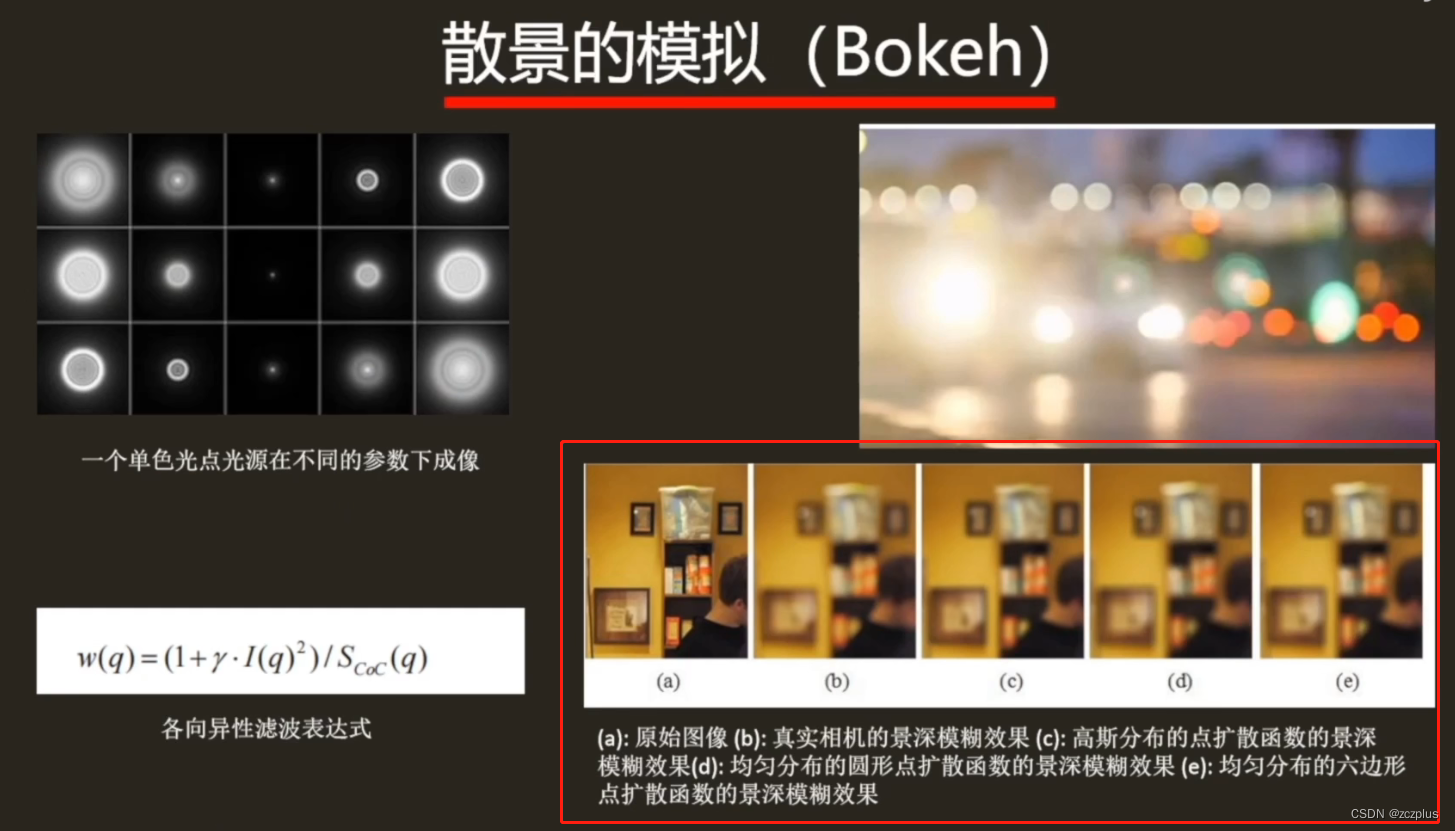
散景的模拟(在高光区域最为显著)
作业
DOF效果:

图片大小限制,还可以调整景深范围在这里没有展示出来。代码部分
关键部分已经给出注释,较好理解。
shader代码:Shader "Custom/Dof" { Properties { _MainTex ("Texture", 2D) = "white" { } _BlurOffset ("Blur Offset", vector) = (0, 0, 0, 0) _FocusRange ("Range Of Focus", float) = 10 _FocusDistance ("Fcous Distance", range(0, 30)) = 10 _DofSmoothRange ("Smooth Range", range(0, 1)) = 0.5 _Step ("Step", range(0, 1)) = 0.5 } SubShader { // Pass 0 对画面进行模糊处理 Pass { CGPROGRAM #pragma vertex vert #pragma fragment frag #include "UnityCG.cginc" sampler2D _MainTex; float4 _BlurOffset; struct v2f { float4 vertex : SV_POSITION; float2 uv : TEXCOORD0; }; v2f vert(appdata_img v) { v2f o; o.vertex = UnityObjectToClipPos(v.vertex); o.uv = v.texcoord; return o; } half4 frag(v2f i) : SV_Target { // 高斯模糊 half2 uv1 = i.uv + _BlurOffset.xy * half2(1, 0) * - 2; half2 uv2 = i.uv + _BlurOffset.xy * half2(1, 0) * - 1; half2 uv3 = i.uv; half2 uv4 = i.uv + _BlurOffset.xy * half2(1, 0) * 1; half2 uv5 = i.uv + _BlurOffset.xy * half2(1, 0) * 2; half2 uv6 = i.uv + _BlurOffset.xy * half2(0, 1) * - 2; half2 uv7 = i.uv + _BlurOffset.xy * half2(0, 1) * - 1; half2 uv8 = i.uv; half2 uv9 = i.uv + _BlurOffset.xy * half2(0, 1) * 1; half2 uv10 = i.uv + _BlurOffset.xy * half2(0, 1) * 2; half4 s = 0; s += tex2D(_MainTex, uv1) * 0.05; s += tex2D(_MainTex, uv2) * 0.25; s += tex2D(_MainTex, uv3) * 0.40; s += tex2D(_MainTex, uv4) * 0.25; s += tex2D(_MainTex, uv5) * 0.05; s += tex2D(_MainTex, uv6) * 0.05; s += tex2D(_MainTex, uv7) * 0.25; s += tex2D(_MainTex, uv8) * 0.40; s += tex2D(_MainTex, uv9) * 0.25; s += tex2D(_MainTex, uv10) * 0.05; s /= 2; return half4(s.rgb, 1); } ENDCG } // Pass 1 根据焦距进行模糊融合 Pass { Cull Off ZTest Always ZWrite Off CGPROGRAM #pragma vertex vert #pragma fragment frag #include "UnityCG.cginc" sampler2D _CameraDepthTexture; sampler2D _MainTex; float4 _MainTex_TS; sampler2D _DoFTex; float _FocusDistance; float _FocusRange; float _DofSmoothRange; float _Step; struct v2f { float4 vertex : SV_POSITION; float2 uv : TEXCOORD0; }; v2f vert(appdata_img v) { v2f o; o.vertex = UnityObjectToClipPos(v.vertex); o.uv = v.texcoord; return o; } fixed4 frag(v2f i) : SV_TARGET { // 原图 fixed4 mainTex = tex2D(_MainTex, i.uv); // 模糊图 fixed4 doFTex = tex2D(_DoFTex, i.uv); // 避免远裁面的值对景深效果的影响 fixed depth = Linear01Depth(tex2D(_CameraDepthTexture, i.uv)).r * _ProjectionParams.z * _Step; // 近焦距离 和 远焦距离 float focusNear = _FocusDistance - _FocusRange; float focusFar = _FocusDistance + _FocusRange; // 根据焦距重新进行赋值 fixed final_depth = 0; if (depth < focusNear) { final_depth = saturate(abs(focusNear - depth) * _DofSmoothRange); } else if (depth > focusFar) { final_depth = saturate(abs(depth - focusFar) * _DofSmoothRange); } fixed4 finalColor = lerp(mainTex, doFTex, final_depth * 1.2); //return doFTex; return fixed4(finalColor.rgb, 1); } ENDCG } } }- 1
- 2
- 3
- 4
- 5
- 6
- 7
- 8
- 9
- 10
- 11
- 12
- 13
- 14
- 15
- 16
- 17
- 18
- 19
- 20
- 21
- 22
- 23
- 24
- 25
- 26
- 27
- 28
- 29
- 30
- 31
- 32
- 33
- 34
- 35
- 36
- 37
- 38
- 39
- 40
- 41
- 42
- 43
- 44
- 45
- 46
- 47
- 48
- 49
- 50
- 51
- 52
- 53
- 54
- 55
- 56
- 57
- 58
- 59
- 60
- 61
- 62
- 63
- 64
- 65
- 66
- 67
- 68
- 69
- 70
- 71
- 72
- 73
- 74
- 75
- 76
- 77
- 78
- 79
- 80
- 81
- 82
- 83
- 84
- 85
- 86
- 87
- 88
- 89
- 90
- 91
- 92
- 93
- 94
- 95
- 96
- 97
- 98
- 99
- 100
- 101
- 102
- 103
- 104
- 105
- 106
- 107
- 108
- 109
- 110
- 111
- 112
- 113
- 114
- 115
- 116
- 117
- 118
- 119
- 120
- 121
- 122
- 123
- 124
- 125
- 126
- 127
- 128
- 129
- 130
- 131
- 132
- 133
- 134
- 135
两个脚本,一个开启深度图,一个用于处理
深度图c#using System.Collections; using System.Collections.Generic; using UnityEngine; public class DepthTexture : MonoBehaviour { private Camera currentCamera = null; private void Awake() { currentCamera = GetComponent<Camera>(); } private void OnEnable() { currentCamera.depthTextureMode |= DepthTextureMode.Depth; } private void OnDisable() { currentCamera.depthTextureMode &= ~DepthTextureMode.Depth; } }- 1
- 2
- 3
- 4
- 5
- 6
- 7
- 8
- 9
- 10
- 11
- 12
- 13
- 14
- 15
- 16
- 17
- 18
- 19
- 20
- 21
- 22
- 23
- 24
渲染脚本
using System.Collections; using System.Collections.Generic; using UnityEngine; public class DoFScript : MonoBehaviour { public Material mat; // 迭代次数 [Range(1, 4)] public int _Iteration = 2; // 模糊半径 [Range(0, 15)] public float _BlurRadius = 5; // 下采样次数 [Range(0, 10)] public float _DownSample = 2; // 景深范围 [Range(0, 10)] public float _FocusRange = 1.0f; // 焦距 [Range(0, 30)] public float _FocusDistance = 10.0f; // Start is called before the first frame update void Start() { // 判断材质和shader是否为空,是否被支持,来决定是否启用 if (mat == null || SystemInfo.supportsImageEffects == false || mat.shader == null || mat.shader.isSupported == false) { enabled = false; return; } } private void OnRenderImage(RenderTexture source, RenderTexture destination) { mat.SetFloat("_FocusRange", _FocusRange); mat.SetFloat("_FocusDistance", _FocusDistance); int width = (int)(source.width / _DownSample); int height = (int)(source.height / _DownSample); mat.SetVector("_BlurOffset", new Vector4(_BlurRadius / width, _BlurRadius / height, 0, 0)); RenderTexture RT1 = RenderTexture.GetTemporary(width, height); RenderTexture RT2 = RenderTexture.GetTemporary(width, height); Graphics.Blit(source, RT1, mat, 0); // 下采样 for (int i = 0; i < _Iteration; i++) { RenderTexture.ReleaseTemporary(RT2); width /= 2; height /= 2; RT2 = RenderTexture.GetTemporary(width, height); Graphics.Blit(RT1, RT2, mat, 0); width /= 2; height /= 2; RenderTexture.ReleaseTemporary(RT1); RT1 = RenderTexture.GetTemporary(width, height); Graphics.Blit(RT2, RT1, mat, 0); } // 上采样 for (int i = 0; i < _Iteration; i++) { RenderTexture.ReleaseTemporary(RT2); width *= 2; height *= 2; RT2 = RenderTexture.GetTemporary(width, height); Graphics.Blit(RT1, RT2, mat, 0); width *= 2; height *= 2; RenderTexture.ReleaseTemporary(RT1); RT1 = RenderTexture.GetTemporary(width, height); Graphics.Blit(RT2, RT1, mat, 0); } // 调用第二个pass进行混合 mat.SetTexture("_DoFTex", RT1); Graphics.Blit(source, destination, mat, 1); // 释放缓存 RenderTexture.ReleaseTemporary(RT1); RenderTexture.ReleaseTemporary(RT2); } }- 1
- 2
- 3
- 4
- 5
- 6
- 7
- 8
- 9
- 10
- 11
- 12
- 13
- 14
- 15
- 16
- 17
- 18
- 19
- 20
- 21
- 22
- 23
- 24
- 25
- 26
- 27
- 28
- 29
- 30
- 31
- 32
- 33
- 34
- 35
- 36
- 37
- 38
- 39
- 40
- 41
- 42
- 43
- 44
- 45
- 46
- 47
- 48
- 49
- 50
- 51
- 52
- 53
- 54
- 55
- 56
- 57
- 58
- 59
- 60
- 61
- 62
- 63
- 64
- 65
- 66
- 67
- 68
- 69
- 70
- 71
- 72
- 73
- 74
- 75
- 76
- 77
- 78
- 79
- 80
- 81
- 82
- 83
- 84
- 85
- 86
- 87
- 88
- 89
- 90
- 91
- 92
- 93
- 94
- 95
- 96
- 97
- 98
- 99
- 100
- 101
- 102
- 103
- 在camera上打开深度图
-
相关阅读:
Javascript笔记
Linux篇13动静态库
大神之路-起始篇 | 第7章.计算机科学导论之【操作系统】学习笔记
The kgdb Patches
学生HTML个人网页作业作品:基于HTML实现教育培训机构网站模板毕业源码(8页)
CASS11.0.0.4 for AutoCAD2010-2023免狗使用方法
binding 里面local的用法
Java设计模式之外观模式
借助PyCharm在代码中自动添加作者、日期
【Git】GitHub 操作
- 原文地址:https://blog.csdn.net/weixin_42221907/article/details/126278813
