-
Astyle Linux风格配置
一、安装Astyle
1.1 下载Astyle
下载地址: Artistic Style download | SourceForge.net
1.2 安装Astyle
Astyle是免安装的,只需将下载下来的zip文件解压到想安装的目录即可,如: F:\software\AStyle
二、将Astyle嵌入到Source Insight 4.0
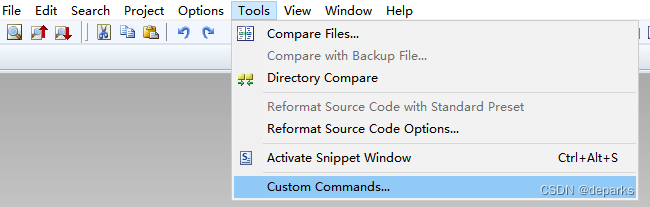
1) 点击Source Insight菜单栏Tools–>Custom Commands...
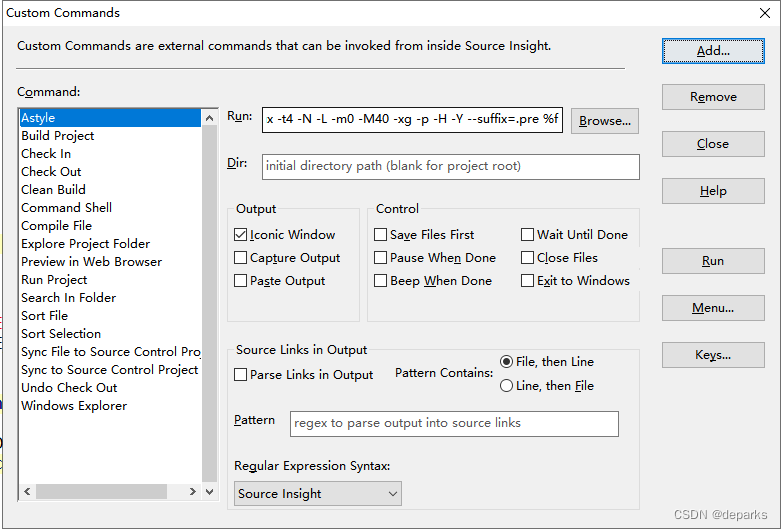
2) 点击Add...添加新的命令,在弹出对话框写入命令名如Astyle

3) 在Run输入框中添加相应的命令。
"F:\software\AStyle\bin\Astyle.exe" --style=linux -t4 -xg -p -H -Y -k3 --suffix=.bak %f
4) 给Astyle添加快捷键
4.1) 1) 点击Source Insight菜单栏Options–>Key Assignments...

4.2) 在KeyAssignment Command输入框住输入Astyle找到刚刚添加的Astyle命令,然后点击Assign New Key...,然后在键盘上输入想设置的按键,如Ctrl+Alt+F,设置好后点击OK。后面使用Ctrl+Alt+F组合键就可以快速格式化代码。

三、Astyle Linux编码风格配置
Astyle官方文档详细介绍了Astyle选项参数的使用方法,详情参考官方文档: Artistic Style。
1. 大括号风格
--style=linux / --style=knf / -A8Linux style uses linux braces. Opening braces are broken from namespace, class, and function definitions. Also known as Kernel Normal Form (KNF) style, this is the style used in the Linux BSD kernel.
int Foo(bool isBar)
{
        if (isFoo) {
                bar();
                return 1;
        } else
                return 0;
}
2. 缩进风格
使用制表符Tabs进行进行缩进,使用空格进行续行对齐。将每个缩进视为 # 个空格(例如 -t4 / --indent=tab=4)。 # 必须介于 2 和 20 之间。如果未设置 #,则将缩进视为 4 个空格。
--indent=tab / --indent=tab=4 / -t / -t4with indent=tab:
void Foo() {
>   if (isBar1
>   ........&& isBar2)    // indent of this line can be changed with min-conditional-indent
>   >   bar();
}
with style=linux, indent=tab=8:
void Foo()
{
>       if (isBar1
>       ....&& isBar2)    // indent of this line can NOT be changed with style=linux
>       >       bar();
}
3. switch-case缩进
Linux switch和case对齐不缩进,如果要缩进使用--indent-switches / -S
4. 操作符间插入空格
--pad-oper / -pif (foo==2) a=bar((b-c)*a,d--);becomes:
if (foo == 2)
    a = bar((b - c) * a, d--);
5. 在运算符周围插入空格
--pad-oper / -pif (foo==2) a=bar((b-c)*a,d--);becomes:
if (foo == 2)
    a = bar((b - c) * a, d--);
6. 在if.for,while等条件或循环语句关键字和括号之间插入空格
--pad-header / -Hif(isFoo((a+2), b)) bar(a, b);becomes:
if (isFoo((a+2), b))
    bar(a, b);
7. 指针贴近变量名
--align-pointer=name / -k3char* foo1; char & foo2; string ^s1;
becomes (with align-pointer=name):
char *foo1;
char &foo2;
string ^s1;
8. 注释和代码一起缩进
--indent-col1-comments / -Yvoid Foo()\n" { // comment if (isFoo) bar(); }becomes:
void Foo()\n" { // comment if (isFoo) bar(); }9. 原始文件名后缀设置
- --suffix=####
将后缀 #### 而不是 '.orig' 附加到原始文件名(例如 --suffix=.bak,如果这是文件扩展名,则必须包含点 '.' , 否则将附加后缀 到当前文件扩展名)
-
相关阅读:
文档在线预览 总结篇
tomcat 理解请求转发 221108
一个月速刷leetcodeHOT100 day13 二叉树结构 以及相关简单题
记一次http接口自动重试现象的排查
【数据结构与算法-初阶】栈和队列
PG 联表更新
SCRUM敏捷产品负责人(CSPO)认证培训课程
spring cloud tencent:基于polaris手把手搭建微服务框架(附带源码)(二)
社交媒体营销策略——如何病毒式传播:增加受众范围的9个技巧
PL/SQL编程
- 原文地址:https://blog.csdn.net/u012408797/article/details/126297954