-
(四)旋转物体检测数据roLabelImg转DOTA格式
欢迎访问个人网络日志🌹🌹知行空间🌹🌹
roLabelImg 工具仓库地址:https://github.com/cgvict/roLabelImg
1.进入可以画旋转检测框的模式

2.标注文件样式
roLabelImg标注旋转检测框时是先画一个常规的矩形框,然后绕矩形的中心点顺时针和逆时针旋转一定的角度来实现的。标注文件中对旋转检测框的定义是使用(cx, cy, width, height, angle)的格式定义的,如下:<robndbox> <cx>1178.4388cx> <cy>1004.6478cy> <w>319.635w> <h>273.2016h> <angle>0.46angle> robndbox>- 1
- 2
- 3
- 4
- 5
- 6
- 7
(cx, cy)是旋转框的中心点像素坐标,w的定义是在roLabelImg中画初始矩形框时在图像x方向上的边长, 另一条边是h,画好初始矩形后,无论后续如何旋转,w和h所指的边都不会变。angle角的定义是旋转矩形检测框的w边和X轴正方向顺时针所成的角度,其大小为[0,pi)初始矩形检测框:

调整姿态后检测框:
其中$\theta$的大小为`2.541593`。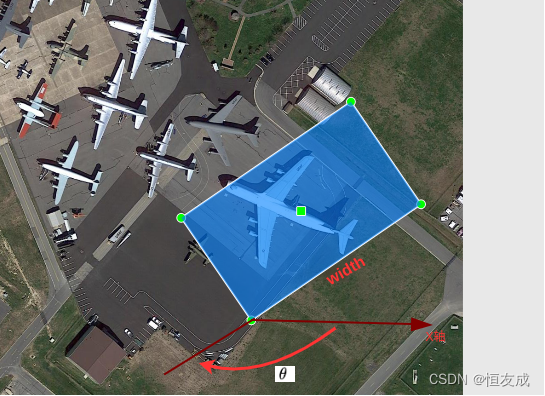
3.DOTA数据格式
DOTA是武汉大学开源的旋转物体检测数据集,其主页见https://captain-whu.github.io/DOTA/dataset.html。DOTA标注文件的格式为:x1, y1, x2, y2, x3, y3, x4, y4, category, difficult- 1
(x1, y1, x2, y2, x3, y3, x4, y4)分别是旋转物体检测框的四个顶点的坐标,category是检测框物体对象的类别4.roLabelImg标注文件转
DOTA格式大多数旋转物体检测的开源算法的数据处理部分都支持
DOTA格式,如商汤开源的mmrotate,为了更快的在自己数据集上验证算法的有效性,最方便的算法就是将roLabelImg标注的xml文件转成上述的标签格式,roLabelImg标注文件转DOTA可分成四种情况。- 1) θ ∈ ( π / 2 , π ) \theta \in (\pi/2, \pi) θ∈(π/2,π),且中心点C落在点1右侧
- 2) θ ∈ ( π / 2 , π ) \theta \in (\pi/2, \pi) θ∈(π/2,π),且中心点C落在点1左侧
- 3) θ ∈ [ 0 , π / 2 ] \theta \in [0, \pi/2] θ∈[0,π/2],且中心点C落在点1左侧
- 4) θ ∈ [ 0 , π / 2 ] \theta \in [0, \pi/2] θ∈[0,π/2],且中心点C落在点1右侧

以 θ ∈ ( π / 2 , π ) \theta \in (\pi/2, \pi) θ∈(π/2,π),且中心点C落在点1右侧为例,

A(x1, y1),B(x3, y3),D(x2, y2),E(x4, y4)点的坐标由上述三角形之间的关系可以求得:β = ∠ C A V 2 = a r c t a n h w + π − θ \beta = \angle CAV_2 = arctan\frac{h}{w}+ \pi - \theta β=∠CAV2=arctanwh+π−θ
d = w 6 2 + h 2 2 d = \frac{\sqrt{w^62+h^2}}{2} d=2w62+h2
x 1 = c x − d c o s β y 1 = c y + d s i n β x 2 = c x + d c o s β y 2 = c y − d s i n β x 3 = x 1 − h c o s ( θ − π 2 ) y 4 = y 1 − h s i n ( θ − π 2 ) x 4 = x 2 + h c o s ( θ − π 2 ) y 4 = y 2 + h s i n ( θ − π 2 ) x1 = cx - d cos\beta \\ y1 = cy + d sin\beta \\ x2 = cx + d cos\beta \\ y2 = cy - d sin\beta \\ x3 = x1 - hcos(\theta - \frac{\pi}{2}) \\ y4 = y1 - hsin(\theta - \frac{\pi}{2}) \\ x4 = x2 + hcos(\theta - \frac{\pi}{2}) \\ y4 = y2 + hsin(\theta - \frac{\pi}{2}) x1=cx−dcosβy1=cy+dsinβx2=cx+dcosβy2=cy−dsinβx3=x1−hcos(θ−2π)y4=y1−hsin(θ−2π)x4=x2+hcos(θ−2π)y4=y2+hsin(θ−2π)同样可以求其他三种情况。
转换代码见:
def convert_rolabelimg2dota(xml_path:str) -> None: """ Args: - `xml_path` (str) : path to roLabelImg label file, like /xx/xx.xml Returns: - `box_points` (list): shape (N, 8 + 1), N is the number of objects, 8 + 1 is \ `(x1, y1, x2, y2, x3, y3, x4, y4, class_name)` """ with open(xml_path) as f: tree = ET.parse(f) root = tree.getroot() size = root.find('size') width = int(size.find('width').text) height = int(size.find('height').text) objects = root.iter('object') boxes = [] # list of tuple(cz, cy, w, h, angle), angle is in [0-pi) for obj in objects: if obj.find('type').text == 'robndbox': rbox_node = obj.find('robndbox') cat = obj.find('name').text rbox = dict() for key in ['cx', 'cy', 'w', 'h', 'angle']: rbox[key] = float(rbox_node.find(key).text) boxes.append(list((*rbox.values(), cat))) print(f"bboxes: {boxes}") box_points = [] # list of box defined with four vertices for box in boxes: cx, cy, w, h, ag, cat = box alpha_w = math.atan(w / h) alpha_h = math.atan(h / w) d = math.sqrt(w**2 + h**2) / 2 if ag > math.pi / 2: beta = ag - math.pi / 2 + alpha_w if beta <= math.pi / 2: x1, y1 = cx + d * math.cos(beta), cy + d * math.sin(beta) x2, y2 = cx - d * math.cos(beta), cy - d * math.sin(beta) elif beta > math.pi / 2: beta = math.pi - beta x1, y1 = cx - d * math.cos(beta), cy + d * math.sin(beta) x2, y2 = cx + d * math.cos(beta), cy - d * math.sin(beta) x3, y3 = x1 - h * math.cos(ag - math.pi / 2), y1 - h * math.sin(ag - math.pi / 2) x4, y4 = x2 + h * math.cos(ag - math.pi / 2), y2 + h * math.sin(ag - math.pi / 2) elif ag <= math.pi / 2: beta = ag + alpha_h if beta <= math.pi / 2: x1, y1 = cx + d * math.cos(beta), cy + d * math.sin(beta) x2, y2 = cx - d * math.cos(beta), cy - d * math.sin(beta) elif beta > math.pi / 2: beta = math.pi - beta x1, y1 = cx - d * math.cos(beta), cy + d * math.sin(beta) x2, y2 = cx + d * math.cos(beta), cy - d * math.sin(beta) x3, y3 = x1 - w * math.cos(ag), y1 - w * math.sin(ag) x4, y4 = x2 + w * math.cos(ag), y2 + w * math.sin(ag) points = np.array([x1, y1, x3, y3, x2, y2, x4, y4], dtype=np.int32) points[0::2] = np.clip(points[0::2], 0, width) points[1::2] = np.clip(points[1::2], 0, height) box_points.append([*points, cat]) return box_points- 1
- 2
- 3
- 4
- 5
- 6
- 7
- 8
- 9
- 10
- 11
- 12
- 13
- 14
- 15
- 16
- 17
- 18
- 19
- 20
- 21
- 22
- 23
- 24
- 25
- 26
- 27
- 28
- 29
- 30
- 31
- 32
- 33
- 34
- 35
- 36
- 37
- 38
- 39
- 40
- 41
- 42
- 43
- 44
- 45
- 46
- 47
- 48
- 49
- 50
- 51
- 52
- 53
- 54
- 55
- 56
- 57
- 58
- 59
- 60
- 61
完整代码见gitee仓库object_detection_task
参考资料
-
相关阅读:
制作一个简单HTML旅游网站(HTML+CSS+JS)无锡旅游网页设计与实现8个页面
[附源码]计算机毕业设计springboot学生宿舍维修管理系统
脑影像独立成分分析(ICA)的自动化流程
16 - 多线程调优(下):如何优化多线程上下文切换?
go同步锁 sync mutex
去中心化应用的终极是应用链?
Linux 零拷贝sendfile函数
长短期负荷预测(Matlab代码实现)
tensorflow安装踩坑总结
高通导航器软件开发包使用指南(8)
- 原文地址:https://blog.csdn.net/lx_ros/article/details/126093044
