-
.net core .net6 Form Cookie Login 认证
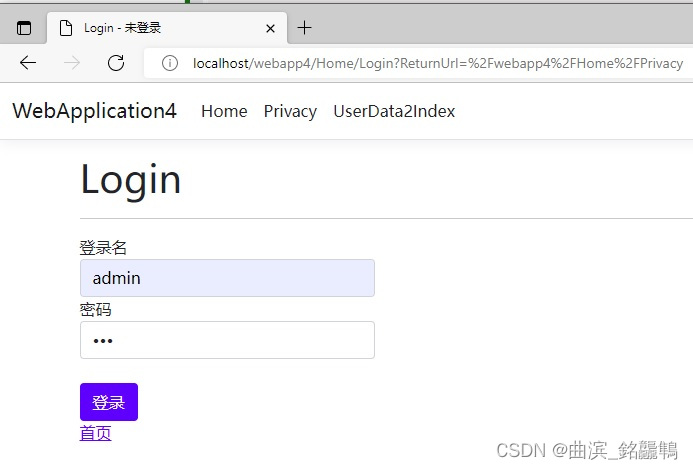
本文环境 Visual Studio 2022, .Net6就是一个最简的登录,访问任意页到登录页,登录后返回
一、新建一个“ASP.NET Core Web 应用”项目
选 .net 6的
二、Program.cs 添加代码
生成代码基本都略
var builder = WebApplication.CreateBuilder(args); //1)在CreateBuilder后至少添加,如下代码AddAuthentication添加的是默认认证的Scheme //支持添加多种认证,比如cookie 混合 JWT 这里不展开 builder.Services.AddAuthentication(CookieAuthenticationDefaults.AuthenticationScheme) .AddCookie(option => option.LoginPath = "/Home/Login"); //...其余代码略- 1
- 2
- 3
- 4
- 5
- 6
- 7
//...之上代码略 //2)在 app.UseAuthorization() 代码上添加 UseAuthentication 即 身份验证中间件, app.UseAuthentication(); app.UseAuthorization();- 1
- 2
- 3
- 4
三、HomeController.cs 添加代码
按注释里 1)、2)…n) 这样的顺序看
//1)添加 [Authorize] ,对本Controller开启认证 [Authorize] public class HomeController : Controller { //...生成的略 //2)添加一个 Login 设置 AllowAnonymous 不认证 [AllowAnonymous] public IActionResult Login(string loginName, string psw, string returnUrl) { if (this.CheckLogin(loginName, psw)) { /* 3)编写如下代码,SignIn 函数就是登陆 上面的 CheckLogin 假定是自己的登陆认证。 上面的 returnUrl 没用就是为了调试容易看见访问的地址。 */ var ci = new ClaimsIdentity("Cookie.Form"); ci.AddClaim(new Claim(ClaimTypes.Name, loginName)); var cp = new ClaimsPrincipal(ci); return this.SignIn(cp); /* ClaimsIdentit new 时传的 AuthenticationType 初始值 不能是空串或空 后续能取到,可用来区分登录来至自己系统其他系统等 Claim如构如本例后续 User.Identity.Name能取到这个 loginName的值 Claim 可以有很多类型,见 ClaimTypes */ } return View(); } //测试登陆状态代码,会在F5调试时显示在输出里面 public override void OnActionExecuting(ActionExecutingContext context) { var cad= (ControllerActionDescriptor)context.ActionDescriptor; //_logger生成代码就有 _logger.LogInformation($"{cad.ActionName}" + $" 用户登录状态 {User.Identity?.IsAuthenticated}" + $" 登录名 {User.Identity?.Name}" + $" 认证类型 {User.Identity?.AuthenticationType}"); base.OnActionExecuting(context); } //测试用的模拟登陆校验的函数 bool CheckLogin(string loginName, string psw) { var rtn = false; if (false == this.User.Identity?.IsAuthenticated && !string.IsNullOrEmpty(loginName)) { if (loginName == "admin" && !string.IsNullOrEmpty(psw)) { rtn = true; } } return rtn; } //...生成的 Index、Privacy、Error 等Action 略。 }- 1
- 2
- 3
- 4
- 5
- 6
- 7
- 8
- 9
- 10
- 11
- 12
- 13
- 14
- 15
- 16
- 17
- 18
- 19
- 20
- 21
- 22
- 23
- 24
- 25
- 26
- 27
- 28
- 29
- 30
- 31
- 32
- 33
- 34
- 35
- 36
- 37
- 38
- 39
- 40
- 41
- 42
- 43
- 44
- 45
- 46
- 47
- 48
- 49
- 50
- 51
- 52
- 53
- 54
- 55
- 56
- 57
- 58
- 59
- 60
四、做个有 登录名、密码与登陆按钮 的页
在 Views/Home/ 下添加 Login.cshtml
<form method="post" > <div class="form-group"> <label class="control-label">登录名label> <input class="form-control" name="loginName" /> div> <div class="form-group"> <label class="control-label">密码label> <input class="form-control" type="password" name="psw" /> div> <div class="form-group"> <br/> <input type="submit" value="登录" class="btn btn-primary" /> div> form>- 1
- 2
- 3
- 4
- 5
- 6
- 7
- 8
- 9
- 10
- 11
- 12
- 13
- 14
- 15
- 16
- 17
五、设启动页,F5调试
本案启动为 Home/Privacy 就是生成的
没认证的会跳转到Login如上;输入用户名密码后,登陆成功如下(admin,密码随意)

调试 输出 信息如下

完
-
相关阅读:
神经网络算法有哪些模型,神经网络模型应用实例
2024年PMP考试备考经验分享
Ubuntu Minkowski Engine安装
Java中生成一个唯一的文件名的方法
数据结构-哈希表-哈希函数-哈希冲突
2023松山湖软件和信息服务业高质量发展大会顺利举行
el-tabs(标签栏)的入门学习
Sql Server查数据库job任务
怎么复习信息系统项目管理师?
Java 日志系列(三):日志使用示例及常见报错
- 原文地址:https://blog.csdn.net/FlashElf/article/details/126306224
