-
红帽8系统部署cobbler
cobbler
一.部署前提
要用系统自带的源,其他的不可用,下载不了cobbler 安装epel源 yum -y install epel-release- 1
- 2
- 3
#查看cobbler [root@localhost ~]# dnf module list |grep cobbler cobbler 3 default [d] Versatile Linux deployment server cobbler 3.3 default Versatile Linux deployment server cobbler #开启选择的cobbler版本 [root@localhost ~]# dnf module enable cobbler:3- 1
- 2
- 3
- 4
- 5
- 6
- 7
- 8
[root@localhost ~]# systemctl disable --now firewalld Removed /etc/systemd/system/multi-user.target.wants/firewalld.service. Removed /etc/systemd/system/dbus-org.fedoraproject.FirewallD1.service. [root@localhost ~]# firewall-cmd --state not running [root@localhost ~]# sed -i "s/=enforcing/=disabled/g" /etc/selinux/config [root@localhost ~]# setenforce 0 [root@localhost ~]# getenforce Permissive [root@localhost ~]# reboot [root@localhost ~]# getenforce Disabled- 1
- 2
- 3
- 4
- 5
- 6
- 7
- 8
- 9
- 10
- 11
- 12
- 13
二.安装依赖包
[root@localhost ~]# yum -y install httpd dhcp* tftp tftp-server cobbler cobbler-web pykickstart rsync rsync-daemon- 1
三.设置开机自启
[root@localhost ~]# systemctl enable --now httpd Created symlink /etc/systemd/system/multi-user.target.wants/httpd.service → /usr/lib/systemd/system/httpd.service. [root@localhost ~]# systemctl enable --now cobblerd Created symlink /etc/systemd/system/multi-user.target.wants/cobblerd.service → /usr/lib/systemd/system/cobblerd.service. [root@localhost ~]# systemctl enable --now rsyncd Created symlink /etc/systemd/system/multi-user.target.wants/rsyncd.service → /usr/lib/systemd/system/rsyncd.service.- 1
- 2
- 3
- 4
- 5
- 6
- 7
四.正式部署
#生成加密密码 [root@localhost ~]# openssl passwd -1 -salt 'random-phrase-here' 'dabao123!' $1$random-p$VAxQnB8rJAXUWAm0cIy.D1- 1
- 2
- 3
##修改/etc/cobbler/settings.yaml [root@localhost ~]# vim /etc/cobbler/settings.yaml #修改默认密码 default_password_crypted: "$1$random-p$VAxQnB8rJAXUWAm0cIy.D1" server: 192.168.192.131 #修改为本机ip next_server: 192.168.192.131 manage_dhcp: true #开启dhcp- 1
- 2
- 3
- 4
- 5
- 6
- 7
- 8
- 9
- 10
##修改/etc/cobbler/dhcp.template subnet 192.168.192.0 netmask 255.255.255.0 { option routers 192.168.192.2; option domain-name-servers 114.114.114.114; option subnet-mask 255.255.255.0; range dynamic-bootp 192.168.192.10 192.168.192.20; default-lease-time 21600; max-lease-time 43200; next-server $next_server;- 1
- 2
- 3
- 4
- 5
- 6
- 7
- 8
- 9
- 10
#检验配置 [root@localhost ~]# cobbler check The following are potential configuration items that you may want to fix: 1: some network boot-loaders are missing from /var/lib/cobbler/loaders. If you only want to handle x86/x86_64 netbooting, you may ensure that you have installed a *recent* version of the syslinux package installed and can ignore this message entirely. Files in this directory, should you want to support all architectures, should include pxelinux.0, menu.c32, and yaboot. 2: reposync is not installed, install yum-utils or dnf-plugins-core 3: yumdownloader is not installed, install yum-utils or dnf-plugins-core 4: debmirror package is not installed, it will be required to manage debian deployments and repositories 5: fencing tools were not found, and are required to use the (optional) power management features. install cman or fence-agents to use them Restart cobblerd and then run 'cobbler sync' to apply changes. 解决方法: yum -y install yum-utils yum -y install syslinux [root@localhost ~]# cp /usr/share/syslinux/pxelinux.0 /var/lib/cobbler/loaders/ [root@localhost ~]# cp /usr/share/syslinux/menu.c32 /var/lib/cobbler/loaders/- 1
- 2
- 3
- 4
- 5
- 6
- 7
- 8
- 9
- 10
- 11
- 12
- 13
- 14
- 15
- 16
- 17
- 18
#同步 [root@localhost ~]# cobbler sync ... shell triggers finished successfully *** TASK COMPLETE ***- 1
- 2
- 3
- 4
- 5
- 6
五.导入镜像
#挂载镜像 [root@localhost ~]# mount /dev/cdrom /mnt mount: /mnt: WARNING: device write-protected, mounted read-only. [root@localhost ~]# cobbler import --path=/mnt --name=centos8 --arch=x86_64 ... *** TASK COMPLETE *** [root@localhost ~]# cobbler list distros: centos8-x86_64 profiles: centos8-x86_64- 1
- 2
- 3
- 4
- 5
- 6
- 7
- 8
- 9
- 10
- 11
- 12
- 13
- 14
- 15
六.自动安装脚本
[root@localhost ~]# cobbler profile get-autoinstall --name centos8-x86_64 # Sample kickstart file for current EL, Fedora based distributions. #platform=x86, AMD64, or Intel EM64T # System authorization information auth --useshadow --enablemd5 # System bootloader configuration bootloader --location=mbr # Partition clearing information clearpart --all --initlabel # Use text mode install text # Firewall configuration firewall --enabled # Run the Setup Agent on first boot firstboot --disable # System keyboard keyboard us # System language lang en_US # Use network installation url --url=http://192.168.192.131/cblr/links/centos8-x86_64 # If any cobbler repo definitions were referenced in the kickstart profile, include them here. repo --name=source-1 --baseurl=http://192.168.192.131/cobbler/distro_mirror/centos8-x86_64/AppStream repo --name=source-2 --baseurl=http://192.168.192.131/cobbler/distro_mirror/centos8-x86_64/BaseOS # Network information network --bootproto=dhcp --device=eth0 --onboot=on # Reboot after installation reboot #Root password rootpw --iscrypted $1$random-p$VAxQnB8rJAXUWAm0cIy.D1 # SELinux configuration selinux --disabled # Do not configure the X Window System skipx # System timezone timezone America/New_York # Install OS instead of upgrade install # Clear the Master Boot Record zerombr # Allow anaconda to partition the system as needed autopart %pre set -x -v exec 1>/tmp/ks-pre.log 2>&1 # Once root's homedir is there, copy over the log. while : ; do sleep 10 if [ -d /mnt/sysimage/root ]; then cp /tmp/ks-pre.log /mnt/sysimage/root/ logger "Copied %pre section log to system" break fi done & # Enable installation monitoring %end %packages %end %post --nochroot set -x -v exec 1>/mnt/sysimage/root/ks-post-nochroot.log 2>&1 %end %post set -x -v exec 1>/root/ks-post.log 2>&1 # Start yum configuration curl "http://192.168.192.131/cblr/svc/op/yum/profile/centos8-x86_64" --output /etc/yum.repos.d/cobbler-config.repo # End yum configuration # Start post_install_network_config generated code # End post_install_network_config generated code # Start download cobbler managed config files (if applicable) # End download cobbler managed config files (if applicable) # Start koan environment setup echo "export COBBLER_SERVER=192.168.192.131" > /etc/profile.d/cobbler.sh echo "setenv COBBLER_SERVER 192.168.192.131" > /etc/profile.d/cobbler.csh # End koan environment setup $SNIPPET('redhat_register') # Begin cobbler registration # cobbler registration is disabled in /etc/cobbler/settings.yaml # End cobbler registration # Enable post-install boot notification # Start final steps curl "http://192.168.192.131/cblr/svc/op/autoinstall/profile/centos8-x86_64" -o /root/cobbler.ks # End final steps %end- 1
- 2
- 3
- 4
- 5
- 6
- 7
- 8
- 9
- 10
- 11
- 12
- 13
- 14
- 15
- 16
- 17
- 18
- 19
- 20
- 21
- 22
- 23
- 24
- 25
- 26
- 27
- 28
- 29
- 30
- 31
- 32
- 33
- 34
- 35
- 36
- 37
- 38
- 39
- 40
- 41
- 42
- 43
- 44
- 45
- 46
- 47
- 48
- 49
- 50
- 51
- 52
- 53
- 54
- 55
- 56
- 57
- 58
- 59
- 60
- 61
- 62
- 63
- 64
- 65
- 66
- 67
- 68
- 69
- 70
- 71
- 72
- 73
- 74
- 75
- 76
- 77
- 78
- 79
- 80
- 81
- 82
- 83
- 84
- 85
- 86
- 87
- 88
- 89
- 90
- 91
- 92
- 93
- 94
- 95
- 96
- 97
- 98
- 99
- 100
- 101
- 102
- 103
- 104
- 105
- 106
- 107
- 108
- 109
- 110
- 111
- 112
[root@localhost ~]# cd /var/lib/cobbler/templates/ [root@localhost templates]# vim centos8.ks [root@localhost templates]# cat centos8.ks auth --useshadow --enablemd5 bootloader --location=mbr clearpart --all --initlabel text firewall --disable firstboot --disable keyboard us lang en_US url --url=http://192.168.192.131/cblr/links/centos8-x86_64 repo --name=source-1 --baseurl=http://192.168.192.131/cobbler/distro_mirror/centos8-x86_64/AppStream repo --name=source-2 --baseurl=http://192.168.192.131/cobbler/distro_mirror/centos8-x86_64/BaseOS network --bootproto=dhcp --device=eth0 --onboot=on reboot rootpw --iscrypted $1$random-p$VAxQnB8rJAXUWAm0cIy.D1 selinux --disabled skipx timezone America/New_York install zerombr autopart %pre set -x -v exec 1>/tmp/ks-pre.log 2>&1 while : ; do sleep 10 if [ -d /mnt/sysimage/root ]; then cp /tmp/ks-pre.log /mnt/sysimage/root/ logger "Copied %pre section log to system" break fi done & %end %packages @^minimal-environment %end %post --nochroot set -x -v exec 1>/mnt/sysimage/root/ks-post-nochroot.log 2>&1 %end %post set -x -v exec 1>/root/ks-post.log 2>&1 curl "http://192.168.192.131/cblr/svc/op/yum/profile/centos8-x86_64" --output /etc/yum.repos.d/cobbler-config.repo echo "export COBBLER_SERVER=192.168.192.131" > /etc/profile.d/cobbler.sh echo "setenv COBBLER_SERVER 192.168.192.131" > /etc/profile.d/cobbler.csh $SNIPPET('redhat_register') curl "http://192.168.192.131/cblr/svc/op/autoinstall/profile/centos8-x86_64" -o /root/cobbler.ks %end- 1
- 2
- 3
- 4
- 5
- 6
- 7
- 8
- 9
- 10
- 11
- 12
- 13
- 14
- 15
- 16
- 17
- 18
- 19
- 20
- 21
- 22
- 23
- 24
- 25
- 26
- 27
- 28
- 29
- 30
- 31
- 32
- 33
- 34
- 35
- 36
- 37
- 38
- 39
- 40
- 41
- 42
- 43
- 44
- 45
- 46
- 47
- 48
- 49
- 50
- 51
- 52
- 53
- 54
- 55
- 56
- 57
- 58
- 59
- 60
- 61
- 62
- 63
- 64
- 65
- 66
- 67
- 68
- 69
- 70
- 71
- 72
#验证 [root@localhost templates]# cobbler validate-autoinstalls ... shell triggers finished successfully *** TASK COMPLETE ***- 1
- 2
- 3
- 4
- 5
- 6
修改默认ks文件 [root@localhost ~]# cobbler profile edit --name centos8-x86_64 --autoinstall centos8.ks #回归传统命名 [root@localhost ~]# cobbler profile edit --name centos8-x86_64 --kernel-options 'net.ifnames=0 biosdevname=0' #查看 [root@localhost ~]# cobbler profile report --name centos8-x86_64 [root@localhost ~]# cobbler sync [root@localhost ~]# systemctl restart httpd cobblerd rsyncd dhcpd tftp- 1
- 2
- 3
- 4
- 5
- 6
- 7
- 8
- 9
- 10
- 11
#配置引导grup [root@localhost ~]# /usr/share/cobbler/bin/mkgrub.sh [root@localhost ~]# ls /var/lib/cobbler/loaders/ grub ldlinux.c32 menu.c32 pxelinux.0 [root@localhost ~]# cobbler sync- 1
- 2
- 3
- 4
- 5

点击进去,等就行了
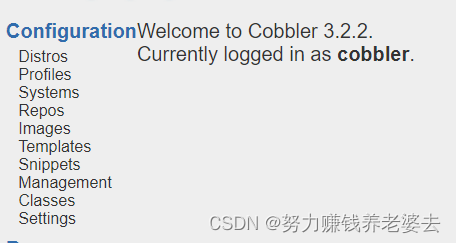


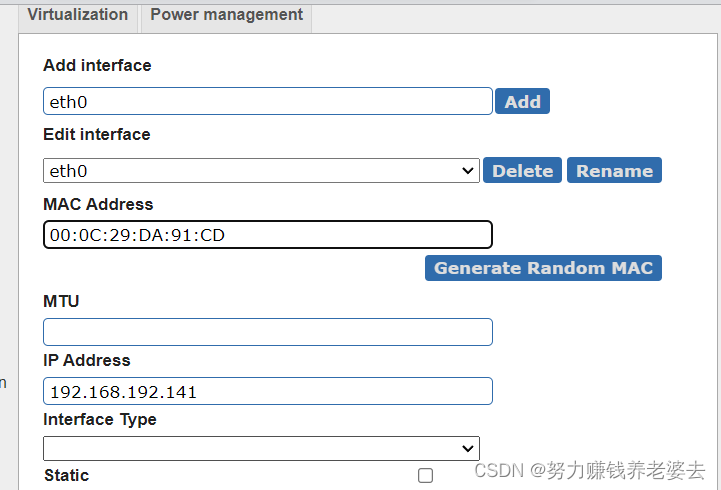

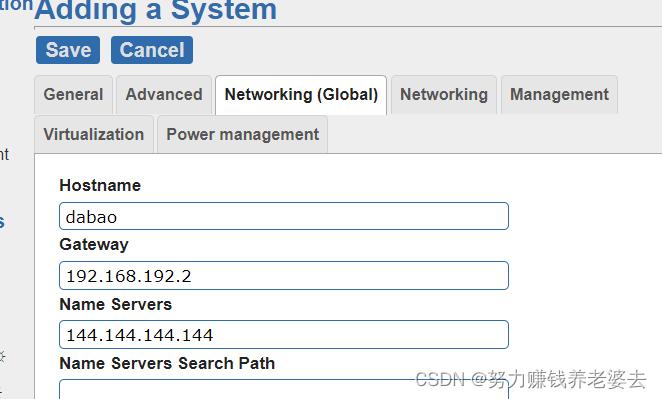
同步配置并重启相关服务 [root@localhost ~]# cobbler sync [root@localhost ~]# systemctl restart httpd [root@localhost ~]# systemctl restart cobblerd [root@localhost ~]# systemctl restart xinetd- 1
- 2
- 3
- 4
- 5
-
相关阅读:
【无标题】
上海-华为全联接大会|竹云受邀参加华为云ROMAConnect行业生态联盟成立联合发布会
泛微OA之获取每月固定日期
【3D视觉】PointNet解析
互联网摸鱼日报(2022-11-05)
寒假12 图论
Android kotlin开启协程的几种方式
linux入门---信号的保存和捕捉
[MapStruct]如何获取Mapper
JavaScript设计模式及代码实现——单例模式
- 原文地址:https://blog.csdn.net/dabaohjl/article/details/126307652
