-
K8s复习笔记10--1个POD2个container实现Wordpress K8s部署
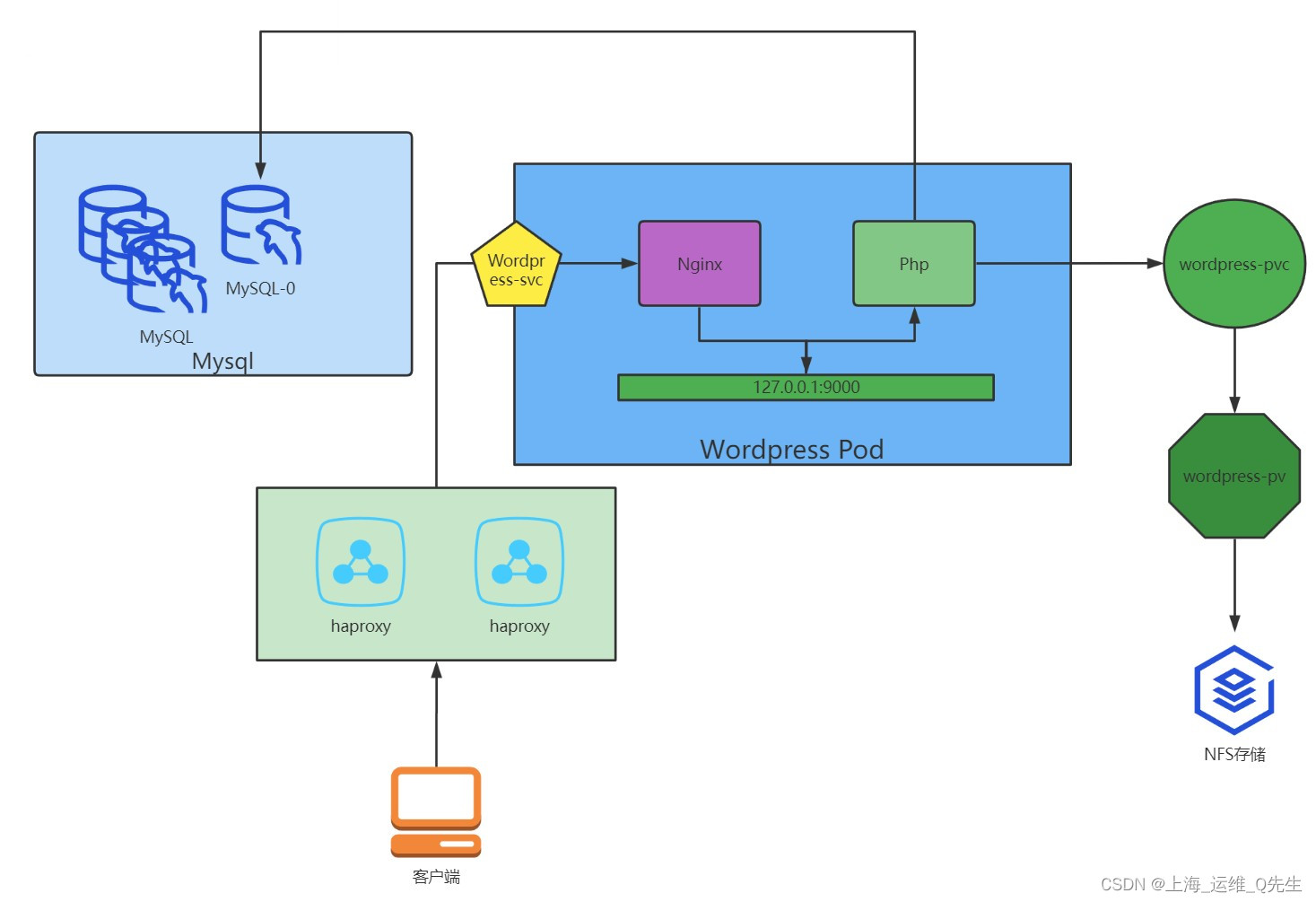
1. Wordpress架构
2. 构建wordpress镜像
2.1 构建nginx-base-wordpress镜像
Dockerfile
FROM harbor.intra.com/baseimages/centos-base:7.9.2009 RUN yum install -y vim wget tree lrzsz gcc gcc-c++ automake pcre pcre-devel zlib zlib-devel openssl openssl-devel iproute net-tools iotop ADD nginx-1.20.2.tar.gz /usr/local/src/ RUN cd /usr/local/src/nginx-1.20.2 && ./configure --prefix=/apps/nginx && make && make install && ln -sv /apps/nginx/sbin/nginx /usr/sbin/nginx &&rm -rf /usr/local/src/nginx-1.20.2.tar.gz- 1
- 2
- 3
- 4
- 5
构建脚本
#!/bin/bash docker build -t harbor.magedu.net/pub-images/nginx-base-wordpress:v1.20.2 . sleep 1 docker push harbor.magedu.net/pub-images/nginx-base-wordpress:v1.20.2- 1
- 2
- 3
- 4
构建镜像
root@k8s-master-01:/opt/k8s-data/dockerfile/web/pub-images/nginx-base-wordpress# ./build-command.sh Successfully built 16a6c56d9d90 Successfully tagged harbor.intra.com/pub-images/nginx-base-wordpress:v1.20.2 The push refers to repository [harbor.intra.com/pub-images/nginx-base-wordpress] ea1d4eb0d9b4: Pushed 51ea35718443: Pushed 63db03ab1289: Pushed 6f2f514dbcfd: Mounted from wework/redis 42a5df432d46: Mounted from wework/redis 7a6c7dc8d8df: Mounted from wework/redis c91e83206e44: Mounted from wework/redis bf0b39b2f6ed: Mounted from wework/redis 174f56854903: Mounted from pub-images/tomcat-base v1.20.2: digest: sha256:532aa3075b2b32ef89a6ff08b97461df194bd7f38b6a4fc15ac6597b0a75bf14 size: 2211- 1
- 2
- 3
- 4
- 5
- 6
- 7
- 8
- 9
- 10
- 11
- 12
- 13
- 14
- 15
2.2 构建nginx-wordpress镜像
Dockerfile
FROM harbor.intra.com/pub-images/nginx-base-wordpress:v1.20.2 ADD nginx.conf /apps/nginx/conf/nginx.conf ADD run_nginx.sh /apps/nginx/sbin/run_nginx.sh RUN mkdir -pv /home/nginx/wordpress RUN useradd nginx -s /sbin/nologin && chown nginx.nginx /home/nginx/wordpress/ -R EXPOSE 80 443 CMD ["/apps/nginx/sbin/run_nginx.sh"]- 1
- 2
- 3
- 4
- 5
- 6
- 7
- 8
- 9
构建脚本
#!/bin/bash TAG=$1 docker build -t harbor.intra.com/wework/wordpress-nginx:${TAG} . echo "镜像制作完成,即将上传至Harbor服务器" sleep 1 docker push harbor.intra.com/wework/wordpress-nginx:${TAG} echo "镜像上传完成"- 1
- 2
- 3
- 4
- 5
- 6
- 7
开始构建
root@k8s-master-01:/opt/k8s-data/dockerfile/web/wework/wordpress/nginx# ./build-command.sh v1 Successfully built 8f8cabcb7218 Successfully tagged harbor.intra.com/wework/wordpress-nginx:v1 镜像制作完成,即将上传至Harbor服务器 The push refers to repository [harbor.intra.com/wework/wordpress-nginx] a10c50297f6e: Pushed 51ae82bfb957: Pushed c95b7ca8b743: Pushed dc2fe2b3eba0: Pushed ea1d4eb0d9b4: Mounted from pub-images/nginx-base-wordpress 51ea35718443: Mounted from pub-images/nginx-base-wordpress 63db03ab1289: Mounted from pub-images/nginx-base-wordpress 6f2f514dbcfd: Mounted from wework/redis 42a5df432d46: Mounted from wework/redis 7a6c7dc8d8df: Mounted from wework/redis c91e83206e44: Mounted from wework/redis bf0b39b2f6ed: Mounted from wework/redis 174f56854903: Mounted from wework/jenkins v1: digest: sha256:1bc3598a70eecf4919a5cf0c952893dafcaf8a9b4740a44fc456e7b520f6eb82 size: 3041 镜像上传完成 root@k8s-master-01:/opt/k8s-data/dockerfile/web/wework/wordpress/nginx# docker images REPOSITORY TAG IMAGE ID CREATED SIZE harbor.intra.com/wework/wordpress-nginx v1 8f8cabcb7218 About a minute ago 3.43GB- 1
- 2
- 3
- 4
- 5
- 6
- 7
- 8
- 9
- 10
- 11
- 12
- 13
- 14
- 15
- 16
- 17
- 18
- 19
- 20
- 21
- 22
- 23
2.3 构建php镜像
Dockerfile
#PHP Base Image FROM harbor.intra.com/baseimages/centos-base:7.9.2009 RUN yum install -y https://mirrors.tuna.tsinghua.edu.cn/remi/enterprise/remi-release-7.rpm && yum install php56-php-fpm php56-php-mysql -y ADD www.conf /opt/remi/php56/root/etc/php-fpm.d/www.conf ADD run_php.sh /usr/local/bin/run_php.sh RUN useradd nginx -s /sbin/nologin EXPOSE 9000 CMD ["/usr/local/bin/run_php.sh"]- 1
- 2
- 3
- 4
- 5
- 6
- 7
- 8
- 9
- 10
构建脚本
#!/bin/bash TAG=$1 docker build -t harbor.intra.com/wework/wordpress-php-5.6:${TAG} . echo "镜像制作完成,即将上传至Harbor服务器" sleep 1 docker push harbor.intra.com/wework/wordpress-php-5.6:${TAG} echo "镜像上传完成"- 1
- 2
- 3
- 4
- 5
- 6
- 7
开始构建镜像
root@k8s-master-01:/opt/k8s-data/dockerfile/web/wework/wordpress/php# ./build-command.sh v1 Successfully built cfbc7d3b9067 Successfully tagged harbor.intra.com/wework/wordpress-php-5.6:v1 镜像制作完成,即将上传至Harbor服务器 The push refers to repository [harbor.intra.com/wework/wordpress-php-5.6] 084c74cb43b5: Pushed 4d89d343ef6a: Pushed 8918bab5ac51: Pushed 6f2f514dbcfd: Mounted from wework/wordpress-nginx 42a5df432d46: Mounted from wework/wordpress-nginx 7a6c7dc8d8df: Mounted from wework/wordpress-nginx c91e83206e44: Mounted from wework/wordpress-nginx bf0b39b2f6ed: Mounted from wework/wordpress-nginx 174f56854903: Mounted from wework/wordpress-nginx v1: digest: sha256:896ffbfc73fe9aa972f6d0aed307fdbd690b75a5172c0139d1c6bb2a844562e1 size: 2413 镜像上传完成- 1
- 2
- 3
- 4
- 5
- 6
- 7
- 8
- 9
- 10
- 11
- 12
- 13
- 14
- 15
- 16
3. Wordpress k8s部署
3.1 pv和pvc
PV配置文件wordpress-persistentvolume.yaml
--- apiVersion: v1 kind: PersistentVolume metadata: name: wordpress-pv namespace: wework spec: capacity: storage: 30Gi accessModes: - ReadWriteOnce nfs: server: 192.168.31.109 path: /data/k8s/wework/wordpress- 1
- 2
- 3
- 4
- 5
- 6
- 7
- 8
- 9
- 10
- 11
- 12
- 13
- 14
PVC配置文件wordpress-persistentvolumeclaim.yaml
--- apiVersion: v1 kind: PersistentVolumeClaim metadata: name: wordpress-pvc namespace: wework spec: volumeName: wordpress-pv accessModes: - ReadWriteOnce resources: requests: storage: 10Gi- 1
- 2
- 3
- 4
- 5
- 6
- 7
- 8
- 9
- 10
- 11
- 12
- 13
生成pv和pvc
root@k8s-master-01:/opt/k8s-data/yaml/web/wework/wordpress/pv# kubectl apply -f wordpress-persistentvolume.yaml persistentvolume/wordpress-pv created root@k8s-master-01:/opt/k8s-data/yaml/web/wework/wordpress/pv# kubectl get pv NAME CAPACITY ACCESS MODES RECLAIM POLICY STATUS CLAIM STORAGECLASS REASON AGE jenkins-datadir-pv 100Gi RWO Retain Bound wework/jenkins-datadir-pvc 146m jenkins-root-datadir-pv 100Gi RWO Retain Bound wework/jenkins-root-data-pvc 146m mysql-datadir-1 50Gi RWO Retain Bound wework/data-mysql-0 20h mysql-datadir-2 50Gi RWO Retain Bound wework/data-mysql-3 20h mysql-datadir-3 50Gi RWO Retain Available 20h mysql-datadir-4 50Gi RWO Retain Bound wework/data-mysql-1 20h mysql-datadir-5 50Gi RWO Retain Available 20h mysql-datadir-6 50Gi RWO Retain Bound wework/data-mysql-2 20h wordpress-pv 30Gi RWO Retain Available 3s zookeeper-datadir-pv-1 20Gi RWO Retain Bound wework/zookeeper-datadir-pvc-1 2d13h zookeeper-datadir-pv-2 20Gi RWO Retain Bound wework/zookeeper-datadir-pvc-2 2d13h zookeeper-datadir-pv-3 20Gi RWO Retain Bound wework/zookeeper-datadir-pvc-3 2d13h root@k8s-master-01:/opt/k8s-data/yaml/web/wework/wordpress/pv# kubectl apply -f wordpress-persistentvolumeclaim.yaml persistentvolumeclaim/wordpress-pvc created root@k8s-master-01:/opt/k8s-data/yaml/web/wework/wordpress/pv# kubectl get pvc -n wework NAME STATUS VOLUME CAPACITY ACCESS MODES STORAGECLASS AGE data-mysql-0 Bound mysql-datadir-1 50Gi RWO 19h data-mysql-1 Bound mysql-datadir-4 50Gi RWO 19h data-mysql-2 Bound mysql-datadir-6 50Gi RWO 19h data-mysql-3 Bound mysql-datadir-2 50Gi RWO 18h jenkins-datadir-pvc Bound jenkins-datadir-pv 100Gi RWO 144m jenkins-root-data-pvc Bound jenkins-root-datadir-pv 100Gi RWO 144m wordpress-pvc Pending wordpress-pv 0 8s zookeeper-datadir-pvc-1 Bound zookeeper-datadir-pv-1 20Gi RWO 2d13h zookeeper-datadir-pvc-2 Bound zookeeper-datadir-pv-2 20Gi RWO 2d13h zookeeper-datadir-pvc-3 Bound zookeeper-datadir-pv-3 20Gi RWO 2d13h root@k8s-master-01:/opt/k8s-data/yaml/web/wework/wordpress/pv# kubectl get pvc -n wework NAME STATUS VOLUME CAPACITY ACCESS MODES STORAGECLASS AGE data-mysql-0 Bound mysql-datadir-1 50Gi RWO 19h data-mysql-1 Bound mysql-datadir-4 50Gi RWO 19h data-mysql-2 Bound mysql-datadir-6 50Gi RWO 19h data-mysql-3 Bound mysql-datadir-2 50Gi RWO 18h jenkins-datadir-pvc Bound jenkins-datadir-pv 100Gi RWO 144m jenkins-root-data-pvc Bound jenkins-root-datadir-pv 100Gi RWO 144m wordpress-pvc Bound wordpress-pv 30Gi RWO 15s zookeeper-datadir-pvc-1 Bound zookeeper-datadir-pv-1 20Gi RWO 2d13h zookeeper-datadir-pvc-2 Bound zookeeper-datadir-pv-2 20Gi RWO 2d13h zookeeper-datadir-pvc-3 Bound zookeeper-datadir-pv-3 20Gi RWO 2d13h- 1
- 2
- 3
- 4
- 5
- 6
- 7
- 8
- 9
- 10
- 11
- 12
- 13
- 14
- 15
- 16
- 17
- 18
- 19
- 20
- 21
- 22
- 23
- 24
- 25
- 26
- 27
- 28
- 29
- 30
- 31
- 32
- 33
- 34
- 35
- 36
- 37
- 38
- 39
- 40
- 41
- 42
3.2 wordpress应用部署
yaml
kind: Deployment apiVersion: apps/v1 metadata: labels: app: wordpress-app name: wordpress-app-deployment namespace: wework spec: replicas: 1 selector: matchLabels: app: wordpress-app template: metadata: labels: app: wordpress-app spec: containers: - name: wordpress-app-nginx image: harbor.intra.com/wework/wordpress-nginx:v1 imagePullPolicy: Always ports: - containerPort: 80 protocol: TCP name: http - containerPort: 443 protocol: TCP name: https volumeMounts: - name: wordpress mountPath: /home/nginx/wordpress readOnly: false - name: wordpress-app-php image: harbor.intra.com/wework/wordpress-php-5.6:v1 #image: harbor.wework.net/wework/php:5.6.40-fpm #imagePullPolicy: IfNotPresent imagePullPolicy: Always ports: - containerPort: 9000 protocol: TCP name: http volumeMounts: - name: wordpress mountPath: /home/nginx/wordpress readOnly: false volumes: - name: wordpress persistentVolumeClaim: claimName: wordpress-pvc --- kind: Service apiVersion: v1 metadata: labels: app: wordpress-app name: wordpress-app-spec namespace: wework spec: type: NodePort ports: - name: http port: 80 protocol: TCP targetPort: 80 nodePort: 30031 - name: https port: 443 protocol: TCP targetPort: 443 nodePort: 30033 selector: app: wordpress-app- 1
- 2
- 3
- 4
- 5
- 6
- 7
- 8
- 9
- 10
- 11
- 12
- 13
- 14
- 15
- 16
- 17
- 18
- 19
- 20
- 21
- 22
- 23
- 24
- 25
- 26
- 27
- 28
- 29
- 30
- 31
- 32
- 33
- 34
- 35
- 36
- 37
- 38
- 39
- 40
- 41
- 42
- 43
- 44
- 45
- 46
- 47
- 48
- 49
- 50
- 51
- 52
- 53
- 54
- 55
- 56
- 57
- 58
- 59
- 60
- 61
- 62
- 63
- 64
- 65
- 66
- 67
- 68
- 69
- 70
- 71
- 72
- 73
- 74
- 75
部署yaml
root@k8s-master-01:/opt/k8s-data/yaml/web/wework/wordpress# kubectl apply -f wordpress.yaml deployment.apps/wordpress-app-deployment created service/wordpress-app-spec created root@k8s-master-01:/opt/k8s-data/yaml/web/wework/wordpress# kubectl get pods -n wework NAME READY STATUS RESTARTS AGE mysql-0 2/2 Running 0 167m mysql-1 2/2 Running 0 167m mysql-2 2/2 Running 0 167m mysql-3 2/2 Running 0 167m wework-jenkins-deployment-5697fd66cf-mw8dl 1/1 Running 0 112m wordpress-app-deployment-67bc78cf9-cn5cf 2/2 Running 0 23s zookeeper1-699d46468c-62nfk 1/1 Running 0 15h zookeeper2-7cc484778-fl594 1/1 Running 0 15h zookeeper3-cdf484f7c-bb9fr 1/1 Running 0 15h- 1
- 2
- 3
- 4
- 5
- 6
- 7
- 8
- 9
- 10
- 11
- 12
- 13
- 14
此时Wordpress的Pod已经生成,且该pod里有2个container
root@k8s-master-01:/opt/k8s-data/yaml/web/wework/wordpress# kubectl describe pods wordpress-app-deployment-67bc78cf9-cn5cf -n wework Name: wordpress-app-deployment-67bc78cf9-cn5cf Namespace: wework Priority: 0 Node: 192.168.31.113/192.168.31.113 Start Time: Fri, 12 Aug 2022 11:32:22 +0800 Labels: app=wordpress-app pod-template-hash=67bc78cf9 Annotations: <none> Status: Running IP: 172.100.76.167 IPs: IP: 172.100.76.167 Controlled By: ReplicaSet/wordpress-app-deployment-67bc78cf9 Containers: wordpress-app-nginx: Container ID: docker://019dc0ebfd1b23ca2a404a04b627488238355006083dfb60f988a1844df54047 Image: harbor.intra.com/wework/wordpress-nginx:v1 Image ID: docker-pullable://harbor.intra.com/wework/wordpress-nginx@sha256:051c8810914678d211e60c438b7bf411564bd4b7103494f9dfd20e568dad444e Ports: 80/TCP, 443/TCP Host Ports: 0/TCP, 0/TCP State: Running Started: Fri, 12 Aug 2022 11:32:28 +0800 Ready: True Restart Count: 0 Environment: <none> Mounts: /home/nginx/wordpress from wordpress (rw) /var/run/secrets/kubernetes.io/serviceaccount from kube-api-access-xpm76 (ro) wordpress-app-php: Container ID: docker://5cff45e252e5ae4991a721df859a927105b19dd663e4f382dfdfdd0a619f2652 Image: harbor.intra.com/wework/wordpress-php-5.6:v1 Image ID: docker-pullable://harbor.intra.com/wework/wordpress-php-5.6@sha256:896ffbfc73fe9aa972f6d0aed307fdbd690b75a5172c0139d1c6bb2a844562e1 Port: 9000/TCP Host Port: 0/TCP State: Running Started: Fri, 12 Aug 2022 11:32:34 +0800 Ready: True Restart Count: 0 Environment: <none> Mounts: /home/nginx/wordpress from wordpress (rw) /var/run/secrets/kubernetes.io/serviceaccount from kube-api-access-xpm76 (ro) Conditions: Type Status Initialized True Ready True ContainersReady True PodScheduled True Volumes: wordpress: Type: PersistentVolumeClaim (a reference to a PersistentVolumeClaim in the same namespace) ClaimName: wordpress-pvc ReadOnly: false kube-api-access-xpm76: Type: Projected (a volume that contains injected data from multiple sources) TokenExpirationSeconds: 3607 ConfigMapName: kube-root-ca.crt ConfigMapOptional: <nil> DownwardAPI: true QoS Class: BestEffort Node-Selectors: <none> Tolerations: node.kubernetes.io/not-ready:NoExecute op=Exists for 300s node.kubernetes.io/unreachable:NoExecute op=Exists for 300s Events: Type Reason Age From Message ---- ------ ---- ---- ------- Normal Scheduled 9m53s default-scheduler Successfully assigned wework/wordpress-app-deployment-67bc78cf9-cn5cf to 192.168.31.113 Normal Pulling 9m52s kubelet Pulling image "harbor.intra.com/wework/wordpress-nginx:v1" Normal Pulled 9m48s kubelet Successfully pulled image "harbor.intra.com/wework/wordpress-nginx:v1" in 4.186752109s Normal Created 9m47s kubelet Created container wordpress-app-nginx Normal Started 9m47s kubelet Started container wordpress-app-nginx Normal Pulling 9m47s kubelet Pulling image "harbor.intra.com/wework/wordpress-php-5.6:v1" Normal Pulled 9m42s kubelet Successfully pulled image "harbor.intra.com/wework/wordpress-php-5.6:v1" in 5.530956757s Normal Created 9m41s kubelet Created container wordpress-app-php Normal Started 9m41s kubelet Started container wordpress-app-php- 1
- 2
- 3
- 4
- 5
- 6
- 7
- 8
- 9
- 10
- 11
- 12
- 13
- 14
- 15
- 16
- 17
- 18
- 19
- 20
- 21
- 22
- 23
- 24
- 25
- 26
- 27
- 28
- 29
- 30
- 31
- 32
- 33
- 34
- 35
- 36
- 37
- 38
- 39
- 40
- 41
- 42
- 43
- 44
- 45
- 46
- 47
- 48
- 49
- 50
- 51
- 52
- 53
- 54
- 55
- 56
- 57
- 58
- 59
- 60
- 61
- 62
- 63
- 64
- 65
- 66
- 67
- 68
- 69
- 70
- 71
- 72
- 73
- 74
- 75
- 76
通过控制台访问
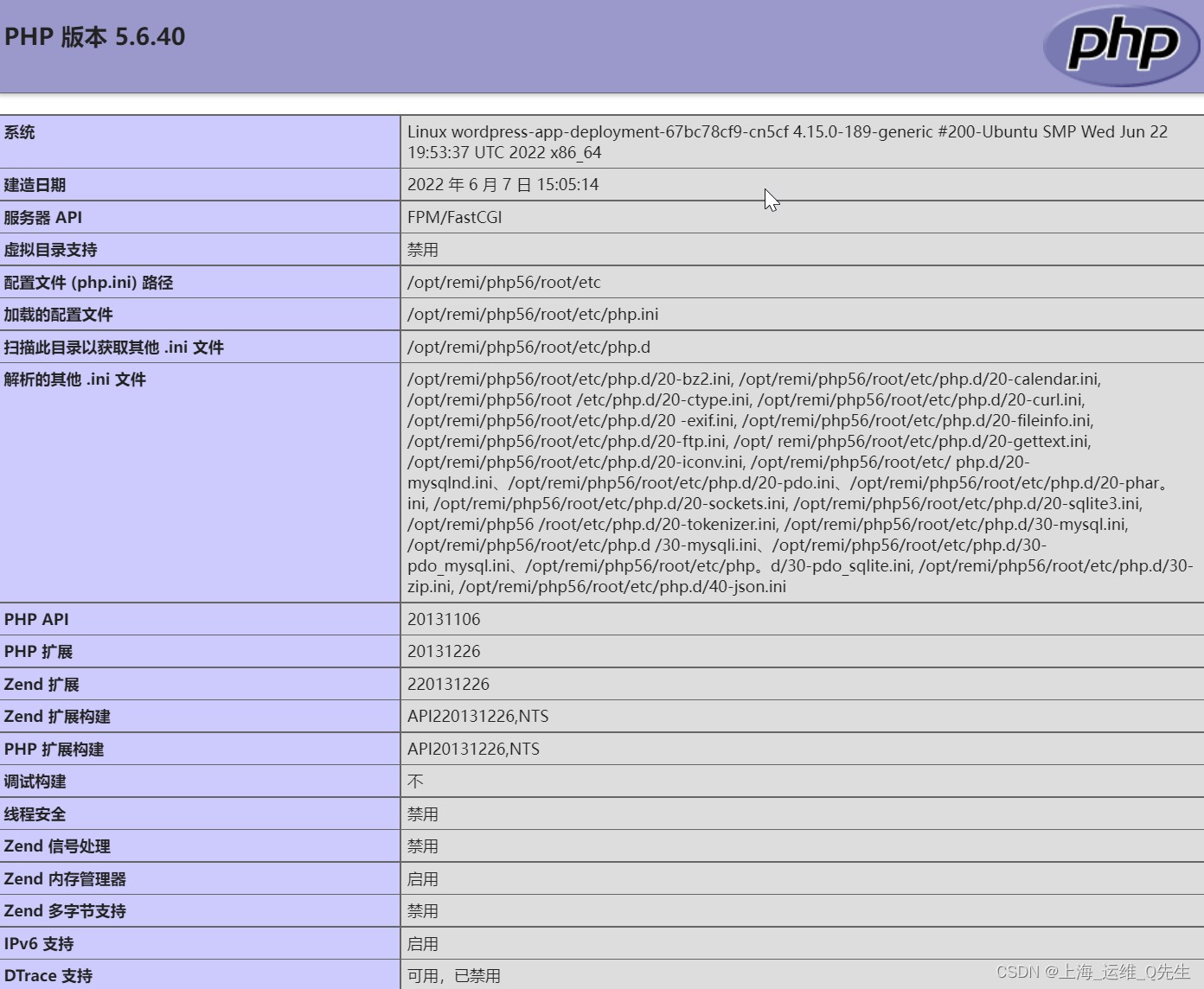
创建了index.html后就能通过service转发nginx访问到页面


创建index.php,通过nginx重定向到phpuser nginx nginx; worker_processes auto; events { worker_connections 1024; } http { include mime.types; default_type application/octet-stream; sendfile on; keepalive_timeout 65; client_max_body_size 10M; client_body_buffer_size 16k; client_body_temp_path /apps/nginx/tmp 1 2 2; gzip on; server { listen 80; server_name blogs.magedu.net; location / { root /home/nginx/wordpress; index index.php index.html index.htm; } location ~ \.php$ { root /home/nginx/wordpress; fastcgi_pass 127.0.0.1:9000; fastcgi_index index.php; fastcgi_param SCRIPT_FILENAME $document_root$fastcgi_script_name; include fastcgi_params; } error_page 500 502 503 504 /50x.html; location = /50x.html { root html; } } }- 1
- 2
- 3
- 4
- 5
- 6
- 7
- 8
- 9
- 10
- 11
- 12
- 13
- 14
- 15
- 16
- 17
- 18
- 19
- 20
- 21
- 22
- 23
- 24
- 25
- 26
- 27
- 28
- 29
- 30
- 31
- 32
- 33
- 34
4. 部署Wordpress应用
4.1 下载并解压Wordpress
下载Wordpress
root@haproxy-1:~# cd /data/k8s/wework/wordpress root@haproxy-1:/data/k8s/wework/wordpress# wget https://cn.wordpress.org/latest-zh_CN.tar.gz root@haproxy-1:/data/k8s/wework/wordpress# tar xf latest-zh_CN.tar.gz root@haproxy-1:/data/k8s/wework/wordpress# mv wordpress/* ./ root@haproxy-1:/data/k8s/wework/wordpress# rm -rf latest-zh_CN.tar.gz wordpress- 1
- 2
- 3
- 4
- 5
4.2 配置负载均衡
修改haproxy
listen wordpress-80 bind 192.168.31.188:80 mode http server 192.168.31.111 192.168.31.111:30031 check inter 2s fall 3 rise 5 server 192.168.31.112 192.168.31.112:30031 check inter 2s fall 3 rise 5 server 192.168.31.113 192.168.31.113:30031 check inter 2s fall 3 rise 5- 1
- 2
- 3
- 4
- 5
- 6
重启haproxy
root@haproxy-1:~# systemctl restart haproxy- 1
4.3 wordpress数据库创建
mysql-0上
root@mysql-0:/# mysql Welcome to the MySQL monitor. Commands end with ; or \g. Your MySQL connection id is 8975 Server version: 5.7.36-log MySQL Community Server (GPL) Copyright (c) 2000, 2021, Oracle and/or its affiliates. Oracle is a registered trademark of Oracle Corporation and/or its affiliates. Other names may be trademarks of their respective owners. Type 'help;' or '\h' for help. Type '\c' to clear the current input statement. mysql> create database wordpress; Query OK, 1 row affected (0.00 sec) mysql> grant all privileges on wordpress.* to "wordpress"@"%" identified by "wordpress"; Query OK, 0 rows affected, 1 warning (0.01 sec) ## 退出后再试下 root@mysql-0:/# mysql -uwordpress -pwordpress mysql: [Warning] Using a password on the command line interface can be insecure. Welcome to the MySQL monitor. Commands end with ; or \g. Your MySQL connection id is 9096 Server version: 5.7.36-log MySQL Community Server (GPL) Copyright (c) 2000, 2021, Oracle and/or its affiliates. Oracle is a registered trademark of Oracle Corporation and/or its affiliates. Other names may be trademarks of their respective owners. Type 'help;' or '\h' for help. Type '\c' to clear the current input statement. mysql> show databases; +--------------------+ | Database | +--------------------+ | information_schema | | wordpress | +--------------------+ 2 rows in set (0.00 sec- 1
- 2
- 3
- 4
- 5
- 6
- 7
- 8
- 9
- 10
- 11
- 12
- 13
- 14
- 15
- 16
- 17
- 18
- 19
- 20
- 21
- 22
- 23
- 24
- 25
- 26
- 27
- 28
- 29
- 30
- 31
- 32
- 33
- 34
- 35
- 36
- 37
- 38
- 39
- 40
- 41
- 42
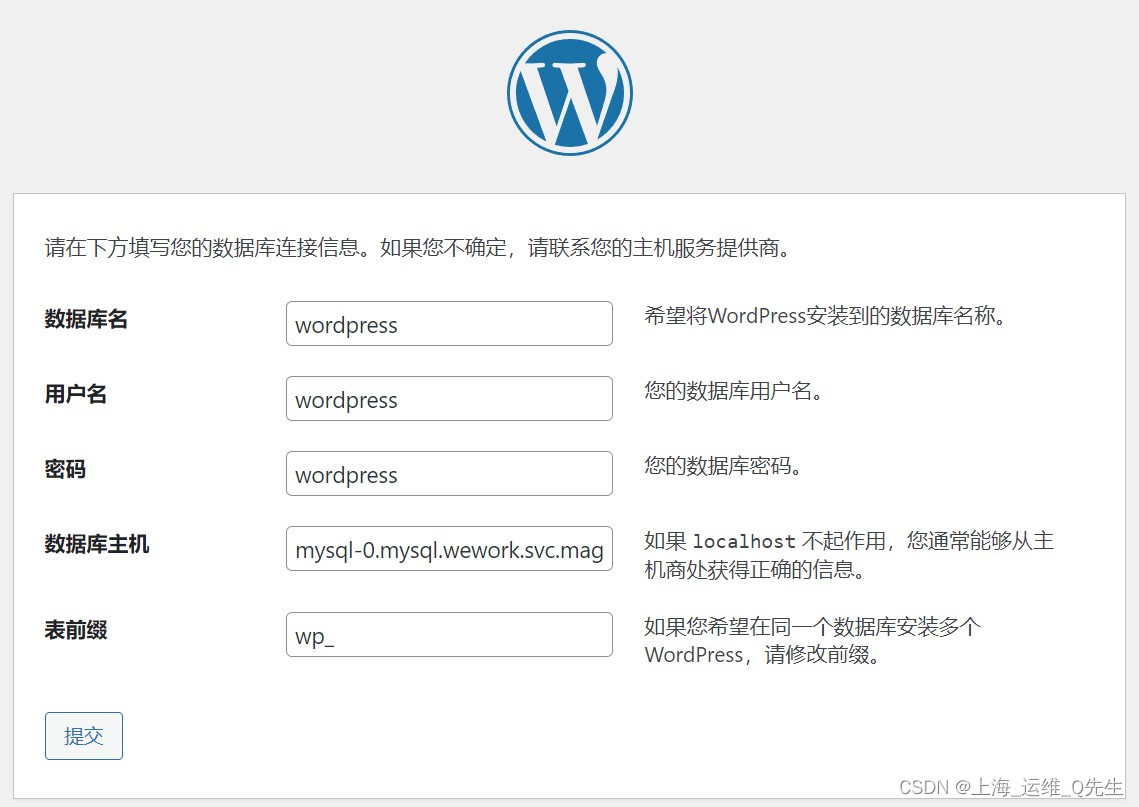
这里的数据库主机就是前几日创建的StatefulSet的mysql.
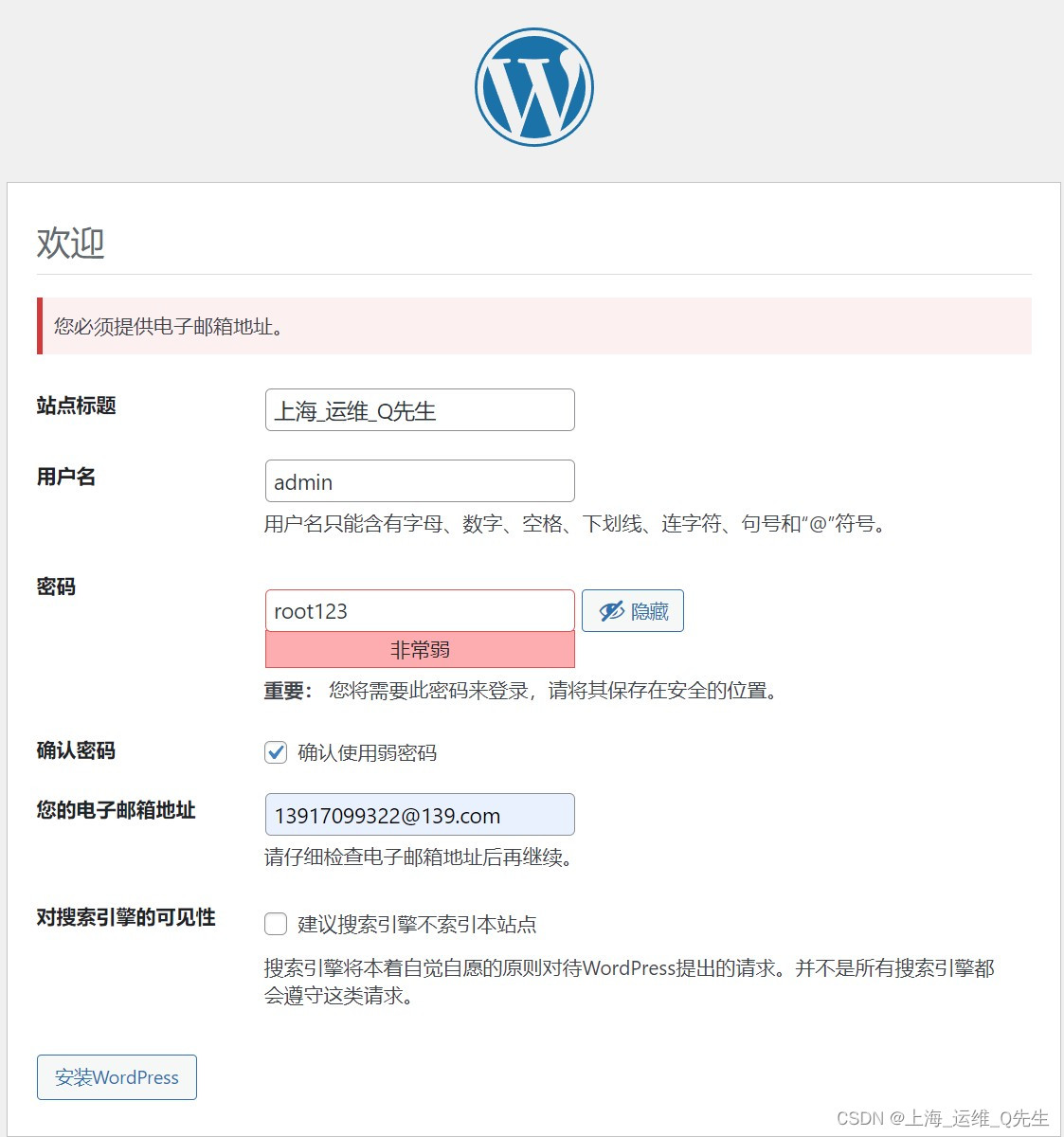
root@haproxy-1:/data/k8s/wework# chown -R 2023.2023 wordpress- 1



-
相关阅读:
Web APIs——轮播图完整版
【王者工具-Valgrind】Valgrind_Memcheck工具使用总结(01)
Flink - checkpoint Failure reason: Not all required tasks are currently running
Pytorch预训练模型和修改——记录
Socks5代理技术:驱动数字化时代跨界发展的利器
【2023年11月第四版教材】第23章《组织通用管理》(合集篇)
六、Python类的高级知识
arthas常用命令
upp(统一流程平台)项目,如果需要项目章程会怎么写
Lru-k在Rust中的实现及源码解析
- 原文地址:https://blog.csdn.net/qq_29974229/article/details/126302457
