-
事务介绍和事务处理
事务介绍
基本介绍:
1.JDBC程序中当一个Connection对象创建时,默认情况下是自动提交事务,每次执行一个SQL语句时,如果执行成功则会向数据库自动提交,而不能回滚
2.JDBC程序中为了让多个SQL语句作为一个整体执行,需要使用事务
3.调用Connection的setAutoCommit(false)可以取消自动提交事务
4.在所有的SQL语句都成功执行后,调用Connection的commit();方法提交事务
5.在其中某个操作失败或出现异常时,调用Connection的rollback();方法回滚事务
事务处理
模拟转账业务:tom给jason转账100
最后代码如下
package com.jh.transaction_;
//演示在JDBC中如何使用事务
import com.jh.jdbc.JDBCUtils;
import org.junit.jupiter.api.Test;import java.sql.Connection;
import java.sql.PreparedStatement;
import java.sql.SQLException;public class Transaction_ {
@Test
public void noTransaction(){
//1.得到连接
Connection connection = null;
//组织SQL语句
String sql = "update accout set balance = balance - 100 where id = 1";
String sql02 = "update accout set balance = balance + 100 where id = 2";
PreparedStatement preparedStatement = null;
//创建PreparedStatement对象try {
connection = JDBCUtils.getConnection();
preparedStatement = connection.prepareStatement(sql);
preparedStatement.executeUpdate();//执行int i = 1/0;
preparedStatement = connection.prepareStatement(sql02);
preparedStatement.executeUpdate();//执行} catch (SQLException e) {
throw new RuntimeException(e);
}finally {
//关闭资源
JDBCUtils.close(null,preparedStatement,connection);
}
}//使用事务
@Test
public void Transaction(){
//1.得到连接
Connection connection = null;
//组织SQL语句
String sql = "update accout set balance = balance - 100 where id = 1";
String sql02 = "update accout set balance = balance + 100 where id = 2";
PreparedStatement preparedStatement = null;
//创建PreparedStatement对象try {
connection = JDBCUtils.getConnection();//默认情况下,connection自动提交
//将connection设置为不自动提交
connection.setAutoCommit(false);preparedStatement = connection.prepareStatement(sql);
preparedStatement.executeUpdate();//执行int i = 1/0;
preparedStatement = connection.prepareStatement(sql02);
preparedStatement.executeUpdate();//执行//提交事务
connection.commit();} catch (SQLException e) {
System.out.println("发送异常,进行回滚...");
try {
connection.rollback();//开始回滚(撤销执行的SQL),默认回滚到事务开始的状态
} catch (SQLException ex) {
throw new RuntimeException(ex);
}
throw new RuntimeException(e);
}finally {
//关闭资源
JDBCUtils.close(null,preparedStatement,connection);
}}
}未使用事务执行转账事件:
执行前查看表信息:
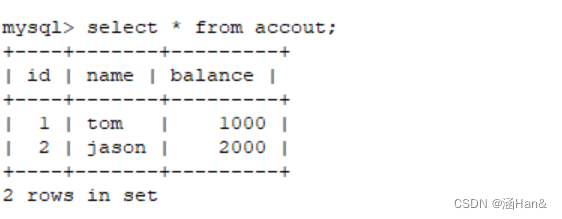
执行后查看表信息:
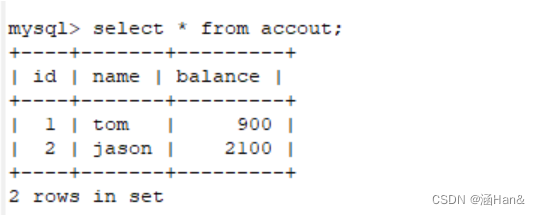
当有异常发生时:

当有异常出现时,执行结果:

可以看出:tom减少一百,而jason并未增加一百
使用事务来执行该转账事件:
执行前:
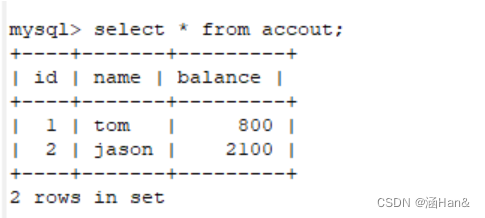
执行后:

当有异常发生时,两条SQL语句都不会去执行
-
相关阅读:
毕业设计 深度学习OCR中文识别 - opencv python
STM32物联网项目-有刷直流电机
MAC系统下Xcode连接iOS真机实现iOS App自动化测试(上)
简易Tomcat服务器
C#【必备技能篇】生成公共属性代码{get;set;}的快捷方法
为什么 Spring和IDEA 都不推荐使用 @Autowired 注解
debian配置distcc分布式编译
SpringMVC拦截器
【STL源码剖析】vector类模拟实现 了解底层-走进底层-掌握底层【超详细的注释和解释】
Linux操作系统——面试题-(腾讯,百度,美团,滴滴)
- 原文地址:https://blog.csdn.net/weixin_46065214/article/details/126298096