-
麒麟v10系统部署ftp,Java无法获取文件列表问题解决
出现问题:
Java连接ftp代码:
- ftpClient.connect(server, Integer.valueOf(port));
- ftpClient.login(loginName, loginPassword);
- log.info("连接ftp服务返回码:" + ftpClient.getReplyCode());
- ftpClient.setBufferSize(bufferSize);
- ftpClient.setControlEncoding(encoding);
- ftpClient.setFileType(FTPClient.EBCDIC_FILE_TYPE);
- ftpClient.enterLocalPassiveMode();
当我用ftpClient连接麒麟服务器部署的FTP服务器时出现了获取不到文件列表的问题:
FTPFile[] ftpFiles = ftpClient.listFiles();
获取文件数组长度为0。
但是使用FileZilla连接是正常的!!!


使用FTP命令也可以正常连接!!!
- [root@bogon /]# ftp 192.168.100.11
- Connected to 192.168.100.11 (192.168.100.11).
- 220 Welcome to blah FTP service.
- Name (192.168.100.11:root): vsftp
- 331 Please specify the password.
- Password:
- 230 Login successful.
- Remote system type is UNIX.
- Using binary mode to transfer files.
- ftp> ls
- 227 Entering Passive Mode (192,168,100,11,42,244).
- 150 Here comes the directory listing.
- -rw-r--r-- 1 0 1014 0 8月 11 19:02 213213
- drwxr-xr-x 2 0 1014 6 8月 11 19:01 456546
- drwxr-xr-x 3 0 0 18 8月 11 14:52 data
- drwxr-xr-x 6 0 1014 58 8月 11 19:07 home
- -rw-r--r-- 1 0 1014 5562368 8月 11 18:56 images (3).tar
- drwxr-xr-x 3 0 1014 17 8月 11 18:54 mnt
- drwxr-xr-x 5 0 0 49 8月 11 10:30 portainer
- -rw-r--r-- 1 0 1014 0 8月 11 19:02 qweqwe
- drwxrwxrwx 2 0 0 6 8月 10 09:37 user
- drwxr-xr-x 3 0 0 23 8月 11 10:57 username
- drwxrwxrwx 17 1014 0 4096 8月 11 13:41 vsftp
- drwxr-xr-x 2 0 1014 6 8月 11 18:56 创建目录
- 226 Directory send OK.
- ftp>
于是我开始打断点查看源码运行情况:
直到发现了这里

FTPFile temp = this.parser.parseFTPEntry(entry);
entry是可以获取到文件字符串信息但无法解析
- 它本身是一个接口
- FTPFile parseFTPEntry(String var1);
不同系统下有多个实现类
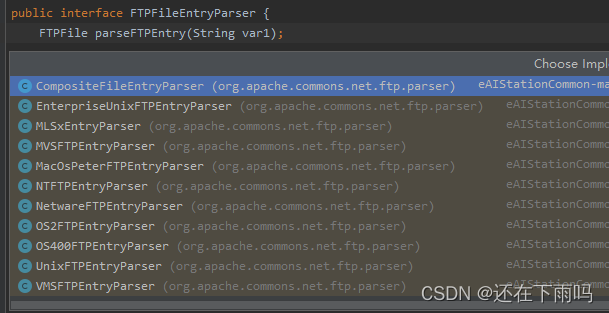
而它默认使用的 UnixFTPEntryParser没有办法解析麒麟系统下的文件字符串!!!
百度之后发现可以通过设置FTPClientConfig来设置系统编码解析类型
- public class FTPClientConfig {
- public static final String SYST_UNIX = "UNIX";
- public static final String SYST_UNIX_TRIM_LEADING = "UNIX_LTRIM";
- public static final String SYST_VMS = "VMS";
- public static final String SYST_NT = "WINDOWS";
- public static final String SYST_OS2 = "OS/2";
- public static final String SYST_OS400 = "OS/400";
- public static final String SYST_AS400 = "AS/400";
- public static final String SYST_MVS = "MVS";
- public static final String SYST_L8 = "TYPE: L8";
- public static final String SYST_NETWARE = "NETWARE";
- public static final String SYST_MACOS_PETER = "MACOS PETER";
经过多次尝试:
- FTPClientConfig conf = new FTPClientConfig(FTPClientConfig.SYST_NT);
- ftpClient.configure(conf);
发现这样是可行的!!!

完美。
连接代码
- ftpClient.connect(server, Integer.valueOf(port));
- ftpClient.login(loginName, loginPassword);
- log.info("连接ftp服务返回码:" + ftpClient.getReplyCode());
- ftpClient.setBufferSize(bufferSize);
- ftpClient.setControlEncoding(encoding);
- ftpClient.setFileType(FTPClient.EBCDIC_FILE_TYPE);
- ftpClient.enterLocalPassiveMode();
- FTPClientConfig conf = new FTPClientConfig(FTPClientConfig.SYST_NT);
- ftpClient.configure(conf);
- // 使用被动模式设为默认
- ftpClient.enterLocalPassiveMode();
-
相关阅读:
404 - File or directory not found.
虹科分享 | 网络流量监控 | 使用 ntopng 收件人和端点进行灵活的警报处理
创新案例分享 | 完善社会治理制度,构建开放融合的现代化平台
回调函数(callback functions)的理解和使用
团队Git规范文档(操作规范及提交规范)
小程序开发外包费用一般是多少?
10最佳iPhone数据恢复软件评论
抖音达人探店有用吗?算不算过时呢
【论文笔记】Baidu Apollo EM Motion Planner
「地埋式积水监测站」智慧防汛,科技先行
- 原文地址:https://blog.csdn.net/qq_43159578/article/details/126296870
