-
1、后端项目框架搭建 [木字楠博客]
后端项目采用多模块项目模式来进行编写
1、新建父模块项目
1.1、SpringBoot项目新建
Name:MuZiNan-Server => [项目名称]
Location:D:\project\many\MuZiNan-Server => [项目位置 ]
Jdk:1.8 => [版本]
packing:jar => [打包方式]
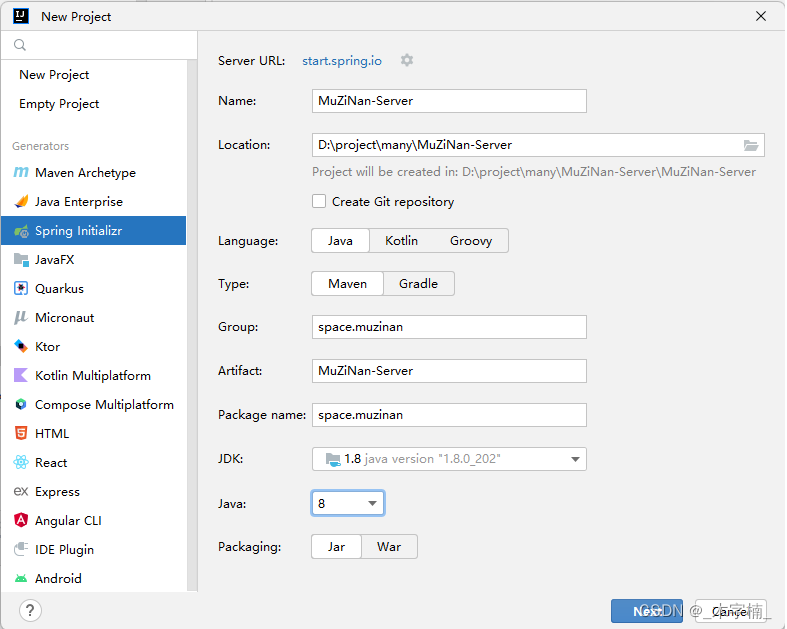
springboot版本随意,先选择一个web依赖即可!

1.2、maven信息配制
IDEA默认maven配制下载速度极慢,我们将其修改为我们自己的配置。
Maven home path: Maven安装位置User setting file: setting.xml文件位置
Local respository:依赖存放仓库位置

1.3、删除多余文件
除了pom.xml文件保留,其他文件全部删除

删除完毕之后

1.4、pom.xml修改
1、SpringBoot版本修改为 2.5.5版本
2、项目基本信息修改
3、版本控制 依赖的版本管理通过properties内部进行控制
4、依赖管理 [dependencyManagement]
使用dependencyManagement包裹dependencies,这样可以做到依赖的声明,但是不引用。

1.5、pom.xml文件
<project xmlns="http://maven.apache.org/POM/4.0.0" xmlns:xsi="http://www.w3.org/2001/XMLSchema-instance" xsi:schemaLocation="http://maven.apache.org/POM/4.0.0 https://maven.apache.org/xsd/maven-4.0.0.xsd"> <modelVersion>4.0.0modelVersion> <packaging>pompackaging> <parent> <groupId>org.springframework.bootgroupId> <artifactId>spring-boot-starter-parentartifactId> <version>2.5.5version> <relativePath/> parent> <groupId>space.muzinangroupId> <artifactId>MuZiNan-ServerartifactId> <version>1.0version> <name>MuZiNan-Servername> <description>木字楠博客后台服务~description> <properties> <java.version>1.8java.version> <springboot.version>2.5.5springboot.version> properties> <dependencyManagement> <dependencies> <dependency> <groupId>org.springframework.bootgroupId> <artifactId>spring-boot-starter-webartifactId> <version>${springboot.version}version> dependency> <dependency> <groupId>org.springframework.bootgroupId> <artifactId>spring-boot-starter-testartifactId> <version>${springboot.version}version> dependency> dependencies> dependencyManagement> project>- 1
- 2
- 3
- 4
- 5
- 6
- 7
- 8
- 9
- 10
- 11
- 12
- 13
- 14
- 15
- 16
- 17
- 18
- 19
- 20
- 21
- 22
- 23
- 24
- 25
- 26
- 27
- 28
- 29
- 30
- 31
- 32
- 33
- 34
- 35
- 36
- 37
- 38
- 39
- 40
- 41
- 42
- 43
- 44
- 45
- 46
- 47
- 48
- 49
- 50
- 51
2、新建子模块项目
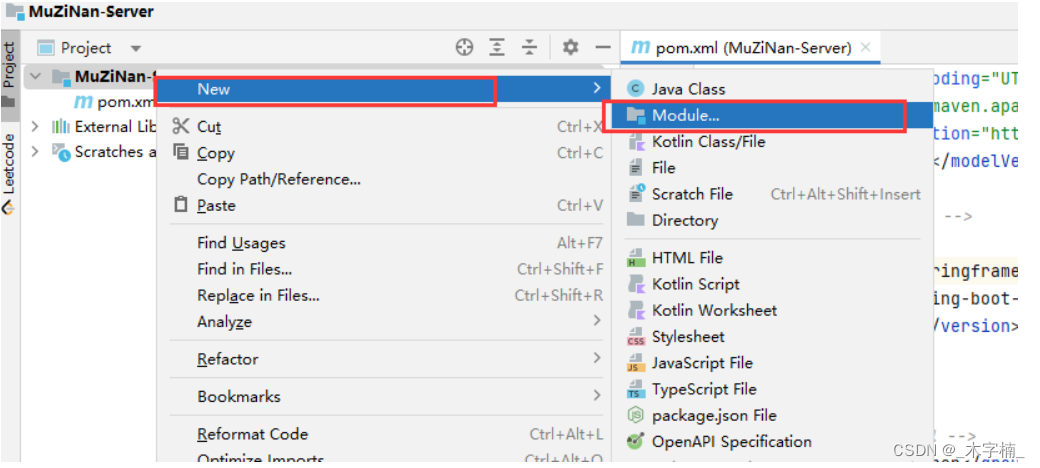
右击父级项目
New -> Module
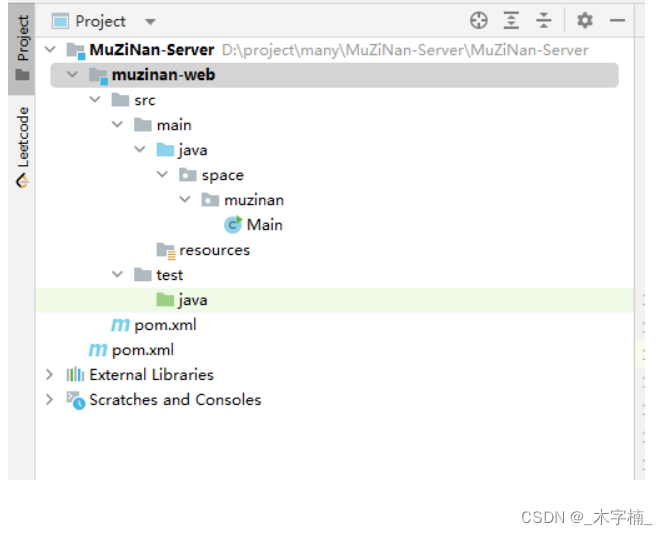
2.1、Web模块[interface模块]
新建一个maven项目
父级模块选用MuZiNan-Server
Jdk版本与父级保持一致
GroupId、ArtifactId 默认即可

新建成功
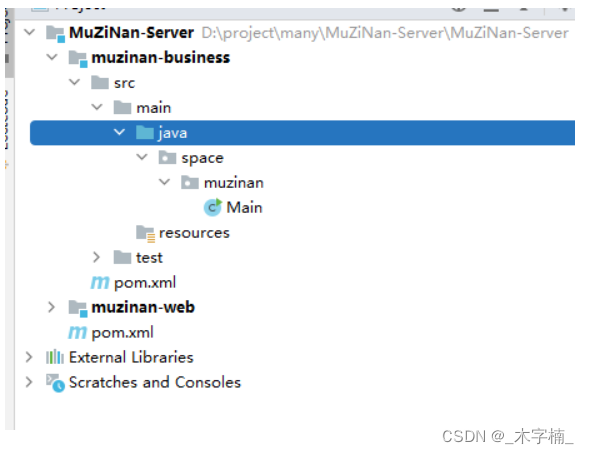
2.2、Business模块[service模块]
新建一个maven项目
父级模块选用MuZiNan-Server
Jdk版本与父级保持一致
GroupId、ArtifactId 默认即可

新建成功
2.3、Mapper模块[dao模块]
新建一个maven项目
父级模块选用MuZiNan-Server
Jdk版本与父级保持一致
GroupId、ArtifactId 默认即可
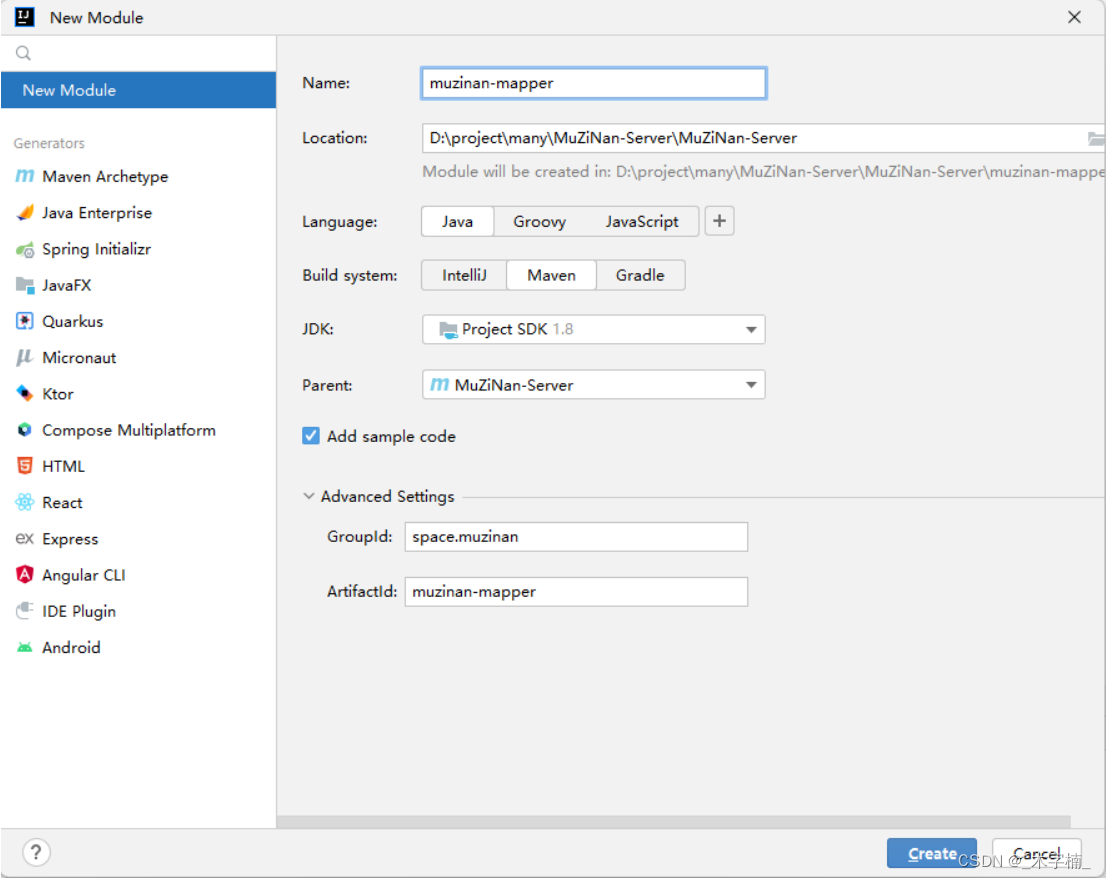
新建成功

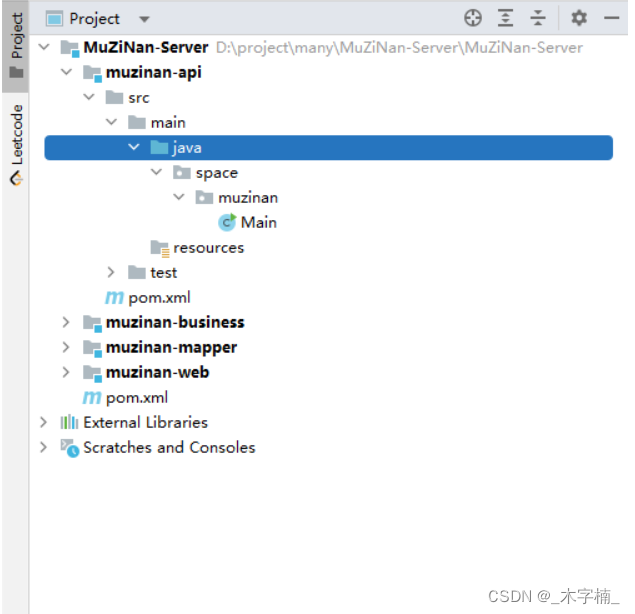
2.4、Api模块[实体类存放]
新建一个maven项目
父级模块选用MuZiNan-Server
Jdk版本与父级保持一致
GroupId、ArtifactId 默认即可

新建成功
2.5、common模块[共用类存放]
新建一个maven项目
父级模块选用MuZiNan-Server
Jdk版本与父级保持一致
GroupId、ArtifactId 默认即可
![[外链图片转存失败,源站可能有防盗链机制,建议将图片保存下来直接上传(img-8jMraeHK-1660199324759)(D:\note\noteFile\日常笔记\木字楠博客\image-20220811115109190.png)]](https://1000bd.com/contentImg/2022/08/14/194146907.png)
新建成功

3、模块依赖关系配制
3.1、保留web模块主启动类
只保留web模块中的主启动类,删除其他模块的主启动类(多模块项目仅需要一个主启动类)

修改主启动类名称(当然也可以不修改,单纯觉得Main很难看,不像是SPringBoot项目)

3.2、模块依赖引入
项目中的各个模块的职能:
web模块: 服务的接口入口,也就是存放Controller以及runner等…
business模块: 存放业务具体的实现类的位置以及相关配置信息等…
mapper模块: 存放Mapper接口以及部分配置信息等…
api模块: 存放实体类、api接口以及request等信息…
common模块: 存放共用工具类,共用服务等…
根据MVC思想,我们正常的思路是通过controller来调用service层,然后通过service层调用dao层来实现一个具体的业务。
多模块项目也是如此,只不过各个部分被分割为不同模块,我们需要使用依赖引入的方式来联通各个模块,是各个模块之间可以进行调用
引入顺序:web模块 引入 business模块(这样controller中可以调用business中的具体实现类)
business模块 引入 mapper模块(business引入了mapper,controller可以间接调用mapper)
mapper模块 引入 api模块(同上)
api模块 引入 common模块(同上)
${parent.groupId}:父级模块的groupId
${parent.version}:父级模块的version
3.2.1、web模块pom.xml
<dependencies> <dependency> <groupId>${parent.groupId}groupId> <artifactId>muzinan-businessartifactId> <version>${parent.version}version> dependency> dependencies>- 1
- 2
- 3
- 4
- 5
- 6
- 7
- 8
3.2.2、business模块pom.xml
<dependencies> <dependency> <groupId>${parent.groupId}groupId> <artifactId>muzinan-mapperartifactId> <version>${parent.version}version> dependency> dependencies>- 1
- 2
- 3
- 4
- 5
- 6
- 7
- 8
3.2.3、mapper模块pom.xml
<dependencies> <dependency> <groupId>${parent.groupId}groupId> <artifactId>muzinan-apiartifactId> <version>${parent.version}version> dependency> dependencies>- 1
- 2
- 3
- 4
- 5
- 6
- 7
- 8
3.2.4、api模块pom.xml
<dependencies> <dependency> <groupId>${parent.groupId}groupId> <artifactId>muzinan-commonartifactId> <version>${parent.version}version> dependency> dependencies>- 1
- 2
- 3
- 4
- 5
- 6
- 7
- 8
3.2.5、依赖引入成功
依赖引入成功,这样我们的几个模块以及相互引入成功

3.3、基础spring依赖引入
因为我们所有模块都需要使用spring依赖信息,所有我们会将所有的基础依赖在common模块进行引入。

4、启动项目
4.1、Web模块配制文件配制

4.2、主启动类配制

4.3、启动项目


-
相关阅读:
探索电子元器件商城:从原型到批量生产的选择
com.mysql.jdbc.exceptions.jdbc4.MySQLNonTransientConnectionException异常解决方法
ubuntu18.0安装搜狗输入法无法显示中文
利用Python进行数据分析【送书第六期:文末送书】
2023双十一爆冷收场,订单后暗藏这些电商痛点问题需要注意
芒果叶病害数据集(用于图像分类,每类500张照片)
技术架构之术
重温 C# 字典Dictionary类
ELF文件格式入门
Python selenium模块的安装使用
- 原文地址:https://blog.csdn.net/nanshen__/article/details/126284821
