-
webpack+TypeScript搭建工程化项目
1、初始化项目:npm init -y 生成package.json文件;
2、安装构建工具:
2-1、webpack //构建工具;
2-2、webpack-cli //webpack命令行工具;
2-3、webpack-dev-server //webpack开发服务器;
2-4、typescript //ts编译器;
2-5、ts-loader //ts加载器、用于在webpack中编译ts文件;
2-6、html-webpack-plugin //webpakc中html插件,用于自动创建html文件;
2-7、clean-webpack-plugin //webpack中的清除插件,用于每一次构建时都清理打包目录下的文件。
安装方式:npm install -D webpack webpack-cli webpack-dev-server html-webpack-plugin clean-webpack-plugin typescript ts-loader

3、根目录下创建:webpack的配置文件webpack.config.js
- const path = require("path");
- const HtmlWebpackPlugin = require("html-webpack-plugin");
- const {
- CleanWebpackPlugin
- } = require("clean-webpack-plugin");
- module.exports = {
- optimization: {
- minimize: false // 关闭代码压缩,可选
- },
- mode: "none",//'development' 、 'production'、'none'
- entry: "./src/index.ts",
- // devServer: {
- // open: true,
- // port: 8081,
- // },
- // devtool: "inline-source-map",
- // performance :{
- // maxEntrypointSize: 10000000,
- // maxAssetSize: 30000000
- // },
- output: {
- path: path.resolve(__dirname, "dist"),
- filename: "bundle.js",
- environment: {
- arrowFunction: false // 关闭webpack的箭头函数,可选
- }
- },
- resolve: {
- //表示在import 文件时文件后缀名可以不写
- extensions:['.js','.jsx','.json'],
- //表示设置路径别名这样在import的文件在src下的时候可以直接 @/component/...
- alias:{
- '@':path.join(__dirname,'./src')
- }
- },
- module: {
- rules: [{
- test: /\.ts$/,
- use: {
- loader: "ts-loader"
- },
- exclude: /node_modules/
- }]
- },
- plugins: [
- new CleanWebpackPlugin(),
- new HtmlWebpackPlugin({
- title: 'TS测试'
- }),
- ]
- }
4、根目录下创建tsconfig.json,或者使用tsc -init
- {
- "compilerOptions": {
- "target": "ES2015",
- "module": "ES2015",
- "strict": true
- }
- }
5. 修改package.json添加如下配置
- {
- ...略...
- "scripts": {
- "test": "echo \"Error: no test specified\" && exit 1",
- "build": "webpack",
- "dev": "webpack-dev-server --open"
- }
- ...略...
- }
6、在 根目录下创建scr目录,并添加index.ts文件
运行:npm run build 打包 npm run dev 运行开发服务器
7、处理兼容问题:安装babel相关包
7-1:@babel/core // babel的核心工具
7-2:@babel/preset-evn //babel预设环境
7-3:babel-loader //babel在webpack中的加载器
7-4:core-js //用来把JS的新语法转成低版本的JS语法,兼容老版本的浏览器
安装:npm install -D @babel/core @babel/preset-env babel-loader core-js

8:修改webpack.config.js配置文件
完整的webpack配置如下:
- const path = require("path");
- const HtmlWebpackPlugin = require("html-webpack-plugin");
- const {
- CleanWebpackPlugin
- } = require("clean-webpack-plugin");
- module.exports = {
- optimization: {
- minimize: false // 关闭代码压缩,可选
- },
- mode: "none", //'development' 、 'production'、'none'
- entry: "./src/index.ts",
- // devServer: {
- // open: true,
- // port: 8081,
- // },
- // devtool: "inline-source-map",
- // performance :{
- // maxEntrypointSize: 10000000,
- // maxAssetSize: 30000000
- // },
- output: {
- path: path.resolve(__dirname, "dist"),
- filename: "bundle.js",
- environment: {
- arrowFunction: false // 关闭webpack的箭头函数,可选
- }
- },
- resolve: {
- extensions: [".ts", ".js"]
- },
- plugins: [
- new CleanWebpackPlugin(),
- new HtmlWebpackPlugin({
- title: 'TS测试',
- template: './src/index.html'
- }),
- ],
- module: {
- rules: [{
- test: /\.ts$/,
- use: [
- {
- loader: "babel-loader",
- options: {
- presets: [
- [
- '@babel/preset-env',
- {
- targets: {
- chrome: 88,
- ie: 11
- },
- corejs: 3,
- useBuiltIns: "usage" //按需加载
- }
- ]
- ]
- }
- },
- {
- loader: "ts-loader"
- }
- ],
- exclude: /node_modules/
- }]
- }
- }
9:npm run build
targets设置chrome 88的版本 经过babel处理
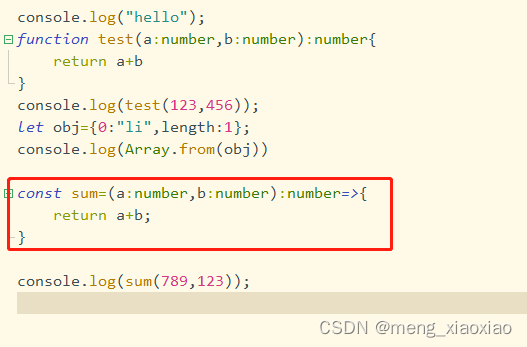
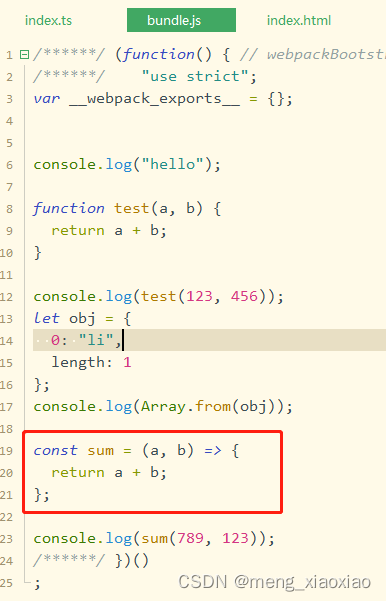
10:npm run build
targets设置ie 88的版本 经过babel处理

-
相关阅读:
面试:容器技术
使用ORL人脸库,通过GRNN网络和HOG特征提取的人脸识别算法matlab仿真
java 里面的基本类型占用的储存空间
信息技术服务连续性管理指南
dp线段树优化-最大子段和
『手撕Vue-CLI』添加终端用户交互
2、数仓理论概述与相关概念
python淘宝商品数据抓取之后数据解析出错怎么办
Promise、async/await、RxJs
JVM之类加载子系统
- 原文地址:https://blog.csdn.net/meng_xiaoxiao/article/details/126279701
