-
ViewBinding 初探-在Activity和Adapter中使用
升级android studio后(主要是gradle升级后),butterknife 不再被支持;
现在google主推ViewBinding
一下就是我用ViewBinding 做的一个小demo,展示ViewBinding 的使用
一、build.gradle配置
1、ViewBinding
- android {
- ……
- buildFeatures {
- viewBinding = true
- }
- }
2、dependencies 相关配置
- dependencies {
- ……
- //RecyclerView 列表
- implementation 'androidx.recyclerview:recyclerview:1.2.0-beta01'
- }
二、界面展示

三、activity代码
1、activity_main.xml 代码
- <LinearLayout xmlns:android="http://schemas.android.com/apk/res/android"
- xmlns:app="http://schemas.android.com/apk/res-auto"
- xmlns:tools="http://schemas.android.com/tools"
- android:layout_width="match_parent"
- android:layout_height="match_parent"
- android:orientation="vertical"
- tools:context=".MainActivity">
- <LinearLayout
- android:layout_width="match_parent"
- android:layout_height="wrap_content"
- android:orientation="vertical">
- <EditText
- android:id="@+id/etName"
- android:layout_width="match_parent"
- android:layout_height="wrap_content"
- android:textColor="#000000"
- android:textSize="18sp"
- android:hint="名称"/>
- <EditText
- android:id="@+id/etAge"
- android:layout_width="match_parent"
- android:layout_height="wrap_content"
- android:textColor="#000000"
- android:inputType="number"
- android:textSize="18sp"
- android:hint="年龄"/>
- <Button
- android:id="@+id/btnAdd"
- android:layout_width="match_parent"
- android:layout_height="wrap_content"
- android:text="添加"/>
- LinearLayout>
- <TextView
- android:layout_width="match_parent"
- android:layout_height="40dp"
- android:gravity="center|left"
- android:paddingLeft="20dp"
- android:background="#D9F8F5"
- android:textColor="#000000"
- android:textSize="18sp"
- android:text="数据列表-点击可删除"/>
- <androidx.recyclerview.widget.RecyclerView
- android:id="@+id/rvData"
- android:layout_width="match_parent"
- android:layout_height="match_parent"/>
- LinearLayout>
2、MainActivity 代码
- import androidx.appcompat.app.AppCompatActivity;
- import androidx.recyclerview.widget.GridLayoutManager;
- import android.os.Bundle;
- import com.xolo.myobjectbox.databinding.ActivityMainBinding;
- import java.util.ArrayList;
- import java.util.List;
- public class MainActivity extends AppCompatActivity {
- //系统依据 activity_main.xml 自动生成的 ActivityMainBinding 类,通过 ActivityMainBinding 可以获取对应的控件
- ActivityMainBinding mainBinding;
- private StudentAdapter studentAdapter;
- private List<StudentModel> list;
- @Override
- protected void onCreate(Bundle savedInstanceState) {
- super.onCreate(savedInstanceState);
- //setContentView(R.layout.activity_main); -需要注释掉
- //加载界面
- mainBinding = ActivityMainBinding.inflate(getLayoutInflater());
- setContentView(mainBinding.getRoot());
- //添加StudentAdapter适配器
- list = new ArrayList<>();
- studentAdapter = new StudentAdapter(this, list, o -> {
- list.remove((int)o);
- studentAdapter.notifyDataSetChanged();
- });
- mainBinding.rvData.setLayoutManager(new GridLayoutManager(this, 1));
- mainBinding.rvData.setNestedScrollingEnabled(true);
- mainBinding.rvData.setAdapter(studentAdapter);
- //添加点击事件
- mainBinding.btnAdd.setOnClickListener(v -> {
- String name = mainBinding.etName.getText().toString();
- String age = mainBinding.etAge.getText().toString();
- list.add(0, new StudentModel(name, age));
- studentAdapter.notifyDataSetChanged();
- });
- }
- }
四、adapter代码
1、adapter_student.xml
- <LinearLayout xmlns:android="http://schemas.android.com/apk/res/android"
- android:layout_width="match_parent"
- android:layout_height="wrap_content"
- android:orientation="vertical"
- android:padding="5dp"
- android:background="#FFFFFF"
- android:layout_marginBottom="1dp"
- android:id="@+id/llClick">
- <TextView
- android:id="@+id/tvName"
- android:layout_width="match_parent"
- android:layout_height="wrap_content"
- android:text="name:"
- android:textColor="#000000"
- android:textSize="18sp" />
- <TextView
- android:id="@+id/tvAge"
- android:layout_width="match_parent"
- android:layout_height="wrap_content"
- android:text="age:"
- android:textColor="#000000"
- android:textSize="18sp" />
- LinearLayout>
2、StudentAdapter
- import android.annotation.SuppressLint;
- import android.content.Context;
- import android.view.LayoutInflater;
- import android.view.ViewGroup;
- import androidx.annotation.NonNull;
- import androidx.recyclerview.widget.RecyclerView;
- import com.xolo.myobjectbox.databinding.AdapterStudentBinding;
- import java.util.List;
- public class StudentAdapter extends RecyclerView.Adapter
- private Context context;
- private List<StudentModel> list;
- private ClickInterface clickInterface;
- public StudentAdapter(Context context, List<StudentModel> list, ClickInterface clickInterface) {
- this.context = context;
- this.list = list;
- this.clickInterface = clickInterface;
- }
- @NonNull
- @Override
- public StudentAdapter.ViewHolder onCreateViewHolder(@NonNull ViewGroup parent, int viewType) {
- //界面设置
- AdapterStudentBinding studentBinding = AdapterStudentBinding.inflate(LayoutInflater.from(context), parent, false);
- return new ViewHolder(studentBinding);
- }
- @SuppressLint("SetTextI18n")
- @Override
- public void onBindViewHolder(@NonNull StudentAdapter.ViewHolder holder, int position) {
- holder.studentBinding.tvName.setText("姓名:"+list.get(position).getName());
- holder.studentBinding.tvAge.setText("年龄:"+list.get(position).getAge());
- holder.studentBinding.llClick.setOnClickListener(v -> clickInterface.ClickOnThe(position));
- }
- @Override
- public int getItemCount() {
- return list.size();
- }
- public class ViewHolder extends RecyclerView.ViewHolder {
- 系统依据 activity_main.xml 自动生成的 AdapterStudentBinding 类,通过 ActivityMainBinding 可以获取对应的控件
- AdapterStudentBinding studentBinding;
- public ViewHolder(@NonNull AdapterStudentBinding itemView) {
- super(itemView.getRoot());
- studentBinding = itemView;
- }
- }
- }
五、Interface代码
- public interface ClickInterface {
- void ClickOnThe(Object o);
- }
六、Model代码
- public class StudentModel {
- private String name;
- private String age;
- public StudentModel() {
- }
- public StudentModel(String name, String age) {
- this.name = name;
- this.age = age;
- }
- public String getName() {
- return name;
- }
- public void setName(String name) {
- this.name = name;
- }
- public String getAge() {
- return age;
- }
- public void setAge(String age) {
- this.age = age;
- }
- }
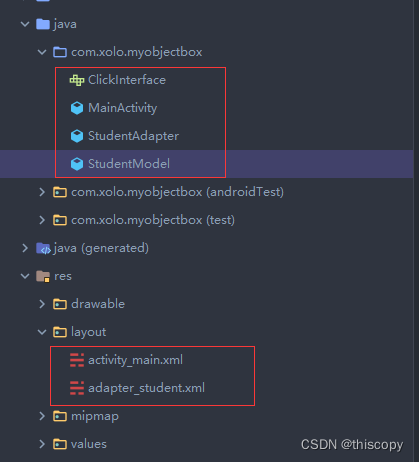
七、代码界面展示
-
相关阅读:
神经网络与深度学习(三):循环神经网络网络
使用 Ant Design Vue 你可能会遇到的14个问题
VS Code Java 3月更新|代码补全、Maven 以及 Java 插件预览版本新升级!
算法总结-最短距离和问题
壳聚糖-聚乙二醇-罗丹明B,RhodamineB-PEG-Chitosan
【LeetCode】【简单】【2】20. 有效的括号
java基础 集合(2) Set接口
极端业务场景下,我们应该如何做好稳定性保障?
devops-5:从0开始构建一条完成的CI CD流水线
4.4——数据库和前后端身份认证
- 原文地址:https://blog.csdn.net/weixin_41454168/article/details/126279414
