-
九、react生命周期钩子(旧)
1. 组件的生命周期
1.1 理解
组件从创建到死亡它会经历一些特定的阶段。
React组件中包含一系列勾子函数(生命周期回调函数), 会在特定的时刻调用。
我们在定义组件时,会在特定的生命周期回调函数中,做特定的工作。
1.2 引入案例
需求:定义组件实现以下功能:让指定的文本做显示 / 隐藏的渐变动画
从完全可见,到彻底消失,耗时2S
点击“不活了”按钮从界面中卸载组件
- html>
- <html lang="en">
- <head>
- <meta charset="UTF-8">
- <meta http-equiv="X-UA-Compatible" content="IE=edge">
- <meta name="viewport" content="width=device-width, initial-scale=1.0">
- <title>引出生命周期title>
- head>
- <body>
- <div id="app">div>
- <script src="https://unpkg.com/react@16/umd/react.development.js" crossorigin>script>
- <script src="https://unpkg.com/react-dom@16/umd/react-dom.development.js" crossorigin>script>
- <script src="https://unpkg.com/babel-standalone@6/babel.min.js">script>
- <script src="https://unpkg.com/prop-types@15.6.2/prop-types.js">script>
- <script type="text/babel">
- //生命周期回调函数
- //创建组件
- class Life extends React.Component{
- state={opacity:1}
- death=()=>{
- //清除定时器
- //clearInterval(this.timer)
- //卸载组件
- ReactDOM.unmountComponentAtNode(document.getElementById('app'))
- }
- //组件挂载完毕,组件挂载页面之后调用,只调用一次
- componentDidMount(){
- this.timer=setInterval(()=>{
- //获取原状态
- let {opacity}=this.state
- //减少0.1
- opacity-=0.1
- if(opacity<=0) opacity=1
- //设置新的透明度
- this.setState({opacity:opacity})
- },200)
- }
- //组件将要被卸载时候调用
- componentWillUnmount(){
- //在这里清除定时器也可以
- clearInterval(this.timer)
- }
- //render调用的时机:初始化渲染与状态更新之后
- render(){
- return(
- <div>
- <h2 style={{opacity:this.state.opacity}}>React学不会怎么办?h2>
- <button onClick={this.death}>不活了button>
- div>
- )
- }
- }
- //2.渲染虚拟DOM到页面
- ReactDOM.render(<Life/>,document.getElementById('app'))
- script>
- body>
- html>
1.3 生命周期的三个阶段(旧)
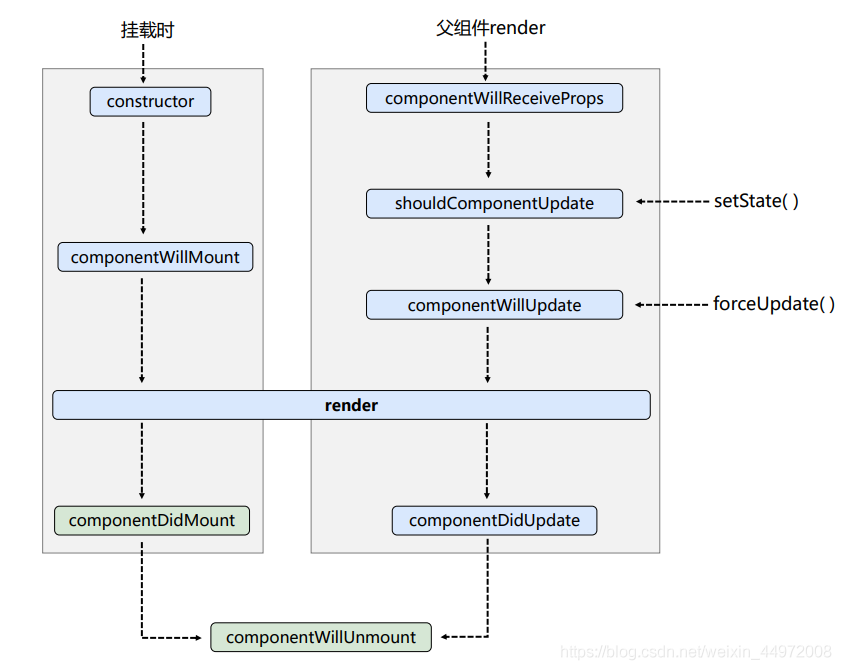
1.3.1 初始化阶段
由ReactDOM.render()触发—初次渲染constructor() —— 类组件中的构造函数
componentWillMount() —— 组件将要挂载 【即将废弃】
render() —— 挂载组件
componentDidMount() —— 组件挂载完成 比较常用
一般在这个钩子中做一些初始化的事,例如:开启定时器、发送网络请求、订阅消息
1.3.2 更新阶段
【第一种情况】父组件重新render触发componentWillReceiveProps() —— 接收属性参数(非首次)【即将废弃】
然后调用下面的钩子函数【第二种情况】由组件内部this.setSate()
shouldComponentUpdate() —— 组件是否应该被更新(默认返回true)
然后调用下面的钩子函数【第三种情况】强制更新 forceUpdate()
componentWillUpdate() ——组件将要更新 【即将废弃】
render() —— 组件更新
componentDidUpdate() —— 组件完成更新
1.3.3 卸载组件
由ReactDOM.unmountComponentAtNode()触发componentWillUnmount() —— 组件即将卸载,常用,一般在这个钩子中做一些收尾的事情,例如:关闭定时器、取消订阅消息
例如:
- html>
- <html lang="en">
- <head>
- <meta charset="UTF-8">
- <meta http-equiv="X-UA-Compatible" content="IE=edge">
- <meta name="viewport" content="width=device-width, initial-scale=1.0">
- <title>ract生命周期(旧)title>
- head>
- <body>
- <div id="app">div>
- <script src="https://unpkg.com/react@16/umd/react.development.js" crossorigin>script>
- <script src="https://unpkg.com/react-dom@16/umd/react-dom.development.js" crossorigin>script>
- <script src="https://unpkg.com/babel-standalone@6/babel.min.js">script>
- <script src="https://unpkg.com/prop-types@15.6.2/prop-types.js">script>
- <script type="text/babel">
- //生命周期回调函数
- /*
- 1.3.1 初始化阶段
- 由ReactDOM.render()触发—初次渲染
- constructor() —— 类组件中的构造函数
- componentWillMount() —— 组件将要挂载 【即将废弃】
- render() —— 挂载组件
- componentDidMount() —— 组件挂载完成 比较常用
- 一般在这个钩子中做一些初始化的事,例如:开启定时器、发送网络请求、订阅消息
- 1.3.2 更新阶段
- 【第一种情况】父组件重新render触发
- componentWillReceiveProps() —— 接收属性参数(非首次)【即将废弃】
- 然后调用下面的钩子函数
- 【第二种情况】由组件内部this.setSate()
- shouldComponentUpdate() —— 组件是否应该被更新(默认返回true)
- 然后调用下面的钩子函数
- 【第三种情况】强制更新 forceUpdate()
- componentWillUpdate() ——组件将要更新 【即将废弃】
- render() —— 组件更新
- componentDidUpdate() —— 组件完成更新
- 1.3.3 卸载组件
- 由ReactDOM.unmountComponentAtNode()触发
- componentWillUnmount() —— 组件即将卸载,常用,一般在这个钩子中做一些收尾的事情,例如:关闭定时器、取消订阅消息
- */
- //创建组件
- class Count extends React.Component{
- //构造器
- constructor(props){
- super(props);
- console.log('Count----constructor');
- //初始化状态
- this.state={count:0}
- }
- add=()=>{
- const {count}=this.state
- this.setState({count:count+1})
- }
- //卸载组件按钮的回调
- death=()=>{
- ReactDOM.unmountComponentAtNode(document.getElementById('app'))
- }
- //强制更新按钮的回调
- force=()=>{
- this.forceUpdate()
- }
- //组件将要挂载时候调用的钩子
- componentWillMount(){
- console.log('Count-----componentWillMount');
- }
- render (){
- console.log('Count----render');
- const {count}=this.state
- return(
- <div>
- <h2>当前求和为:{count}h2>
- <button onClick={this.add}>点我+1button>
- <button onClick={this.death}>卸载组件button>
- <button onClick={this.force}>不更改任何状态中的数据,强制更新button>
- div>
- )
- }
- //组件挂在完毕调用的钩子
- componentDidMount(){
- console.log('Count-----componentDidMount');
- }
- //组件将要卸载时候调用
- componentWillUnmount(){
- console.log('Count----componentWillUnmount');
- }
- //组件是否应该更新,控制组件更新的阀门,return返回是(true)就更新,否(false)就不更新生命周期到这就结束了
- shouldComponentUpdate(){
- console.log('Count----shouldComponentUpdate');
- return true
- }
- //组件将要更新时调用
- componentWillUpdate(){
- console.log('Count----componentWillUpdate');
- }
- //组件更新完毕之后调用
- componentDidUpdate(){
- console.log('Count-----componentDidUpdate');
- }
- }
- //父组件render 子组件执行componentWillReceiveProps
- //A是父组件,B是子组件
- class A extends React.Component{
- state={carName:'奔驰'}
- changeCar=()=>{
- this.setState({carName:'奥拓'})
- }
- render(){
- return(
- <div>
- <div>我是A组件div>
- <button onClick={this.changeCar}>换车button>
- <B carName={this.state.carName}/>
- div>
- )
- }
- }
- //子组件B
- class B extends React.Component{
- //组件将要接收新的props时候调用
- componentWillReceiveProps(props){
- console.log('B----componentWillReceiveProps',props)
- }
- //组件是否应该更新,控制组件更新的阀门,return返回是(true)就更新,否(false)就不更新生命周期到这就结束了
- shouldComponentUpdate(){
- console.log('Count----shouldComponentUpdate');
- return true
- }
- //组件将要更新时调用
- componentWillUpdate(){
- console.log('Count----componentWillUpdate');
- }
- //组件更新完毕之后调用
- componentDidUpdate(){
- console.log('Count-----componentDidUpdate');
- }
- render(){
- return(
- <div>我是B组件,接收到的车是:{this.props.carName}div>
- )
- }
- }
- //2.渲染虚拟DOM到页面
- ReactDOM.render(<A/>,document.getElementById('app'))
- script>
- body>
- html>
重要的勾子
render:初始化渲染或更新渲染调用componentDidMount:开启监听, 发送ajax请求componentWillUnmount:做一些收尾工作, 如: 清理定时器
-
相关阅读:
【DLL修复工具下载】一键修复电脑丢失d3dcompiler_47.dll问题方法
Compose Multiplatform 正式版将于年内发布
给LaTeX公式添加优美的注解;日更『数据科学』面试题集锦;大学生『计算机』自学指南;个人防火墙;前沿资料/论文 | ShowMeAI资讯日报
同花顺_代码解析_技术指标_EJK
mlops产品调研方案
SpringBoot如何实现自动装配
Qt网络编程之搭建Udp通信【单播、组播、广播】
压缩图片怎么弄?这些方法我逢人必推
Chisel-Strike:一款功能强大的.NET异或XOR加密CobaltStrike Aggressor实现
【计算机毕业设计】小型OA系统设计与实现Springboot
- 原文地址:https://blog.csdn.net/chunxiaqiudong5/article/details/126279474


