-
机器人微控制器编程(CoCube)-突破边界
将C语言+嵌入式+单片机+ROS2等相关知识点,有机融合到一门课程之中。
突破windows或linux的限制,突破电脑或手机的限制,突破单片机原有的理论实践体系,全面提升到CoCube机器人平台。

模拟量采集和转换:
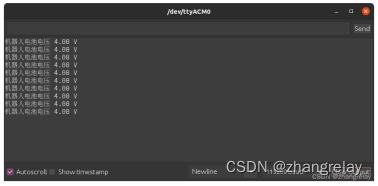
- #include "Arduino.h"
- #include
- ESP32AnalogRead adc;
- void setup()
- {
- adc.attach(34);
- Serial.begin(115200);
- }
- void loop()
- {
- delay(50);
- Serial.println("Voltage = "+String(adc.readVoltage()));
- }
机器人电池电压的实时监控:

- #include
- #include
- #include
- #include
- #include
- #include
- #include
- #if !defined(ESP32) && !defined(TARGET_PORTENTA_H7_M7) && !defined(ARDUINO_NANO_RP2040_CONNECT)
- #error This example is only avaible for Arduino Portenta, Arduino Nano RP2040 Connect and ESP32 Dev module
- #endif
- #define BAT_DET 34
- rcl_publisher_t publisher;
- std_msgs__msg__Float32 msg;
- rclc_support_t support;
- rcl_allocator_t allocator;
- rcl_node_t node;
- #define LED_PIN 13
- #define RCCHECK(fn) { rcl_ret_t temp_rc = fn; if((temp_rc != RCL_RET_OK)){error_loop();}}
- #define RCSOFTCHECK(fn) { rcl_ret_t temp_rc = fn; if((temp_rc != RCL_RET_OK)){}}
- void error_loop(){
- while(1){
- digitalWrite(LED_PIN, !digitalRead(LED_PIN));
- delay(100);
- }
- }
- void timer_callback(rcl_timer_t * timer, int64_t last_call_time)
- {
- RCLC_UNUSED(last_call_time);
- if (timer != NULL) {
- RCSOFTCHECK(rcl_publish(&publisher, &msg, NULL));
- msg.data++;
- }
- }
- void setup() {
- set_microros_wifi_transports("***", "***", "***", 8888);
- pinMode(BAT_DET, INPUT);
- pinMode(LED_PIN, OUTPUT);
- digitalWrite(LED_PIN, HIGH);
- delay(2000);
- allocator = rcl_get_default_allocator();
- //create init_options
- RCCHECK(rclc_support_init(&support, 0, NULL, &allocator));
- // create node
- RCCHECK(rclc_node_init_default(&node, "robot_battery_wifi_node", "", &support));
- // create publisher
- RCCHECK(rclc_publisher_init_best_effort(
- &publisher,
- &node,
- ROSIDL_GET_MSG_TYPE_SUPPORT(std_msgs, msg, Float32),
- "robot_battery"));
- msg.data = 0.66;
- }
- void loop() {
- float battery = 4.21 * analogRead(BAT_DET) / 2435;
- RCSOFTCHECK(rcl_publish(&publisher, &msg, NULL));
- msg.data=battery;
- delay(1000);
- }
不仅掌握的模拟量基本读取,也能知道其应用,例如电池电量测量,环境亮度监测等一系列涉及到具体机器人各环节的基础知识点。
从原有枯燥的单片机知识点融合到机器人细节设计的实际调试。
C和C++的区别,电脑C++编程和嵌入式C编程,代码如何保持相似的风格。
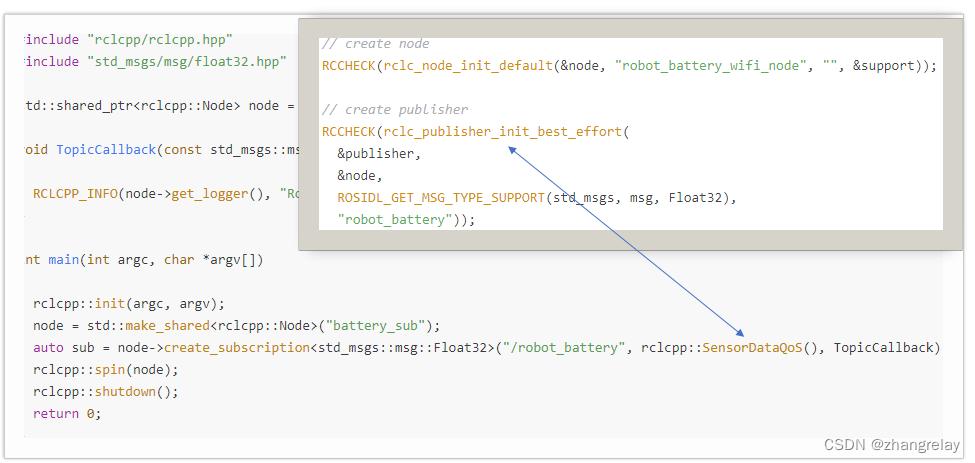
ESP32:
RCCHECK(rclc_publisher_init_best_effort(
&publisher,
&node,
ROSIDL_GET_MSG_TYPE_SUPPORT(std_msgs, msg, Int32),
"topic_name"));RCCHECK(rclc_publisher_init_default(
&publisher,
&node,
ROSIDL_GET_MSG_TYPE_SUPPORT(std_msgs, msg, Int32),
"topic_name"));PC:
rclcpp::QoS qos(rclcpp::KeepLast(7));
pub_ = this->create_publisher
sub_ = create_subscription
sub_ = create_subscription
-
相关阅读:
《安富莱嵌入式周报》第292期:树莓派单片机100M双通道示波器开源,MDK5.38发布,万用表单芯片解决方案,8通道±25V模拟前端芯片,开源贴片拾取电机板
深度之眼(三)——矩阵的行列式
GB/T 14710-2009 医用电器环境要求及试验方法
女同桌找我要表情包,还好我会Python,分分钟给她下载几十个G...
阿里云服务器u1和e实例有什么区别?哪个比较好?
【蓝桥杯选拔赛真题26】python统计字符个数 青少年组蓝桥杯python 选拔赛STEMA比赛真题解析
git-命令行显示当前目录分支
聊聊 mysql 事务?(二:redo log保证事务持久性)
localhost与127.0.0.1和本机ip的区别
composer 安装和基本使用
- 原文地址:https://blog.csdn.net/ZhangRelay/article/details/126277843
