-
[计算机动画]Games103-作业1-刚体动画
用unity实现在线课程
GAMES103-基于物理的计算机动画入门-王华民
的作业1
链接:
课程主页
 https://games-cn.org/games103/
作业内容:
Angry Bunny: 使兔子模型带有刚体动画效果
参考链接:
Tips: 文章最下方附有全部源码
目录
一,程序演示
键盘操作:
- 点击“L”:发射兔子。
- 点击“R”:重置兔子。
二,公式推导
使用冲量法(Impulse)实现物体的刚体碰撞动画:物体的动画与两个参数,位置Position与旋转Rotation有关,而这两个参数的更新分别与线速度v与角速度w相关。冲量法的本质就是在动画计算过程中,时刻求解不断改变的v与w。
1. 定义动画中下一时刻的v与w

解释:
j表示冲量,定义如下:
 假设dt无限小,所以在这段时间内的加速度a可以近似看作常量,所以可以根据牛顿第二定律F=Ma近似认为
(1.1)新线速度


(1.2)新角速度

<1.2.1> 首先定义刚体绕定点转动时,刚体的动量矩L为:

i表示组成刚体的mesh的第i个顶点,进而将等式L展开,可以得到以下形式,

<1.2.2> 其中,我们将红框部分称为惯性张量
 ,同时,惯性张量可整理为: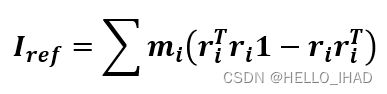
<1.2.3> 上式1为单位矩阵。此时,我们可将动量矩L表示为:

<1.2.4> 因为力矩
 的物理定义为:
且动量矩L可变形为:

所以,我们可以得出结论,力矩
等于动量矩L的一阶导,即:
<1.2.5> 由<1.2.3>知,
则关于角速度w的一阶导
 为:
为:
<1.2.6> 所以,最终下一时刻的新角速度
为:
<1.2.7> 注意最终一个细节,考虑到要将刚体的局部坐标系转到世界坐标系,所以对上式出现的所有ri左乘一个旋转矩阵,然后进行替换。


<1.2.8> 则新角速度为

这时回到开头,根据冲量J的定义,则新角速度为:

2. 计算冲量j
根据上述公式知,只要知道冲量j,就可以计算出新的
和,然后更新刚体的新位置和状态。冲量j可根据假设下一时刻的新速度
已知,从而通过计算得到。2.1 刚体上某一点的新速度
 与线速度和角速度的关系为
2.2 定义一个新的计算符号,将向量叉乘转换为向量*乘

2.3 这时,根据新旧速度差(
-  ),我们可以计算得到冲量j
2.4 此时,除假设的
外,一切参数已知。而可通过提前设定的摩擦力系数 与
与 计算得到。
计算得到。
note: 由公式知,冲量和当前帧与下一帧的速度差有关,所以速度差越小,冲量越小。表现在动画效果上,即兔子在碰撞多次后,速度不断减缓,并慢慢停了下来。
三,代码实现
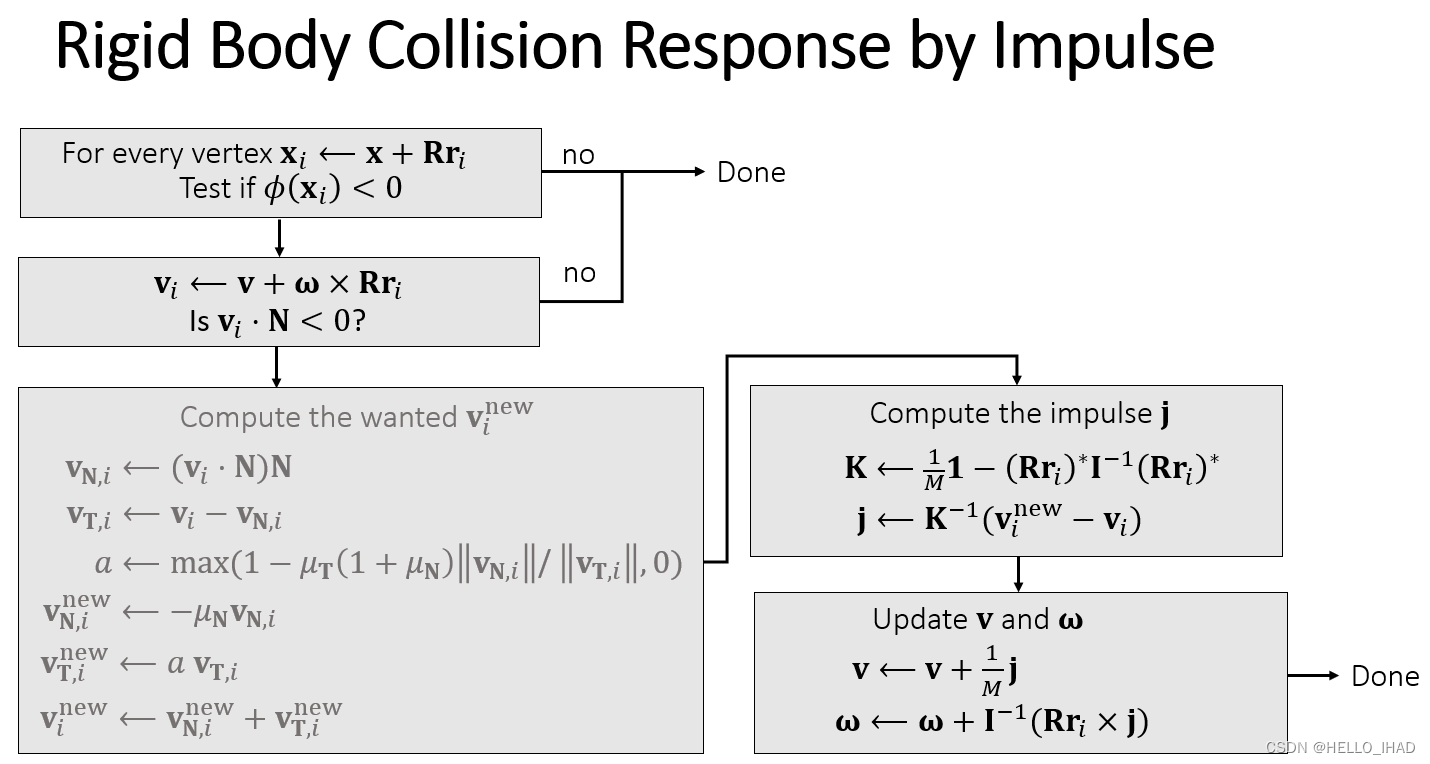
代码逻辑结构如下,
- 首先寻找该帧中所有发生碰撞且未产生回弹的点,然后取这些碰撞点的平均点,参与之后计算。
- 计算平均碰撞点的新速度
- 根据已知参数,计算系数K与冲量j
- 更新线速度和角速度
- (最后在update()函数中,根据LeapFrog Integration蛙跳法更新刚体新的位置position与旋转状态rotation)
脚本源码:
- using UnityEngine;
- using System.Collections;
- public class Rigid_Bunny : MonoBehaviour
- {
- bool launched = false;
- float dt = 0.015f;
- Vector3 v = new Vector3(0, 0, 0); // velocity
- Vector3 w = new Vector3(0, 0, 0); // angular velocity
- float mass; // mass
- Matrix4x4 I_ref; // reference inertia
- float linear_decay = 0.999f; // for velocity decay
- float angular_decay = 0.98f;
- float restitution = 0.5f; // for collision
- float restitution_T = 0.2f; //水平面的摩擦力(自己给定)
- Vector3 gravity =new Vector3(0.0f, -9.8f, 0.0f);
- // Use this for initialization
- void Start ()
- {
- Mesh mesh = GetComponent
().mesh; - Vector3[] vertices = mesh.vertices;
- float m = 1;
- mass=0;
- for (int i=0; i{mass += m;float diag=m*vertices[i].sqrMagnitude;I_ref[0, 0]+=diag;I_ref[1, 1]+=diag;I_ref[2, 2]+=diag;I_ref[0, 0]-=m*vertices[i][0]*vertices[i][0];I_ref[0, 1]-=m*vertices[i][0]*vertices[i][1];I_ref[0, 2]-=m*vertices[i][0]*vertices[i][2];I_ref[1, 0]-=m*vertices[i][1]*vertices[i][0];I_ref[1, 1]-=m*vertices[i][1]*vertices[i][1];I_ref[1, 2]-=m*vertices[i][1]*vertices[i][2];I_ref[2, 0]-=m*vertices[i][2]*vertices[i][0];I_ref[2, 1]-=m*vertices[i][2]*vertices[i][1];I_ref[2, 2]-=m*vertices[i][2]*vertices[i][2];}I_ref [3, 3] = 1;}Matrix4x4 Get_Cross_Matrix(Vector3 a){//Get the cross product matrix of vector aMatrix4x4 A = Matrix4x4.zero;A [0, 0] = 0;A [0, 1] = -a [2];A [0, 2] = a [1];A [1, 0] = a [2];A [1, 1] = 0;A [1, 2] = -a [0];A [2, 0] = -a [1];A [2, 1] = a [0];A [2, 2] = 0;A [3, 3] = 1;return A;}// In this function, update v and w by the impulse due to the collision with//a planevoid Collision_Impulse(Vector3 P, Vector3 N){// 0. 检测mesh的所有点,是否与平面发生碰撞Matrix4x4 mat_R = Matrix4x4.Rotate(transform.rotation);Vector3 pos = transform.position;Mesh mesh = GetComponent
().mesh; Vector3[] vertices = mesh.vertices;Vector3 avg_Collision_Point = new Vector3(0.0f, 0.0f, 0.0f); //平均碰撞点int num_Collision = 0;Vector3 ri = new Vector3(0.0f, 0.0f, 0.0f);Vector3 vi = new Vector3(0.0f, 0.0f, 0.0f);//计算在该帧中,模型一共有多少点发生了碰撞,最终取这些碰撞点的平均点参与计算for (int i = 0; i < vertices.Length; i++){//0.0 计算xi在世界坐标中的位置ri = vertices[i];Vector3 xi = pos + mat_R.MultiplyVector(ri);//0.1 计算是否发生碰撞if (Vector3.Dot((xi - P), N) >= 0.0f)continue;//0.2 计算碰撞后mesh是否已经处在回弹状态vi = v + Vector3.Cross(w, mat_R.MultiplyVector(ri));if (Vector3.Dot(vi, N) >= 0.0f)continue;avg_Collision_Point += ri;num_Collision++;}if (num_Collision == 0) //如果模型没有发生碰撞,则返回return;// 1. 如果发生碰撞,则进行模型回弹处理ri = avg_Collision_Point / num_Collision; //此时ri为模型的平均碰撞点Vector3 Rri = mat_R.MultiplyVector(ri);vi = v + Vector3.Cross(w, Rri);// 1.0 计算碰撞后的新速度 vi_newVector3 vi_N = Vector3.Dot(vi, N) * N;Vector3 vi_T = vi - vi_N;float a = Mathf.Max(1.0f - (restitution_T * (1.0f + restitution) * vi_N.magnitude / vi_T.magnitude), 0.0f);Vector3 vi_new_N = -restitution * vi_N;Vector3 vi_new_T = a * vi_T;Vector3 vi_new = vi_new_N + vi_new_T;// 1.1 计算冲量JMatrix4x4 I = mat_R * I_ref * mat_R.transpose;Matrix4x4 K_temp = Get_Cross_Matrix(Rri) * I.inverse * Get_Cross_Matrix(Rri);因为 unity没有提供matrix的加减法,所以手动计算Matrix4x4 K = Matrix4x4.zero;K[0, 0] = 1.0f / mass - K_temp[0, 0];K[0, 1] = -K_temp[0, 1];K[0, 2] = -K_temp[0, 2];K[0, 3] = -K_temp[0, 3];K[1, 0] = -K_temp[1, 0];K[1, 1] = 1.0f / mass - K_temp[1, 1];K[1, 2] = -K_temp[1, 2];K[1, 3] = -K_temp[1, 3];K[2, 0] = -K_temp[2, 0];K[2, 1] = -K_temp[2, 1];K[2, 2] = 1.0f / mass - K_temp[2, 2];K[2, 3] = -K_temp[2, 3];K[3, 0] = -K_temp[3, 0];K[3, 1] = -K_temp[3, 1];K[3, 2] = -K_temp[3, 2];K[3, 3] = 1.0f / mass - K_temp[3, 3];Vector3 J = K.inverse.MultiplyVector(vi_new - vi);//1.2 更新v and wv += 1.0f / mass * J;w += I.inverse.MultiplyVector(Vector3.Cross(Rri, J));}// Update is called once per framevoid Update(){//Game Controlif (Input.GetKey("r")){transform.position = new Vector3(0, 0.6f, 0);transform.rotation = Quaternion.Euler(0.0f, 0.0f, 0.0f);launched = false;}if (Input.GetKey("l")){v = new Vector3(5, 2, 0);w = new Vector3(0, 1, 0); // angular velocitlaunched = true;}if (launched == false)return;// Part I: Update velocities// -- linear velocityv = v + dt * gravity;v *= linear_decay;// -- angular velocityw *= angular_decay;//Part II: Collision ImpulseCollision_Impulse(new Vector3(0, 0.01f, 0), new Vector3(0, 1, 0));Collision_Impulse(new Vector3(2, 0, 0), new Vector3(-1, 0, 0));// Part III: Update position & orientation//Update linear statusVector3 x = transform.position;x += dt * v;//Update angular statusQuaternion q = transform.rotation;Vector3 wt = 0.5f * dt * w;Quaternion dq = new Quaternion(wt.x, wt.y, wt.z, 0.0f) * q;q.Set(q.x + dq.x, q.y + dq.y, q.z + dq.z, q.w + dq.w);// Part IV: Assign to the objecttransform.position = x;transform.rotation = q;}}
- 相关阅读:
可复现的语言大模型推理性能指标
(c语言)用冒泡排序模拟实现qsort()函数交换整数
sshpass传输文件提示Host key verification failed.
面试算法十问(中英文)
集合框架1
数据结构---复杂度(1)
计算机毕业设计springboot精品课程网站u1aq3源码+系统+程序+lw文档+部署
智慧工地:实现作业区域安全管控
场景应用:图解实现单点登录系统设计
为什么评职称要趁早?
- 原文地址:https://blog.csdn.net/z136411501/article/details/126273351
