-
kafka 3.0 跟着b站尚硅谷老师学习。(有需要zookeeper的配置(2.8之前)和Kraft(2.8之后))
gitee代码连接地址:
https://gitee.com/liushanshan126/kafka-test
百度网盘链接地址:
链接:https://pan.baidu.com/s/1vsFCu6vQTuktq6QTnh9dlg
提取码:4h45一、kafka的定义(分布式的基于发布/订阅模式的消息队列)

二、kafka的应用场景(大数据用kafka,java基本用rabbitmq等)
缓存/消峰、解耦和异步通信。
三、点对点模式和发布/订阅模式

四、kafka基础架构


总结:一个100T的数据放不进去一个服务器里面的topic中,所以引入分区的概念,将一个topic变成多个分区,存入不同的服务器中。partition的认知,参考知乎回答(总的来说就是一个topic可以分成多个分区partition,一个分区可以被多个consumer监听,当写入数据到topic的时候, 会根据一定的规则分发到分区里面去):
https://zhuanlan.zhihu.com/p/371886710#:~:text=Kafka%20%E4%B8%AD%20Topic%20%E8%A2%AB%E5%88%86%E6%88%90%E5%A4%9A%E4%B8%AA%20Partition%20%E5%88%86%E5%8C%BA%E3%80%82%20Topic%20%E6%98%AF%E4%B8%80%E4%B8%AA,%EF%BC%8C%E6%8E%8C%E6%8F%A1%E7%9D%80%E4%B8%80%E4%B8%AA%20Topic%20%E7%9A%84%E9%83%A8%E5%88%86%E6%95%B0%E6%8D%AE%E3%80%82%20%E6%AF%8F%E4%B8%AA%20Partition%20%E9%83%BD%E6%98%AF%E4%B8%80%E4%B8%AA%E5%8D%95%E7%8B%AC%E7%9A%84%20log%20%E6%96%87%E4%BB%B6%EF%BC%8C%E6%AF%8F%E6%9D%A1%E8%AE%B0%E5%BD%95%E9%83%BD%E4%BB%A5%E8%BF%BD%E5%8A%A0%E7%9A%84%E5%BD%A2%E5%BC%8F%E5%86%99%E5%85%A5%E3%80%82
五、搭建kafka集群需要zookeeper(版本2.8之前还需要zookeeper的支持)

六、搭建集群,查看kafka文档(和zookeeper配合使用)
6.1、启动 Kafka

cd
6.2、关闭kafka

bin/kafka-server-stop.sh
七、命令行操作(**)
7.1、topic操作
7.1.1、查看操作主题命令参数 bin/kafka-topics.sh
bin/kafka-topics.sh

7.1.2、查看当前服务器中的所有 topic

7.1.3、增,删,改,查
增加topic:bin/kafka-topics.sh --bootstrap-server 192.168.75.128:9092 --create --partitions 1 --replication-factor 3 --topic siv

7.2、生产者命令行操作 kafka-console-producer.sh
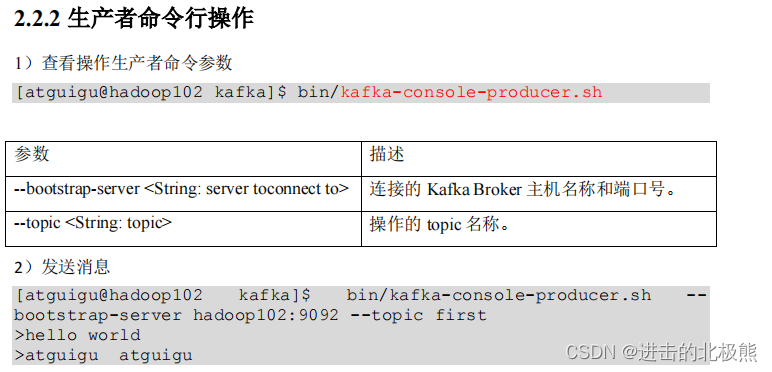
bin/kafka-console-producer.sh --bootstrap-server 192.168.75.128:9092 --topic first
7.3、消费者命令行操作 kafka-console-consumer.sh

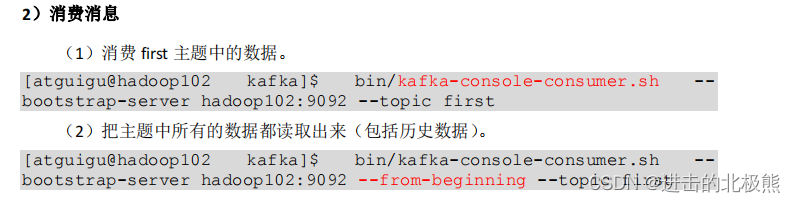
bin/kafka-console-consumer.sh --bootstrap-server 192.168.75.128:9092 --topic topic1 --from-beginning
八、kafka生产者
8.1、生产者发送原理图
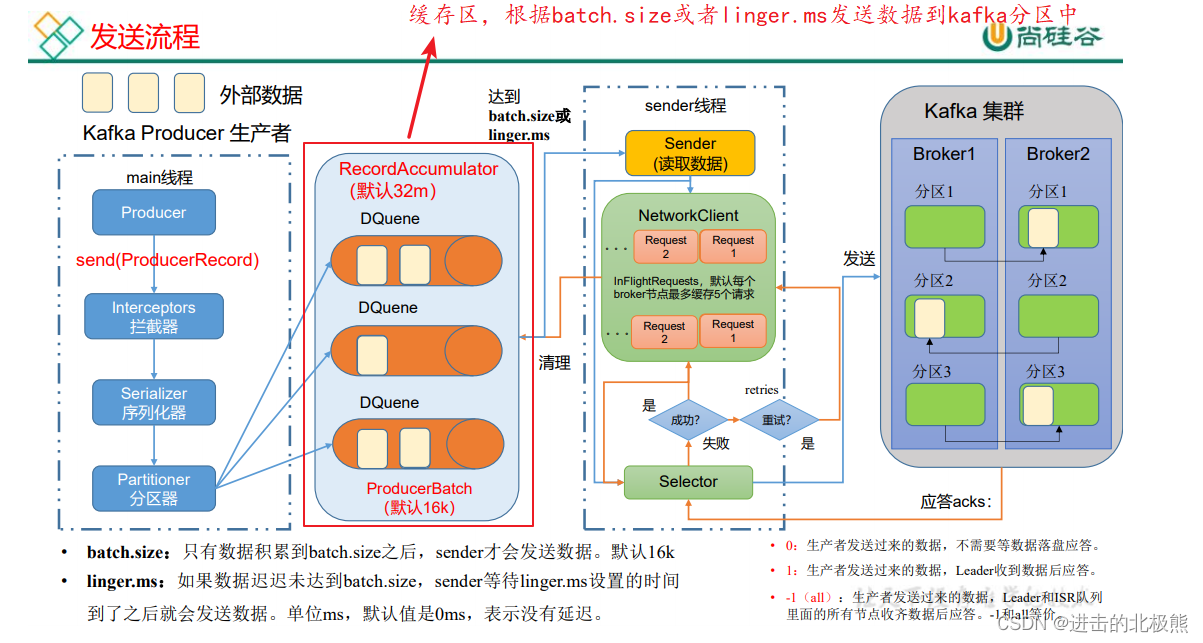


8.2、异步发送 API(遇到的问题,java中无法close掉kafka生产者,原因:需要将server.properties中的
listeners=PLAINTEXT://192.168.75.128:9092释放出来。这里的ip地址是当前服务器的ip)

8.3、异步回调(跟异步api没有区别,只有多了new Callback())

8.4、同步发送api(只需在异步发送的基础上,再调用一下 get()方法即可。)

8.5 、分区(linux中设置分区会报错,所以这部分未完成)
8.5.1、分区的好处

8.5.2、指定分区(java代码)

8.6、生产者如何提高吞吐量

8.7、生产者如何保证可靠性(acks:0,1,-1;-1的安全性最高)

代码中实现:

8.8、数据重复问题/数据去重(幂等性+事务)
8.8.1、幂等性

8.8.2、事务(事务的原子性,要么成功,要么失败)

8.8.3 、代码实现(必须要事务id)

8.8、数据乱序(1.x版本之后开启幂等性,可以保证最近的5个请求的顺序,1.x之前只能保证单分区的一个请求的有序性)
九、kafka中的broker(没学,直接学消费者)
十、kafka消费者
10.1、kafka的消费方式(主动从broker中拉取数据)

**10.2、消费者工作流程

注意:- 一个consumer可以消费多个分区里面的内容
- 同一个组里面的不同consumer不能消费同一个分区里面的内容
- offset在kafka2.8之后放在了磁盘上,2.8之前放在zookeeper上。
10.3、消费者组原理
- 消费者组内每个消费者负责消费不同分区的数据,一个分区只能由一个组内消费者消费。
- 消费者组之间互不影响。所有的消费者都属于某个消费者组,即消费者组是逻辑上的一个订阅者。
10.4、消费者组初始化流程
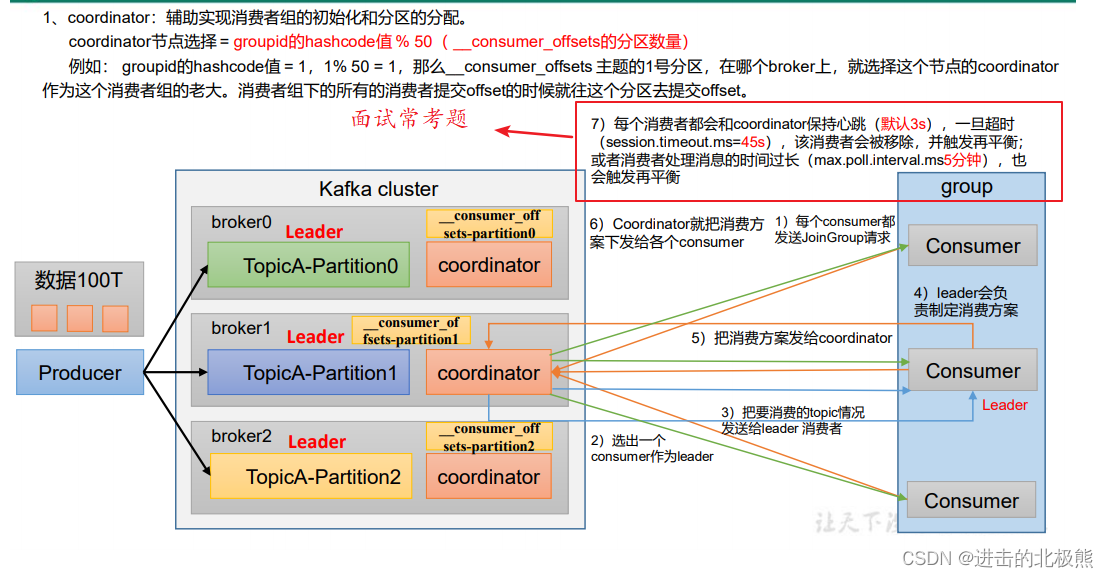
10.5、消费者组消费详情

生产者有 序列化、拦截器
消费者有 反序列化、拦截器10.6、消费者api (订阅主题topic)

10.7、消费者api(订阅分区)–跟订阅主题的不同在于红框里面的数据 – 一个消费组里面的多个consumer可以当做一个consumer,不能同时消费一个topic里面的分区数据

10.8、消费者 range、roundrobin、sticky(没学)

10.9、offset(没学)
10.10、事务
十一、**Kafka-Kraft 模式(2.8之后舍弃zookeeper)
11.1、配置
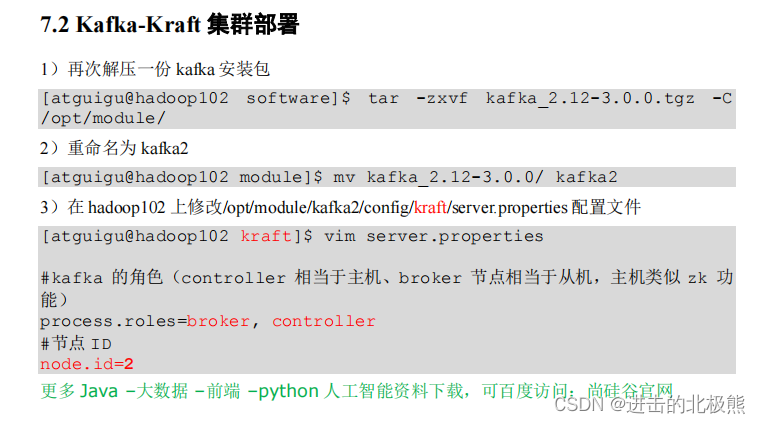


11.2、启动kafka集群
bin/kafka-server-start.sh -daemon config/kraft/server.properties

11.3、停止kafka集群
bin/kafka-server-stop.sh

十二、整合springboot
12.1、生产者
pom.xml
<project xmlns="http://maven.apache.org/POM/4.0.0" xmlns:xsi="http://www.w3.org/2001/XMLSchema-instance" xsi:schemaLocation="http://maven.apache.org/POM/4.0.0 http://maven.apache.org/xsd/maven-4.0.0.xsd"> <modelVersion>4.0.0modelVersion> <parent> <groupId>org.springframework.bootgroupId> <artifactId>spring-boot-starter-parentartifactId> <version>2.6.1version> <relativePath/> parent> <groupId>org.examplegroupId> <artifactId>kafka-testartifactId> <version>1.0-SNAPSHOTversion> <properties> <maven.compiler.source>8maven.compiler.source> <maven.compiler.target>8maven.compiler.target> properties> <dependencies> <dependency> <groupId>org.apache.kafkagroupId> <artifactId>kafka-clientsartifactId> <version>3.0.0version> dependency> <dependency> <groupId>org.springframework.bootgroupId> <artifactId>spring-boot-starter-webartifactId> dependency> <dependency> <groupId>org.springframework.kafkagroupId> <artifactId>spring-kafkaartifactId> dependency> <dependency> <groupId>org.projectlombokgroupId> <artifactId>lombokartifactId> <optional>trueoptional> dependency> <dependency> <groupId>org.springframework.bootgroupId> <artifactId>spring-boot-starter-testartifactId> <scope>testscope> dependency> <dependency> <groupId>org.springframework.kafkagroupId> <artifactId>spring-kafka-testartifactId> <scope>testscope> dependency> dependencies> <build> <plugins> <plugin> <groupId>org.springframework.bootgroupId> <artifactId>spring-boot-maven-pluginartifactId> <configuration> <excludes> <exclude> <groupId>org.projectlombokgroupId> <artifactId>lombokartifactId> exclude> excludes> configuration> plugin> plugins> build> project>- 1
- 2
- 3
- 4
- 5
- 6
- 7
- 8
- 9
- 10
- 11
- 12
- 13
- 14
- 15
- 16
- 17
- 18
- 19
- 20
- 21
- 22
- 23
- 24
- 25
- 26
- 27
- 28
- 29
- 30
- 31
- 32
- 33
- 34
- 35
- 36
- 37
- 38
- 39
- 40
- 41
- 42
- 43
- 44
- 45
- 46
- 47
- 48
- 49
- 50
- 51
- 52
- 53
- 54
- 55
- 56
- 57
- 58
- 59
- 60
- 61
- 62
- 63
- 64
- 65
- 66
- 67
- 68
- 69
- 70
application.properties
# 应用名称 spring.application.name=kafka-test # 指定 kafka 的地址 spring.kafka.bootstrapservers=192.168.75.128:9092,192.168.75.129:9092,192.168.75.130:9092 #指定 key 和 value 的序列化器 spring.kafka.producer.keyserializer=org.apache.kafka.common.serialization.StringSerializer spring.kafka.producer.valueserializer=org.apache.kafka.common.serialization.StringSerializer- 1
- 2
- 3
- 4
- 5
- 6
- 7
controller
package com.bear.springbootkafka.controller; import org.springframework.beans.factory.annotation.Autowired; import org.springframework.kafka.core.KafkaTemplate; import org.springframework.web.bind.annotation.RequestMapping; import org.springframework.web.bind.annotation.RestController; /** * @author LiuShanshan * @version V1.0 * @Description */ @RestController public class ProducerController { @Autowired KafkaTemplate<String, String> kafka; @RequestMapping("/kafkaProducterTest") public String data(String msg) { kafka.send("first", msg); return "ok"; } }- 1
- 2
- 3
- 4
- 5
- 6
- 7
- 8
- 9
- 10
- 11
- 12
- 13
- 14
- 15
- 16
- 17
- 18
- 19
- 20
- 21
- 22
- 23
- 24
12.2、消费者(@KafkaListener监听kafka的topic/分区中是否有数据)

实例化对象放入spring容器中,这里的@KafkaListener一直监听kafka中是否有新的数据产生。

监听了topic为first和siv的测试结果:

-
相关阅读:
044-WEB攻防-PHP应用&SQL盲注&布尔回显&延时判断&报错处理&增删改查方式
完犊子!原单位的离职证明丢了,下周要入职了,用AI做一个行不行?
光储直流微电网MATLAB/Simulink仿真
驱动开发,stm32mp157a开发板的led灯控制实验(优化),使用ioctl函数,让write/read函数的专注读写功能
开发运维-常用远程桌面开源软件
阅读论文的方法和技巧(快速且有效)
【Java 实战】通过Redis实现购物车功能
Raid 独立磁盘冗余阵列
Apple官网的动效
vue视图响应-watch
- 原文地址:https://blog.csdn.net/M1275601161/article/details/126036811
