-
Promethus+node_exporter集群部署监控
测试pod的时候promethus的记录学习
服务器集群如下:
10.37.0.101 node1
10.37.0.103 node2
10.37.0.216 master一、服务端配置
先通过kubectl启promethus及其配置,这里看两个配置就行一个是9090端口用来收集数据,另外一个是host,是进行host配置以便用于通过prometheus.devops.com直接访问,
可以在windows的system32/drives/hosts或者linux下的/etc/hosts文件添加你的普罗米修斯服务器hosts映射即可,如下:
10.37.0.216 prometheus.devops.comcat promethus.yaml #promethus.yaml apiVersion: v1 kind: Namespace metadata: name: monitor --- apiVersion: apps/v1 kind: Deployment metadata: name: prometheus namespace: monitor labels: app: prometheus spec: selector: matchLabels: app: prometheus template: metadata: labels: app: prometheus spec: serviceAccountName: prometheus nodeSelector: prometheus: "true" initContainers: - name: "change-permission-of-directory" image: busybox command: ["/bin/sh"] args: ["-c", "chown -R 65534:65534 /prometheus"] securityContext: privileged: true volumeMounts: - mountPath: "/etc/prometheus" name: config-volume - mountPath: "/prometheus" name: data containers: - image: prom/prometheus:v2.28.0 name: prometheus args: - "--config.file=/etc/prometheus/prometheus.yml" - "--storage.tsdb.path=/prometheus" # 指定tsdb数据路径 - "--web.enable-lifecycle" # 支持热更新,直接执行localhost:9090/-/reload立即生效 - "--web.console.libraries=/usr/share/prometheus/console_libraries" - "--web.console.templates=/usr/share/prometheus/consoles" ports: - containerPort: 9090 name: http volumeMounts: - mountPath: "/etc/prometheus" name: config-volume - mountPath: "/prometheus" name: data resources: requests: cpu: 100m memory: 512Mi limits: cpu: 100m memory: 512Mi volumes: - name: data hostPath: path: /data/prometheus/ - configMap: name: prometheus-config name: config-volume --- apiVersion: v1 kind: ServiceAccount metadata: name: prometheus namespace: monitor --- apiVersion: rbac.authorization.k8s.io/v1 kind: ClusterRole metadata: name: prometheus rules: - apiGroups: - "" resources: - nodes - services - endpoints - pods - nodes/proxy verbs: - get - list - watch - apiGroups: - "extensions" resources: - ingresses verbs: - get - list - watch - apiGroups: - "" resources: - configmaps - nodes/metrics verbs: - get - nonResourceURLs: - /metrics verbs: - get --- apiVersion: rbac.authorization.k8s.io/v1 kind: ClusterRoleBinding metadata: name: prometheus roleRef: apiGroup: rbac.authorization.k8s.io kind: ClusterRole name: prometheus subjects: - kind: ServiceAccount name: prometheus namespace: monitor --- apiVersion: v1 kind: Service metadata: name: prometheus namespace: monitor labels: app: prometheus spec: selector: app: prometheus type: ClusterIP ports: - name: web port: 9090 targetPort: http --- apiVersion: networking.k8s.io/v1 kind: Ingress metadata: name: prometheus namespace: monitor spec: rules: - host: prometheus.devops.com http: paths: - path: / pathType: Exact backend: service: name: prometheus port: number: 9090 ---- 1
- 2
- 3
- 4
- 5
- 6
- 7
- 8
- 9
- 10
- 11
- 12
- 13
- 14
- 15
- 16
- 17
- 18
- 19
- 20
- 21
- 22
- 23
- 24
- 25
- 26
- 27
- 28
- 29
- 30
- 31
- 32
- 33
- 34
- 35
- 36
- 37
- 38
- 39
- 40
- 41
- 42
- 43
- 44
- 45
- 46
- 47
- 48
- 49
- 50
- 51
- 52
- 53
- 54
- 55
- 56
- 57
- 58
- 59
- 60
- 61
- 62
- 63
- 64
- 65
- 66
- 67
- 68
- 69
- 70
- 71
- 72
- 73
- 74
- 75
- 76
- 77
- 78
- 79
- 80
- 81
- 82
- 83
- 84
- 85
- 86
- 87
- 88
- 89
- 90
- 91
- 92
- 93
- 94
- 95
- 96
- 97
- 98
- 99
- 100
- 101
- 102
- 103
- 104
- 105
- 106
- 107
- 108
- 109
- 110
- 111
- 112
- 113
- 114
- 115
- 116
- 117
- 118
- 119
- 120
- 121
- 122
- 123
- 124
- 125
- 126
- 127
- 128
- 129
- 130
- 131
- 132
- 133
- 134
- 135
- 136
- 137
- 138
- 139
- 140
- 141
- 142
- 143
- 144
- 145
- 146
- 147
- 148
- 149
- 150
- 151
- 152
- 153
- 154
- 155
- 156
- 157
- 158
- 159
- 160
- 161
然后启动收集数据的配置Prometheus-configmap.yaml,采集的node的数据ip及端口配置一下即可
#Prometheus-configmap.yaml apiVersion: v1 kind: ConfigMap metadata: name: prometheus-config namespace: monitor data: prometheus.yml: | global: scrape_interval: 15s evaluation_interval: 15s scrape_configs: - job_name: 'prometheus' static_configs: - targets: ['10.37.0.216:9090'] - job_name: 'k8s-master' static_configs: - targets: ['10.37.0.216:9100'] - job_name: 'k8s-slave2' static_configs: - targets: ['10.37.0.103:9100'] - job_name: 'k8s-slave1' static_configs: - targets: ['10.37.0.101:9100'] # 采集node exporter离线包监控数据 - job_name: 'node' static_configs: - targets: ['10.37.0.103:8080']- 1
- 2
- 3
- 4
- 5
- 6
- 7
- 8
- 9
- 10
- 11
- 12
- 13
- 14
- 15
- 16
- 17
- 18
- 19
- 20
- 21
- 22
- 23
- 24
- 25
- 26
- 27
- 28
配置收集接受数据的node-exporter.yaml
#node-exporter.yaml apiVersion: apps/v1 kind: DaemonSet metadata: name: node-exporter namespace: monitor labels: name: node-exporter spec: selector: matchLabels: name: node-exporter template: metadata: labels: name: node-exporter spec: hostPID: true hostIPC: true hostNetwork: true containers: - name: node-exporter image: prom/node-exporter:v1.0.1 ports: - containerPort: 9100 resources: requests: cpu: 0.15 securityContext: privileged: true args: - --path.procfs - /host/proc - --path.sysfs - /host/sys - --collector.filesystem.ignored-mount-points - '"^/(sys|proc|dev|host|etc)($|/)"' volumeMounts: - name: dev mountPath: /host/dev - name: proc mountPath: /host/proc - name: sys mountPath: /host/sys - name: rootfs mountPath: /rootfs tolerations: - key: "node-role.kubernetes.io/master" operator: "Exists" effect: "NoSchedule" volumes: - name: proc hostPath: path: /proc - name: dev hostPath: path: /dev - name: sys hostPath: path: /sys - name: rootfs hostPath: path: /- 1
- 2
- 3
- 4
- 5
- 6
- 7
- 8
- 9
- 10
- 11
- 12
- 13
- 14
- 15
- 16
- 17
- 18
- 19
- 20
- 21
- 22
- 23
- 24
- 25
- 26
- 27
- 28
- 29
- 30
- 31
- 32
- 33
- 34
- 35
- 36
- 37
- 38
- 39
- 40
- 41
- 42
- 43
- 44
- 45
- 46
- 47
- 48
- 49
- 50
- 51
- 52
- 53
- 54
- 55
- 56
- 57
- 58
- 59
- 60
- 61
- 62
- 63
分别kubectl create -f这三yaml文件
kubectl create -f promethus.yaml
kubectl create -f Prometheus-configmap.yaml
kubectl create -f node-exporter.yaml
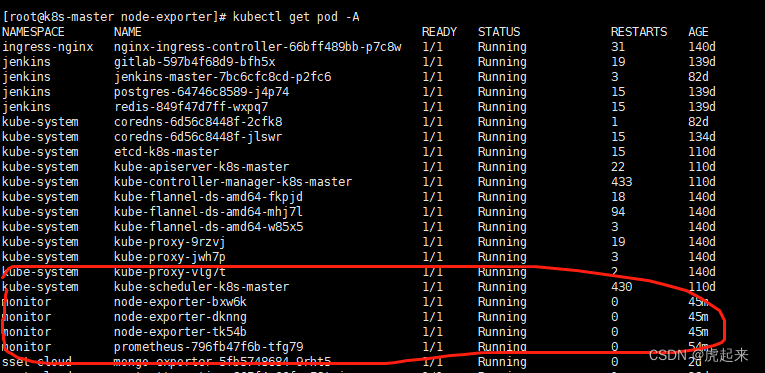
通过kubectl get pod -A观察启动无误
二,客户端配置
直接kubectl create -f promethus上述的node-export即可。顺便这里加了一个离线包的node_export以供需要离线安装node_export时也能正常使用,下载地址https://download.csdn.net/download/xinshuzhan/12281198?utm_source=iteye_new
随意下载一个node_export,通过tar -xvf 解压下载的tar.gz包
配置自启动cp node_exporter-0.18.1.linux-amd64/node_exporter /usr/local/bin/ [root@localhost opt]# vim /usr/lib/systemd/system/node_exporter.service [Unit] Description=node_export Documentation=https://github.com/prometheus/node_exporter After=network.target [Service] Type=simple User=prometheus ExecStart=/usr/local/bin/node_exporter Restart=on-failure [Install] WantedBy=multi-user.target- 1
- 2
- 3
- 4
- 5
- 6
- 7
- 8
- 9
- 10
- 11
- 12
- 13
- 14
启用离线包监听及服务
./node_exporter --web.listen-address 10.37.0.103:8080
curl 10.37.0.103:8080

通过html可以看到下面有一个curl 10.37.0.103:8080/metrics,就可以得到我们想要的上报数据了,同时也确认了自己的数据export成功

启动
[root@localhost opt]# systemctl daemon-reload [root@localhost opt]# systemctl enable node_exporter Created symlink from /etc/systemd/system/multi-user.target.wants/node_exporter.service to /usr/lib/systemd/system/node_exporter.service. [root@localhost opt]# systemctl start node_exporter- 1
- 2
- 3
- 4
查看验证下是否正常处于监听
[root@localhost opt]# netstat -anlptu|grep 9100- 1

在上述的node_export.yaml加上,上面已经加过了

三,访问promethus自带的ui去进行验证
上面进行host配置过了

所以直接访问prometheus.devops.com即可
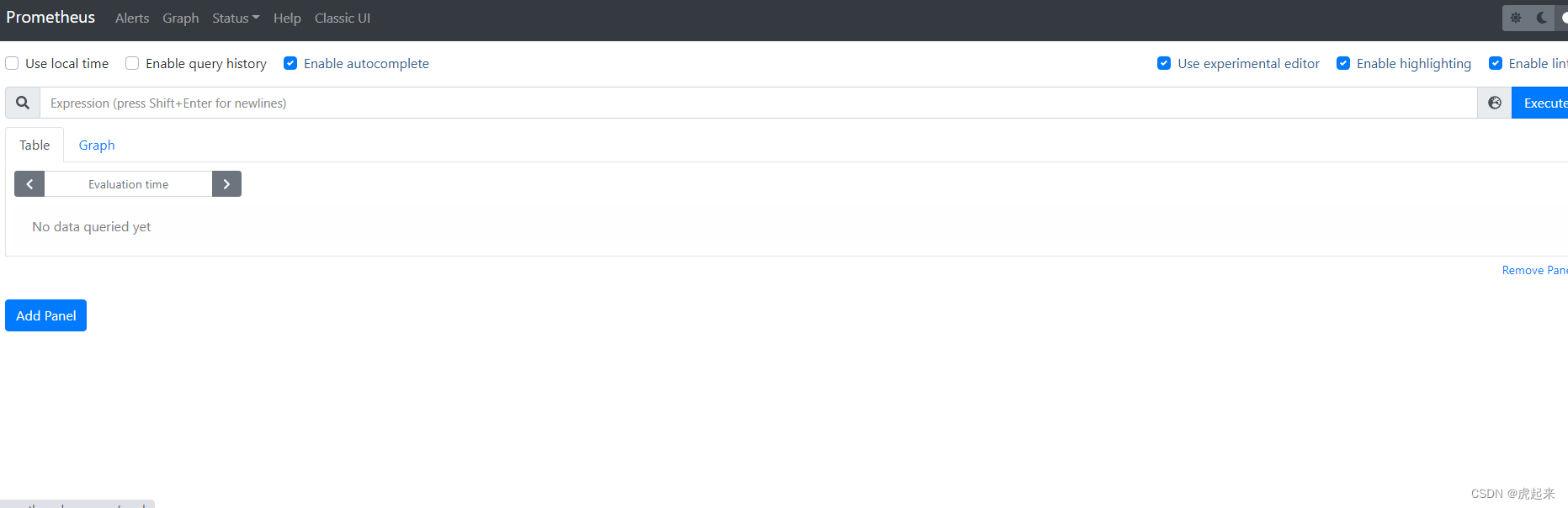
这里可以看到已经正常启动promethus了,验证看一下是否正常监控,通过excute输入查看cpu
100 - (avg by (instance) (irate(node_cpu_seconds_total{mode=“idle”}[5m])) * 100)

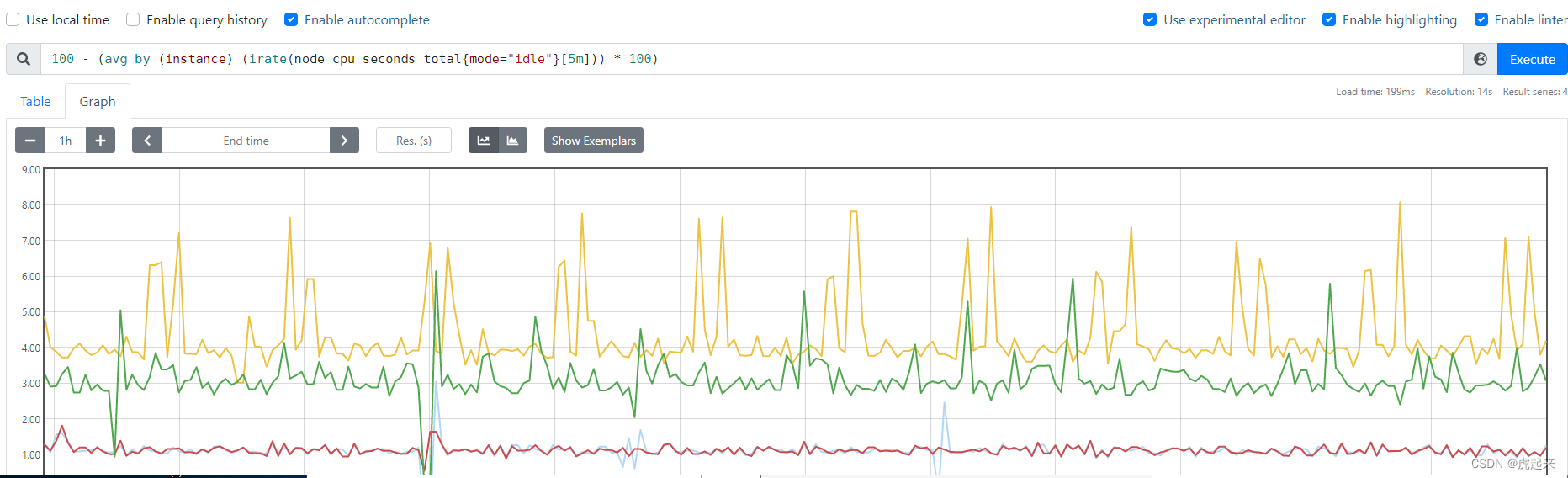
可以看到已经成功监控了集群的cpu
其他的常用监控如:4.收集系统CPU监控信息
4.1 CPU使用率 公式:100 - (avg by (instance) (irate(node_cpu_seconds_total{mode=“idle”}[5m])) * 100)4.2 CPU负载 公式:
1分钟负载:node_load1
5分钟负载:node_load5
15分钟负载:node_load15
5.收集系统内存监控信息
5.1 内存使用率 公式:(1 - (node_memory_MemAvailable_bytes / node_memory_MemTotal_bytes ))* 1005.2 可用内存(单位:M) 公式:node_memory_MemAvailable_bytes / 1024 / 1024
6.收集系统磁盘监控信息
6.1 磁盘总大小(单位: G) 公式:node_filesystem_size_bytes {fstype=~“ext4|xfs”} / 1024 / 1024 / 10246.2 磁盘剩余大小(单位: G) 公式:node_filesystem_avail_bytes {fstype=~“ext4|xfs”} / 1024 / 1024 / 1024
6.3 磁盘使用率 公式:(1-(node_filesystem_free_bytes{fstype=~“ext4|xfs”} / node_filesystem_size_bytes{fstype=~“ext4|xfs”})) * 100
7.收集系统网络监控信息(ip add 查看网卡信息)
7.1 网卡入网流量 (指定某一个网卡) 公式:irate(node_network_receive_bytes_total{device=‘ens33’}[5m])7.2 网卡出网流量(指定某一个网卡) 公式:irate(node_network_transmit_bytes_total{device=‘ens33’}[5m])
-
相关阅读:
图形学中一些基本知识的总结与复习
js浮点数精度问题详解
JSP学生选课管理系统myeclipse开发sql数据库BS模式java编程网页结构
mount -o bind
go-cli
c语言的编译过程
springBoot中集成Swagger
第六章认识Node.js服务器开发
Python 中调用 Java 的 JAR 包
Docker(三)-Docker常用命令
- 原文地址:https://blog.csdn.net/qq_36967200/article/details/126265941
