-
关于前后端分离
目录
1.完成登录
1.1 完整登录界面
- <template>
- <div id="login_box">
- <div class="img_position">
- <el-avatar :size="140" :src="imgUrl">el-avatar>
- div>
- <el-card class="box-card">
- <el-form :model="ruleForm" status-icon :rules="rules" ref="ruleForm" label-width="100px" class="demo-ruleForm">
- <el-form-item label="用户名" prop="name">
- <el-input type="text" v-model="ruleForm.name" autocomplete="off">el-input>
- el-form-item>
- <el-form-item label="密码" prop="password">
- <el-input type="password" v-model="ruleForm.password" autocomplete="off">el-input>
- el-form-item>
- <el-form-item>
- <el-button type="primary"
- size="mini"
- :plain="true"
- @click="login()"
- style="margin-left: 100px;width: 100px">登录el-button>
- el-form-item>
- el-form>
- el-card>
- div>
- template>
- <script>
- export default {
- name: "Login",
- data(){
- return {
- ruleForm: {
- name: '',
- password: ''
- },
- rules: {
- name: [
- {required: true, message:'用户名不能为空', trigger: 'blur'},
- ],
- password: [
- {required: true, message: '密码不能为空', trigger: 'blur'},
- ]
- },
- imgUrl:'https://cube.elemecdn.com/0/88/03b0d39583f48206768a7534e55bcpng.png'
- }
- },
- methods:{
- login(){
- //表单校验
- this.$refs['ruleForm'].validate((valid=>{
- if(valid){
- //url:后端登录接口的路径
- this.$http.post("http://localhost:8808/user/login",this.ruleForm).then(result=>{
- if(result.data.code==2000){
- //获取登陆成功后的token
- var token = result.data.data;
- //把token保存在sessionStorage理解为session
- sessionStorage.setItem("token",token);
- //路由跳转
- this.$router.push("/home")
- console.log(result.data.msg);
- }
- })
- }
- }))
- }
- }
- }
- script>
- <style>
- #login_box{
- position: relative;
- width: 500px;
- margin: 250px auto;
- }
- #login_box div.img_position{
- position: absolute;
- left: 200px;
- top: -70px;
- }
- .text {
- font-size: 14px;
- }
- .item {
- padding: 18px 0;
- }
- .box-card {
- padding: 100px 50px 0 0;
- width: 480px;
- }
- style>
1.2 登录按钮事件
如果想在vue工程中使用axios进行异步请求,则需要在main.js中导入axios
[1]//导入axios
import axios from "axios";
[2]//把axios挂载到vue对象中,以后在vue中如果使用axios直接可以用$http名称
Vue.prototype.$http=axios- methods:{
- login(){
- //表单校验
- this.$refs['ruleForm'].validate((valid) => {
- if(valid){
- //url:后端登录接口的路径
- this.$http.post("http://localhost:8808/user/login",this.ruleForm).then(result=>{
- });
- }
- })
- }
- }
1.3 完成登录接口(后端)
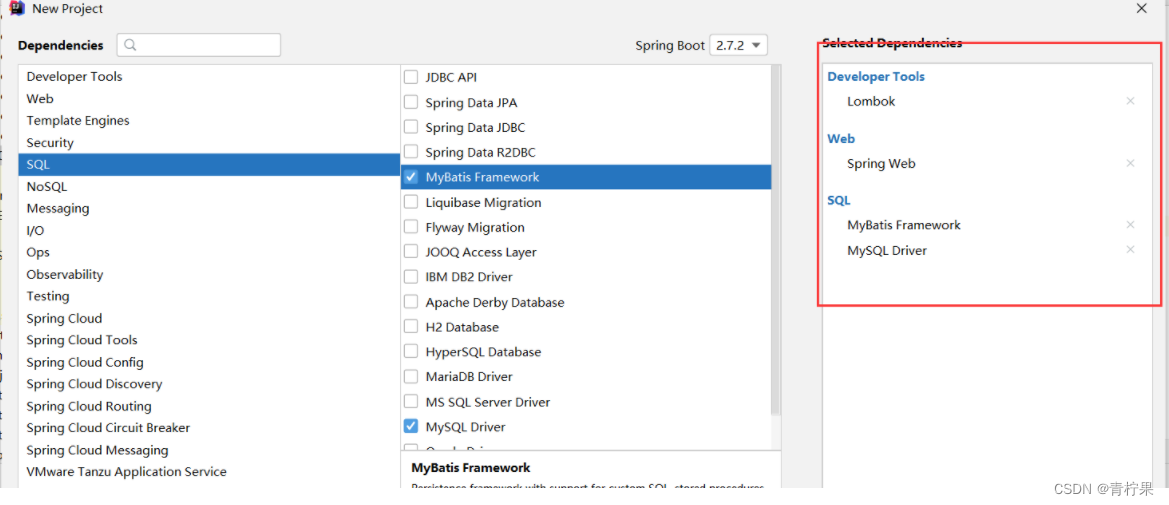
1.3.1 依赖
- <dependencies>
- <dependency>
- <groupId>org.springframework.bootgroupId>
- <artifactId>spring-boot-starter-webartifactId>
- dependency>
- <dependency>
- <groupId>org.mybatis.spring.bootgroupId>
- <artifactId>mybatis-spring-boot-starterartifactId>
- <version>2.2.2version>
- dependency>
- <dependency>
- <groupId>com.fasterxml.jackson.coregroupId>
- <artifactId>jackson-databindartifactId>
- <version>2.11.3version>
- dependency>
- <dependency>
- <groupId>mysqlgroupId>
- <artifactId>mysql-connector-javaartifactId>
- <scope>runtimescope>
- dependency>
- <dependency>
- <groupId>org.projectlombokgroupId>
- <artifactId>lombokartifactId>
- <optional>trueoptional>
- dependency>
- <dependency>
- <groupId>org.springframework.bootgroupId>
- <artifactId>spring-boot-starter-testartifactId>
- <scope>testscope>
- dependency>
- <dependency>
- <groupId>com.baomidougroupId>
- <artifactId>mybatis-plus-generatorartifactId>
- <version>3.5.2version>
- dependency>
- <dependency>
- <groupId>org.freemarkergroupId>
- <artifactId>freemarkerartifactId>
- <version>2.3.31version>
- dependency>
- <dependency>
- <groupId>com.baomidougroupId>
- <artifactId>mybatis-plus-boot-starterartifactId>
- <version>3.5.2version>
- dependency>
- <dependency>
- <groupId>com.alibabagroupId>
- <artifactId>druid-spring-boot-starterartifactId>
- <version>1.2.8version>
- dependency>
- <dependency>
- <groupId>com.github.xiaoymingroupId>
- <artifactId>swagger-bootstrap-uiartifactId>
- <version>1.9.6version>
- dependency>
- <dependency>
- <groupId>com.spring4allgroupId>
- <artifactId>swagger-spring-boot-starterartifactId>
- <version>1.9.1.RELEASEversion>
- dependency>
- <dependency>
- <groupId>org.springframework.bootgroupId>
- <artifactId>spring-boot-starter-data-redisartifactId>
- dependency>
- <dependency>
- <groupId>org.apache.commonsgroupId>
- <artifactId>commons-pool2artifactId>
- dependency>
- <dependency>
- <groupId>com.fasterxml.jackson.datatypegroupId>
- <artifactId>jackson-datatype-jsr310artifactId>
- <version>2.9.3version>
- dependency>
- <dependency>
- <groupId>org.apache.shirogroupId>
- <artifactId>shiro-spring-boot-starterartifactId>
- <version>1.7.0version>
- dependency>
- dependencies>
1.3.2 mp的代码生成器
- public class Generator {
- public static void main(String[] args) {
- FastAutoGenerator.create("jdbc:mysql://localhost:3306/useshiro?serverTimezone=Asia/Shanghai", "root", "root")
- .globalConfig(builder -> {
- builder.author("孟一") // 设置作者
- .enableSwagger() // 开启 swagger 模式
- .fileOverride() // 覆盖已生成文件
- .outputDir(".\\src\\main\\java\\"); // 指定输出目录
- })
- .packageConfig(builder -> {
- builder.parent("com.wd") // 设置父包名
- .moduleName("system") // 设置父包模块名
- .pathInfo(Collections.singletonMap(OutputFile.xml, "src\\main\\resources\\mapper\\")); // 设置mapperXml生成路径
- })
- .strategyConfig(builder -> {
- builder.addInclude("acl_user","acl_role","acl_permission")// 设置需要生成的表名
- .addTablePrefix("acl_"); // 设置过滤表前缀
- })
- .templateEngine(new FreemarkerTemplateEngine()) // 使用Freemarker引擎模板,默认的是Velocity引擎模板
- .execute();
- }
- }
1.3.3 配置application文件
- server.port=8808
- spring.datasource.druid.url=jdbc:mysql://localhost:3306/useshiro?serverTimezone=Asia/Shanghai
- spring.datasource.druid.driver-class-name=com.mysql.cj.jdbc.Driver
- spring.datasource.druid.username=root
- spring.datasource.druid.password=root
- #日志
- mybatis-plus.configuration.log-impl=org.apache.ibatis.logging.stdout.StdOutImpl
1.3.4 接口
- @RestController
- @RequestMapping("/system")
- public class LoginController {
- @Autowired
- private IUserService userService;
- @PostMapping("login")
- public CommonResult login(@RequestBody LoginVo loginVo){
- QueryWrapper
wrapper = new QueryWrapper<>(); - wrapper.eq("username",loginVo.getName());
- wrapper.eq("password",loginVo.getPassword());
- wrapper.eq("isdeleted",0);
- User one = userService.getOne(wrapper);
- if(one!=null){
- return new CommonResult(2000,"登录成功",null);
- }else{
- return new CommonResult(5000,"登录失败",null);
- }
- }
- }

1.3.5 跨域问题
前端调用后端登录接口时出现如下的错误

为跨域问题:
当使用异步请求从一个网址访问另一个网址时可能会出现跨域问题。
前提:
1. 必须为异步请求
2. 当端口号或协议或ip不同时则会出现跨域出现两个请求: 有一个请求的方式为: OPTIONS 和真实的请求方式
如何解决跨域:
1.前端解决
2.后端解决---->这里也有几种方式:
【1】可以借助nginx.
【2】在代码中解决在控制层接口上添加@CrossOrigin

(origins = {"192.168.0.111:8080","192.168.0.120:8081"},allowedHeaders="运行哪些请求头跨域",methods={"GET","POST"})
origins: 允许哪些域可以跨域访问我这个接口
allowedHeaders:允许哪些请求头信息跨域
methods: 允许哪些请求方式跨域上面再控制层接口处加上注解的方式解决跨,麻烦的地方就需要对每个控制类都加该注解。 设置一个全局跨域配置类。
- @Configuration
- public class CorsConfig {
- // 当前跨域请求最大有效时长。这里默认1天
- private static final long MAX_AGE = 24 * 60 * 60;
- @Bean
- public CorsFilter corsFilter() {
- UrlBasedCorsConfigurationSource source = new UrlBasedCorsConfigurationSource();
- CorsConfiguration corsConfiguration = new CorsConfiguration();
- corsConfiguration.addAllowedOrigin("*"); // 1 设置访问源地址
- corsConfiguration.addAllowedHeader("*"); // 2 设置访问源请求头
- corsConfiguration.addAllowedMethod("*"); // 3 设置访问源请求方法
- corsConfiguration.setMaxAge(MAX_AGE);
- source.registerCorsConfiguration("/**", corsConfiguration); // 4 对接口配置跨域设置
- return new CorsFilter(source);
- }
- }
1.3.6 登录成功后前端路由跳转

2.登录的bug
上面写的登录,后端没有保存数据 前端也没有拿到数据进行保存

2.1 修改登录的接口
- @RestController
- @RequestMapping("/system")
- @Api(tags = "登录的接口类")
- public class LoginController {
- @Autowired
- private IUserService userService;
- @Autowired
- private RedisTemplate redisTemplate;
- @PostMapping("login")
- @ApiOperation(value="登录接口")
- public CommonResult login(@RequestBody LoginVo loginVo){
- QueryWrapper
wrapper = new QueryWrapper<>(); - wrapper.eq("username",loginVo.getName());
- wrapper.eq("password",loginVo.getPassword());
- wrapper.eq("is_deleted",0);
- User one = userService.getOne(wrapper);
- if(one!=null){
- //随机生成一个唯一字符串。
- String token = UUID.randomUUID().toString();
- //把该token作为redis的key value为当前登录用户信息
- ValueOperations forValue = redisTemplate.opsForValue();
- forValue.set(token,one,24, TimeUnit.HOURS);
- return new CommonResult(2000,"登录成功",token);
- }else{
- return new CommonResult(5000,"登录失败",null);
- }
- }
- }
2.2 修改前端登录方法

后面每次请求都可以携带该token
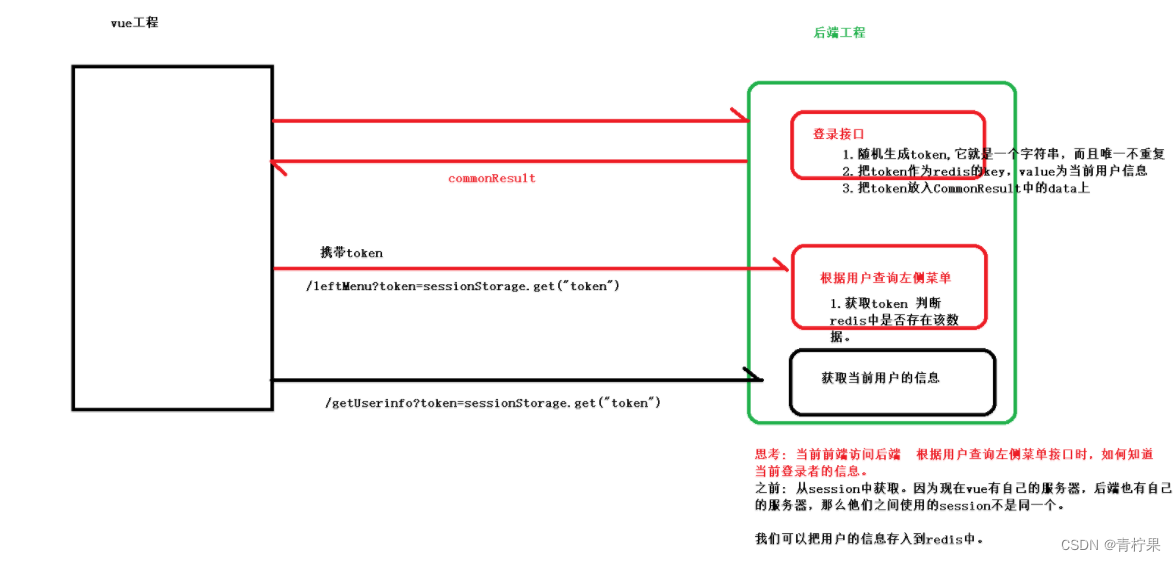
每次请求都得要人为添加参数token. 我们可以使用axios得请求拦截器。

3.前置路由守卫
前置路由守卫:就是在路由跳转前加上自己得一些业务代码。
- //设置前置路由守卫 to:到哪个路由 from:从哪个路由来 next():放行到指定路由
- router.beforeEach((to,from,next)=>{
- //获取跳转得路径
- var path = to.path;
- //判断是否为登录路由路径
- if(path==="/login"){
- console.log("~~~~~~~~~~~~~~~~~~~~~~~~~~~~~~~~~~")
- //放行
- return next();
- }
- //其他路由路径 判断是否登录过
- var token = sessionStorage.getItem("token");
- if(token){
- return next();
- }
- //跳转登录
- return next("/login");
- })
4.整合shiro
4.1 依赖
org.apache.shiro
shiro-spring-boot-starter
1.7.0
4.2 shiro的配置类
- @Configuration
- public class ShiroConfig {
- @Bean
- public DefaultWebSecurityManager securityManager(){
- DefaultWebSecurityManager securityManager=new DefaultWebSecurityManager();
- securityManager.setRealm(realm());
- return securityManager;
- }
- @Bean
- public Realm realm(){
- MyRealm myRealm=new MyRealm();
- myRealm.setCredentialsMatcher(credentialsMatcher());
- return myRealm;
- }
- @Bean
- public CredentialsMatcher credentialsMatcher(){
- HashedCredentialsMatcher credentialsMatcher=new HashedCredentialsMatcher();
- credentialsMatcher.setHashAlgorithmName("MD5");
- credentialsMatcher.setHashIterations(1024);
- return credentialsMatcher;
- }
- @Resource
- private RedisTemplate redisTemplate;//此处之所以引入是因为LoginFilter中的构造函数使用
- @Bean(value = "shiroFilter")
- public ShiroFilterFactoryBean filterFactoryBean(){
- ShiroFilterFactoryBean factoryBean = new ShiroFilterFactoryBean();
- factoryBean.setSecurityManager(securityManager());
- //设置拦截规则
- HashMap
- map.put("/user/login","anon");
- //配置swigger过滤权限
- map.put("/**/*.css","anon");
- map.put("/**/*.js","anon");
- map.put("/doc.html","anon");
- map.put("/swagger-resources","anon");
- map.put("/v2/api-docs","anon");
- map.put("/**","authc");
- factoryBean.setFilterChainDefinitionMap(map);
- //设置自定义认证过滤器
- HashMap
- filterMap.put("authc",new LoginFilter(redisTemplate));
- factoryBean.setFilters(filterMap);
- return factoryBean;
- }
- @Bean //注册filter
- public FilterRegistrationBean
filterRegistrationBean(){ - FilterRegistrationBean
filterRegistrationBean=new FilterRegistrationBean<>(); - filterRegistrationBean.setName("shiroFilter");
- filterRegistrationBean.setFilter(new DelegatingFilterProxy());
- filterRegistrationBean.addUrlPatterns("/*");
- return filterRegistrationBean;
- }
- //开始shiro注解
- @Bean
- public AuthorizationAttributeSourceAdvisor authorizationAttributeSourceAdvisor() {
- AuthorizationAttributeSourceAdvisor authorizationAttributeSourceAdvisor = new AuthorizationAttributeSourceAdvisor();
- authorizationAttributeSourceAdvisor.setSecurityManager(securityManager());
- return authorizationAttributeSourceAdvisor;
- }
- @Bean
- public DefaultAdvisorAutoProxyCreator getDefaultAdvisorAutoProxyCreator() {
- DefaultAdvisorAutoProxyCreator advisorAutoProxyCreator=new DefaultAdvisorAutoProxyCreator();
- advisorAutoProxyCreator.setProxyTargetClass(true);
- return advisorAutoProxyCreator;
- }
- }
4.3 增加一个realm类对象
- public class MyRealm extends AuthorizingRealm {
- @Autowired
- private IUserService userService;
- //授权
- protected AuthorizationInfo doGetAuthorizationInfo(PrincipalCollection principalCollection) {
- return null;
- }
- //认证
- protected AuthenticationInfo doGetAuthenticationInfo(AuthenticationToken authenticationToken) throws AuthenticationException {
- String user = (String) authenticationToken.getPrincipal();
- QueryWrapper queryWrapper=new QueryWrapper();
- queryWrapper.eq("username",user);
- queryWrapper.eq("is_deleted",0);
- User one = userService.getOne(queryWrapper);
- if(one!=null){
- ByteSource source = ByteSource.Util.bytes(one.getSalt());
- SimpleAuthenticationInfo info=new SimpleAuthenticationInfo(one,one.getPassword(),source,this.getName());
- return info;
- }
- return null;
- }
- }
4.4 修改controller代码

4.5 测试登录

登录成功后获取用户信息时出现如下得错误

4.6 被shiro的拦截器拦截
- //如果类没有交于spring容器来管理 那么该类中得属性也不能让spring帮你注入
- public class LoginFilter extends FormAuthenticationFilter {
- //当没有登录时会经过该方法。如果想让他返回json数据那么必须重写该方法
- private RedisTemplate redisTemplate; //LoginFilter必须交于spring容器来管理。
- // //使用注解注入时,结果为null 重新new一个结果也是空
- public LoginFilter(RedisTemplate redisTemplate){
- this.redisTemplate=redisTemplate;
- }
- //当登录成功后执行得方法,如果该方法返回false,则执行onAccessDenied
- @Override
- protected boolean isAccessAllowed(ServletRequest request, ServletResponse response, Object mappedValue) {
- HttpServletRequest req= (HttpServletRequest) request;
- //1.请求方式是否为OPTIONS
- String method = req.getMethod();
- if(method!=null&&method.equals("OPTIONS")){
- return true;
- }
- //2.判断请求头是否有token值
- String token = req.getHeader("token");
- if(token!=null && redisTemplate.hasKey(token)){//只判断token!=null,只能防君子不能防小人 可以伪造token
- return true;
- }
- return false;
- }
- //未登录时调用该方法 为什么进入没有登录方法
- //第一个请求是OPTIONS,没有携带token 第二个因为前端和后端不是用同一个session,默认shiro以sessionid为是否登录的标准
- @Override
- protected boolean onAccessDenied(ServletRequest request, ServletResponse response) throws Exception {
- response.setContentType("application/json;charset=utf-8");
- PrintWriter writer=response.getWriter();
- CommonResult commonResult=new CommonResult(4001,"未登录",null);
- ObjectMapper objectMapper=new ObjectMapper();
- String json = objectMapper.writeValueAsString(commonResult);
- writer.print(json);//响应给客户json数据
- writer.flush();
- writer.close();
- return false;
- }
- }
5. 主页的布局
- <el-container>
- <el-header>
- <span id="logo" style="display: inline-block;width: 50%;height: 100%;float: left" >
- <a href="https://www.bilibili.com/video/BV14g41197PY/"><img src="../assets/logo.png" height="100%" width="180px">a>
- span>
- <span id="avatar" style="float: right">
- <el-dropdown >
- <span class="el-dropdown-link" style="margin-top: 10px; display: inline-block;">
- <el-avatar >el-avatar>
- span>
- <el-dropdown-menu slot="dropdown">
- <el-dropdown-item command="info">个人信息el-dropdown-item>
- <el-dropdown-item command="logout">退出登录el-dropdown-item>
- el-dropdown-menu>
- el-dropdown>
- span>
- el-header>
- <el-container>
- <el-aside width="200px">
- el-aside>
- <el-main>
- el-main>
- el-container>
- <el-footer>Footerel-footer>
- el-container>
- template>
- <script>
- export default {
- name: "Home",
- methods:{
- getInfo(){
- this.$http.get("http://localhost:8808/system/user/getInfo").then(result=>{
- console.log(result)
- })
- }
- }
- }
- script>
- <style>
- html,body,#app{
- height: 100%;
- }
- body,#app{
- padding: 0px;
- margin:0px;
- }
- .el-container{
- height: 100%;
- }
- .el-header, .el-footer {
- background-color: #1F272F;
- color: #333;
- line-height: 60px;
- }
- .el-aside {
- background-color: #545c64;
- color: #333;
- line-height: 560px;
- }
- .el-aside>.el-menu{
- border: none;
- }
- .el-main {
- background-color: #E9EEF3;
- color: #333;
- line-height: 560px;
- }
- body > .el-container {
- margin-bottom: 40px;
- }
- .el-container:nth-child(5) .el-aside,
- .el-container:nth-child(6) .el-aside {
- line-height: 260px;
- }
- .el-container:nth-child(7) .el-aside {
- line-height: 320px;
- }
- style>

6. 退出
6.1 前端
注意:此处不是@click点击事件


6.2 后端
- @GetMapping("/logout")
- public CommonResult logout(HttpServletRequest request){
- String token = request.getHeader("token");
- redisTemplate.delete(token);
- System.out.println("==========================");
- return new CommonResult(2000,"退出成功",null);
- }
7.查询左侧菜单
7.1 前端
- <el-container height="600px">
- <el-aside width="200px">
- <el-menu
- default-active="2"
- class="el-menu-vertical-demo"
- background-color="#C0C4CC"
- text-color="#000"
- active-text-color="#ffd04b">
- <el-submenu :index="menu.id+''" v-for="menu in leftMenus">
- <template slot="title">
- <i class="el-icon-location">i>
- <span>{{menu.name}}span>
- template>
- <el-menu-item :index="second.id+''" v-for="second in menu.children">
- <i :class="el-icon-menu">i>
- <span slot="title">
- <a style="color: white; text-decoration: none ">{{second.name}}span>
- el-menu-item>
- el-submenu>
- el-menu>
- el-aside>
- <el-main>el-main>
- el-container>

7.2 后端
这个时候出现注入不成功问题,切记注入是要看这个类有没有交给spring进行管理。但是此处即使使用spring容器来管理,但是使用注解注入时,结果为null 重新new一个结果也是空。
- @RestController
- @RequestMapping("/system/permission")
- public class PermissionController {
- @Autowired
- private IPermissionService iPermissionService;
- @GetMapping("/leftMenu")
- public CommonResult leftMenus(HttpServletRequest request){
- String token = request.getHeader("token");
- return iPermissionService.findPermissionByUserId(token);
- }
- }
server层
- @Service
- public class PermissionServiceImpl extends ServiceImpl
- @Autowired
- private PermissionMapper permissionMapper;
- @Autowired
- private RedisTemplate redisTemplate;
- @Override
- public CommonResult findPermissionByUserId(String token) {
- //1.根据token获取userid
- ValueOperations forValue = redisTemplate.opsForValue();
- User o = (User) forValue.get(token);
- String id = o.getId();
- //2.根据用户id查询该用户具有的权限
- List
permissionList=permissionMapper.selectByUserId(id); - //设置层级关系
- List
firstMenus=new ArrayList<>(); - for (Permission first:permissionList) {
- //int
- if(first.getPid().equals("1")){
- firstMenus.add(first);
- }
- }
- //为一级菜单设置二级菜单
- for (Permission first : firstMenus) {
- //根据一级菜单id 查询 该菜单的二级菜单,如果出现不确定有几级菜单 那么我们可以使用方法的递归调用
- first.setChildren(findChildren(permissionList,first.getId()));
- }
- return new CommonResult(2000,"查询成功",firstMenus);
- }
- //方法递归
- private List
findChildren(List permissionList, String id) { - List
children=new ArrayList<>(); - for (Permission p : permissionList) {
- if(p.getPid().equals(id)){
- children.add(p);
- }
- }
- for (Permission child : children) {
- child.setChildren(findChildren(permissionList,child.getId()));
- }
- return children;
- }
- }
mapper:sql语句
- "1.0" encoding="UTF-8"?>
- DOCTYPE mapper PUBLIC "-//mybatis.org//DTD Mapper 3.0//EN" "http://mybatis.org/dtd/mybatis-3-mapper.dtd">
- <mapper namespace="com.wd.system.mapper.PermissionMapper">
- <select id="selectByUserId" resultType="com.wd.system.entity.Permission">
- select distinct ap.* from
- acl_user_role ur join acl_role_permission rp on ur.role_id=rp.role_id
- join acl_permission ap on rp.permission_id=ap.id
- where ur.user_id=#{userid} and type=1
- select>
- mapper>
-
相关阅读:
zabbix集成openldap认证
笔记整理(安全)
Redis 事务 - 监控测试
Kotlin 数据类型详解:数字、字符、布尔值与类型转换指南
抗疫逆行者网页作业 感动人物HTML网页代码成品 网页作业带JS下拉菜单 最美逆行者网页模板 致敬疫情感动人物网页设计制作
Axure中的样式
记一次 .NET某新能源检测系统 崩溃分析
React 入门使用 (官方文档向 Part2)
【C++11】initializer_list详解!
JAVA基础 - URI、URL和URN的区别
- 原文地址:https://blog.csdn.net/qq_50896786/article/details/126255690
