-
Fiori 动态磁贴示例
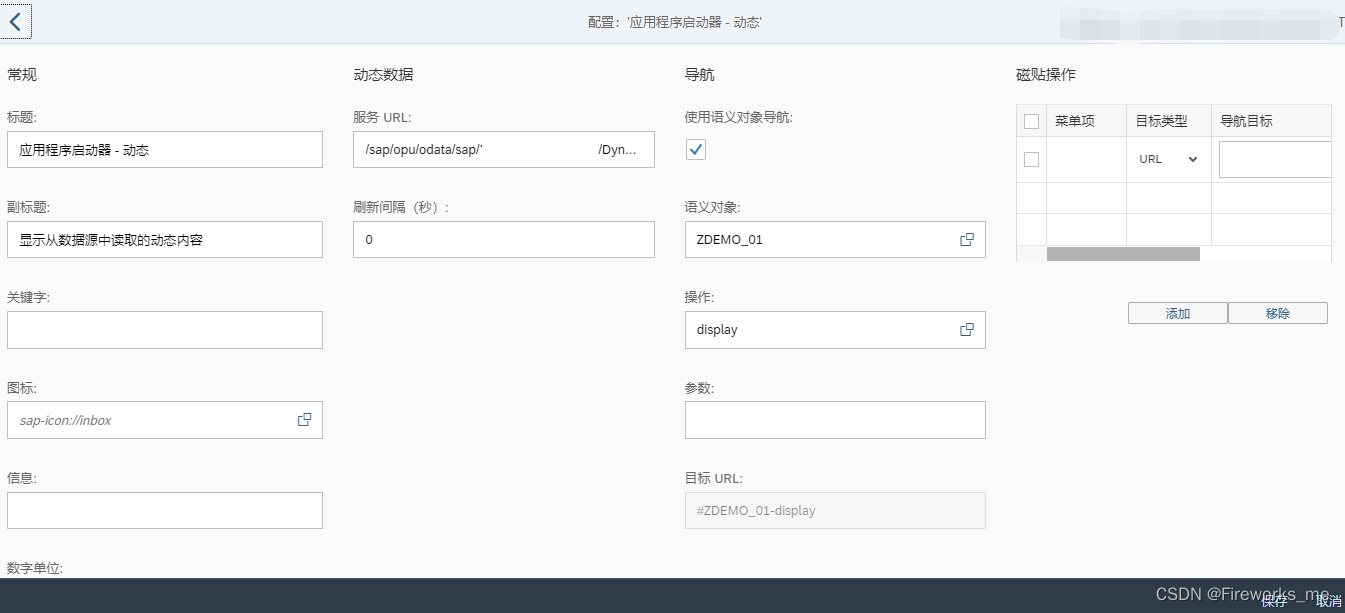
1. 动态磁贴配置页面
2. 服务URL
2.1 服务URL示例(ODATA GetEntity (Read)方法)
/sap/opu/odata/sap/ZODATA/GetEntity(par='XXX')/sap/opu/odata/sap/YTEST_ODATA_SRV/DynamictileSet(type='1')2.2 服务URL接口参数参考
- {
- “d”: {
- “icon”: “sap-icon://travel-expense”,
- “info”: “Quarter Ends!”,
- “infoState”: “Critical”,
- “number”: 43.333,
- “numberDigits”: 1
- “numberFactor”: “k”,
- “numberState”: “Positive”,
- “numberUnit”: “EUR”,
- “stateArrow”: “Up”,
- “subtitle”: “Quarterly overview”,
- “title”: “Travel Expenses”,
- }
- }
Parameter
Description
icon
Enter an sap-icon:// URL, for example sap-icon://cart.
You can look up the names of the available icons in tile configuration.
For more information, see Static App Launcher Tiles.
info
Text to be displayed at the bottom of the tile.
infoState
The color of the tile is adapted according to the value of this property. The precise color depends on the theme that you have selected in UI theme designer.
Allowed values: Negative, Neutral, Positive, Critical
number
Number to be displayed in the top right corner of the tile.
numberDigits
Number of digits to be displayed following the decimal separator (decimal point or decimal comma, depending on the language settings).
numberFactor
A factor for scaling numbers, for example, for displaying large numbers like 1.000.000 (-> number = 1 and numberFactor=”M”) or for percentages (number = 22.2 and numberFactor = “%”). The scaling is not done by the front end but has to be provided by the app developer.
numberState
The color of the number is adapted according to the value of this property. The precise color depends on the theme that you have selected in UI theme designer.
Allowed values: Negative, Neutral, Positive, Critical
numberUnit
Unit to be displayed below the number, for example, USD.
stateArrow
Displays an arrow indicating a trend.
Allowed values: None, Up, Down
subtitle
Subtitle to be displayed below the tile title.
targetParams
List of key-value-pairs separated by ampersands.
When the application is lauched (by clicking on it), these parameters are passed to the application as business parameters (if semantic object-based navigation is used) or as URL parameters (if URL-based navigation is used).
If any parameters have been entered in the Parametersfield in the tile configuration, the parameters passed by the OData service are appended to the list of parameters to be passed to the application.
title
Title to be displayed in the tile.
- type 1 Edm.String
- icon 0 Edm.String
- info 0 Edm.String
- infoState 0 Edm.String
- number 0 Edm.String
- numberDigits 0 Edm.String
- numberFactor 0 Edm.String
- numberState 0 Edm.String
- numberUnit 0 Edm.String
- stateArrow 0 Edm.String
- subtitle 0 Edm.String
- targetParams 0 Edm.String
- title 0 Edm.String
2.3 服务URL接口代码示例
- METHOD xxx_get_entity.
- DATA: ls_entity_data TYPE xxxxxxodata_mpc=>ts_xxxxxx.
- DATA: ls_key TYPE /iwbep/s_mgw_name_value_pair.
- TRY.
- ls_entity_data-icon = 'sap-icon://Fiori2/F0003'.
- ls_entity_data-info = 'Demo Info'.
- ls_entity_data-infostate = 'Positive'."Negative, Neutral, Positive, Critical
- ls_entity_data-number = 200.
- ls_entity_data-numberdigits = 0.
- ls_entity_data-numberfactor = ''.
- ls_entity_data-numberstate = ''.
- ls_entity_data-numberunit = 'USD'.
- ls_entity_data-statearrow = 'Up'."None, Up, Down
- ls_entity_data-subtitle = 'Sub title'.
- ls_entity_data-targetparams = ''.
- ls_entity_data-title = 'Title'.
- CATCH /iwbep/cx_mgw_busi_exception .
- CATCH /iwbep/cx_mgw_tech_exception .
- ENDTRY.
- er_entity = ls_entity_data.
- ENDMETHOD.
3. 效果
-
相关阅读:
使用WildCard充值ChatGPT Plus 会员
go入门学习笔记
【TCP和UDP通信】多发多收
构建curl 静态库 vs2012win7可用
qml布局管理器介绍与代码演示
Django笔记二十九之中间件介绍
springBoot 项目中的静态资源文件夹static和模版文件文件夹templates
vue3+ts实现Tab滚动居中
常见项目管理中npm包操作总结
day14I102.二叉树的层序遍历
- 原文地址:https://blog.csdn.net/xiefireworks/article/details/126111956