-
【全志T113-S3_100ask】12-2 Linux蓝牙通信实战(BLE初窥)
背景
介绍完BLE之后,下面简单操作蓝牙
(一)初始化蓝牙
# 复位蓝牙 echo 0 > /sys/class/rfkill/rfkill0/state sleep 1 echo 1 > /sys/class/rfkill/rfkill0/state sleep 1 # 绑定蓝牙设备 hciattach -n ttyS1 xradio > /dev/null 2>&1 & sleep 8 # 启用蓝牙设备 hciconfig hci0 up hciconfig hci0 piscan- 1
- 2
- 3
- 4
- 5
- 6
- 7
- 8
- 9
- 10
- 11
- 12
- 13
(二)Linux下蓝牙工具(bluez 工具集)
- hcitool、bluetoothctl等工具,可以进行BLE设备的扫描、连接、配对、广播等操作
- hcitool 可以发送HCI command,设置BLE的广播数据
- bluetoothctl 可以新增蓝牙服务,返回回调等操作
- sdptool 查看蓝牙信息和提供的服务
- hciconfig 查看蓝牙信息
- l2ping 测试蓝牙的连通性
- gatttool :可以在GATT层面,完成GATT profile的连接、service attribute的读写等操作【更多】
(三)蓝牙扫描
hcitool scan #扫描经典蓝牙 hcitool lescan #扫描BL低功耗蓝牙- 1
- 2
- 3
(四)使用Bluetoothctl创建蓝牙服务
1、先启动蓝牙,进入可搜索状态
# 复位蓝牙 echo 0 > /sys/class/rfkill/rfkill0/state sleep 1 echo 1 > /sys/class/rfkill/rfkill0/state sleep 1 # 绑定设备 hciattach -n ttyS1 xradio > /dev/null 2>&1 & sleep 8 # 启用蓝牙设备 hciconfig hci0 up hciconfig hci0 piscan # 免认证 hciconfig hci0 auth # 广播 hciconfig hci0 leadv- 1
- 2
- 3
- 4
- 5
- 6
- 7
- 8
- 9
- 10
- 11
- 12
- 13
- 14
- 15
- 16
- 17
- 18
2、进入 bluetoothctl 交互界面
# bluetoothctl Agent registered [CHG] Controller 22:92:C9:8C:04:EA Pairable: yes [bluetooth]#- 1
- 2
- 3
- 4
3、手机使用BLE调试助手连接蓝牙,如下图所示

4、连接后,bluetoothctl会发生变化,此时已经进入交互界面

4、但是我们没有其他服务,只能做一些简单的操作,比如读取,因为现有的服务是 bluetoothctl 提供的
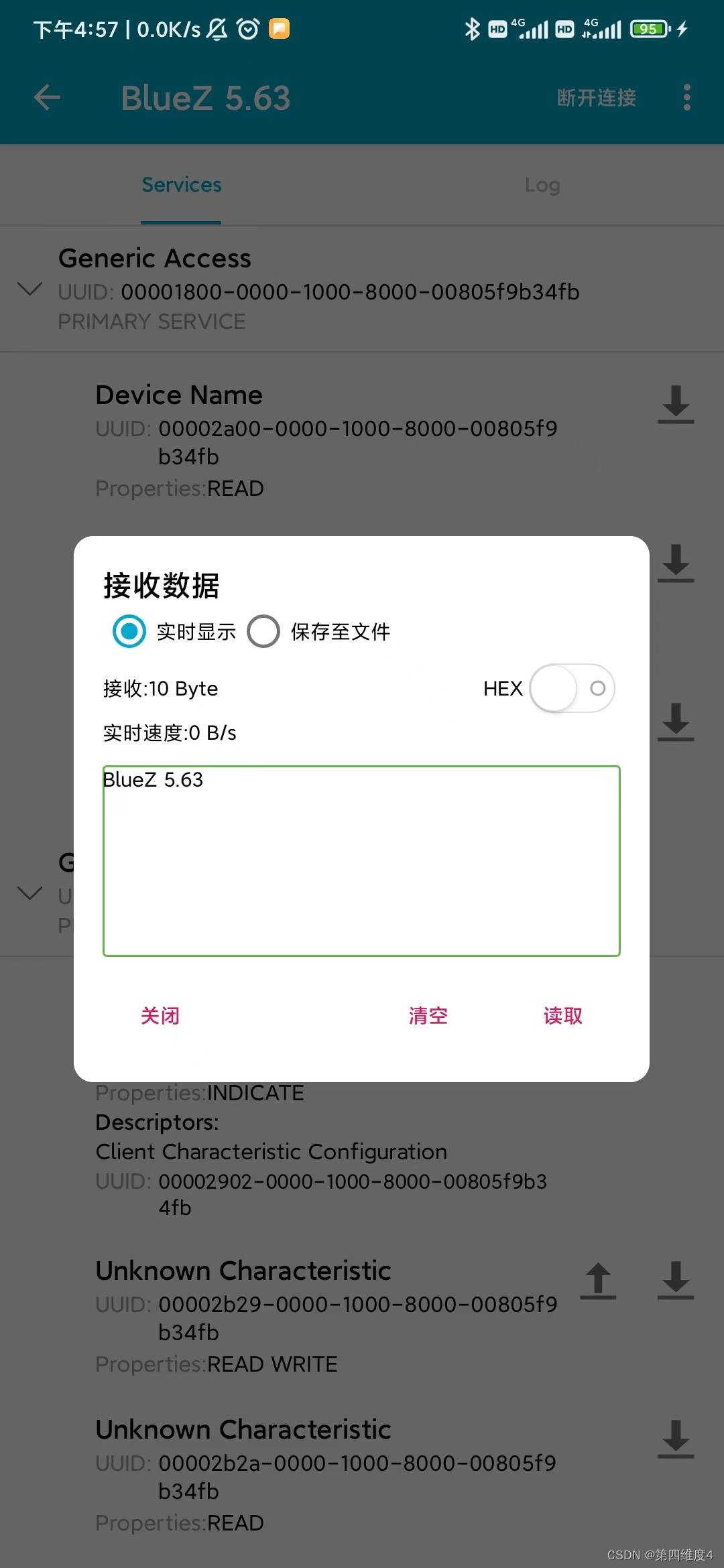
5、下面我们添加自己的服务
5.1 进入菜单[6B-3C-BF-AD-2A-A8]# menu gatt Menu gatt: Available commands: ------------------- list-attributes [dev/local] List attributes select-attribute <attribute/UUID> Select attribute attribute-info [attribute/UUID] Select attribute read [offset] Read attribute value write <data=xx xx ...> [offset] [type] Write attribute value acquire-write Acquire Write file descriptor release-write Release Write file descriptor ....- 1
- 2
- 3
- 4
- 5
- 6
- 7
- 8
- 9
- 10
- 11
- 12
- 13
5.2 添加自己的service和characteristic
[bluetoothctl] register-service 0xFFFF # (Choose yes when asked if primary service) [bluetoothctl] register-characteristic 0xAAAA read # (Select a value of 1 when prompted)# 输入的值是初始值,每次读取,会加一 [bluetoothctl] register-characteristic 0xBBBB read,write # (Select a value of 0 when prompted) [bluetoothctl] register-characteristic 0xCCCC read # (Select a value of 2 when prompted) [bluetoothctl] register-application # (This commits the services/characteristics and registers the profile) [bluetoothctl] back [bluetoothctl] advertise on- 1
- 2
- 3
- 4
- 5
- 6
- 7
通过 show 操作可以看到刚才添加的0xffff 服务

5.3 手机重新连接蓝牙
服务从 3 项变为 4 项,第 4 项即为我们刚才添加的服务。
5.4 读写操作
在有上传按钮的服务上传数据 此时收到:
此时收到:

读操作的话,直接读取就好了,值为刚才我们设置的值。
至此测试完毕(五)其他操作
1、启动/关闭/重启蓝牙
hciconfig hci0 up #启动蓝牙设备 hciconfig hci0 off #关闭蓝牙设备 hciconfig hci0 reset #重启蓝牙设备- 1
- 2
- 3
2、测试蓝牙是否可达 l2ping
l2ping -i hci0 -c 4 21:12:A3:C4:50:66- 1
3、查看功能与服务
sdptool browse local # local可以改成其它蓝牙的mac地址- 1
4、查看蓝牙的状态和信息
hciconfig -a- 1
5、查看蓝牙设备
hcitool dev Devices: hci0 22:22:2A:B0:9C:3C- 1
- 2
- 3
6、开启/关闭蓝牙广播
hciconfig hci0 leadv / noleadv- 1
7、查看已经连接的BLE设备
(此时调试助手已经连接)
hcitool -i hci0 con Connections: > LE 60:AB:D1:B5:A6:FB handle 0 state 1 lm PERIPHERAL- 1
- 2
- 3
8、 蓝牙认证打开/关闭
直接体现在进行蓝牙连接时,是否输入连接PIN密码,用于PIN配对
hciconfig hci0 auth/noauth- 1
9、 查看/改变蓝牙主从状态
hciconfig hci0 lm master、hciconfig hci0 lm slave- 1
10、查看/设置蓝牙名称
hciconfig hci0 name 、hciconfig hci0 name BLXX- 1
11、 查看支持的链路层状态
hciconfig hci0 lestates- 1
12、列出低功耗蓝牙的服务
bluetoothctl --monitor gatt.list-attributes- 1
其他操作自己慢慢摸索哈,我一个人只能啃成这样了,如有写得不对的地方大佬指正。
(六)入门推荐阅读
-
相关阅读:
LeetCode 69. x 的平方根
elasticsearch安装部署详细教程
通义大模型使用指南之通义千问
Linux 删除大量小文件的两种方案 | 运维进阶
典型卷积神经网络算法(AlexNet、VGG、GoogLeNet、ResNet)
搭建solidity开发环境(以太坊)
SpringBoot之拦截器
浅谈树状数组
HDU 3549 Flow Problem (最大流ISAP)
CentOS7 Zookeeper3.8.3 单节点安装
- 原文地址:https://blog.csdn.net/qq_46079439/article/details/126244998