-
vue3 吸顶搜索框在页面滚动时改变样式
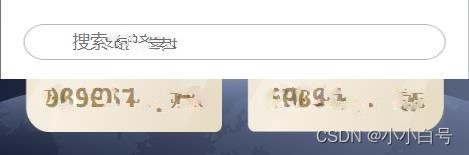
效果图:

思路:
监听滚动条距离顶部的距离,在距顶部40px内密集监听(依照自己的情况而定),不断改变样式,实现过度效果代码:
html
- 1
- 2
- 3
- 4
- 5
- 6
script
// 滚动事件 var navbarBg = ref('rgba(255,255,255,0)') var borderBg = ref(false) var inputColor = ref(true) let IndexTitleScroll = () => { // 获取距离顶部的距离 let scrollTop = window.pageYOffset || document.documentElement.scrollTop || document.body.scrollTop; if (scrollTop < 5) { navbarBg.value = "rgba(255,255,255,0)"; borderBg.value = 'url(./img/InputTitle2.png)' inputColor.value = true } else if (5 < scrollTop && scrollTop < 10) { navbarBg.value = "rgba(255,255,255,0.2)"; } else if (10 < scrollTop && scrollTop < 20) { navbarBg.value = "rgba(255,255,255,0.4)"; } else if (20 < scrollTop && scrollTop < 30) { navbarBg.value = "rgba(255,255,255,0.6)"; } else if (30 < scrollTop && scrollTop < 40) { navbarBg.value = "rgba(255,255,255,0.8)"; } else { navbarBg.value = "rgba(255,255,255,1)" borderBg.value = true inputColor.value = false } } window.addEventListener("scroll", IndexTitleScroll);- 1
- 2
- 3
- 4
- 5
- 6
- 7
- 8
- 9
- 10
- 11
- 12
- 13
- 14
- 15
- 16
- 17
- 18
- 19
- 20
- 21
- 22
- 23
- 24
- 25
- 26
- 27
- 28
- 29
style
#searchTitle { position: fixed; top: 0; left: 50%; z-index: 9999; width: 100%; max-width: 375px; transform: translateX(-50%); padding: 20px 0px 15px; div { display: flex; align-items: center; width: 90%; padding: 6px 0px; margin: 0px auto; background-image: url(./img/InputTitle2.png); background-size: 100% 100%; } div.inputTitle { background-image: url(./img/InputTitle.png); } div img { width: 14px; margin: 0px 10px 0px 15px; } div input { flex: 1; height: 96%; border: none; background: none; } // 改变文本框内提示语句的文字样式 div input.inputtext::-webkit-input-placeholder { /* Chrome/Opera/Safari */ color: #fff; } div input.inputtext:-ms-input-placeholder { /* IE 10+ */ color: #fff; } div input.inputtext:-moz-placeholder { /* Firefox 18- */ color: #fff; } div input.inputtext::-moz-placeholder { /* Firefox 19+ */ color: #fff; } }- 1
- 2
- 3
- 4
- 5
- 6
- 7
- 8
- 9
- 10
- 11
- 12
- 13
- 14
- 15
- 16
- 17
- 18
- 19
- 20
- 21
- 22
- 23
- 24
- 25
- 26
- 27
- 28
- 29
- 30
- 31
- 32
- 33
- 34
- 35
- 36
- 37
- 38
- 39
- 40
- 41
- 42
- 43
- 44
- 45
- 46
- 47
- 48
- 49
- 50
- 51
- 52
- 53
- 54
- 55
- 56
- 57
-
相关阅读:
17、JAVA入门——多态、抽象方法和抽象类
Tcl语言:基础入门(一)
JavaScript-箭头函数
day17正则表达式作业
455. 分发饼干
Redis持久化
计算机毕业设计(附源码)python装修服务分析系统
LeetCode 387---First Unique Character in a String
微软成AI热潮大赢家,继续押注大模型和人工智能
数据恢复篇:如何恢复丢失的Android短信?
- 原文地址:https://blog.csdn.net/WiseGirls/article/details/126247790
