-
Vue.js 框架源码与进阶 - 封装 Vue.js 组件库
一、组件开发基础
1.1 CDD
- CDD(Component-Driven Development)
- 自上而下
- 从组件级别开始,到页面级别结束
- 先从相对完善的设计中抽象出来组件,先隔离开发组件然后再开发页面
好处
- 可以使组件在最大程度被重用
- 并行开发
- 对单个组件的开发使用 CDD 可以让以页面级开发无法实现的方式在不同团队之间共享任务:开发相对隔离的组件
- 可视化测试
- 通过一些工具可以直接浏览一些组件,而不需要到业务系统中再测试组件,可以对不同组件的状态进行测试
1.2 处理组件的边界情况
1.2.1 $root
- 小型应用中可以在 vue 根实例里存储共享数据
- 组件中可以通过 $root 访问根实例
- 获取的数据是响应式的
main.js
import Vue from 'vue' import App from './App.vue' Vue.config.productionTip = false new Vue({ render: h => h(App), data: { title: '根实例 - Root' }, methods: { handle () { console.log(this.title) } } }).$mount('#app')- 1
- 2
- 3
- 4
- 5
- 6
- 7
- 8
- 9
- 10
- 11
- 12
- 13
- 14
- 15
- 16
root.vue
<template> <div> $root.title:{{ $root.title }} <br> <button @click="$root.handle">获取 titlebutton> <button @click="$root.title = 'Hello $root'">改变 titlebutton> div> template> <script> export default { } script> <style> style>- 1
- 2
- 3
- 4
- 5
- 6
- 7
- 8
- 9
- 10
- 11
- 12
- 13
- 14
- 15
- 16
- 17
- 18
- 19
- 20
- 21
- 22
1.2.2 $parent
- 获取的数据是响应式的
parent.vue
<template> <div class="parent"> parent <child>child> div> template> <script> import child from './02-child' export default { components: { child }, data () { return { title: '获取父组件实例' } }, methods: { handle () { console.log(this.title) } } } script> <style> .parent { border: palegreen 1px solid; } style>- 1
- 2
- 3
- 4
- 5
- 6
- 7
- 8
- 9
- 10
- 11
- 12
- 13
- 14
- 15
- 16
- 17
- 18
- 19
- 20
- 21
- 22
- 23
- 24
- 25
- 26
- 27
- 28
- 29
- 30
- 31
child.vue
<template> <div class="child"> child<br> $parent.title:{{ $parent.title }}<br> <button @click="$parent.handle">获取 $parent.titlebutton> <button @click="$parent.title = 'Hello $parent.title'">改变 $parent.titlebutton> <grandson>grandson> div> template> <script> import grandson from './03-grandson' export default { components: { grandson } } script> <style> .child { border:paleturquoise 1px solid; } style>- 1
- 2
- 3
- 4
- 5
- 6
- 7
- 8
- 9
- 10
- 11
- 12
- 13
- 14
- 15
- 16
- 17
- 18
- 19
- 20
- 21
- 22
- 23
- 24
- 25
grandson.vue
<template> <div class="grandson"> grandson<br> $parent.$parent.title:{{ $parent.$parent.title }}<br> <button @click="$parent.$parent.handle">获取 $parent.$parent.titlebutton> <button @click="$parent.$parent.title = 'Hello $parent.$parent.title'">改变 $parent.$parent.titlebutton> div> template> <script> export default { } script> <style> .grandson { border:navajowhite 1px solid; } style>- 1
- 2
- 3
- 4
- 5
- 6
- 7
- 8
- 9
- 10
- 11
- 12
- 13
- 14
- 15
- 16
- 17
- 18
- 19
1.2.3 $children
- 获取所有子组件
parent.vue
<template> <div> <children1>children1> <children2>children2> <button @click="getChildren">获取子组件button> div> template> <script> import children1 from './02-children1' import children2 from './03-children2' export default { components: { children1, children2 }, methods: { getChildren () { console.log(this.$children) console.log(this.$children[0].title) console.log(this.$children[1].title) this.$children[0].handle() this.$children[1].handle() } } } script> <style> style>- 1
- 2
- 3
- 4
- 5
- 6
- 7
- 8
- 9
- 10
- 11
- 12
- 13
- 14
- 15
- 16
- 17
- 18
- 19
- 20
- 21
- 22
- 23
- 24
- 25
- 26
- 27
- 28
- 29
- 30
- 31
- 32
- 33
children1.vue
<template> <div>children1div> template> <script> export default { data () { return { title: 'children1 获取子组件 - title' } }, methods: { handle () { console.log(this.title) } } } script> <style> style>- 1
- 2
- 3
- 4
- 5
- 6
- 7
- 8
- 9
- 10
- 11
- 12
- 13
- 14
- 15
- 16
- 17
- 18
- 19
- 20
- 21
- 22
children2.vue
<template> <div>children2div> template> <script> export default { data () { return { title: 'children2 获取子组件 - title' } }, methods: { handle () { console.log(this.title) } } } script> <style> style>- 1
- 2
- 3
- 4
- 5
- 6
- 7
- 8
- 9
- 10
- 11
- 12
- 13
- 14
- 15
- 16
- 17
- 18
- 19
- 20
- 21
- 22
1.2.4 $refs
- 如果你把它作用到普通 HTML 标签上,则获取到的是 DOM
- 如果你把它作用到组件标签上,则获取到的是组件实例
parent.vue
<template> <div> <myinput ref="mytxt">myinput> <button @click="focus">获取焦点button> div> template> <script> import myinput from './02-myinput' export default { components: { myinput }, methods: { focus () { this.$refs.mytxt.focus() this.$refs.mytxt.value = 'hello' } } // mounted () { // this.$refs.mytxt.focus() // } } script> <style> style>- 1
- 2
- 3
- 4
- 5
- 6
- 7
- 8
- 9
- 10
- 11
- 12
- 13
- 14
- 15
- 16
- 17
- 18
- 19
- 20
- 21
- 22
- 23
- 24
- 25
- 26
- 27
- 28
- 29
myinput.vue
<template> <div> <input v-model="value" type="text" ref="txt"> div> template> <script> export default { data () { return { value: 'default' } }, methods: { focus () { this.$refs.txt.focus() } } } script> <style> style>- 1
- 2
- 3
- 4
- 5
- 6
- 7
- 8
- 9
- 10
- 11
- 12
- 13
- 14
- 15
- 16
- 17
- 18
- 19
- 20
- 21
- 22
- 23
- 24
1.2.5 provide / inject
- 依赖注入,在多层嵌套中可以使用,但会使组件之间的耦合变高
- 数据不是响应式的,避免修改父组件数据
parent.vue
<template> <div class="parent"> parent <child>child> div> template> <script> import child from './02-child' export default { components: { child }, provide () { return { title: this.title, handle: this.handle } }, data () { return { title: '父组件 provide' } }, methods: { handle () { console.log(this.title) } } } script> <style> .parent { border: palegreen 1px solid; } style>- 1
- 2
- 3
- 4
- 5
- 6
- 7
- 8
- 9
- 10
- 11
- 12
- 13
- 14
- 15
- 16
- 17
- 18
- 19
- 20
- 21
- 22
- 23
- 24
- 25
- 26
- 27
- 28
- 29
- 30
- 31
- 32
- 33
- 34
- 35
- 36
- 37
child.vue
<template> <div class="child"> child<br> title:{{ title }}<br> <button @click="handle">获取 titlebutton> <button @click="title='xxx'">改变 titlebutton> <grandson>grandson> div> template> <script> import grandson from './03-grandson' export default { components: { grandson }, inject: ['title', 'handle'] } script> <style> .child { border:paleturquoise 1px solid; } style>- 1
- 2
- 3
- 4
- 5
- 6
- 7
- 8
- 9
- 10
- 11
- 12
- 13
- 14
- 15
- 16
- 17
- 18
- 19
- 20
- 21
- 22
- 23
- 24
- 25
grandson.vue
<template> <div class="grandson"> grandson<br> title:{{ title }}<br> <button @click="handle">获取 titlebutton> <button @click="title='yyy'">改变 titlebutton> div> template> <script> export default { inject: ['title', 'handle'] } script> <style> .grandson { border:navajowhite 1px solid; } style>- 1
- 2
- 3
- 4
- 5
- 6
- 7
- 8
- 9
- 10
- 11
- 12
- 13
- 14
- 15
- 16
- 17
- 18
- 19
- 20
1.3 $attrs / $listeners
如果你需要开发自定义组件的话,你会用到这两个属性
- $attrs
- 把父组件中非 prop 属性绑定到内部组件
- $listeners
- 把父组件中的DOM对象的原生事件绑定到内部组件
parent.vue
<template> <div> <myinput required placeholder="Enter your username" class="theme-dark" @focus="onFocus" @input="onInput" data-test="test"> myinput> <button @click="handle">按钮button> div> template> <script> import myinput from './02-myinput' export default { components: { myinput }, methods: { handle () { console.log(this.value) }, onFocus (e) { console.log(e) }, onInput (e) { console.log(e.target.value) } } } script> <style> style>- 1
- 2
- 3
- 4
- 5
- 6
- 7
- 8
- 9
- 10
- 11
- 12
- 13
- 14
- 15
- 16
- 17
- 18
- 19
- 20
- 21
- 22
- 23
- 24
- 25
- 26
- 27
- 28
- 29
- 30
- 31
- 32
- 33
- 34
- 35
- 36
- 37
- 38
- 39
- 40
- 41
- 42
- 43
- 44
- 45
myinput.vue
<template> <div> <input type="text" v-bind="$attrs" class="form-control" v-on="$listeners" > div> template> <script> export default { // 会报错,不可以设置 class 和 style // props: ['placeholder', 'style', 'class'] // 修改后 // props: ['placeholder'] inheritAttrs: false } script> <style> style>- 1
- 2
- 3
- 4
- 5
- 6
- 7
- 8
- 9
- 10
- 11
- 12
- 13
- 14
- 15
- 16
- 17
- 18
- 19
- 20
- 21
- 22
- 23
- 24
- 25
- 26
- 27
- 28
- 29
- 30
- 31
- 32
- 33
- 34
- 35
- 36
- 37
- 38
- 39
- 40
- 41
- 42
- 43
- 44
- 45
- 46
- 47
- 48
- 49
- 50
- 51
- 52
- 53
- 54
- 55
- 56
- 57
- 58
- 59
- 60
- 61
- 62
1.4 快速原型开发
Vue/cli 提供了快速原型开发的工具,它可以让我们很方便地运行一个单文件组件而不需要关心额外的配置
- VueCLI 中提供了一个插件可以进行快速原型开发
- 需要先额外安装一个全局的扩展
npm install -g @vue/cli-service-global- 1
- 使用 vue serve 快速查看组件运行效果
- vue serve 如果不指定参数默认会在当前目录找到以下的入口文件(main.js、index.js、App.vue、app.vue)
- 可以指定要加载的组件
- vue serve ./src/login.vue
1.5 快速原型开发 - Element-UI
我们除了可以从零开发组件外,还可以在第三方组件的基础上二次开发:比如在 Element-UI的基础上开发自己的组件
安装 Element-UI
- 初始化 package.json
npm init -y- 1
- 安装 Element-UI
vue add element- 1
- 加载 Element-UI,使用 Vue.use() 安装插件
接下来我们使用 Element-UI 做一个登录的组件
-
在使用 Element-UI 之前,首先导入 Element-UI 注册插件
- 创建入口文件 main.js
import Vue from 'vue' import ElementUI from 'element-ui' import 'element-ui/lib/theme-chalk/index.css' import Login from './src/Login.vue' Vue.use(ElementUI) new Vue({ el: '#app', render: h => h(Login) })- 1
- 2
- 3
- 4
- 5
- 6
- 7
- 8
- 9
- 10
- 11
- src/Login.vue
<template> <el-form class="form" ref="form" :model="user" :rules="rules"> <el-form-item label="用户名" prop="username"> <el-input v-model="user.username">el-input> el-form-item> <el-form-item label="密码" prop="password"> <el-input type="password" v-model="user.password">el-input> el-form-item> <el-form-item> <el-button type="primary" @click="login">登 录el-button> el-form-item> el-form> template> <script> export default { name: "Login", data() { return { user: { username: "", password: "", }, rules: { username: [ { required: true, message: "请输入用户名", }, ], password: [ { required: true, message: "请输入密码", }, { min: 6, max: 12, message: "请输入6-12位密码", }, ], }, }; }, methods: { login() { console.log("button"); return false; // this.$refs.form.validate(valid => { // if (valid) { // alert('验证成功') // } else { // alert('验证失败') // return false // } // }) }, }, }; script> <style> .form { width: 30%; margin: 150px auto; } style>- 1
- 2
- 3
- 4
- 5
- 6
- 7
- 8
- 9
- 10
- 11
- 12
- 13
- 14
- 15
- 16
- 17
- 18
- 19
- 20
- 21
- 22
- 23
- 24
- 25
- 26
- 27
- 28
- 29
- 30
- 31
- 32
- 33
- 34
- 35
- 36
- 37
- 38
- 39
- 40
- 41
- 42
- 43
- 44
- 45
- 46
- 47
- 48
- 49
- 50
- 51
- 52
- 53
- 54
- 55
- 56
- 57
- 58
- 59
- 60
- 61
- 62
- 63
- 64
- 65
- 66
- 67
vue serve- 1

二、组件开发
2.1 组件分类
- 第三方组件:ElementUI、iView
- 基础组件:文本框、按钮、表单等
- 业务组件:结合特定的行业使用场景,可以根据用户的行为输出特定的界面
如果们要开发的应用对界面的要求不高,我们可以直接使用第三方组件
如果对组件的样式有比较高的要求,或者有一套自己的使用标准,则需要开发自己的组件库,开发一套方便团队内部使用的基础组件、通用组件
如果针对特定的行业例如财务、餐饮或者人力系统,会有针对特定业务可以抽象出来的组件,我们可以把它们抽象出来方便未来的重用,开发业务组件一般可以基于现有的组件比如第三方组件,在第三方组件的基础上进行开发
2.2 步骤条组件
- src/steps.css
.lg-steps { position: relative; display: flex; justify-content: space-between; } .lg-steps-line { position: absolute; height: 2px; top: 50%; left: 24px; right: 24px; transform: translateY(-50%); z-index: 1; background: rgb(223, 231, 239); } .lg-step { border: 2px solid; border-radius: 50%; height: 32px; width: 32px; display: flex; justify-content: center; align-items: center; font-weight: 700; z-index: 2; background-color: white; box-sizing: border-box; }- 1
- 2
- 3
- 4
- 5
- 6
- 7
- 8
- 9
- 10
- 11
- 12
- 13
- 14
- 15
- 16
- 17
- 18
- 19
- 20
- 21
- 22
- 23
- 24
- 25
- 26
- 27
- 28
- 29
- 30
- src/Steps.vue
<template> <div class="lg-steps"> <div class="lg-steps-line">div> <div class="lg-step" v-for="index in count" :key="index" :style="{ color: active >= index ? activeColor : defaultColor }" > {{ index }} div> div> template> <script> import './steps.css' export default { name: 'LgSteps', props: { count: { type: Number, default: 3 }, active: { type: Number, default: 0 }, activeColor: { type: String, default: 'red' }, defaultColor: { type: String, default: 'green' } } } script> <style> style>- 1
- 2
- 3
- 4
- 5
- 6
- 7
- 8
- 9
- 10
- 11
- 12
- 13
- 14
- 15
- 16
- 17
- 18
- 19
- 20
- 21
- 22
- 23
- 24
- 25
- 26
- 27
- 28
- 29
- 30
- 31
- 32
- 33
- 34
- 35
- 36
- 37
- 38
- 39
- 40
- 41
- 42
- 运行
vue serve src/Steps.vue- 1

- 新建控制步骤条的组件(src/Steps-test.vue)
<template> <div> <steps :count="count" :active="active">steps> <button @click="next">下一步button> div> template> <script> import Steps from './Steps.vue' export default { components: { Steps }, data () { return { count: 4, active: 0 } }, methods: { next () { this.active++ } } } script> <style> style>- 1
- 2
- 3
- 4
- 5
- 6
- 7
- 8
- 9
- 10
- 11
- 12
- 13
- 14
- 15
- 16
- 17
- 18
- 19
- 20
- 21
- 22
- 23
- 24
- 25
- 26
- 27
- 28
- 29
- 30

2.3 表单组件
整体结构
- Form
- FormItem
- Input
- Button
Form-test.vue
<template> <lg-form class="form" ref="form" :model="user" :rules="rules"> <lg-form-item label="用户名" prop="username"> <lg-input :value="user.username" @input="user.username = $event" placeholder="请输入用户名" >lg-input> lg-form-item> <lg-form-item label="密码" prop="password"> <lg-input type="password" v-model="user.password">lg-input> lg-form-item> <lg-form-item> <lg-button type="primary" @click="login">登 录lg-button> lg-form-item> lg-form> template> <script> import LgForm from "./form/Form"; import LgFormItem from "./form/FormItem"; import LgInput from "./form/Input"; import LgButton from "./form/Button"; export default { components: { LgForm, LgFormItem, LgInput, LgButton, }, data() { return { user: { username: "", password: "", }, rules: { username: [ { required: true, message: "请输入用户名", }, ], password: [ { required: true, message: "请输入密码", }, { min: 6, max: 12, message: "请输入6-12位密码", }, ], }, }; }, methods: { login() { console.log("button"); this.$refs.form.validate((valid) => { if (valid) { alert("验证成功"); } else { alert("验证失败"); return false; } }); }, }, }; script> <style> .form { width: 30%; margin: 150px auto; } style>- 1
- 2
- 3
- 4
- 5
- 6
- 7
- 8
- 9
- 10
- 11
- 12
- 13
- 14
- 15
- 16
- 17
- 18
- 19
- 20
- 21
- 22
- 23
- 24
- 25
- 26
- 27
- 28
- 29
- 30
- 31
- 32
- 33
- 34
- 35
- 36
- 37
- 38
- 39
- 40
- 41
- 42
- 43
- 44
- 45
- 46
- 47
- 48
- 49
- 50
- 51
- 52
- 53
- 54
- 55
- 56
- 57
- 58
- 59
- 60
- 61
- 62
- 63
- 64
- 65
- 66
- 67
- 68
- 69
- 70
- 71
- 72
- 73
- 74
- 75
- 76
- 77
- 78
- 79
- 80
src/form/Form.vue
<template> <form> <slot>slot> form> template> <script> export default { name: "LgForm", // 用于表单验证 provide() { return { form: this, }; }, props: { model: { type: Object, }, rules: { type: Object, }, }, data() { return {}; }, created() {}, mounted() {}, methods: { validate(cb) { const tasks = this.$children .filter((child) => child.prop) .map((child) => child.validate()); Promise.all(tasks) .then(() => cb(true)) .catch(() => cb(false)); }, }, }; script> <style scoped lang="less"> style>- 1
- 2
- 3
- 4
- 5
- 6
- 7
- 8
- 9
- 10
- 11
- 12
- 13
- 14
- 15
- 16
- 17
- 18
- 19
- 20
- 21
- 22
- 23
- 24
- 25
- 26
- 27
- 28
- 29
- 30
- 31
- 32
- 33
- 34
- 35
- 36
- 37
- 38
- 39
- 40
- 41
- 42
- 43
- 44
src/form/FormItem.vue
<template> <div> <label>{{ label }}label> <div> <slot>slot> <p v-if="errMessage">{{ errMessage }}p> div> div> template> <script> // 用于表单验证的插件,需要手动安装(elementui使用的就是这个插件) import AsyncValidator from "async-validator"; export default { name: "LgFormItem", // 用于表单验证 inject: ["form"], props: { label: { type: String, }, prop: { type: String, }, }, mounted() { this.$on("validate", () => { this.validate(); }); }, data() { return { errMessage: "", }; }, created() {}, methods: { // 表单验证 validate() { if (!this.prop) return; const value = this.form.model[this.prop]; const rules = this.form.rules[this.prop]; const descriptor = { [this.prop]: rules }; const validator = new AsyncValidator(descriptor); // 变量作为属性要加中括号[] return validator.validate({ [this.prop]: value }, (errors) => { if (errors) { this.errMessage = errors[0].message; } else { this.errMessage = ""; } }); }, }, }; script> <style scoped lang="less"> style>- 1
- 2
- 3
- 4
- 5
- 6
- 7
- 8
- 9
- 10
- 11
- 12
- 13
- 14
- 15
- 16
- 17
- 18
- 19
- 20
- 21
- 22
- 23
- 24
- 25
- 26
- 27
- 28
- 29
- 30
- 31
- 32
- 33
- 34
- 35
- 36
- 37
- 38
- 39
- 40
- 41
- 42
- 43
- 44
- 45
- 46
- 47
- 48
- 49
- 50
- 51
- 52
- 53
- 54
- 55
- 56
- 57
- 58
- 59
- 60
src/form/Input.vue
<template> <div> <input :type="type" :value="value" @input="handleInput" v-bind="$attrs" /> div> template> <script> export default { name: "LgInput", inheritAttrs: false, props: { value: { type: String, }, type: { type: String, default: "text", }, }, data() { return {}; }, created() {}, mounted() {}, methods: { handleInput(evt) { this.$emit("input", evt.target.value); const findParent = (parent) => { while (parent) { if (parent.$options.name === "LgFormItem") { break; } else { parent = parent.$parent; } } return parent; }; const parent = findParent(this.$parent); if (parent) { parent.$emit("validate"); } }, }, }; script> <style scoped lang="less"> style>- 1
- 2
- 3
- 4
- 5
- 6
- 7
- 8
- 9
- 10
- 11
- 12
- 13
- 14
- 15
- 16
- 17
- 18
- 19
- 20
- 21
- 22
- 23
- 24
- 25
- 26
- 27
- 28
- 29
- 30
- 31
- 32
- 33
- 34
- 35
- 36
- 37
- 38
- 39
- 40
- 41
- 42
- 43
- 44
- 45
- 46
- 47
- 48
src/form/Button.vue
<template> <div> <button @click="handleClick"> <slot>slot> button> div> template> <script> export default { name: "LgButton", data() { return {}; }, created() {}, mounted() {}, methods: { handleClick(evt) { this.$emit("click", evt); evt.preventDefault(); }, }, }; script> <style scoped lang="less"> style>- 1
- 2
- 3
- 4
- 5
- 6
- 7
- 8
- 9
- 10
- 11
- 12
- 13
- 14
- 15
- 16
- 17
- 18
- 19
- 20
- 21
- 22
- 23
- 24
- 25
- 26
- 27
三、 组件库管理
3.1 Monorepo
- 假设我们现在要开发一个组件库,其中有很多组件,当它开发完毕后还会发布到诸如 npm 或者私有仓库让其他人去使用
- 在使用 ElementUI 的时候我们可以完整地引用,如果只使用到部分组件,为了减少打包的体积我们会选择按需引用的方式,此时要安装 babel 的插件然后再配置比较麻烦
- 我们开发的组件库为了让别人使用的方便,我们决定把每一个组件作为一个单独的包发布到 npm 上,其他人在使用时可以只下载他所需要的组件
两种项目的组织方式:
- Multirepo(Multiple Repository)
- 每一个包对应一个项目
- Monorepo(Monoltipe Repository)
- 一个项目仓库中管理多个模块/包
目录结构
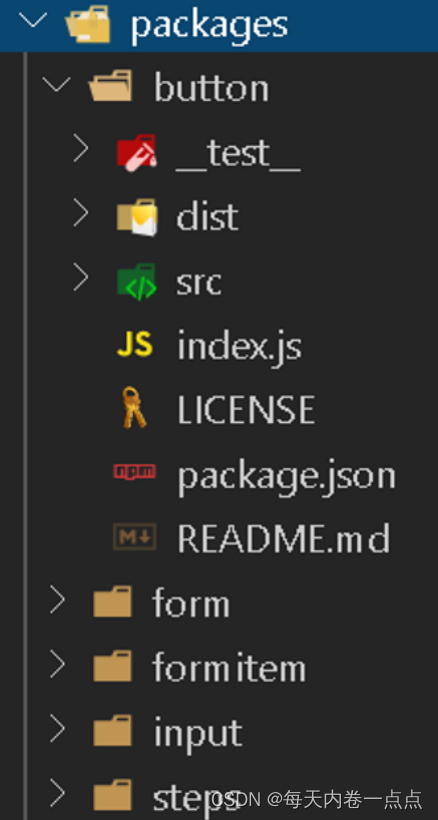
__test__:测试代码目录dist:打包的目录src:源码目录index.js:打包入口LICENSE:版权信息package.json:包的描述信息README.md:文档
3.2 Storybook
- 可视化的组件展示平台
- 在隔离的开发环境中,以交互式的方式展示组件
- 独立开发组件
- 支持的框架
- React、React Native、Vue、Angular
- Ember、HTML、Svelte、Mithril、Riot
Storybook 安装
- 手动安装(请参考官方文档)
- 自动安装
- npx -p @storybook/cli sb init --type vue
- yarn add vue
- yarn add vue-loader vue-template-compiler --dev
演示:

- 创建一个空项目
lgelement执行上述操作 - 按照自动安装步骤安装完成后,启动项目
yarn storybook- 1

- .storybook/main.js
module.exports = { stories: ['../packages/**/*.stories.js'], addons: ['@storybook/addon-actions', '@storybook/addon-links'], };- 1
- 2
- 3
- 4
- 这里演示表单组件,先给 input 写一个简单的 stories:渲染文本框、渲染密码框
packages/input/stories/input.stories.js
import LgInput from '../' export default { title: 'LgInput', component: LgInput } export const Text = () => ({ components: { LgInput }, template: '', data () { return { value: 'admin' } } }) export const Password = () => ({ components: { LgInput }, template: ' ', data () { return { value: 'admin' } } }) - 1
- 2
- 3
- 4
- 5
- 6
- 7
- 8
- 9
- 10
- 11
- 12
- 13
- 14
- 15
- 16
- 17
- 18
- 19
- 20
- 21
- 22
- 23
- 24
- 25
- 26
packages/input/index.js
import LgInput from './src/input.vue' LgInput.install = Vue => { Vue.component(LgInput.name, LgInput) } export default LgInput- 1
- 2
- 3
- 4
- 5
- 6
- 7
- 进入 fromitem 文件夹,安装 async-validator 依赖
yarn add async-validator- 1
packages/form/stories/form.stories.js
import LgForm from '../' import LgFormItem from '../../formitem' import LgInput from '../../input' import LgButton from '../../button' export default { title: 'LgForm', component: LgForm } export const Login = () => ({ components: { LgForm, LgFormItem, LgInput, LgButton }, template: `登 录 - 1
- 2
- 3
- 4
- 5
- 6
- 7
- 8
- 9
- 10
- 11
- 12
- 13
- 14
- 15
- 16
- 17
- 18
- 19
- 20
- 21
- 22
- 23
- 24
- 25
- 26
- 27
- 28
- 29
- 30
- 31
- 32
- 33
- 34
- 35
- 36
- 37
- 38
- 39
- 40
- 41
- 42
- 43
- 44
- 45
- 46
- 47
- 48
- 49
- 50
- 51
- 52
- 53
- 54
- 55
- 56
- 57
- 58
- 59
- 60
- 61
- 62
- 63
- 64
- 65
- 66
- 67
packages/form/index.js
import LgForm from './src/form.vue' LgForm.install = Vue => { Vue.component(LgForm.name, LgForm) } console.log('test') export default LgForm- 1
- 2
- 3
- 4
- 5
- 6
- 7
3.3 yarn workspaces
开启 yarn workspaces 可以让我们在根目录中使用 yarn install 给所有的包统一安装依赖
项目依赖

- 如果不同的包引用相同的第三方包只会下载一次并把相同的依赖提升到根目录的
node_modules中减少重复 - 如果不同的包引用的
lodash版本不相同只会把相同版本的lodash提升到根目录的node_modules中 npm不支持workspaces
开启 yarn 的工作区
- 项目根目录的
package.json
{ "private": true, "workspaces": [ "packages/*" ] ... }- 1
- 2
- 3
- 4
- 5
- 6
- 7
yarn workspaces 使用
- 给工作区根目录安装开发依赖
- yarn add jest -D -W
- 给指定工作区安装依赖
- yarn workspace lg-button add lodash@4
- 给所有工作区安装依赖
- yarn install
演示
- 先手动在每个区域安装依赖
yarn workspace lg-button add lodash@4 yarn workspace lg-form add lodash@4 yarn workspace lg-input add lodash@3- 1
- 2
- 3
- 4
- 5
- 删除每个区域的
node_modules,运行 yarn install 看效果- 此时,除了 lg-input 的依赖安装在 input 包内,其余依赖均提升到了根目录包依赖内
3.4 Lerna
Lerna 可以方便我们把项目中的所有包统一发布
Lerna 介绍
- Lerna 是一个优化使用 git 和 npm 管理多包仓库的工作流工具
- 用于管理具有多个包的 JavaScript 项目
- 它可以一键把代码提交到 git 和 npm 仓库
Lerna 使用
- 全局安装
- yarn global add lerna
- 初始化
- lerna init
- 发布
- lerna publish
初始化完成过后会做几件事情
- 如果当前项目没有被 git 管理的话会进行 git 初始化
- 在项目根目录创建 lerna.json 的配置文件
- 在 package.json 中添加开发依赖确保别人获取我们的项目也可以正常工作
3.5 Vue 组件的单元测试
- 组件开发完毕发布之前,我们还应该对组件进行单元测试
- 单元测试就是对一个函数的输入和输出进行测试,使用断言的方式,根据输入判断实际的输出和预测的输出是否相同
- 使用单元测试的目的是用来发现模块内部可能存在的各种错误
- 组件的单元测试指的是使用单元测试工具对组件的各种状态和行为进行测试,确保组件发布之后在项目中使用组件的过程中不会导致程序出现错误
组件单元测试的好处
- 提供描述组件行为的文档
- 节省动手测试的时间
- 减少研发新特性时产生的 bug
- 改进设计
- 促进重构
安装依赖
- Vue Test Utils
- Vue 官方提供的组件单元测试的官方库
- Jest
- Vue Test Utils 需要结合该单元测试框架一起使用,它和vue的结合最方便、配置最少
- Vue-jest
- 预处理器,用于把 vue 的单文件组件编译之后的结果交给 js 处理,Vue-jest 支持单文件组件的大多数功能
- Babel-jest
- 测试中会使用到一些ESModule的语法和一些ES的新特性的语法,需要此插件对测试代码进行降级处理
- 安装
- yarn add jest @vue/test-utils vue-jest babel-jest -D -W
配置测试脚本
package.json"scripts": { "test": "jest", ... }- 1
- 2
- 3
- 4
Jest 配置文件
jest.config.jsmodule.exports = { "testMatch": ["**/__tests__/**/*.[jt]s?(x)"], "moduleFileExtensions": [ "js", "json", // 告诉 Jest 处理 `*.vue` 文件 "vue" ], "transform": { // 用 `vue-jest` 处理 `*.vue` 文件 ".*\\.(vue)$": "vue-jest", // 用 `babel-jest` 处理 js ".*\\.(js)$": "babel-jest" } }- 1
- 2
- 3
- 4
- 5
- 6
- 7
- 8
- 9
- 10
- 11
- 12
- 13
- 14
- 15
Babel 配置文件 babel.config.js
module.exports = { presets: [ [ '@babel/preset-env' ] ] }- 1
- 2
- 3
- 4
- 5
- 6
- 7
Babel 桥接
yarn add babel-core@bridge -D -W- 1
Jest 常用 API
- 全局函数
- describe(name,fn):把相关测试组合在一起
- test(name, fn):测试方法
- expect(value):断言
- 匹配器
- toBe(value):判断值是否相等
- toEqual(obj):判断对象是否相等
- toContain(value):判断数组或者字符串中是否包含
- …
- 快照
- toMatchSnapshot()
Vue Test Utils 常用 API
- mount()
- 创建一个包含被挂载和渲染的 Vue 组件 的 Wrapper
- Wrapper
- vm:Wrapper 包裹的组件实例
- props():返回 Vue 实例选项中的 props 对象
- html():组件生成的 HTML 标签
- find():通过选择器返回匹配到的组件中的 DOM 元素
- trigger():触发 DOM 原生事件,自定义事件 wrapper.vm.$emit()
- …
packages/input/
__tests__/input.test.jsimport input from '../src/input.vue' import { mount } from '@vue/test-utils' describe('lg-input', () => { test('input-text', () => { const wrapper = mount(input) expect(wrapper.html()).toContain('input type="text"') }) test('input-password', () => { const wrapper = mount(input, { propsData: { type: 'password' } }) expect(wrapper.html()).toContain('input type="password"') }) test('input-password', () => { const wrapper = mount(input, { propsData: { type: 'password', value: 'admin' } }) expect(wrapper.props('value')).toBe('admin') }) test('input-snapshot', () => { const wrapper = mount(input, { propsData: { type: 'text', value: 'admin' } }) expect(wrapper.vm.$el).toMatchSnapshot() }) })- 1
- 2
- 3
- 4
- 5
- 6
- 7
- 8
- 9
- 10
- 11
- 12
- 13
- 14
- 15
- 16
- 17
- 18
- 19
- 20
- 21
- 22
- 23
- 24
- 25
- 26
- 27
- 28
- 29
- 30
- 31
- 32
- 33
- 34
- 35
- 36
- 37
- 38
测试
yarn test- 1
3.6 Rollup 打包
- Rollup 是一个模块打包器
- Rollup 支持 Tree-shaking
- 打包的结果比 Webpack 要小
- 开发框架/组件库的时候使用 Rollup 更合适
安装依赖
- Rollup
- rollup-plugin-terser:对代码进行压缩
- rollup-plugin-vue@5.1.9:把单文件组件编译成JS代码
- vue-template-compiler
安装 Rollup 以及所需的插件
yarn add rollup rollup-plugin-terser rollup-plugin-vue@5.1.9 vue-template-compiler -D -W- 1
Rollup 配置文件
- 在 button 目录中创建 rollup.config.js
import { terser } from 'rollup-plugin-terser' import vue from 'rollup-plugin-vue' module.exports = [ { input: 'index.js', output: [ { file: 'dist/index.js', format: 'es' } ], plugins: [ vue({ css: true, // Dynamically inject css as a - CDD(Component-Driven Development)