-
SpringOAuth2授权流程分析
一、什么是OAuth2.0
简单说,OAuth(开放授权)是一个开放标准,允许用户授权第三方移动应用访问他们存储在另外的服务提供者上的信息,而不需要将用户名和密码提供给第三方移动应用或分享他们数据的所有内容。
具体可以参考阮一峰的博客:OAuth 2.0 的一个简单解释 - 阮一峰的网络日志,这里面形象的讲述了什么是OAuth2.0
二、OAuth 2.0 授权
1、OAuth2.0的组成部分
OAuth 2.0 的标准是 RFC 6749 文件,该文件介绍了OAuth 2.0 的四个组成部分
- Resource Owner(资源所有者)
- Client (第三方接入平台,请求者)
- Resource Server (资源服务器: 数据中心)
- Authorization Server (授权/认证服务器)
RFC6749文件中表明:OAuth2.0 引入了一个授权层,用来分离两种不同的角色:请求者Client 和资源所有者Resource Owner。请求者Client 向资源所有者Resource Owner申请授权,资源所有者Resource Owner同意以后,授权/认证服务器Authorization Server可以向请求者Client颁发令牌。请求者通过令牌,去资源服务器Resource Server请求数据。
2、授权方式
RFC6749文件中对于OAuth 2.0 如何颁发令牌的细节,规定得非常详细。具体来说,一共分成四种授权类型(authorization grant),即四种颁发令牌的方式,适用于不同的互联网场景。
- 授权码(authorization-code)
- 隐藏式(implicit)
- 密码式(password)
- 客户端凭证(client credentials)
注意,不管哪一种授权方式,请求者在申请令牌时都必须携带两个身份识别码:客户端 ID(client ID)和客户端密钥(client secret)。这些clientID 和 clientSecret 都必须先到系统备案(OAuth2.0 自带的数据库表oauth_client_details中存在记录),这是为了防止令牌被滥用,没有备案过的,是不会拿到令牌的。
2.3、授权码模式
授权码(authorization code)模式,指的是第三方应用先申请一个授权码,然后再用该码获取令牌。
这种方式是最常用的流程,安全性也最高,它适用于那些有后端的 Web 应用。授权码通过前端传送,令牌则是储存在后端,而且所有与资源服务器的通信都在后端完成。这样的前后端分离,可以避免令牌泄漏。
1.第一步,A 网站提供一个链接,用户点击后就会跳转到 B 网站,授权用户数据给 A 网站使用。下面就是 A 网站跳转 B 网站的一个示意链接。
https://b.com/oauth/authorize?response_type=code&client_id=CLIENT_ID&redirect_uri=CALLBACK_URL&scope=read
上面 URL 中,response_type参数表示要求返回授权码(code),client_id参数让 B 知道是谁在请求,redirect_uri参数是 B 接受或拒绝请求后的跳转网址,scope参数表示要求的授权范围(这里是只读)。2.第二步,用户跳转后,B 网站会要求用户登录,然后重定向到确认页,询问是否同意给予 A 网站授权。用户点击按钮表示同意,这时 B 网站就会跳回redirect_uri参数指定的网址。跳转时,会传回一个授权码,就像下面这样。
https://a.com/callback?code=AUTHORIZATION_CODE
上面 URL 中,code参数就是授权码。3.第三步,A 网站拿到授权码以后,就可以在后端,向 B 网站请求令牌。
https://b.com/oauth/token?client_id=CLIENT_ID&client_secret=CLIENT_SECRET&grant_type=authorization_code&code=AUTHORIZATION_CODE&redirect_uri=CALLBACK_URL
上面 URL 中,client_id参数和client_secret参数用来让 B 确认 A 的身份(client_secret参数是保密的,因此只能在后端发请求),grant_type参数的值是AUTHORIZATION_CODE,表示采用的授权方式是授权码,code参数是上一步拿到的授权码,redirect_uri参数是令牌颁发后的回调网址。4.第四步,B 网站收到请求以后,就会颁发令牌。具体做法是向redirect_uri指定的网址,发送一段 JSON 数据。
- {
- "access_token":"ACCESS_TOKEN",
- "token_type":"bearer",
- "expires_in":2592000,
- "refresh_token":"REFRESH_TOKEN",
- "scope":"read",
- "uid":100101,
- "info":{...}
- }
上面 JSON 数据中,access_token字段就是令牌,A 网站在后端拿到了。
最终请求路径示意图如下图所示:(图片来源于网络,有侵权可联系删除)
2.4、简化模式(隐藏式)
有些 Web 应用是纯前端应用,没有后端。这时就不能用上面的方式了,必须将令牌储存在前端。RFC 6749 就规定了第二种方式,允许直接向前端颁发令牌。这种方式没有授权码这个中间步骤,所以称为(授权码)"隐藏式"(implicit)。
1.第一步,A 网站提供一个链接,要求用户跳转到 B 网站,授权用户数据给 A 网站使用。
https://b.com/oauth/authorize?response_type=token&client_id=CLIENT_ID&redirect_uri=CALLBACK_URL&scope=read
上面 URL 中,response_type参数为token,表示要求直接返回令牌。2.第二步,用户跳转到 B 网站,登录后同意给予 A 网站授权。这时,B 网站就会跳回redirect_uri参数指定的跳转网址,并且把令牌作为 URL 参数,传给 A 网站。
https://a.com/callback#token=ACCESS_TOKEN
上面 URL 中,token参数就是令牌,A 网站因此直接在前端拿到令牌。注意,令牌的位置是 URL 锚点(fragment),而不是查询字符串(querystring),这是因为 OAuth 2.0 允许跳转网址是 HTTP 协议,因此存在"中间人攻击"的风险,而浏览器跳转时,锚点不会发到服务器,就减少了泄漏令牌的风险。
这种方式把令牌直接传给前端,是很不安全的。因此,只能用于一些安全要求不高的场景,并且令牌的有效期必须非常短,通常就是会话期间(session)有效,浏览器关掉,令牌就失效了。(图片来源于网络,有侵权可联系删除)

2.5、密码模式
如果你高度信任某个应用,RFC 6749 也允许用户把用户名和密码,直接告诉该应用,该应用就使用你的密码,申请令牌,这种方式称为"密码式"(password)。
1.第一步,A 网站要求用户提供 B 网站的用户名和密码。拿到以后,A 就直接向 B 请求令牌。
https://oauth.b.com/token?grant_type=password&username=USERNAME&password=PASSWORD&client_id=CLIENT_ID
上面 URL 中,grant_type参数是授权方式,这里的password表示"密码式",username和password是 B 的用户名和密码。2.第二步,B 网站验证身份通过后,直接给出令牌。注意,这时不需要跳转,而是把令牌放在 JSON 数据里面,作为 HTTP 回应,A 因此拿到令牌。
这种方式需要用户给出自己的用户名/密码,显然风险很大,因此只适用于其他授权方式都无法采用的情况,而且必须是用户高度信任的应用,比如公司内部用户访问公司内部系统。(图片来源于网络,有侵权可联系删除)

2.6、客户端模式
最后一种方式是客户端模式(client credentials),没有前端应用,适合后台服务间的认证和访问。
1.第一步,A 应用向 B 发出请求。
https://oauth.b.com/token?grant_type=client_credentials&client_id=CLIENT_ID&client_secret=CLIENT_SECRET
上面 URL 中,grant_type参数等于client_credentials表示采用客户端模式,client_id和client_secret用来让 B 确认 A 的身份。2.第二步,B 网站验证通过以后,直接返回令牌。
这种方式给出的令牌,是针对第三方应用的,而不是针对用户的,即有可能多个用户共享同一个令牌。(图片来源于网络,有侵权可联系删除)

2.7、总结
- 授权码模式,适合客户端有后台应用可存储token信息的情况,token存放在客户端的后台,安全性最高,适合外部用户登录访问。
- 简化模式(隐藏式),客户端client无后台应用(前后端分离后,用户直接访问前端程序),访问的令牌需要保存在前端(如浏览器),不安全,令牌有效期不能太长了。
- 密码模式,因为用户名和密码需要提交给客户端(client),不太安全,适合对client应用相当信任的场景,比如公司内部用户访问公司内部系统。
- 客户端模式,不需要用户授权,适合后台服务间的认证和访问。
三、spring Security OAuth 授权流程分析
1、那些你必须知道的基础概念
spring security OAuth 是对OAuth2协议的一个实现。是在spring security的基础上发展而来,之前是spring security的一个子项目,现在已经独立出来。点这里进入官网。
1.1、授权/认证服务
一个授权服务大致几个模块:client管理、授权接口、用户认证、令牌管理。
client管理
client管理主要用来管理和区分不同的client,我们可以通过配置认证client链接是否合法,能为该client提供哪些授权服务,个性化定制client允许的行为。在spring secruity OAuth2中,可以对client进行如下属性配置:
- clientId:(必须的)用来标识客户的Id。
- secret:客户端安全密钥。
- scope:用来限制客户端的访问范围,如果为空(默认)的话,那么客户端拥有全部的访问范围。
- authorizedGrantTypes:此客户端可以使用的授权类型,默认为空。
- authorities:此客户端可以使用的权限(基于Spring Security authorities)
授权接口
授权接口是授权服务对外提供的http入口。在spring中授权端口如下:
- /oauth/authorize:授权端点。对应AuthorizationEndpoint类
- /oauth/token:令牌端点。对应TokenEndpoint类
- /oauth/confirm_access:用户确认授权提交端点。对应WhitelabelApprovalEndpoint类
- /oauth/error:授权服务错误信息端点。对应WhitelabelApprovalEndpoint类
- /oauth/check_token:用于资源服务访问的令牌解析端点。对应CheckTokenEndpoint类
- /oauth/token_key:提供公有密匙的端点,如果你使用JWT令牌的话。对应TokenKeyEndpoint类
授权是使用 AuthorizationEndpoint 这个端点来进行控制的,你能够使用 AuthorizationServerEndpointsConfigurer 这个对象的实例来进行配置 ,如果你不进行设置的话,默认是除了资源所有者密码(password)授权类型以外,支持其余所有标准授权类型(RFC6749),我们来看一下这个配置对象有哪些属性可以设置吧,如下列表:
- authenticationManager:认证管理器,当你选择了资源所有者密码(password)授权类型的时候,请设置这个属性注入一个 AuthenticationManager 对象。
- userDetailsService:如果设置了这个属性的话,那说明你有一个自己的 UserDetailsService 接口的实现,或者你可以把这个东西设置到全局域上面去(例如 GlobalAuthenticationManagerConfigurer 这个配置对象)
- authorizationCodeServices:这个属性是用来设置授权码服务的(即 AuthorizationCodeServices 的实例对象),主要用于 "authorization_code" 授权码类型模式。
- implicitGrantService:这个属性用于设置隐式授权模式,用来管理隐式授权模式的状态。
- tokenGranter:这个属性就很牛B了,当你设置了这个东西(即 TokenGranter 接口实现),那么授权将会交由你来完全掌控,并且会忽略掉上面的这几个属性,这个属性一般是用作拓展用途的,即标准的四种授权模式已经满足不了你的需求的时候,才会考虑使用这个
- @Configuration
- @EnableAuthorizationServer
- public class AuthorizationConfig extends AuthorizationServerConfigurerAdapter {
- @Autowired
- private AuthenticationManager authenticationManager;
- @Autowired
- public DataSource dataSource;
- @Autowired
- private RedisConneFactory redisConneFactory;
- @Resource
- private CustomBasicAuthenticationFilter customBasicAuthenticationFilter;
- @Autowired
- private CustomWeixinUserDetailsServiceImpl customWeixinUserDetailsService;
- /**
- * 从数据库中查询出客户端信息
- * @return
- */
- @Bean
- public JdbcClientDetailsService jdbcClientDetailService() {
- return new JdbcClientDetailsService(dataSource);
- }
- /**
- * 授权码模式专用对象
- * @return
- */
- @Bean
- public AuthorizationCodeServices authorizationCodeServices() {
- return new JdbcAuthorizationCodeServices(dataSource);
- }
- @Bean
- public RedisTokenStore tokenStore() {
- RedisTokenStore redisTokenStore = new RedisTokenStore(redisConneFactory.redisConnectionFactory());
- redisTokenStore.setPrefix("AC:oauth2:");
- return redisTokenStore;
- }
- @Bean
- public CustomTokenServicesImpl tokenService() {
- CustomTokenServicesImpl tokenServices = new CustomTokenServicesImpl();
- //配置token存储
- tokenServices.setTokenStore(tokenStore());
- //开启支持refresh_token,此处如果之前没有配置,启动服务后再配置重启服务,可能会导致不返回token的问题,解决方式:清除redis对应token存储
- tokenServices.setSupportRefreshToken(true);
- //复用refresh_token
- tokenServices.setReuseRefreshToken(false);
- //是否复用access_token
- tokenServices.setReuseAccessToken(false);
- //token有效期,设置12小时
- tokenServices.setAccessTokenValiditySeconds(NumberConstant.ACCESS_TOKEN_VALIDITY_SECONDS);
- //refresh_token有效期,设置一周
- tokenServices.setRefreshTokenValiditySeconds(NumberConstant.REFRESH_TOKEN_VALIDITY_SECONDS);
- //token增强,设置jwt类型的token
- tokenServices.setTokenEnhancer(tokenEnhancerChain());
- return tokenServices;
- }
- /**
- * 非对称加密RSA
- * keytool -genkeypair -alias huangtc-jwt -validity 3650 -keyalg RSA -keypass huangtcTest -keystore huangtc-jwt.jks -storepass huangtcTest
- * @return
- */
- @Bean
- public JwtAccessTokenConverter jwtAccessTokenConverter(){
- JwtAccessTokenConverter converter = new JwtAccessTokenConverter();
- KeyStoreKeyFactory storeKeyFactory = new KeyStoreKeyFactory(new ClassPathResource("xxx.jks"), "xxx".toCharArray());
- converter.setKeyPair(storeKeyFactory.getKeyPair("xxx"));
- return converter;
- }
- /**
- * 配置JWT token增强器,增加额外信息
- **/
- @Bean
- public TokenEnhancerChain tokenEnhancerChain() {
- TokenEnhancerChain tokenEnhancerChain = new TokenEnhancerChain();
- tokenEnhancerChain.setTokenEnhancers(Arrays.asList(new CustomTokenEnhancer(), jwtAccessTokenConverter()));
- return tokenEnhancerChain;
- }
- @Override
- public void configure(AuthorizationServerEndpointsConfigurer endpoints) throws Exception {
- endpoints
- //配置认证管理器
- .authenticationManager(authenticationManager)
- //配置token存储
- .tokenStore(tokenStore())
- .tokenEnhancer(tokenEnhancerChain())
- .accessTokenConverter(jwtAccessTokenConverter())
- .tokenServices(tokenService())
- .authorizationCodeServices(authorizationCodeServices())
- .exceptionTranslator(new CustomResponseExceptionTranslator())
- .allowedTokenEndpointRequestMethods(HttpMethod.POST, HttpMethod.GET)
- .tokenGranter(tokenGranter(endpoints));
- }
- /**
- * 添加自定义微信认证
- **/
- private TokenGranter tokenGranter(final AuthorizationServerEndpointsConfigurer endpoints) {
- List
granters = new ArrayList<>(Arrays.asList(endpoints.getTokenGranter())); - //自定义的granter
- CustomTokenServicesImpl tokenServices = tokenService();
- ClientDetailsService jdbcClientDetailService = jdbcClientDetailService();
- OAuth2RequestFactory oAuth2RequestFactory = new DefaultOAuth2RequestFactory(jdbcClientDetailService);
- //微信认证
- granters.add(new CustomOpenIdTokenGranter(tokenServices, jdbcClientDetailService, oAuth2RequestFactory, new ProviderManager(Lists.newArrayList(authenticationProvider()))));
- return new CompositeTokenGranter(granters);
- }
- /**
- * 增加微信认证provider
- **/
- private DaoAuthenticationProvider authenticationProvider() {
- DaoAuthenticationProvider authenticationProvider = new DaoAuthenticationProvider();
- authenticationProvider.setUserDetailsService(customWeixinUserDetailsService);
- authenticationProvider.setPasswordEncoder(new CustomIgnorePasswordEncoder());
- return authenticationProvider;
- }
- @Override
- public void configure(ClientDetailsServiceConfigurer clients) throws Exception {
- clients.withClientDetails(jdbcClientDetailService());
- }
- @Override
- public void configure(AuthorizationServerSecurityConfigurer security) throws Exception {
- security
- //允许表单提交
- .allowFormAuthenticationForClients()
- //允许资源服务调用校验token的接口,如果是使用jwt则不需要再去授权服务器校验token
- .checkTokenAccess("isAuthenticated()")
- .addTokenEndpointAuthenticationFilter(customBasicAuthenticationFilter);
- }
- }
用户认证
例如在使用password授权模式时,需要在获取令牌之前先校验用户提供的凭证是否合法,合法的凭证是用户获取授权令牌的前提,spring secuiurty OAuth使用了spring security的认证服务,在令牌获取端口AuthenticationManager进行授权,这个会在后面的授权端口中提到。
- @Configuration
- @EnableWebSecurity
- @EnableGlobalMethodSecurity(prePostEnabled = true)
- public class SecurityConfig extends WebSecurityConfigurerAdapter {
- @Autowired
- private UserDetailsServiceImpl userDetailsService;
- @Autowired
- private CustomPasswordEncoder customPasswordEncoder;
- @Override
- @Bean
- public AuthenticationManager authenticationManager() throws Exception {
- return super.authenticationManager();
- }
- @Override
- protected void configure(AuthenticationManagerBuilder auth) throws Exception {
- auth.userDetailsService(userDetailsService).passwordEncoder(customPasswordEncoder);
- }
- @Override
- protected void configure(HttpSecurity http) throws Exception {
- http.formLogin()
- .loginProcessingUrl("/login")
- .permitAll()
- .and()
- .authorizeRequests()
- .antMatchers("/login/**","/oauth/**","/custom/**").permitAll()
- .anyRequest().authenticated()//所有请求都需要通过认证
- .and()
- .httpBasic() //Basic提交
- .and()
- .csrf().disable(); //关跨域保护
- }
- @Override
- public void configure(WebSecurity web) throws Exception {
- //配置静态文件不需要认证
- web.ignoring().antMatchers("/static/**");
- }
- }
令牌管理
负责令牌生成、校验等操作
令牌主要有两种解决方案:
一种是使用随机算法生成唯一标示与用户授权关联,然后保存起来供校验时查询,为了方便资源服务器验证令牌,这种方案常常是授权服务和资源服务共存的(大多数实际业务中都不会共存),如果不共存,那么资源服务的tokenStore服务与授权服务tokenStore要做到数据互通,spring 的解决方案是提供/oauth/check_token接口来完成。这种方式每次请求资源服务都需要向认证服务校验,增加了网络开销。
这种方案授权服务器需要添加以下配置:
- @Override
- public void configure(AuthorizationServerSecurityConfigurer security) throws Exception {
- security
- //允许表单提交
- .allowFormAuthenticationForClients()
- //允许资源服务调用校验token的接口,如果是使用jwt则不需要再去授权服务器校验token
- .checkTokenAccess("isAuthenticated()")
- }
资源服务器需要配置请求认证服务器的check接口
- # 配置认证服务
- security:
- oauth2:
- client:
- # 获取token接口
- access-token-uri: http://127.0.0.1:xxx/oauth/token
- # 各应用对应的clientId
- client-id: PC
- # 各应用对应的clientSecret 使用MD5加密
- client-secret: xxx
- # 账号授权接口
- user-authorization-uri: http://127.0.0.1:xxx/oauth/authorize
- resource:
- # 认证服务器的token校验接口
- token-info-uri: http://127.0.0.1:xxx/oauth/check_token
同时资源服务需要在ResourceServerConfigurerAdapter继承类中新增以下代码,配置校验token的地址
- @Override
- public void configure(ResourceServerSecurityConfigurer resources) throws Exception {
- super.configure(resources);
- resources.tokenServices(tokenService())
- .tokenExtractor(customTokenExtractor())
- .authenticationEntryPoint(customOAuthEntryPoint())
- ;
- }
- /**
- * 资源服务发送令牌请求认证中心解析
- * @return
- */
- @Bean
- public ResourceServerTokenServices tokenService() {
- //使用远程服务请求授权服务器校验token,必须指定校验token 的url、client_id,client_secret
- final RemoteTokenServices service = new RemoteTokenServices();
- service.setCheckTokenEndpointUrl(securityResourceProperties.getTokenInfoUri());
- service.setClientId(securityClientProperties.getClientId());
- service.setClientSecret(securityClientProperties.getClientSecret());
- return service;
- }
第二种是授权服务器使用某种算法生成字符串,资源服务器使用约定好的算法对令牌进行解析校验,以验证他的合法性。这种方式资源服务器需要知道授权服务器的密钥和加密算法,在spring security OAuth2中提供了InMemoryTokenStore、JdbcTokenStore、JwtTokenStore。前面两者需要将令牌存在起来,最后一个JwtTokenStore是jwt令牌TokenStore的实现,他不存储令牌,只根据一定的规则和秘钥验证令牌的合法性。jwt令牌分为三段:头部信息(一个json字符串,包含当前令牌名称,以及加密算法,然后使用base64加密)、playload(一个json字符创,包含一些自定义的信息,然后使用base64加密)、签名(base64加密后的header和base64加密后的payload使用.连接组成的字符串,然后通过header中声明的加密方式进行加盐secret组合加密),每段之间使用"."连接。
这种方式认证服务需要在AuthorizationServerConfigurerAdapter集成类中配置中修改以下代码,允许资源服务访问认证服务获取token算法和签名密钥的接口。
- @Override
- public void configure(final AuthorizationServerSecurityConfigurer security) throws Exception {
- security
- //允许表单提交
- .allowFormAuthenticationForClients()
- //允许资源服务访问获取token算法和签名密钥
- .tokenKeyAccess("permitAll()");
- }
资源服务的配置需要添加key-uri,资源服务的代码就不需要配置RemoteTokenServices
- # 配置认证服务
- security:
- oauth2:
- client:
- # 获取token接口
- access-token-uri: http://127.0.0.1:xxx/oauth/token
- # 各应用对应的clientId
- client-id: PC
- # 各应用对应的clientSecret 使用MD5加密
- client-secret: xxx
- # 账号授权接口
- user-authorization-uri: http://127.0.0.1:xxx/oauth/authorize
- resource:
- jwt:
- key-uri: http://127.0.0.1:xxx/oauth/token_key
1.2、资源服务
一个资源服务(可以和授权服务在同一个应用中,当然也可以分离开成为两个不同的应用程序)提供一些受token令牌保护的资源,Spring OAuth是通过Spring Security authentication filter过滤器实现保护(OAuth2AuthenticationProcessingFilter),我们可以通过 @EnableResourceServer 注解到一个 @Configuration 配置类上来标记应用是一个资源服务器,通过配置 ResourceServerConfigurer 配置对象来进行资源服务器的一些自定义配置(可以选择继承自 ResourceServerConfigurerAdapter 然后覆写其中的方法,参数就是这个对象的实例),下面是一些可以配置的属性:
- tokenServices:ResourceServerTokenServices 类的实例,用来实现令牌服务。
- resourceId:这个资源服务的ID,这个属性是可选的,但是推荐设置并在授权服务中进行验证。
- 其他的拓展属性例如 tokenExtractor 令牌提取器用来提取请求中的令牌,也就说,你可以自定义提如何在请求中提取令牌。
- 请求匹配器,用来设置需要进行保护的资源路径,默认的情况下是受保护资源服务的全部路径。
- 受保护资源的访问规则,默认的规则是简单的身份验证(plain authenticated)。
其他的自定义权限保护规则通过 HttpSecurity 来进行配置。
- @Configuration
- @EnableResourceServer
- @EnableConfigurationProperties({SecurityProperties.class, SecurityResourceProperties.class, SecurityClientProperties.class})
- public class ResourceConfig extends ResourceServerConfigurerAdapter {
- @Autowired
- private SecurityProperties securityProperties;
- @Autowired
- private SecurityResourceProperties securityResourceProperties;
- @Autowired
- private SecurityClientProperties securityClientProperties;
- @Override
- public void configure(HttpSecurity http) throws Exception {
- http.authorizeRequests()
- .antMatchers(securityProperties.getWriteUrlArgs())
- .permitAll()
- .anyRequest()
- .authenticated();
- }
- @Override
- public void configure(ResourceServerSecurityConfigurer resources) throws Exception {
- super.configure(resources);
- resources.tokenServices(tokenService())
- .tokenExtractor(customTokenExtractor())
- .authenticationEntryPoint(customOAuthEntryPoint())
- ;
- }
- /**
- * 资源服务发送令牌请求认证中心解析
- * @return
- */
- @Bean
- public ResourceServerTokenServices tokenService() {
- //使用远程服务请求授权服务器校验token,必须指定校验token 的url、client_id,client_secret
- final RemoteTokenServices service = new RemoteTokenServices();
- service.setCheckTokenEndpointUrl(securityResourceProperties.getTokenInfoUri());
- service.setClientId(securityClientProperties.getClientId());
- service.setClientSecret(securityClientProperties.getClientSecret());
- return service;
- }
- /**
- * 验证token失败(未带token/token失效)时返回值重写
- * @return
- */
- @Bean
- public CustomOAuthEntryPoint customOAuthEntryPoint() {
- return new CustomOAuthEntryPoint();
- }
- /**
- * 自定义token校验解析器
- *
- * @return token解析器
- */
- @Bean
- public TokenExtractor customTokenExtractor() {
- return new CustomTokenExtractor(securityProperties.getWriteUrlArgs());
- }
- }
@EnableResourceServer 注解自动增加了一个类型为 OAuth2AuthenticationProcessingFilter 的过滤器链。
ResourceServerTokenServices 是组成授权服务的另一半,如果你的授权服务和资源服务在同一个应用程序上的话,你可以使用 DefaultTokenServices ,这样的话,你就不用考虑关于实现所有必要的接口的一致性问题,因为这通常是很困难的。如果你的资源服务器是分离开的,那么你就必须要确保能够有匹配授权服务提供的 ResourceServerTokenServices,它知道如何对令牌进行解码。
在授权服务器上,你通常可以使用 DefaultTokenServices 并且选择一些主要的表达式通过 TokenStore(后端存储或者本地编码)来保存token信息
而在资源服务器上,可以使用 RemoteTokenServices 通过HTTP请求来解码令牌(也就是访问授权服务器的 /oauth/check_token 端点)。如果你的资源服务没有太大的访问量的话,那么使用RemoteTokenServices 将会很方便(所有受保护的资源请求都将请求一次授权服务用以检验token值),或者你可以通过缓存来保存每一个token验证的结果。
2、密码模式授权流程源码分析
密码模式进行源码跟踪。
前端发起请求:https://huangtc/login
携带参数:- {
- "username": "huangtc",
- "password": "I3E83byLHBFDgJxyyxkQwqVPv6Sc8cSBVU3rIq2KGc/1JNpM1d3Pnh+dO/f/fZAo3urgdQvOXrnnhskPGkRUXA==",
- "grantType": "password"
- }
login服务接收参数,进行参数封装:
1、将clientId与clientSecret的值使用:拼接,然后经过Basic64编码,设置在请求头的Authorization属性中
- private HttpHeaders getHttpHeaders() {
- HttpHeaders headers = new HttpHeaders();
- headers.setContentType(MediaType.APPLICATION_FORM_URLENCODED);
- //public static final String auth = "Basic UEM6ZTViNDM0ODExZjY4MTUzOTYyZjdjMTA1MDYwNjQ1MTk4MjYyOTIwZTcwOTE2YzNi"
- headers.add("Authorization", BasicAuth.auth);
- return headers;
- }
2、将参数组装在请求体中
- private MultiValueMap
- MultiValueMap
- params.add("username", username);
- params.add("password", password);
- params.add("grant_type", grantType);
- params.add("scope", "all");
- return params;
- }
3、发送请求给认证服务器:http://127.0.0.1:xxx/oauth/token
1、认证服务器颁发token的主要流程
- 用户请求/oauth/token,发起获取token的请求,经过一系列过滤器
- 其中BasicAuthenticationFilter过滤器会经过Basic64解码得到clientId和clientSecret。
- 调用ProviderManager->DaoAuthenticationProvider->ClientDetailsUserDetailsService查询client记录,并检查client是否有效。
- 回到BasicAuthenticationFilter过滤器,会将包含了client信息的Authentication存入上下文
- 以上全部通过会进入地址/oauth/token,即TokenEndpoint的postAccessToken方法中。
- postAccessToken方法中重新获取ClientDetails对象,校验scope。
- 之后调用AbstractTokenGranter中的grant方法。
- grant方法中调用ProviderManager->DaoAuthenticationProvider->userDetailsService查询用户是否存在,并检查user是否有效
- 然后调用DefaultTokenServices创建OAuth2AccessToken对象,将其关联关系存入redis中。
- 然后将OAuth2AccessToken对象包装进响应流返回
2、认证服务器源码跟踪
基础概念
- TokenEndpoint: 是入口controller,也就是我们请求/oauth/token返回token的接口
- ClientDetailsService: 这个就有点类似SpringSecurity中的UserDetailsService,UserDetailsService是读取用户信息的,而ClientDetailsService则是读取客户端信息的,也就是根据我们发送/oauth/token请求是存放在Authorization中的username和password,注意这个不是用户的,而是客户端的端点信息
- ClientDetails: 这个就是用来存储ClientDetailsService查询到的客户端信息的
- TokenRequest: 这也是用来封装请求中的一些其他信息如grant_type、client_id等,同时也会将ClientDetails放入到这里面
- TokenGrande: 这个接口封装的就是SpringSecurityOAuth2提供的5中默认授权模式,这个接口中会根据传入的grant_type执行不同的授权逻辑,这里不管走那种授权模式,都会产生两个对象OAuth2Request和Authentication,最终这两个对象会组合为OAuth2Authentication
- OAuth2Request: 这个就是将ClientDetails和TokenRequest的信息做一个整合
- Authentication: 这个就是存储当前授权登录的用户信息,实际上也就是从UserDetailsService中得到的用户信息
- OAuth2Authentication: 这个对象就是将当前授权登录的用户信息,当前授权的是那个客户端信息,还有授权模式是什么,还有一些授权中的其他参数,最终这些数据都会被封装在这个对象中
- AuthorizationServerTokenServices: 这个接口实际上就是使用组装好的OAuth2Authentication按照TokenEnhance生成策略生成Token,按照TokenStore存储方式存储Token
- OAuth2AccessToken: 这个就是最终返回去的Token信息
源码跟踪开始
认证服务器首先会经过一系列的过滤器

1、经过BasicAuthenticationFilter过滤器,从header中抽取Authorization的值,然后进行Basic64解码
2、调用authenticationManager.authenticate(authRequest)方法,authenticationManager接口的实例对象是ProviderManager

3、ProviderManager中调用authenticationProvider.authenticate方法,authenticationProvider的接口实例对象是DaoAuthenticationProvider

4、DaoAuthenticationProvider中调用其父类抽象类AbstractUserDetailsAuthenticationProvider中的retrieveUser方法

5、DaoAuthenticationProvider中重写了retrieveUser方法,方法中调用this.getUserDetailsService().loadUserByUsername(username);这里的UserDetailsService接口实例对象是ClientDetailsUserDetailsService

6、ClientDetailsUserDetailsService中调用clientDetailsService.loadClientByClientId(username);这里的clientDetailsService接口实例对象是我在认证中心配置的JdbcClientDetailsService

它最终从数据库oauth_client_details表里找clientId为PC的记录

7、然后回到DaoAuthenticationProvider中校验client是否禁用,校验密码等

preAuthenticationChecks.check(user)方法校验client是否锁定、是否过期、是否可用
additionalAuthenticationChecks方法校验clientSecret是否正确,
postAuthenticationChecks.check(user)校验凭证是否过期
8、然后回到BasicAuthentication将认证信息设置到上下文中

然后进入下一个过滤器,整个过滤器链结束之后,就进入TokenEndpoint类,请求/oauth/token接口。
TokenEndpoint入口

方法入参

1、从principal中获取clientId、通过clientId重新获取ClientDetails

2、构造TokenRequest

3、校验scope
4、调用getTokenGranter().grant(tokenRequest.getGrantType(), tokenRequest)方法获取token
正常情况下这里getTokenGranter()返回的只有AuthorizationServerEndpointsConfigurer实例对象,我这里自定义了一个微信授权的CustomOpenIdTokenGranter,所以返回两个实例对象,在AuthorizationServerEndpointsConfigurer中使用了委派模式,有一个CompositeTokenGranter对象,这个对象里集合了OAuth自定义的五种授权模式认证器

5、granter.grant方法会循环拿所有的TokenGranter执行grant方法,最终匹配到的是ResourceOwnerPasswordTokenGranter

ResourceOwnerPasswordTokenGranter调用的是其基类抽象类AbstractTokenGranter的grant方法

判断请求的grantType是否与当前TokenGranter的grantType相同,最终匹配得到的是ResourceOwnerPasswordTokenGranter对象,然后查询ClientDetails,判断当前client对象所支持的授权类型是否包括当前的grantType

6、调用getAccessToken方法

7、密码模式授权器ResourceOwnerPasswordTokenGranter对象重写了上图中红色部分getOAuth2Authentication方法,方法中调用authenticationManager.authenticate(userAuth)方法,authenticationManager的实例是ProviderManager对象

8、ProviderManager中调用provider.authenticate(authentication)方法,provider的实例是DaoAuthenticationProvider对象

9、DaoAuthenticationProvider的authenticate方法调用其基类AbstractUserDetailsAuthenticationProvider的retrieveUser方法

10、DaoAuthenticationProvider重写了retrieveUser方法,调用了UserDetailsServiceImpl的loadUserByUsername方法,这个类就是我重写的用户名密码校验类

11、UserDetailsServiceImpl的loadUserByUsername方法

12、然后回到DaoAuthenticationProvider中校验user是否禁用,校验密码等

preAuthenticationChecks.check(user)方法校验user是否锁定、是否过期、是否可用
additionalAuthenticationChecks方法校验clientSecret是否正确
postAuthenticationChecks.check(user)校验凭证是否过期
13、然后回到AbstractTokenGranter类中,tokenServices.createAccessToken方法,tokenService的实例是DefaultTokenServices对象

14、DefaultTokenServices对象中生成token,通过tokenStore保存token等操作

createAccessToken方法创建token

经过第一个类,自定义enhance方法,向token中增加额外的自定义信息

经过JwtAccessTokenConverter的enhance方法,在这里转换成jwt类型的token


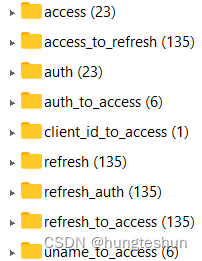
15、最终生成了token,这里的tokenStore是RedistokenStore对象,将accessToken和refreshToken等信息保存在redis中,最终将accessToken返回给客户端

redis中的数据存储
四、认证鉴权流程分析
1、鉴权过程中资源服务器与认证服务器的主要流程
- 用户携带token,请求资源资源服务器,会经过OAuth2AuthenticationProcessingFilter过滤器,请求中的token值构造成Authentication
- 调用OAuth2AuthenticationManager.authenticate(authentication)方法
- 调用RemoteTokenServices的loadAuthentication方法,即请求http://认证服务器地址/oauth/check_token地址
- 认证服务器首先进入BasicAuthenticationFilter,对clientId进行校验
- 然后进入CheckTokenEndpoint,先从tokenStore中获取token,然后通过token在tokenStore中获取Authentication信息
- 最终返回授权结果
2、资源服务器入口:OAuth2AuthenticationProcessingFilter
当一个服务配置为资源服务的时候OAuth2AuthenticationProcessingFilter过滤器被置入过滤器链,并用请求中的token值构造Authentication

调用authenticationManager.authenticate(authentication);方法,这里的authenticationManager返回的是OAuth2AuthenticationManager实例

调用RemoteTokenServices的loadAuthentication方法

调用postForMap方法

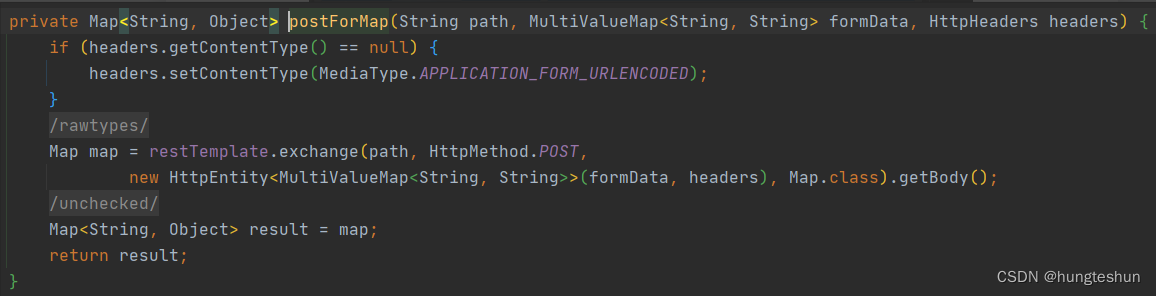 请求的认证服务器接口http://认证服务器地址/oauth/check_token
3、认证服务器根据token鉴权
1、首先进入BasicAuthenticationFilter,对clientId进行校验
2、然后进入CheckTokenEndpoint,先从tokenStore中获取token

3、调用resourceServerTokenServices.loadAuthentication方法,通过token在tokenStore中获取Authentication信息

最终返回授权结果

至此,鉴权结束,过滤器放行,走正常业务流程。
-
相关阅读:
x5sec滑块请求{"code":8778,"dt":"success","ec":200,"result":{"code":8778,"sig":"from bx"},"success":true}
测试人进阶技能:单元测试报告应用指南
ACM模式下构建二叉树来实现各个核心代码 (java含注释)
FOC程序cubemx配置-ADC配置
6. Gin集成redis
C语言规范标准-C99(中文版) 完整版正式发布
Python-NumPy系统教程
csharp写一个招聘信息采集的程序
channel 进阶
JScript的编写、调试
- 原文地址:https://blog.csdn.net/hjfcgt123/article/details/126228873
