-
【Android】UI组件之basicView-EditText
1、文本输入框
- 1
- 2
- 3
- 4
- 5
- 6
- 7
- 8
- 9

singleline:单行模式
输入数字后,多余的不会换行,滚动输入
android:singleLine="true"- 1

maxLength:最大长度
最大长度为10,因此大于10后面数字无法输入
android:maxLength="10"- 1
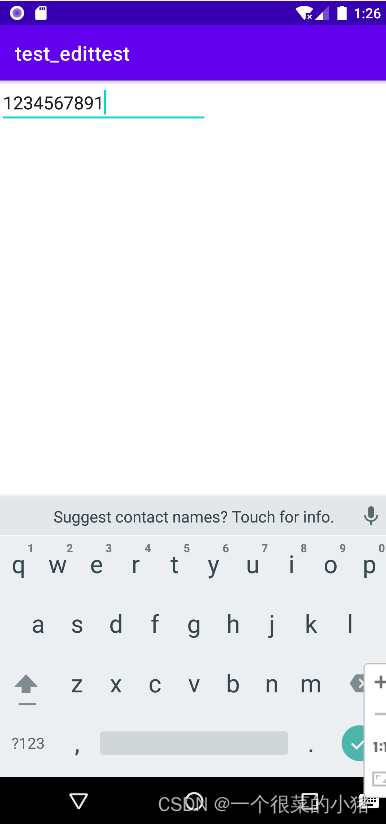
requestFocus让某个元素自动获得焦点
- 1
hint:text为空时显示的文字提示信息
android:hint="请输入汉字!"- 1
textColorHint:设置提示信息的颜色
android:textColor="#ff0000"- 1
- 1
- 2
- 3
- 4
- 5
- 6
- 7
- 8
- 9
- 10
- 11
- 12
- 13
- 14
- 15
- 16
- 17
- 18
- 19
- 20
- 21
- 22


2、numeric
integer:正整数
signed:负数
decimal
digits:对内容罗列3、限制EditText内容的特殊方式
特殊方式1:TextChangedListener
将输入的内容,在toast中显示出来,输入1234,toast提示1234
public class MainActivity extends AppCompatActivity { @Override protected void onCreate(Bundle savedInstanceState) { super.onCreate(savedInstanceState); setContentView(R.layout.activity_main); EditText editText2=(EditText) findViewById(R.id.editText2); editText2.addTextChangedListener(new TextWatcher() { @Override public void beforeTextChanged(CharSequence charSequence, int i, int i1, int i2) { } @Override public void onTextChanged(CharSequence charSequence, int i, int i1, int i2) { } @Override public void afterTextChanged(Editable editable) { String string= editable.toString(); Toast.makeText(getApplicationContext(), string, Toast.LENGTH_SHORT).show(); } }); }- 1
- 2
- 3
- 4
- 5
- 6
- 7
- 8
- 9
- 10
- 11
- 12
- 13
- 14
- 15
- 16
- 17
- 18
- 19
- 20
- 21
- 22
- 23
- 24
- 25

设置不能输入4,当接收到4时,toast提示“不能输入4”
public void afterTextChanged(Editable editable) { String string= editable.toString(); if (string.indexOf("4")!=-1){ Toast.makeText(getApplicationContext(), "不能输入4", Toast.LENGTH_SHORT).show(); } Toast.makeText(getApplicationContext(), string, Toast.LENGTH_SHORT).show(); }- 1
- 2
- 3
- 4
- 5
- 6
- 7

特殊方式2:CharSequence filter
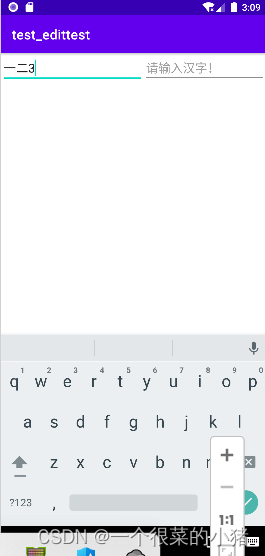
输入长度限制为5
输入小写字母自动转化为大写字母
输入为1,则显示“一”,输入为2,则显示“二”,其余输入均显示本身EditText editText1=findViewById(R.id.editText1); editText1.setFilters(new InputFilter[]{ new InputFilter.LengthFilter(5), new InputFilter.AllCaps(), new InputFilter() { @Override public CharSequence filter(CharSequence charSequence, int i, int i1, Spanned spanned, int i2, int i3) { if ("1".equals(charSequence.toString())){ return "一"; }else if ("2".equals(charSequence.toString())){ return"二"; } else return null; } } });- 1
- 2
- 3
- 4
- 5
- 6
- 7
- 8
- 9
- 10
- 11
- 12
- 13
- 14
- 15
- 16
- 17
- 18
-
相关阅读:
flutter在导航栏处实现对两个列表的点击事件
Java源码分析:Guava之不可变集合ImmutableMap的源码分析
《机器学习》李宏毅(21P5-9)
11-01课堂
8个关于 Promise.then 和 Promise.catch 的面试题,一定要掌握
顺序表的折半查找法
中集世联达工业级成熟航运港口人工智能AI产品规模化应用,打造新一代高效能智慧港口和创新数字港口,全球港航人工智能能领军者中集飞瞳
外贸案例分享:我是这样“教”客户做事的!
河北建筑八大员资料员施工员劳务员题库练习
Json数据格式
- 原文地址:https://blog.csdn.net/weixin_51293984/article/details/126221285
